
Snowflake Integration
Integration of Snowflake with Entropy Data.
Integration Options
When setting up an integration between Entropy Data and Snowflake, we provide two options:
1. Ingestion-based Integration (Built-In)
The integration is managed within Entropy Data. Configure the connection and sync schedule to start syncing with Snowflake.
No additional deployments are needed.
2. Connector-based Integration
Our connectors are based on the Entropy Data SDK and provide support for more use cases. You get the asset syncing capabilities of the ingestion-based integration, plus direct integration with Snowflake permissions. Changes through the Access Approval Workflow can be dynamically applied to Snowflake user permissions.
If you have a complex network topology or direct integration with Entropy Data is not possible due to governance restrictions, the Snowflake connector can be deployed in a DMZ of your network to provide additional security.
| Feature | Ingestion-based Integration | Connector-based Integration |
|---|---|---|
| Direct integration into Entropy Data | ✅ | |
| Syncing of assets | ✅ | ✅ |
| Syncing of permissions | ✅ | |
| Complete control of deployment | ✅ | |
| Support for different network topologies | ✅ |
To write the descriptions and tags of your data contracts back to Snowflake, add a second integration with the purpose Write Snowflake Metadata. See Metadata Writer.
1. Ingestion-based Integration
You can directly integrate Snowflake with Entropy Data.
Prerequisites
To start, navigate to Settings > Integrations > Add Integration.
This opens a wizard that guides you through configuring the integration.
Select the Integration Type
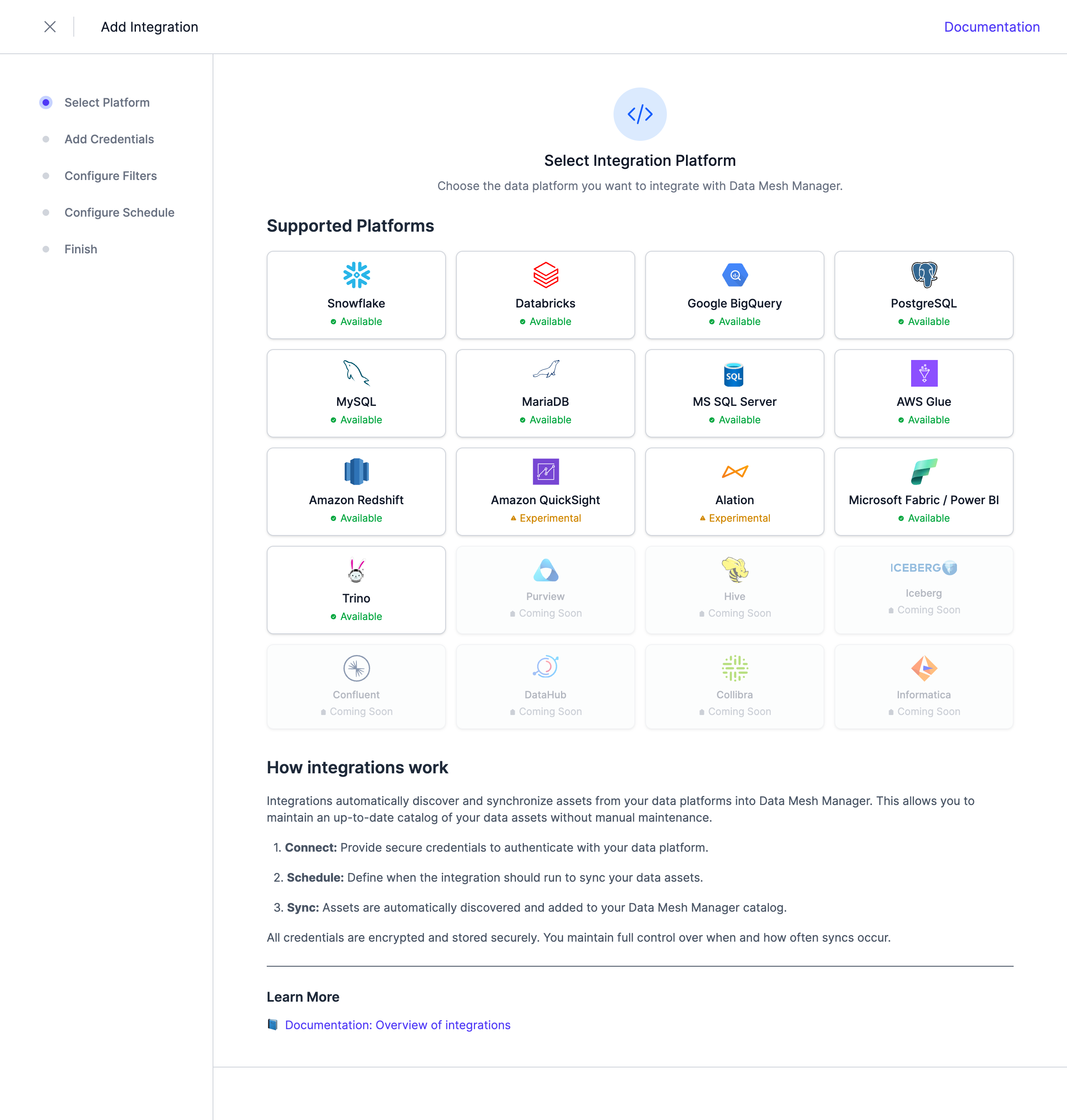 Select Snowflake from the list of available integrations.
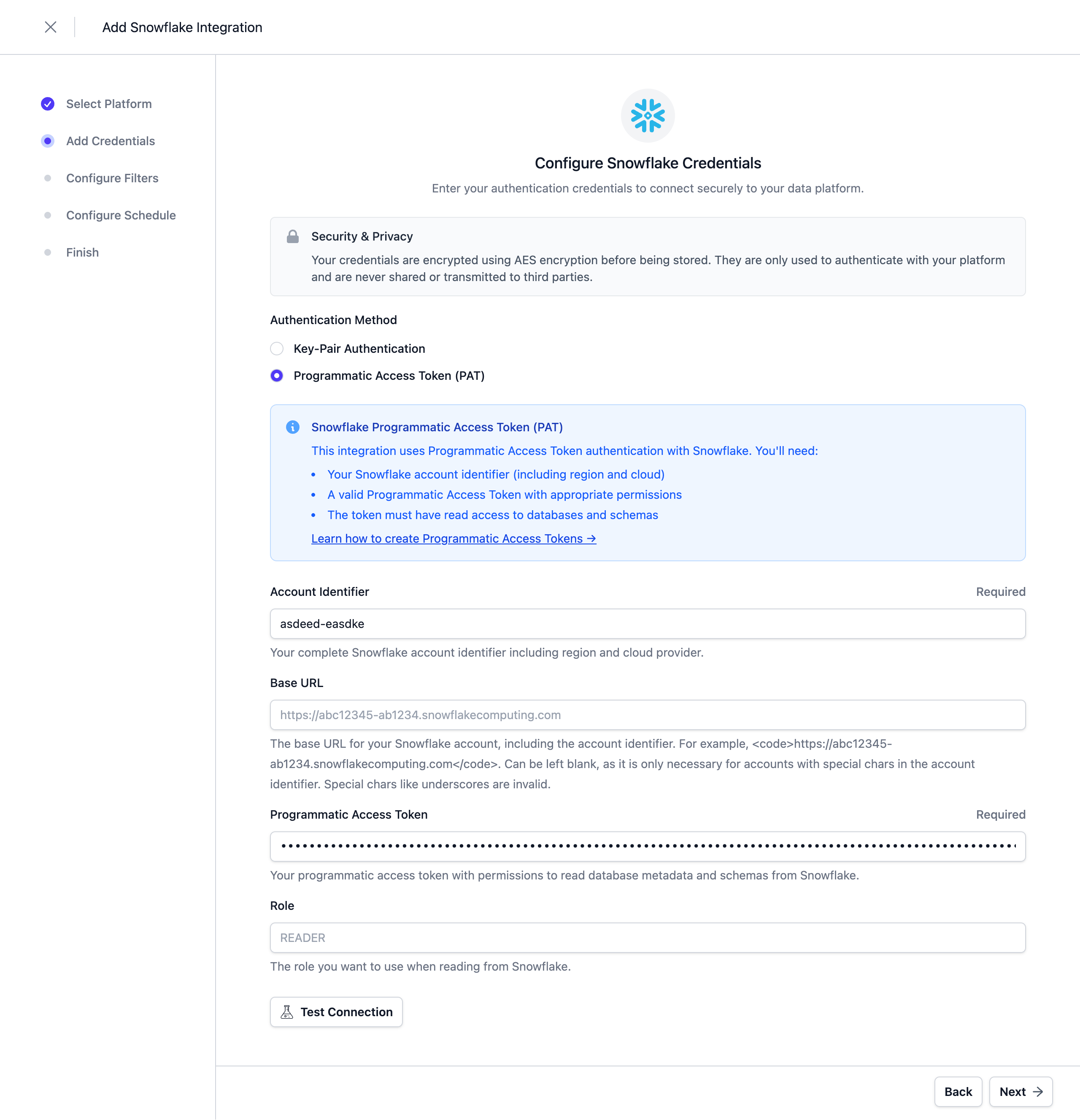
Configure the Credentials
At the moment, Programmatic Access Tokens and Key Pair Authentication are supported as authentication methods. Refer to the Snowflake documentation - Key Pair Authentication or Programmatic Access Tokens for more information.
Note: When using Programmatic Access Tokens (PAT), an active network policy must be configured in Snowflake.
The Warehouse is optional. Enter one to import semantic views and to read back the tags a metadata writer set; an X-Small warehouse is sufficient. Without a warehouse, the run imports the databases, schemas, tables, and views and leaves semantic views and tags out.
Note: Credentials are stored encrypted in the Entropy Data database. To enable encryption in your environment, set a 64 hex character
APPLICATION_ENCRYPTION_KEYSin your environment (see Configuration).
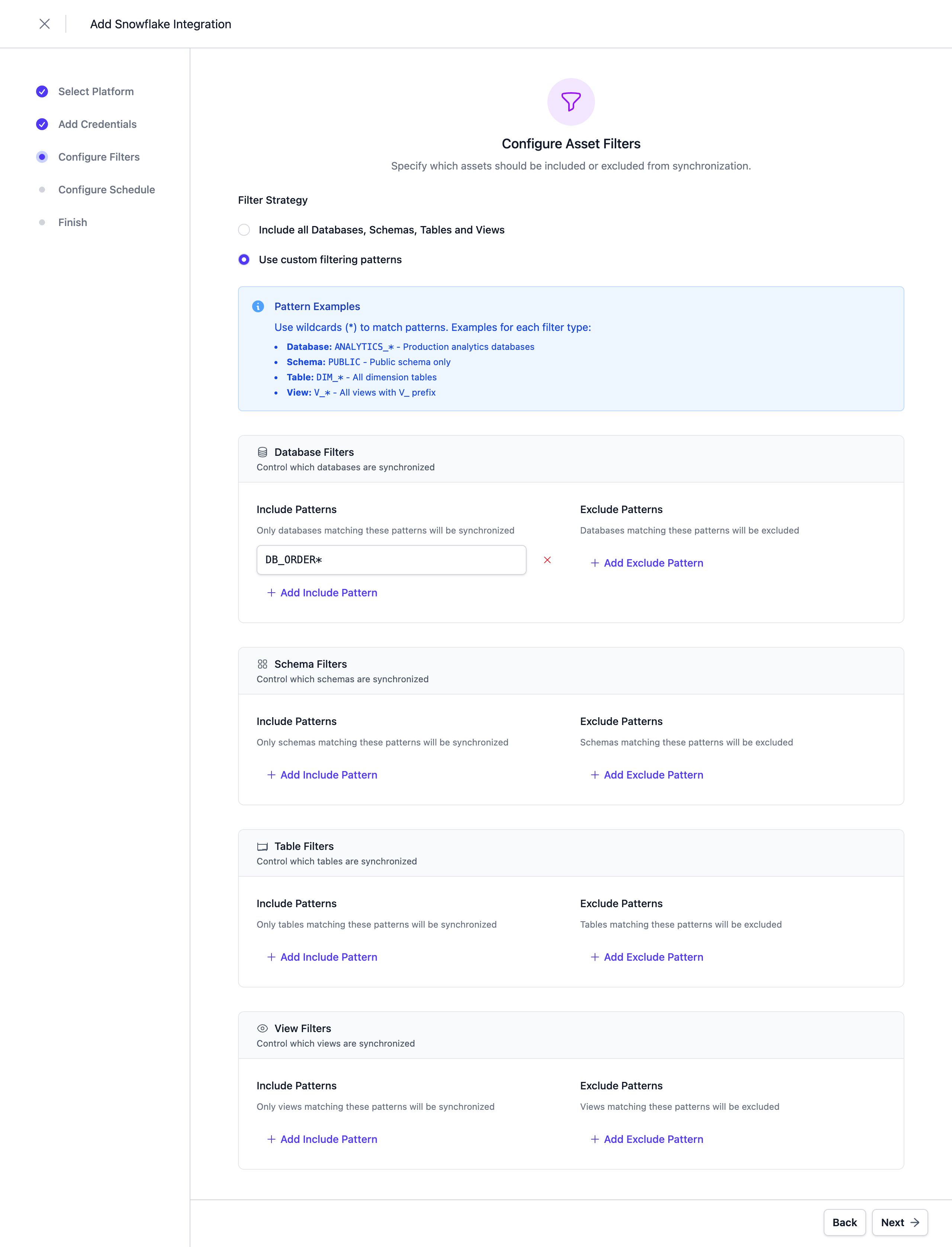
Configure Filters
Configure filters to limit which assets are synchronized. Both include and exclude filters are supported. For Snowflake, filters can be applied to Databases, Schemas, Tables, and Views. The view filters apply to semantic views as well.
Filters support '*' as a wildcard character to match any number of characters.
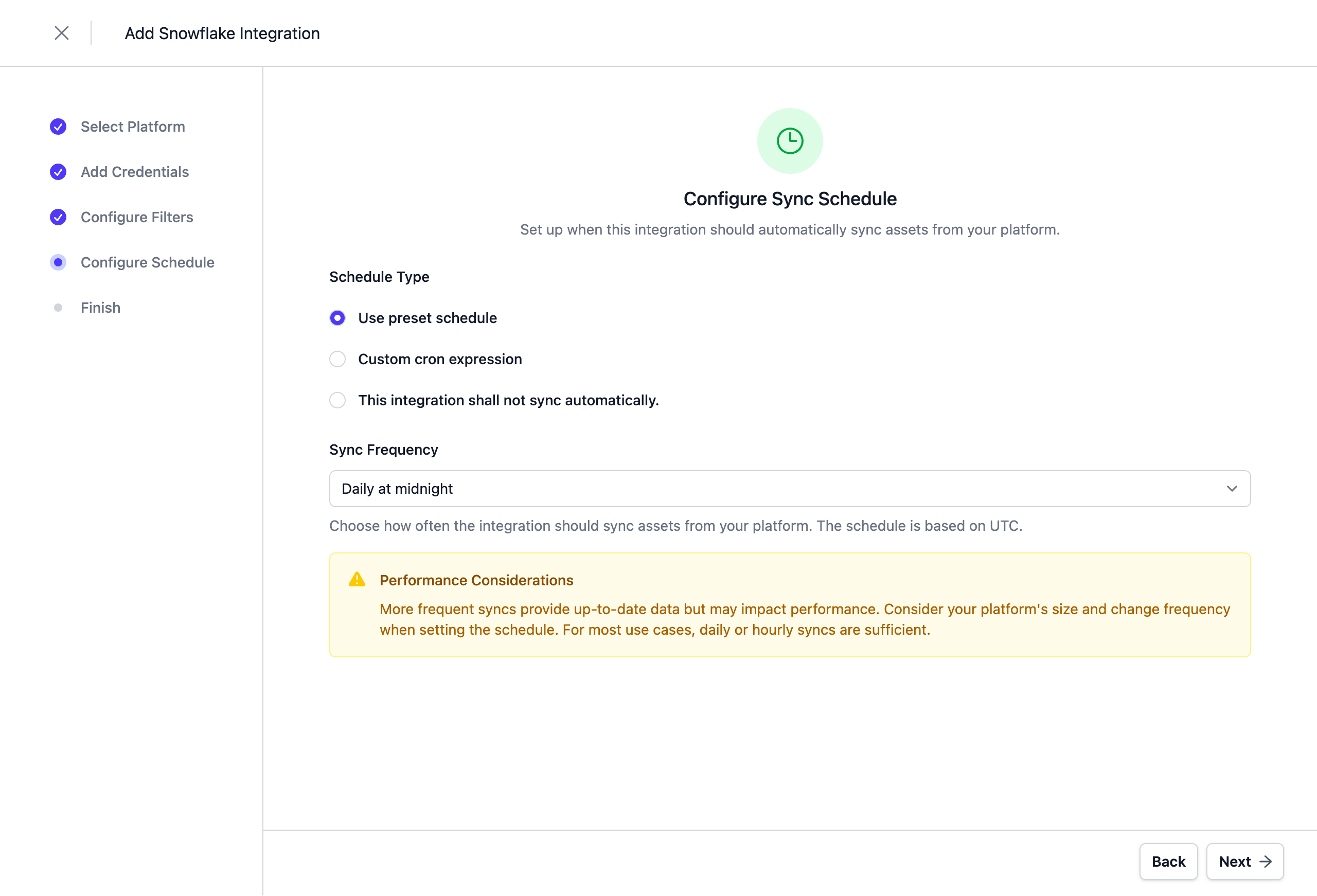
Configure Schedule
Set a schedule to automatically synchronize assets. You can choose from predefined schedules or define a custom schedule using the cron expression format.
Note: All schedules use the UTC timezone, so make sure to take this into account when configuring your schedule. Please do not synchronize the assets more than once or twice per day. We reserve the right to disable the integration if this happens. You will be able to trigger a synchronization manually if you need an immediate update.
Complete the Integration Configuration
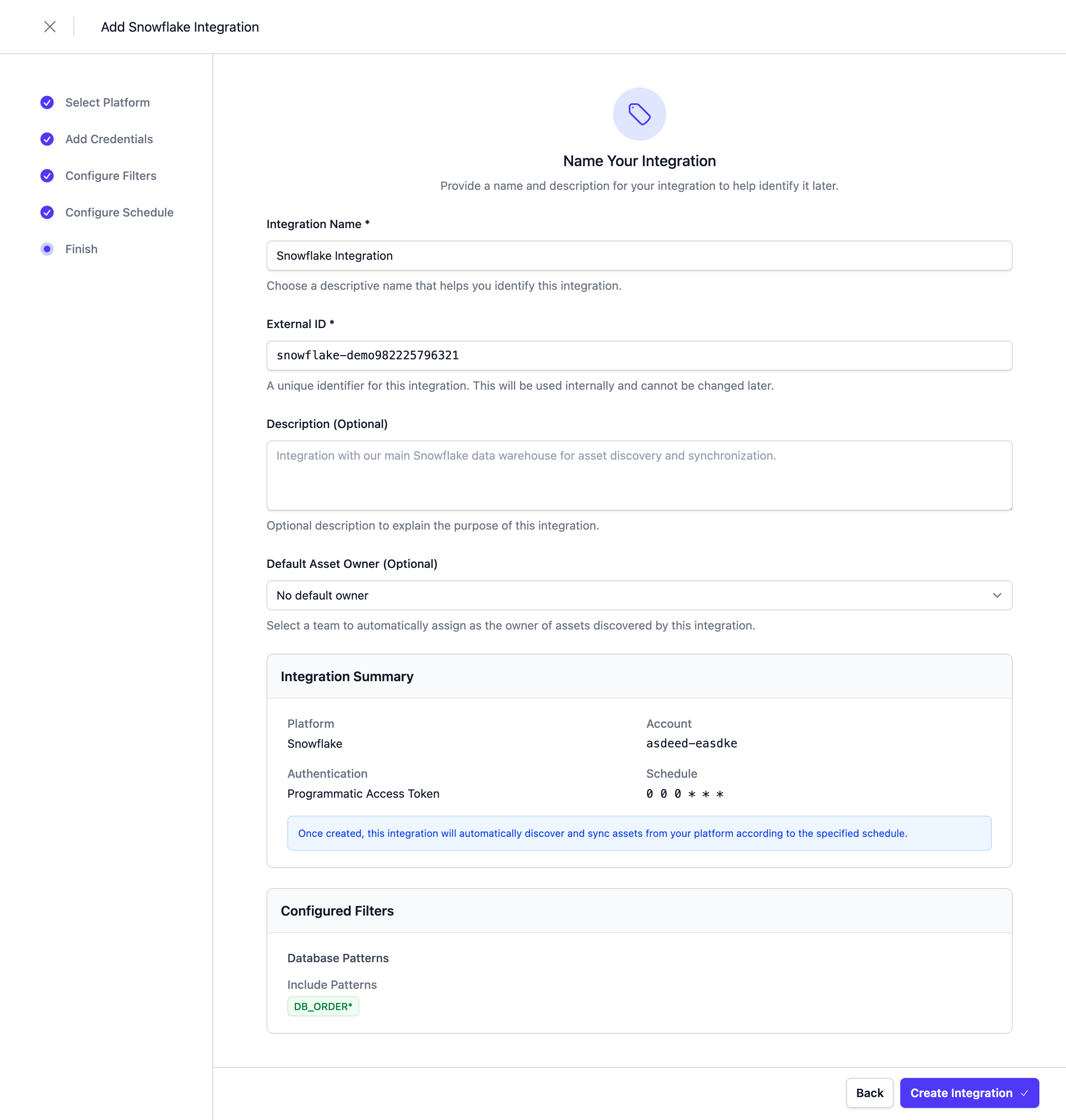
Choose a unique name for the integration, review your configuration, and click Create Integration.
Next Steps
The integration is now configured and will run according to the schedule. To check the integration status, navigate to Settings > Integrations. Here you'll find the current status and the last 10 integration runs.
You can adjust the integration configuration at any time. The configuration is saved in YAML format with syntax validation support in the editor.
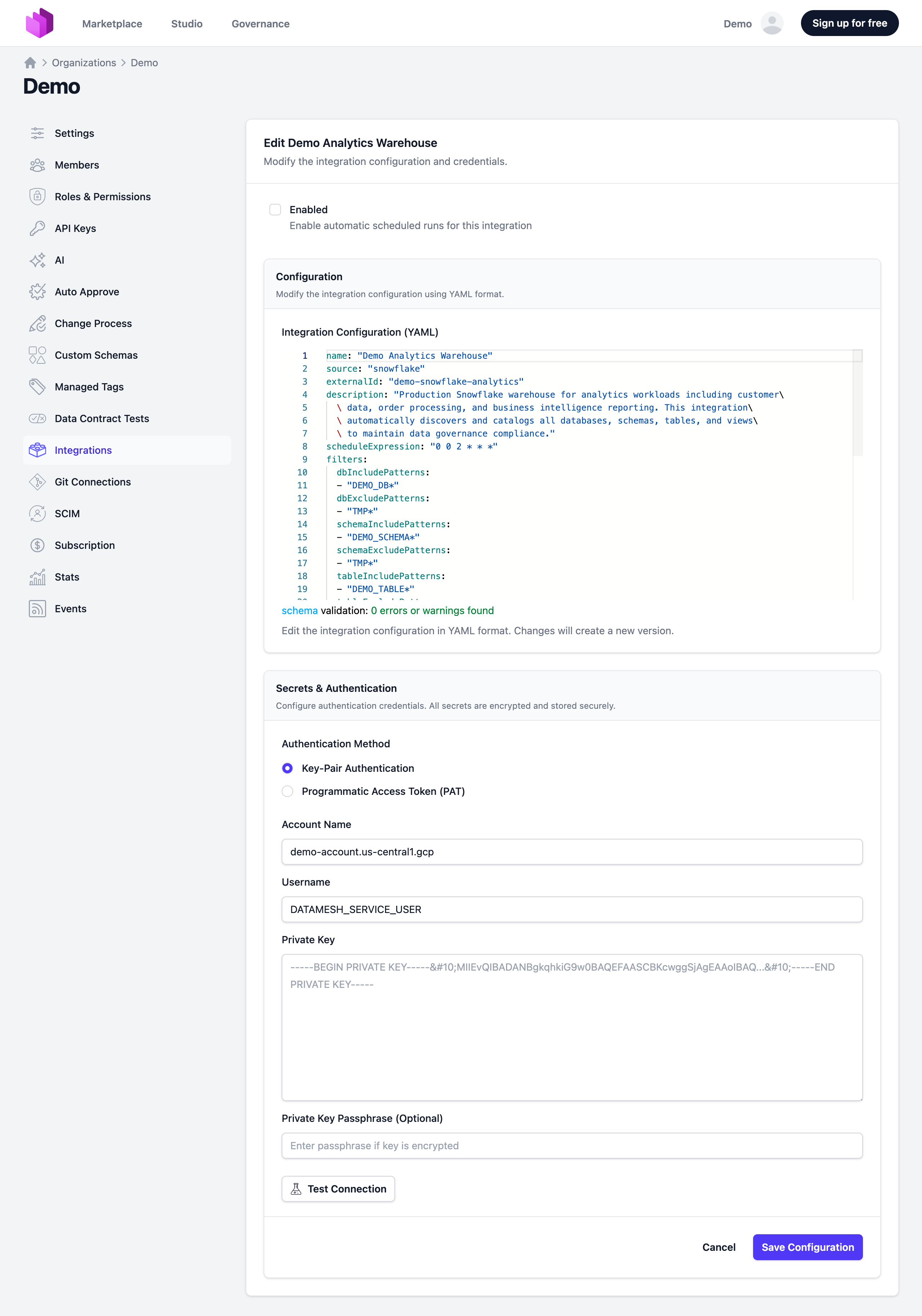
You can also change and test credentials in the edit view.
Note: The previously stored credentials are not displayed in the edit view for security reasons. If you want to change them, add new credentials and save the integration.
Deselecting the Enabled checkbox disables the automatic schedule. Manual integration runs are still possible.
Semantic Views
The ingestion also imports the semantic views of each schema. Snowflake lists them only through its SQL API, which runs on a warehouse, so the credentials need a Warehouse. Without one, the run imports everything else and notes that semantic views were left out.
In each schema, the ingestion lists the semantic views with SHOW SEMANTIC VIEWS and reads the semantic model of each with SYSTEM$READ_YAML_FROM_SEMANTIC_VIEW. The role needs a privilege on the semantic view, such as REFERENCES or SELECT, and USAGE on the warehouse. SELECT on the base tables is not needed.
What is synced
| Object in Snowflake | Asset in Entropy Data | Notes |
|---|---|---|
| Semantic view | snowflake_semantic_view | Child of the schema. Custom properties account, database, schema, semanticView, owner, createdOn. The comment becomes the description. A uses relationship points to every base table of its logical tables. The YAML Snowflake returns is kept as the asset's source and shown on the Source tab of the asset page |
| Dimension, time dimension, fact, metric | Column of the asset | Named <logical table>.<name>, as a query of the view names it; a derived metric of the whole view keeps its own name. Each column carries its kind, its expression, its synonyms, its access modifier, and the base table of its logical table |
The asset page shows the semantic view as cards, one per logical table: its dimensions and time dimensions, its facts, and its metrics, with the relationships between the logical tables. Derived metrics appear on a card named after the view. A private fact or metric is marked as hidden.
Data contracts
A data contract created from a semantic view states each dimension, fact, and metric as a transformation: the expression is its logic, and the base table of its logical table is its source object. The YAML of the semantic view is not copied into the data contract.
Notes
- A schema whose semantic views cannot be listed is named in the run's message, and the semantic view assets of earlier runs are kept, so nothing disappears because of a missing privilege.
- A semantic view whose YAML cannot be read is imported without it: no columns, no base tables, and no cards on the asset page.
2. Connector-based Integration
The Snowflake Connector is an open-source component that integrates Entropy Data with Snowflake. It is based on the SDK and available as a Docker image. The source code can be forked to implement custom integrations.
Features
- Asset Synchronization: Sync databases, schemas, tables, and views from Snowflake to Entropy Data as Assets.
- Access Management: Listen for AccessActivated and AccessDeactivated events in Entropy Data and grant access on Snowflake to the data consumer.
Links
- Source Code: Entropy Data Connector for Snowflake on GitHub
Metadata Writer
The metadata writer is the counterpart of the ingestion. The ingestion reads the metadata of Snowflake into Entropy Data. The metadata writer writes the descriptions and tags of your data contracts to the tables and columns in Snowflake, so data teams see them in Snowsight or in a query on INFORMATION_SCHEMA. It runs whenever a data contract changes. There is no filter and no schedule.
Prerequisites
You need:
- A Snowflake service user with key-pair authentication or a programmatic access token.
- A role for this user. The integration shows the grants that this role needs.
- A warehouse. An X-Small warehouse is sufficient.
The role needs no access to data.
REFERENCES lets the role see the metadata of a table, but not its rows.
This example creates a role and a service user. Replace <public key> with your RSA public key:
CREATE ROLE ENTROPY_METADATA_WRITER;
CREATE USER ENTROPY_METADATA_WRITER_USER
  TYPE = SERVICE
  DEFAULT_ROLE = ENTROPY_METADATA_WRITER
  RSA_PUBLIC_KEY = '<public key>';
GRANT ROLE ENTROPY_METADATA_WRITER TO USER ENTROPY_METADATA_WRITER_USER;
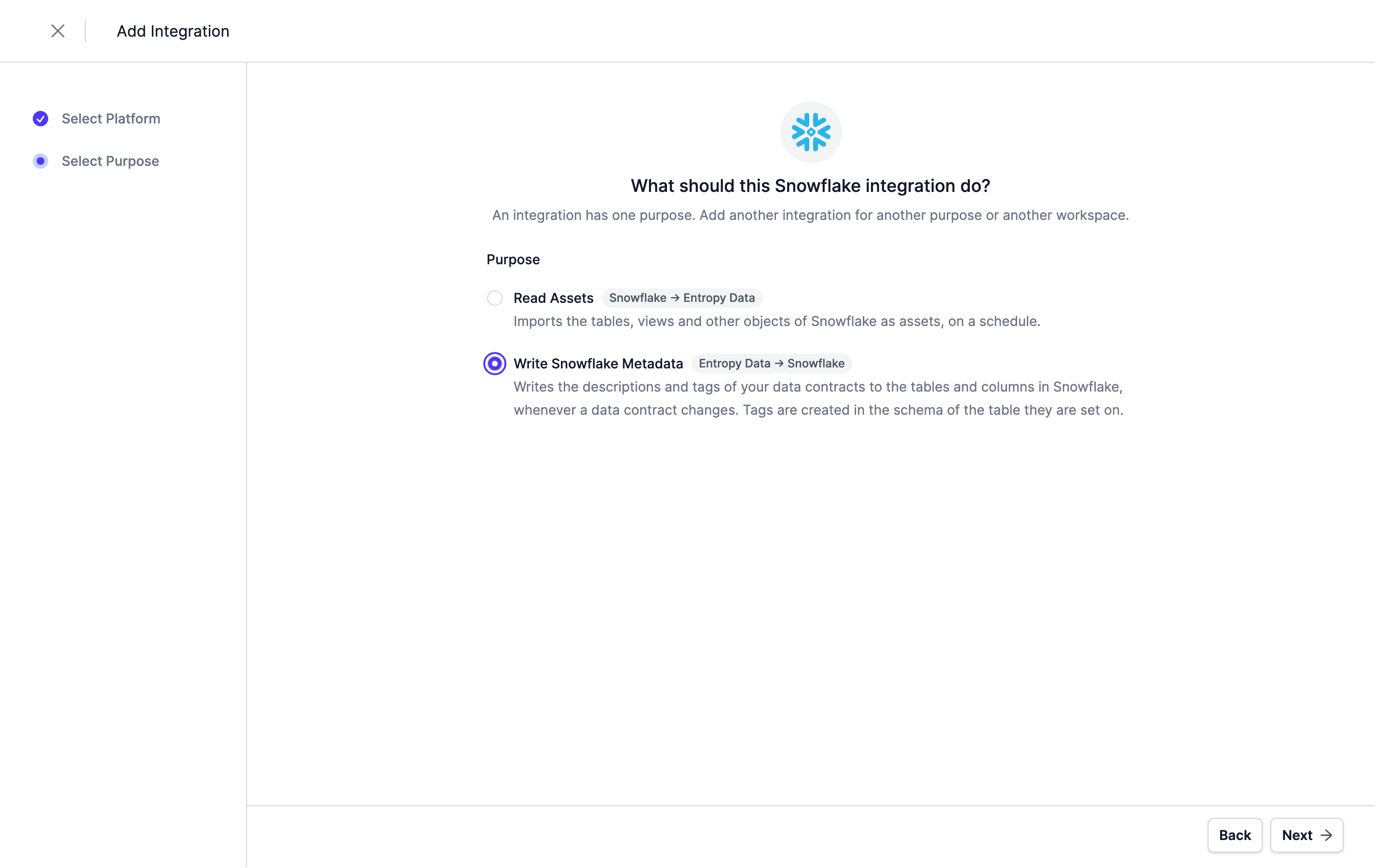
Select the Integration Type and Purpose
Navigate to Settings > Integrations > Add Integration, select Snowflake from the list of available integrations, and choose the purpose Write Snowflake Metadata.
Configure the Credentials
Enter the account identifier, the user, the role, the private key or token, and the warehouse.
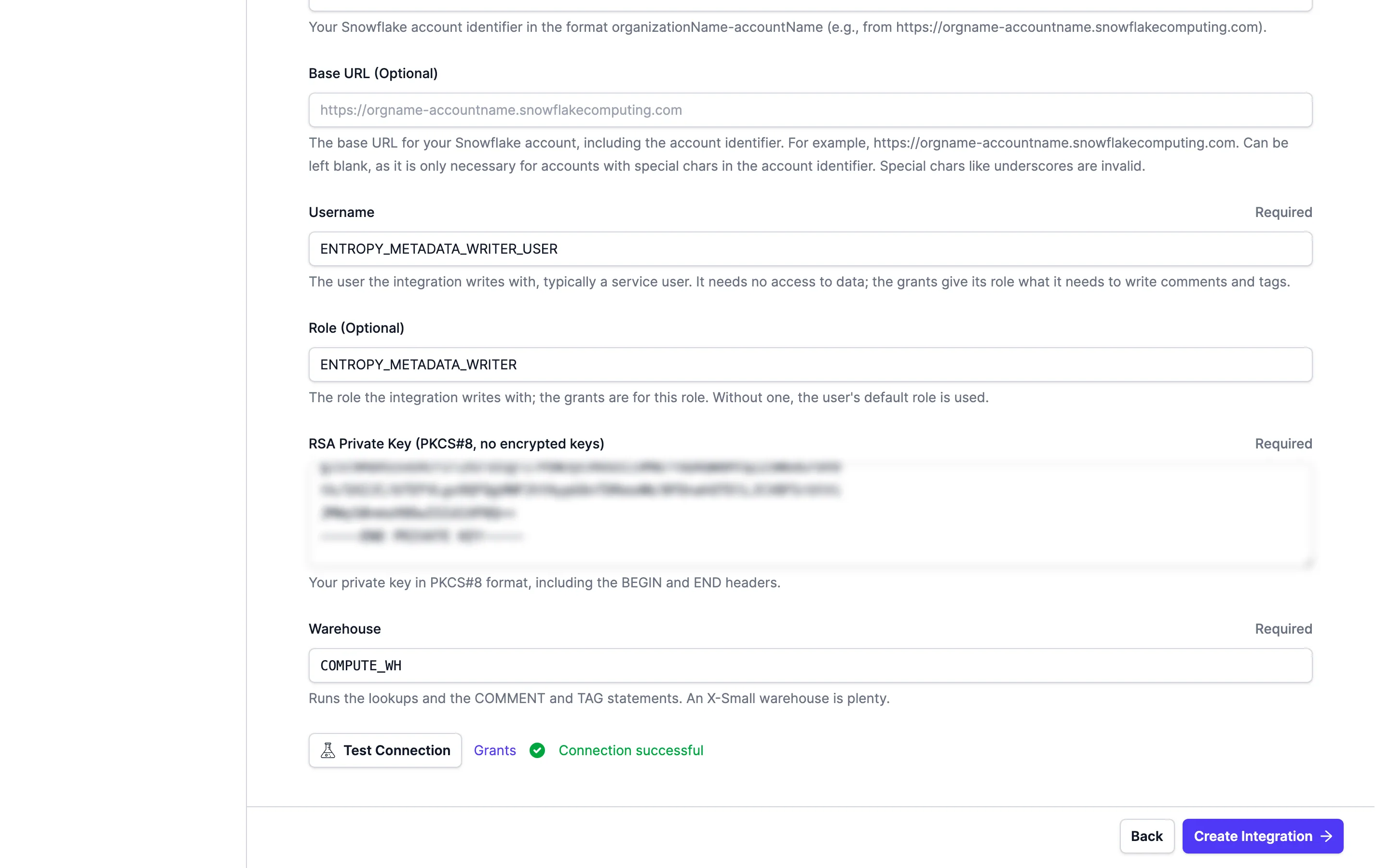
Test Connection signs in with the credential and runs a statement on the warehouse. Grants shows the statements from the next section for the tables your data contracts name today.
Note: Credentials are stored encrypted in the Entropy Data database. To enable encryption in your environment, set a 64 hex character
APPLICATION_ENCRYPTION_KEYSin your environment (see Configuration).
Grant the Minimal Privileges
Click Grants to see the statements for your role.
The tables in the statements come from your data contracts.
Run the statements as an administrator of the account, for example with the SECURITYADMIN role.
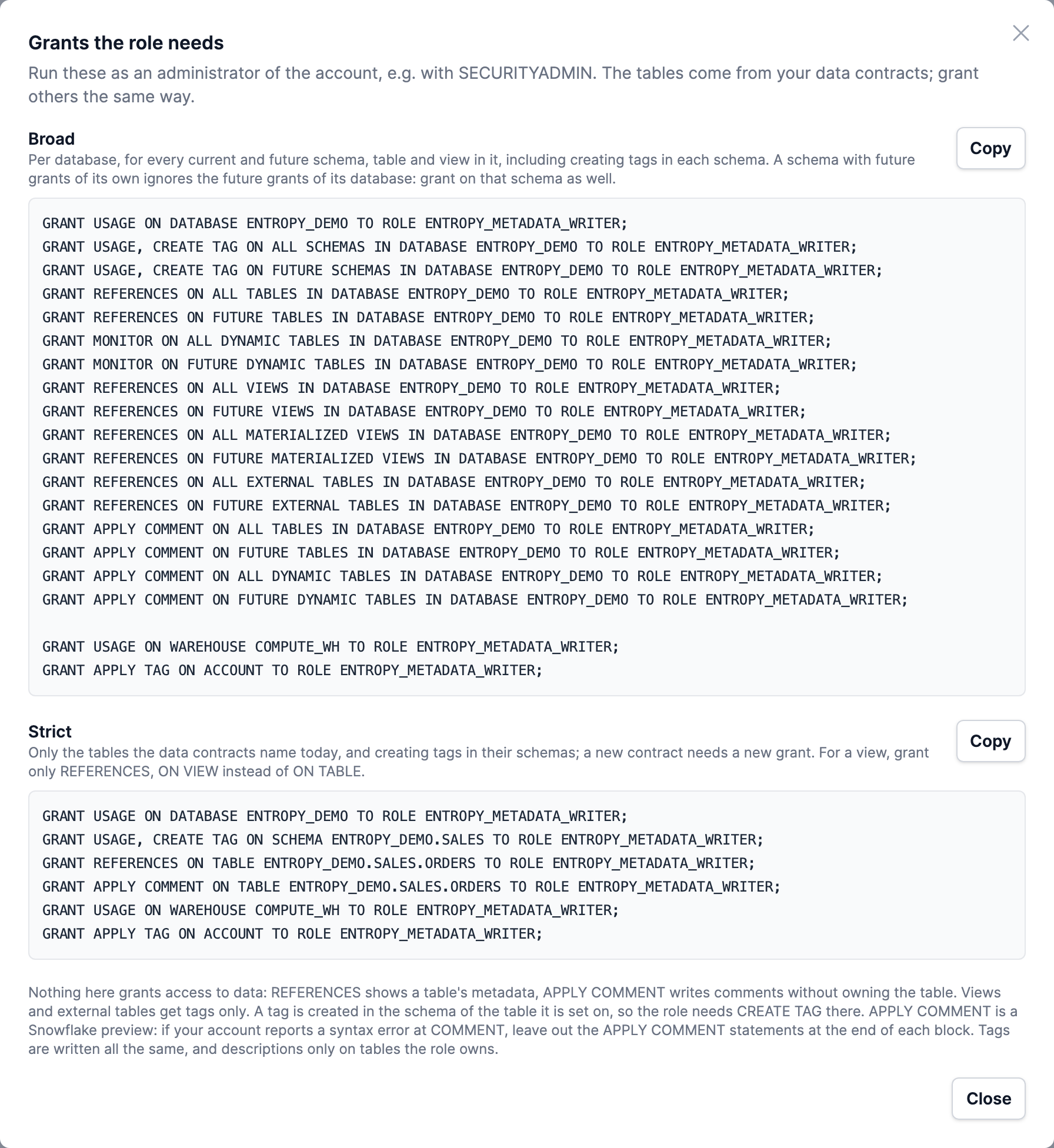
You can choose between two sets of grants:
Broadgrants per database, for all current and future schemas, tables, and views. A new data contract needs no new grant.Strictgrants only on the tables that your data contracts name today. This is the minimal set. A new data contract needs a new grant.
The strict grants for one table are:
GRANT USAGE ON DATABASE ENTROPY_DEMO TO ROLE ENTROPY_METADATA_WRITER;
GRANT USAGE, CREATE TAG ON SCHEMA ENTROPY_DEMO.SALES TO ROLE ENTROPY_METADATA_WRITER;
GRANT REFERENCES ON TABLE ENTROPY_DEMO.SALES.ORDERS TO ROLE ENTROPY_METADATA_WRITER;
GRANT APPLY COMMENT ON TABLE ENTROPY_DEMO.SALES.ORDERS TO ROLE ENTROPY_METADATA_WRITER;
GRANT USAGE ON WAREHOUSE COMPUTE_WH TO ROLE ENTROPY_METADATA_WRITER;
GRANT APPLY TAG ON ACCOUNT TO ROLE ENTROPY_METADATA_WRITER;
| Privilege | Why the integration needs it |
|---|---|
USAGE on the database | To find the schema. |
USAGE on the schema | To find the table. |
CREATE TAG on the schema | To create the tags in the schema of the table. |
REFERENCES on the table | To see the table and its columns, without access to data. |
APPLY COMMENT on the table | To write the table and column comments without owning the table. |
USAGE on the warehouse | To run the lookups and the COMMENT and TAG statements. |
APPLY TAG on the account | To set tags on tables and columns. |
For a view, grant REFERENCES ON VIEW instead of ON TABLE. Views and external tables get tags only.
Note:
APPLY COMMENTis a Snowflake preview feature. If your account reports a syntax error atCOMMENT, leave out theAPPLY COMMENTstatements. The integration then writes the tags, and it writes descriptions only on tables that the role owns.
Complete the Integration Configuration
Choose a unique name for the integration and click Create Integration. From now on, the metadata writer writes the tables your data contracts name.
You can adjust the integration configuration and credentials at any time. Deselecting the Enabled checkbox pauses the metadata writer. It keeps the changes and writes them once it is enabled again. Deleting the integration leaves what it wrote in Snowflake as it is.
Which data contracts are written
The metadata writer considers data contracts in the ODCS format with the status active. Drafts, other statuses, branches, and data contracts in the DCS format are skipped.
A data contract names its tables in its servers. A server needs the type snowflake, a database, and a schema. Every schema object of the data contract is written as a table in that schema: <database>.<schema>.<physicalName>, or the object's name if there is no physicalName. A server with an account or host is only written by the metadata writer of that account; a server without one by every metadata writer.
What is written
| Data contract | Snowflake |
|---|---|
schema[].description | Table comment |
schema[].tags | Table tags |
schema[].properties[].description | Column comment |
schema[].properties[].tags | Column tags |
| Data contract ID and URL | Tags ENTROPY_DATA_CONTRACT and ENTROPY_DATA_URL |
| Linked semantic concept | Tags ENTROPY_DATA_CONCEPT and ENTROPY_DATA_CONCEPT_URL |
A tag key:value or key=value becomes a Snowflake tag with that key and value, for example domain:sales becomes the tag DOMAIN with the value sales. A tag without a value gets an empty value. The metadata writer creates each tag in the schema of the table it is set on.
If a property has no description but links a semantic concept, the column comment is the description of the concept, and the tag ENTROPY_DATA_COMMENT_SOURCE is set to concept.
What is left untouched
- Tags set by other tools. A tag the metadata writer did not set before is left untouched, even when a data contract carries the same key. Only tags the metadata writer set itself are updated or removed. The
ENTROPY_DATA_*tags always belong to the metadata writer. - Views and external tables receive tags only.
- Limits of Snowflake. A table takes 50 tags and a column 20, with values of at most 256 characters. Tags beyond a limit are left out with a note on the table.
- Tables that do not exist are not created. The table is marked as unresolved until it appears in Snowflake, or the data contract no longer names it.
When it writes
Creating, updating, or deleting a data contract puts an event in the queue of the metadata writer. Updating or deleting a semantic concept that data contracts reference does the same. The metadata writer writes about a minute later. Several changes of the same data contract in that time result in one write. If a table already has what the data contract says, it is not written again.
A failed write is retried with growing intervals and given up after eight attempts. If the credentials are refused, the waiting events are given up. If the account is unreachable or throttles, the queue pauses and continues later.
When a data contract is no longer active, is deleted, or no longer names a table, the metadata writer retires the table: it removes the comments and tags it wrote there.
Next Steps
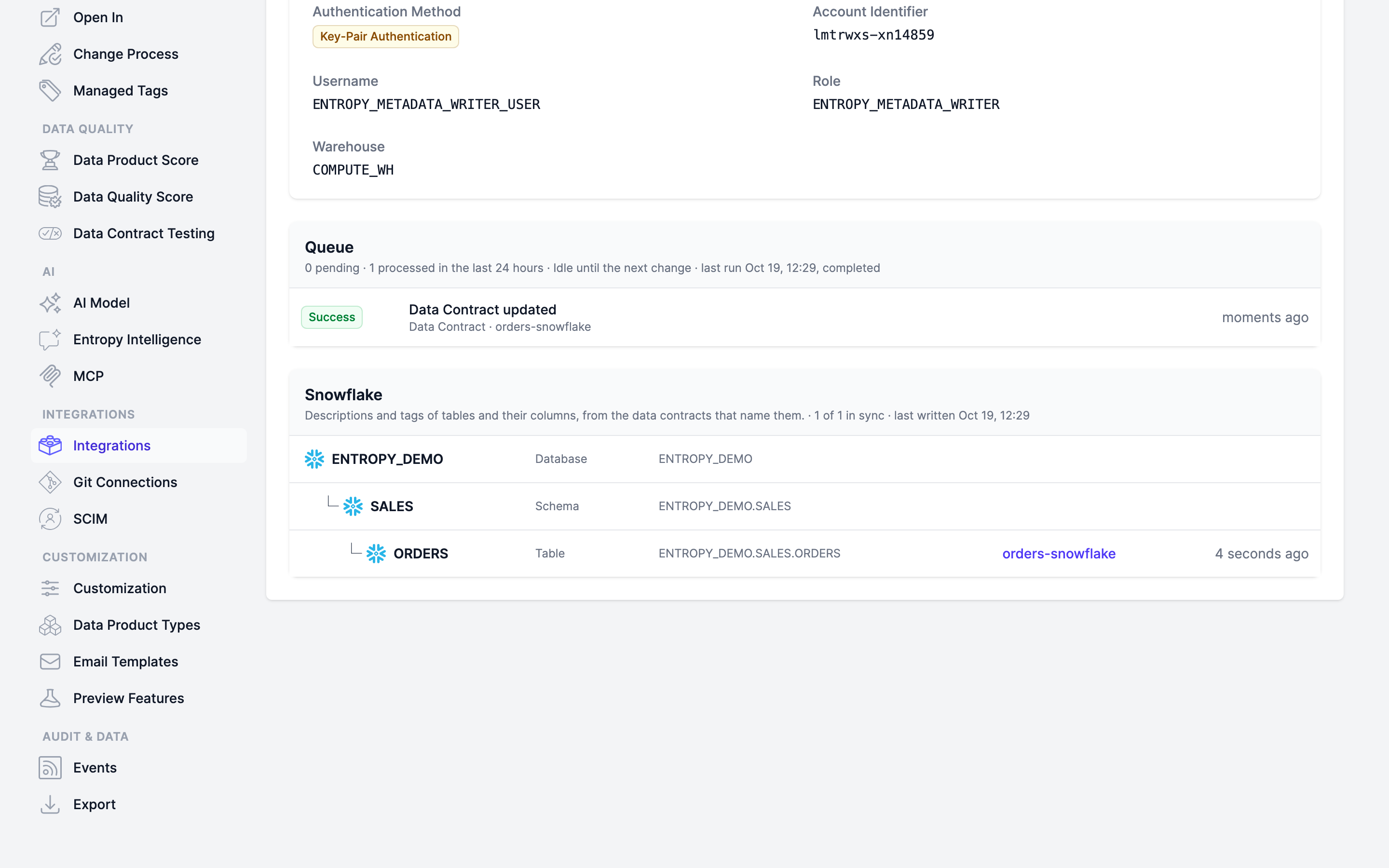
To check the status of the metadata writer, navigate to Settings > Integrations and open the integration. The page shows:
Queue: the pending events, and the events processed in the last 24 hours, with their attempts and errors.Discard pendingdrops the waiting events.Write againputs a processed event back in the queue.Retry given upputs the events given up in the last day back in the queue.Snowflake: the tables the metadata writer wrote. A table isIn sync,Unresolved(there is no such table in Snowflake), orFailed.Retry failedwrites the data contracts with failed or unresolved tables again.Credentials: the service user, withTest ConnectionandGrants.
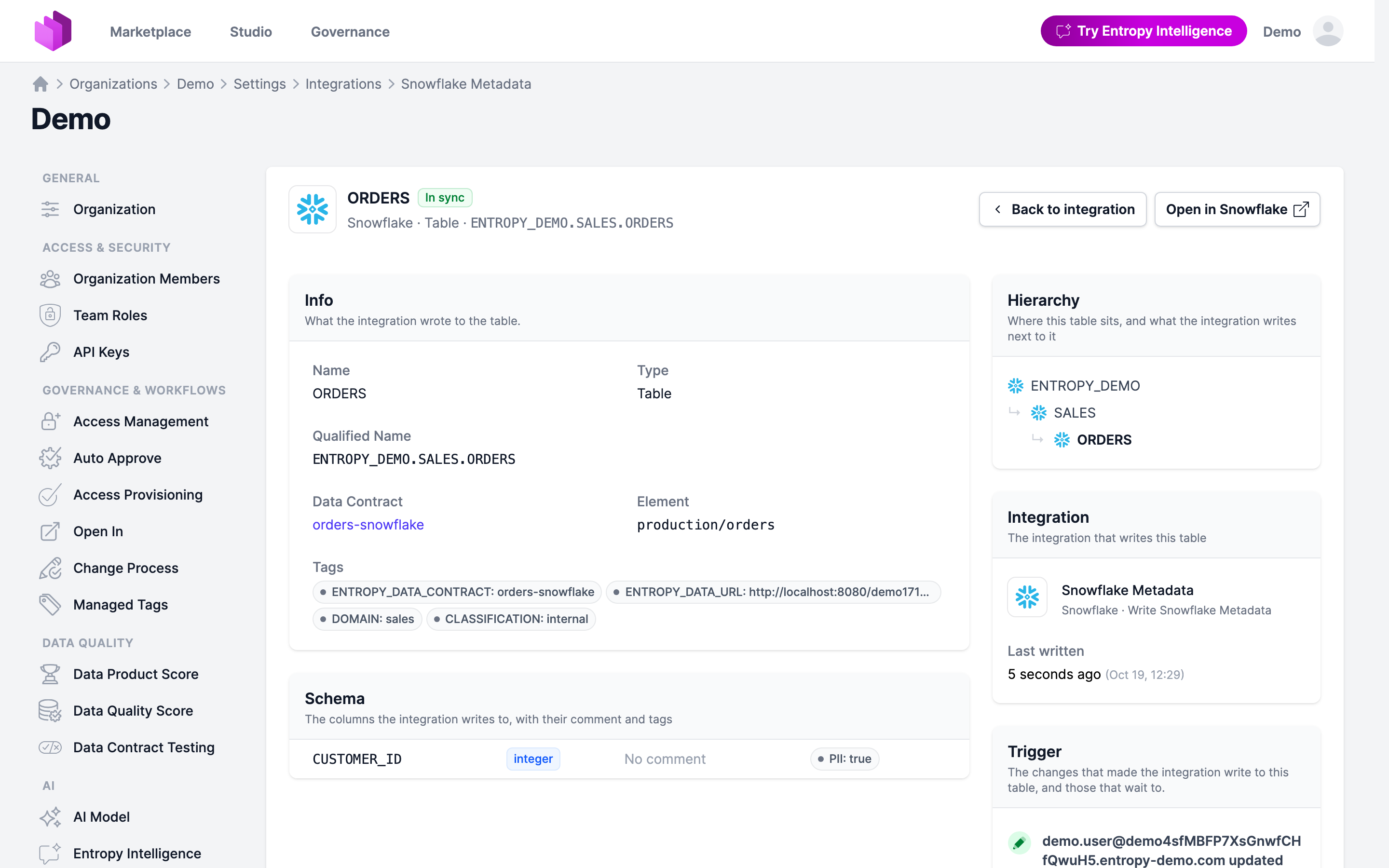
Click a table to see the comment and tags the metadata writer last wrote to it and its columns, and the changes that triggered the writes. Open in Snowflake opens the table in Snowsight.
Make Sure That the Metadata Is in Snowflake
This query shows the tags on a table and its columns:
SELECT tag_name, tag_value, column_name
FROM TABLE(ENTROPY_DEMO.INFORMATION_SCHEMA.TAG_REFERENCES_ALL_COLUMNS('ENTROPY_DEMO.SALES.ORDERS', 'table'));
You will also be able to see comments and tags in the metadata pages of your tables and columns.
API
You can also manage metadata writers via the REST API under /api/integrations/snowflake-metadata:
| Method | Path | Description |
|---|---|---|
GET | /api/integrations/snowflake-metadata | List the metadata writers |
GET | /api/integrations/snowflake-metadata/{integration} | Get a metadata writer with its credential (without the secret) and status |
PUT | /api/integrations/snowflake-metadata/{integration} | Create or update a metadata writer. Omit the credential on update to keep the stored one |
DELETE | /api/integrations/snowflake-metadata/{integration} | Delete a metadata writer. What it wrote stays in Snowflake |
GET | /api/integrations/snowflake-metadata/{integration}/tables | List the tables it wrote, optionally filtered by state |
GET | /api/integrations/snowflake-metadata/{integration}/queue | List its queue |
POST | /api/integrations/snowflake-metadata/{integration}/tables/retry-failed | Write the failed and unresolved tables again |
POST | /api/integrations/snowflake-metadata/{integration}/queue/discard | Discard the waiting events |
The credential in a PUT takes type, account, user, role, privateKey or pat, and warehouse. Ingestions are managed under /api/integrations/ingest.
Query Execution
Once a Snowflake data product is available, users can execute read-only SQL queries against its output ports through:
- MCP Interface: Use the
execute_querytool to run SQL queries on Snowflake output ports. - Entropy Intelligence: Chat-based query execution with automatic connection setup.
To execute queries, each user needs to configure a personal Snowflake connection in their profile under Connections. This ensures queries run on behalf of the individual user with their own Snowflake credentials and permissions.