
Classifications
Describe how sensitive your data is with classification schemes and levels, derived automatically and shown as badges across the platform.
Classifications let you define one or more schemes (for example a confidentiality scheme with the levels Public, Internal, Restricted, and Sensitive). Each scheme holds an ordered set of levels. You can start from a preset such as GDPR or TLP, or define a scheme yourself.
Classifications surface as badges in two places. On a data product, the effective level per scheme is derived from its output-port data contracts and its linked semantic concepts, and can be used to filter the data product list. On a data contract, one badge per scheme appears in the header, and each schema column carries its own level or inherits one from its linked semantic concept.
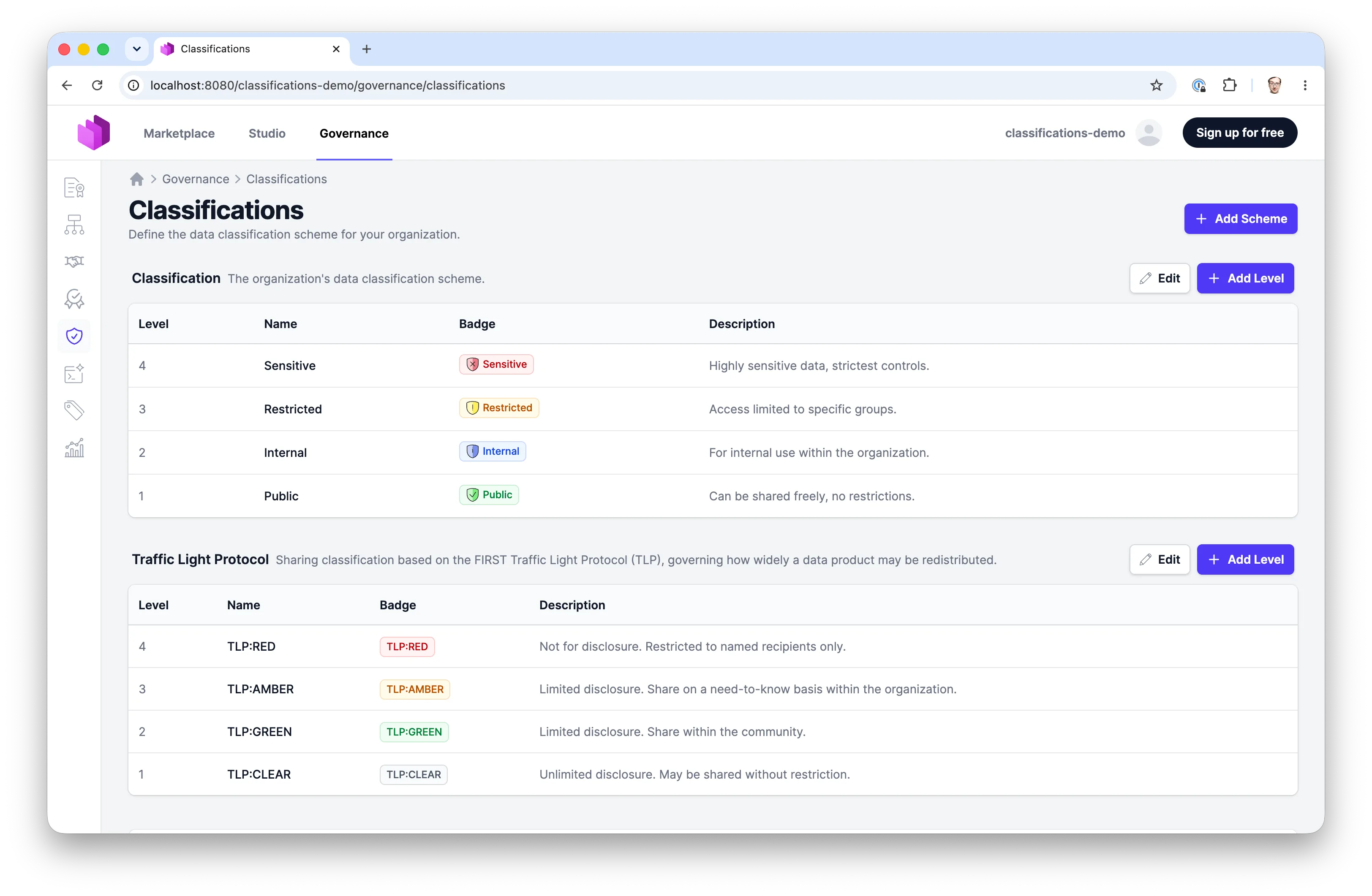
Schemes and Levels
Classifications are managed under Governance > Classifications. The page lists each scheme with its levels. A scheme whose custom property is classification is serialized to the standard classification field.
Starting from a preset
The Add Scheme dropdown offers a library of ready-made schemes alongside the option to build one from scratch. Each entry opens a preview showing the scheme's levels before you import it, and importing creates a normal, fully editable scheme — presets are a starting point, not a managed template.
| Preset | Levels |
|---|---|
| Classification | Public, Internal, Confidential, Restricted |
| GDPR | Non-personal, Personal data, Special category, Criminal offence, with the badge prefix GDPR |
| GDPR Special Categories (multiple values) | Racial or ethnic origin, Political opinions, Religious or philosophical beliefs, Trade union membership, Genetic data, Biometric data, Health data, Sex life or sexual orientation, Criminal convictions, badged as ETHNIC, POLITICAL, BELIEFS, UNION, GENETIC, BIOMETRIC, HEALTH, SEXUALITY, CRIMINAL with the badge prefix ART. 9 |
| CCPA Categories (multiple values) | Identifiers, Customer records, Protected classifications, Commercial information, Biometric information, Network activity, Geolocation, Sensory data, Professional information, Education information, Inferences, with the badge prefix CCPA |
| TLP 2.0 | CLEAR, GREEN, AMBER, AMBER+STRICT, RED, with the badge prefix TLP |
| US Government (CUI) | UNCLASSIFIED, CUI, CONFIDENTIAL, SECRET, TOP SECRET, badged as U, CUI, C, S, TS |
| NATO | Unclassified, Restricted, Confidential, Secret, Cosmic Top Secret, badged as NU, NR, NC, NS, CTS with the badge prefix NATO |
Classification is the same scheme every new organization is seeded with, offered here in case it was deleted. It is also the only preset that may claim the standard classification field: importing it into an organization that has no default scheme makes it the default. The other presets always serialize to their own custom property (classification.<id>), so they sit alongside the default rather than replacing it.
Importing a preset whose ID already exists fails rather than overwriting the existing scheme. Preset level names, descriptions, and criteria are English-only.
The two presets marked multiple values import as multi-value schemes: a data set commonly falls under several GDPR special categories or CCPA categories at once, so each imported value can be combined with the others.
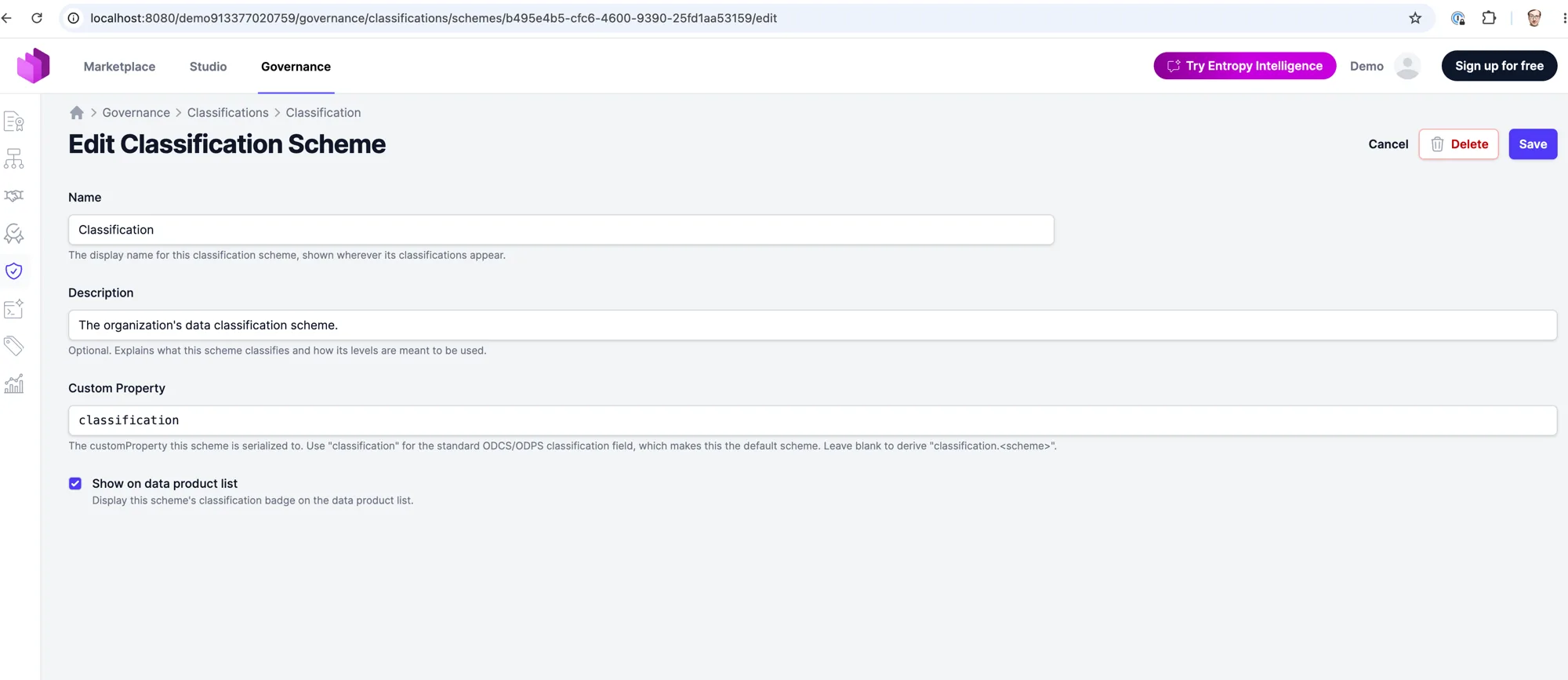
Classification Scheme
A scheme groups related levels and controls how they are serialized.
- Name: The display name of the scheme (e.g. "Confidentiality").
- ID: A canonical key auto-generated from the name (e.g.
confidentiality). It is used in the serialized custom-property name (classification.<id>) and is immutable after creation. - Description: Optional. Explains what the scheme classifies and how its levels are meant to be used.
- Custom Property: The property this scheme is serialized to. Use
classificationfor the standard ODCS/ODPS classification field. Leave it blank to deriveclassification.<id>. - Show on data product list: When enabled, this scheme's badge is shown on the data product list and a matching filter appears.
- Allow multiple values: When enabled, the scheme's values are not mutually exclusive. See Multi-value schemes. Not available for the scheme mapped to the standard
classificationfield. - Badge prefix: Optional short label such as
CLASS,COMP, orTLP. When set, every badge of the scheme renders as a two-part shield: the prefix in neutral gray on the left, the value in its color on the right, so a badge says which scheme it belongs to. A multi-value scheme shows one shield with the prefix once and one segment per value. Leave it empty for the plain badge.
Classification Level
Each level is one value within a scheme.
- Name: The display name of the level (e.g. "Sensitive"). This is also the value written into data contracts and concepts.
- Short name: Optional abbreviation printed on the badge instead of the name (e.g.
CTSfor Cosmic Top Secret), at most 12 characters and unique within the scheme. The name stays the stored value and is spelled out in the badge tooltip. The NATO and US Government presets ship with their standard abbreviations, and the GDPR Special Categories preset with one word per category. - Level: A numeric sensitivity rank. A higher number is more sensitive and wins when a data product carries several levels. In a scheme that allows multiple values it only orders the badges.
- Description: What this level means.
- Criteria: Markdown describing the handling rules for data at this level.
- Color and Icon: Control how the badge looks.
How Classifications Are Derived
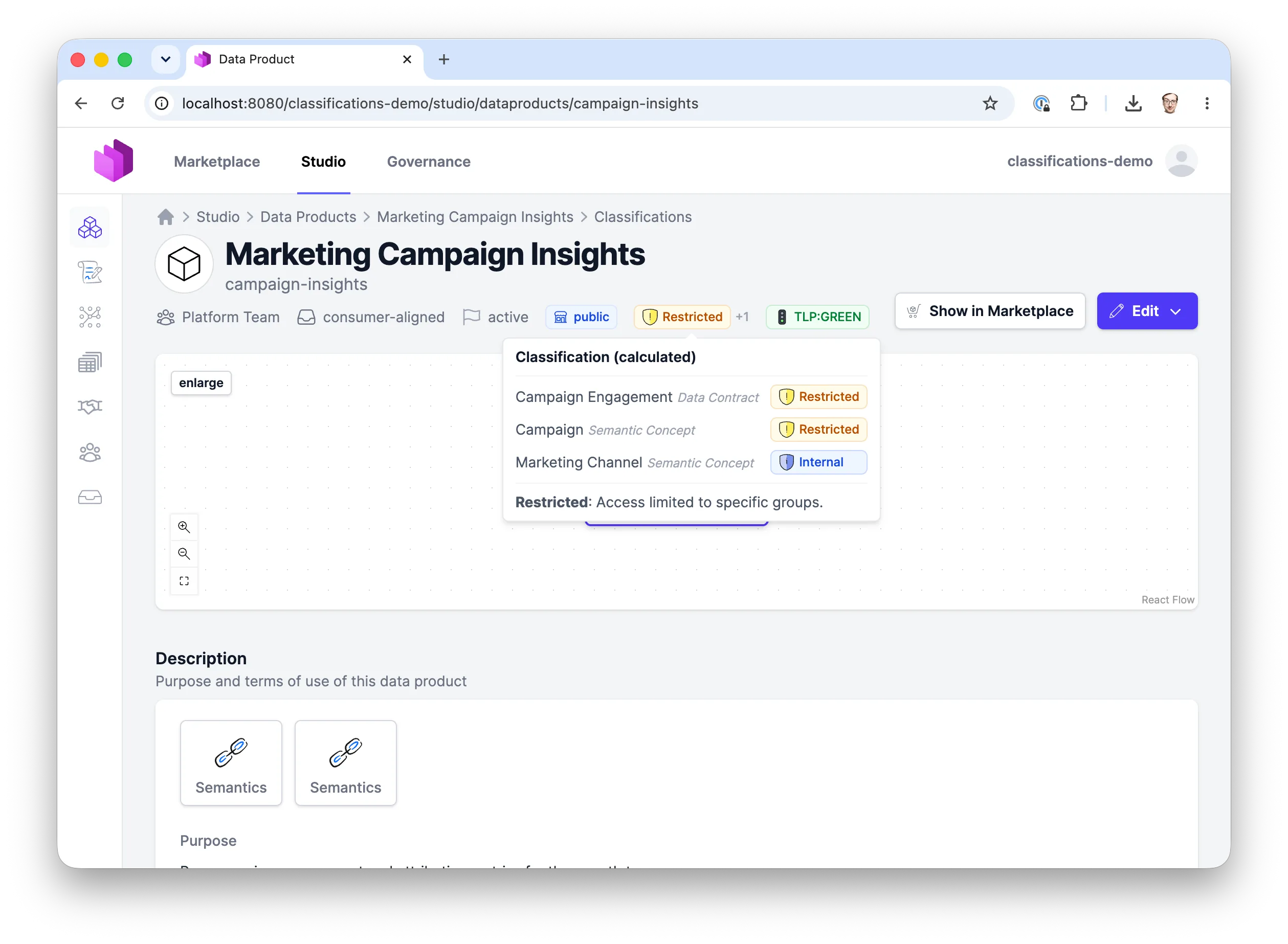
A data product does not store a classification directly. Instead, the effective classification per scheme is derived from:
- The output-port data contracts of the data product (these contribute via the standard
classificationfield, so only to the scheme mapped to it). - The data product's linked semantic concepts (these contribute to every scheme, via each scheme's custom property).
When several sources contribute different levels, the most sensitive level wins and is shown on the badge. A +N hint indicates how many other distinct levels are present.
You can override the derived value per data product in the data product editor. Each scheme offers an Auto option (the derived value) plus the explicit levels; choosing a level pins it regardless of the sources.
Multi-Value Schemes
Some classifications are not a ladder. A compartmentalization scheme with the values LEGAL, GAMMA, and OMEGA describes which compartments data belongs to, and a table can belong to several at once. Enable Allow multiple values on such a scheme.
For a multi-value scheme:
- A column, a data contract, a data product, or a semantic concept can carry any set of the scheme's values, shown as one badge per value.
- The roll-up is the union of every contributing value instead of the most sensitive level: a contract whose columns carry
OMEGAandOMEGA, GAMMAresolves toGAMMA, OMEGA, and a data product with two output ports collects the values of both contracts. There is no+Nhint, because nothing is hidden. - The Level number only orders the badges, highest first. The governance page labels it Order.
- An override on a data product or a data contract replaces the derived set. In the data product editor the scheme offers Auto plus one checkbox per value.
- Values are stored as one comma-separated string, so value names must not contain a comma.
- A badge shows at most three values; further ones fold into a
+Nsegment whose tooltip lists them.
The scheme mapped to the standard classification field cannot allow multiple values, because that field holds a single value for every tool that reads ODCS or ODPS. Give the scheme its own custom property.
schema:
  - name: case_file
    properties:
      - name: customer_name
        classification: Confidential
        customProperties:
          - property: classification.compartmentalization
            value: OMEGA
      - name: legal_notes
        classification: Restricted
        customProperties:
          - property: classification.compartmentalization
            value: OMEGA, GAMMA

# contract-level override, same field at the root
customProperties:
  - property: classification.compartmentalization
    value: OMEGA, GAMMA, LEGAL
The data product's ODPS custom property takes the same form. A YAML list ([OMEGA, GAMMA]) is read as well; the data contract editor shows such a field as a multiselect and the platform stores the comma-separated form.
On the Data Product List
When a scheme has Show on data product list enabled, two things happen on the marketplace data product list:
- The data product shows the scheme's badge with its effective (most sensitive) level.
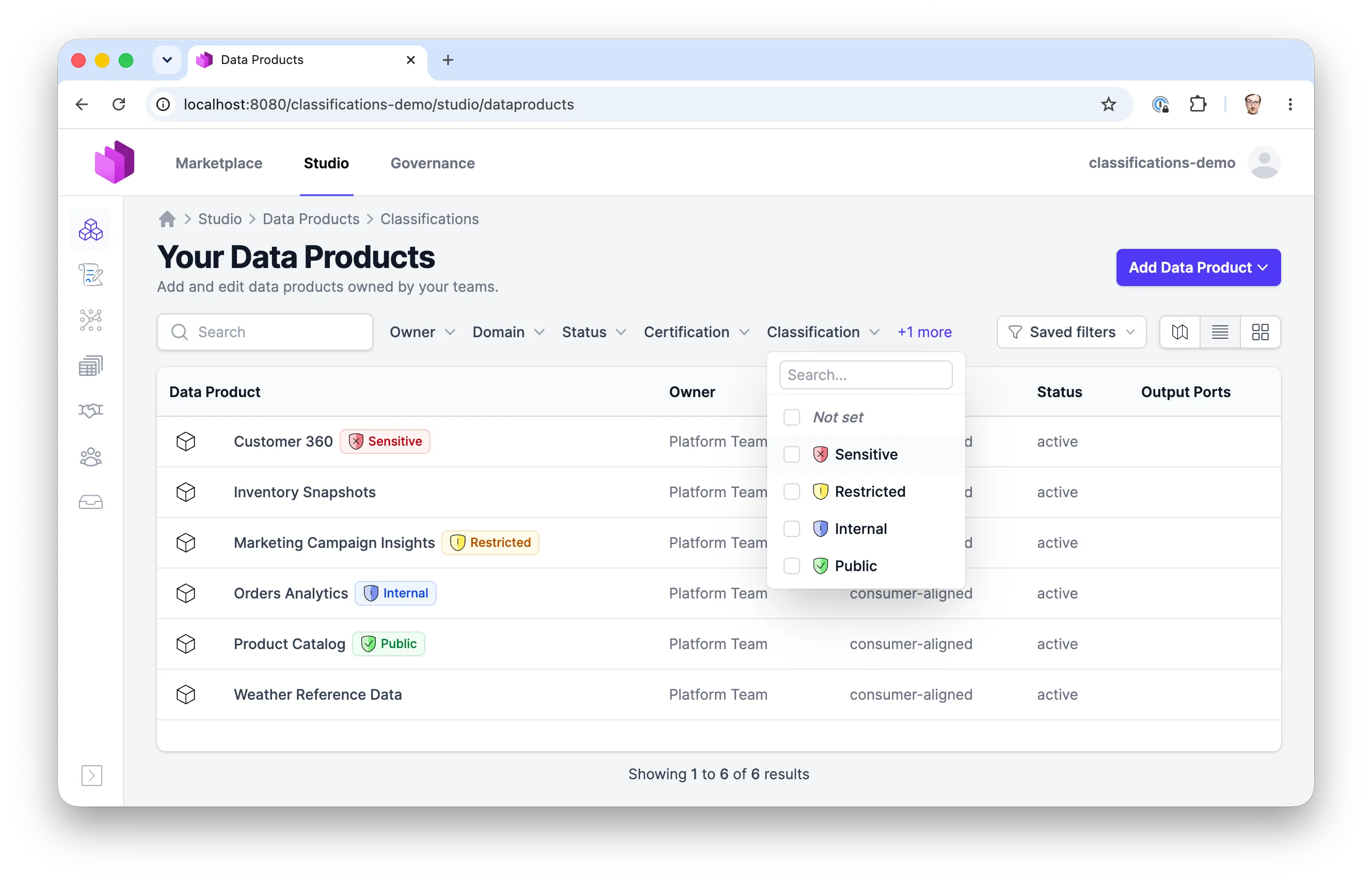
- A Classification filter appears (one per flagged scheme, after the Certification filter). The options are the scheme's levels plus "Not set".
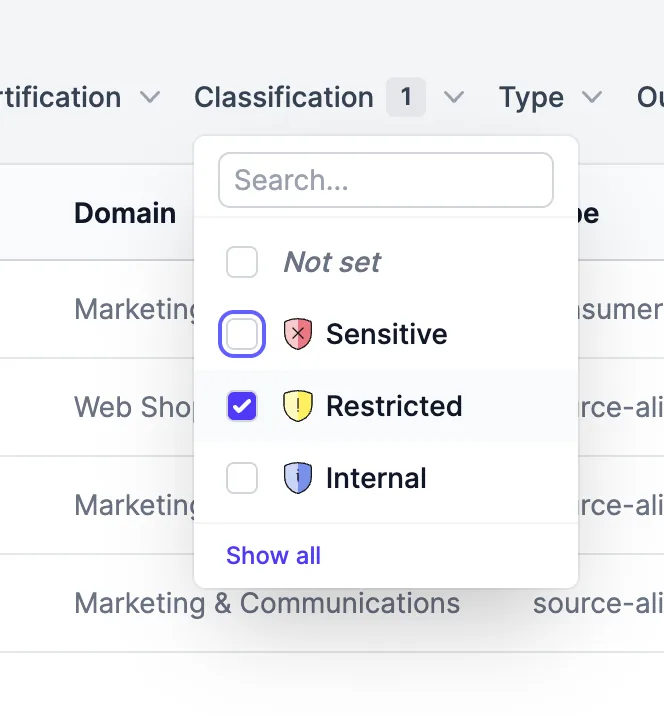
The filter matches a data product if any level it carries is selected, not only the effective one shown on the badge. For example, a product whose badge shows Sensitive but that also carries Restricted will appear when you filter for Restricted.
On the Data Contract
A data contract carries classifications at two levels: once for the contract as a whole, and once per schema column.
Contract header
The header shows one badge per scheme, in scheme rank order. For each scheme the value is either:
- Authored on the contract — a root custom property naming a level. This is an absolute override; the tooltip reads (set on the contract).
- Derived from the schema — the most sensitive level found across the contract's columns, the same roll-up used for data products. The tooltip reads (derived from the schema).
If a scheme's authored value matches none of its levels, that scheme shows no badge rather than falling back to the derived value. This keeps a typo from silently reading as a valid classification.
Schema columns
Each column shows one badge per scheme. The effective value for a (column, scheme) pair is resolved as:
- The level stated on the column itself, if there is one.
- Otherwise, the level carried by the semantic concept the column links to through its
authoritativeDefinition.
An explicit column value always wins over the concept's. Concepts contribute to every scheme — they carry the default scheme in their classification field and every other scheme in their custom fields — so a column and the contract header agree across all schemes.
The tooltip names where the value came from: inherited from <concept>, set on this column, or set on this column, overriding <level> from <concept>. A column that states the same level as its concept still reads as an override, because the column asserts it independently. An inherited value that matches no level in its scheme is skipped rather than shown as raw text, so a stale concept value cannot look authoritative.
Because a column can inherit, a column with no classification of its own is not necessarily unclassified — check its linked concept.
Concept inheritance is resolved on the data contract page. The schema table also appears on data product and asset detail pages and in the semantic model preview, where each column shows only the classification stated on the column itself.
Serialization
The value stored everywhere is the level's display name (e.g. Sensitive).
Where a scheme is serialized depends on its Custom Property:
- A scheme whose custom property is
classificationserializes to the standardclassificationfield in ODCS data contracts and ODPS data products. - Any other scheme serializes to its custom property (by default
classification.<id>), written as ODCS columncustomPropertiesand ODPScustomProperties. - A scheme that allows multiple values writes its values as one comma-separated string (
OMEGA, GAMMA) into that custom property.
This keeps schemes mapped to the standard classification field compatible with the open standards while allowing additional schemes alongside them.
Permissions
Managing classification schemes and levels (creating, editing, deleting) is restricted to governance group members and organization owners. Anyone who can view a data product sees its classification badges, and anyone can open a level's read-only details page.
For more details on roles and permissions, see Roles & Permissions.