
Chart Gallery
Every chart a dashboard can show, with the YAML of its panel. Copy a panel into spec.panels of your dashboard and place it in a grid.
Each example is one entry of spec.panels. To show it, add an item for its key to a grid in spec.layouts:
layouts:
  - kind: "Grid"
    spec:
      items:
        - x: 0
          "y": 0
          width: 12
          height: 8
          content:
            $ref: "#/spec/panels/reuse_rate_by_team"
The screenshots come from the demo organization, with numbers at width 6 and height 3, charts at width 12 and height 8, and the funnel at width 24 and height 9.
| Chart | Plugin kind | Metrics | Grouping | Over time |
|---|---|---|---|---|
| Number | StatChart | 1, or 2 for a share of a total | none | Change and sparkline |
| Line chart | TimeSeriesChart | 1 to 3, same unit | none | Yes |
| Bar chart | BarChart | 1 to 3, same unit | groupBy, optional stackBy | No |
| Table | Table | 1 to 3 | groupBy | No |
| Pie chart | PieChart | 1 | groupBy | No |
| Funnel | FunnelChart | 1 count or sum | groupBy a field with ordered values | No |
| Scatter chart | ScatterChart | 1, dated, one dataset | optional groupBy for colours | Yes, one dot per row |
| Text | Markdown | none | none | No |
Number
StatChart shows a metric as one number. For a metric with a history, it adds the change against a month ago and a sparkline of the period.
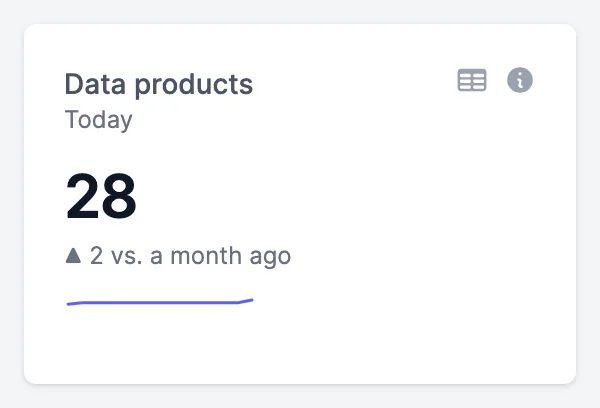
data_products:
  kind: "Panel"
  spec:
    plugin:
      kind: "StatChart"
      spec: {}
    queries:
      - kind: "TimeSeriesQuery"
        spec:
          plugin:
            kind: "EntropyDataMetricQuery"
            spec:
              metric: "entropy_data_marketplace_analytics.data_products"
Share of a total
A second query is the total the number is a share of. Both metrics need the same unit.
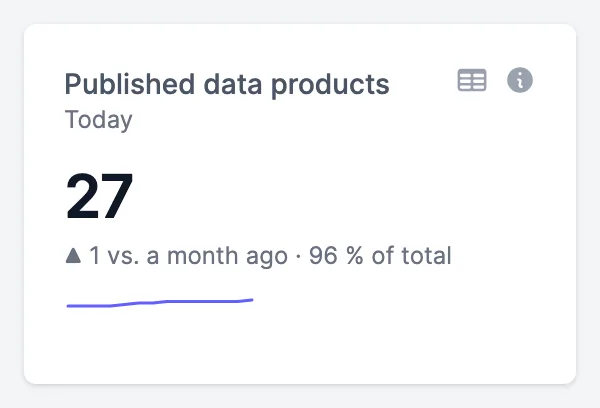
published_data_products:
  kind: "Panel"
  spec:
    plugin:
      kind: "StatChart"
      spec: {}
    queries:
      - kind: "TimeSeriesQuery"
        spec:
          plugin:
            kind: "EntropyDataMetricQuery"
            spec:
              metric: "entropy_data_marketplace_analytics.marketplace_data_products"
      - kind: "TimeSeriesQuery"
        spec:
          plugin:
            kind: "EntropyDataMetricQuery"
            spec:
              metric: "entropy_data_marketplace_analytics.data_products"
Measured today
A metric without a history shows its value today, with its unit and without a change.
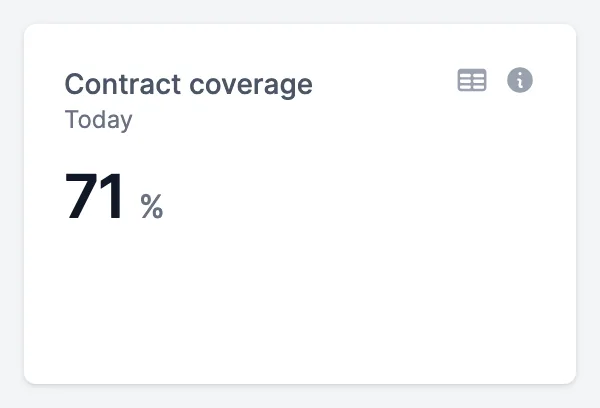
contract_coverage:
  kind: "Panel"
  spec:
    plugin:
      kind: "StatChart"
      spec: {}
    queries:
      - kind: "TimeSeriesQuery"
        spec:
          plugin:
            kind: "EntropyDataMetricQuery"
            spec:
              metric: "entropy_data_marketplace_analytics.contract_coverage"
A duration
A metric in days shows its value for the period. The arrow shows whether it went up or down against a month ago.
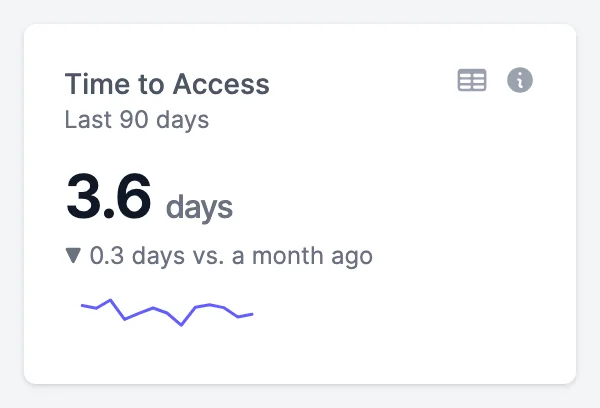
time_to_access:
  kind: "Panel"
  spec:
    plugin:
      kind: "StatChart"
      spec: {}
    queries:
      - kind: "TimeSeriesQuery"
        spec:
          plugin:
            kind: "EntropyDataMetricQuery"
            spec:
              metric: "entropy_data_marketplace_analytics.time_to_access_days"
Line chart
TimeSeriesChart shows a metric over the period, by week for the last 30 or 90 days and by month for this year. The metric needs a history: one measured today can't be shown over time.
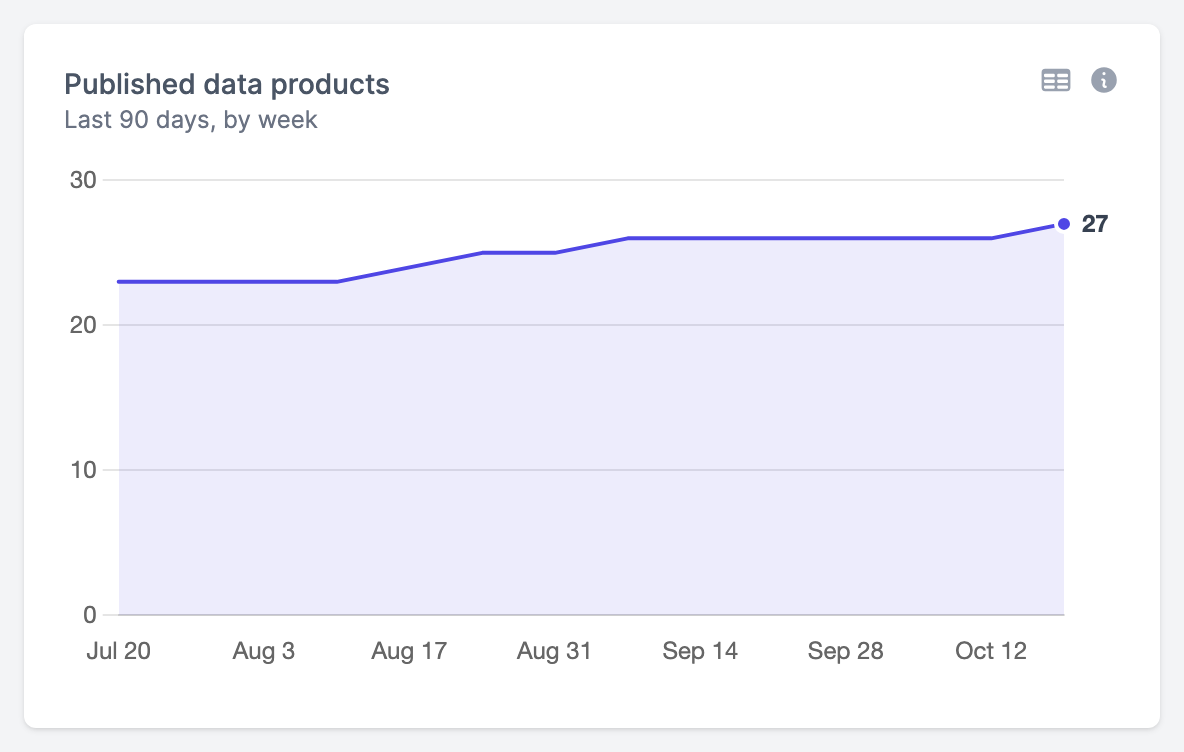
marketplace_data_products:
  kind: "Panel"
  spec:
    plugin:
      kind: "TimeSeriesChart"
      spec: {}
    queries:
      - kind: "TimeSeriesQuery"
        spec:
          plugin:
            kind: "EntropyDataMetricQuery"
            spec:
              metric: "entropy_data_marketplace_analytics.marketplace_data_products"
Several lines
Up to three queries each draw a line on the same axis, so they need the same unit. querySettings gives a line its colour; queryIndex counts the queries from 0. The second and third lines are dashed and dotted, so they stay apart without relying on colour.
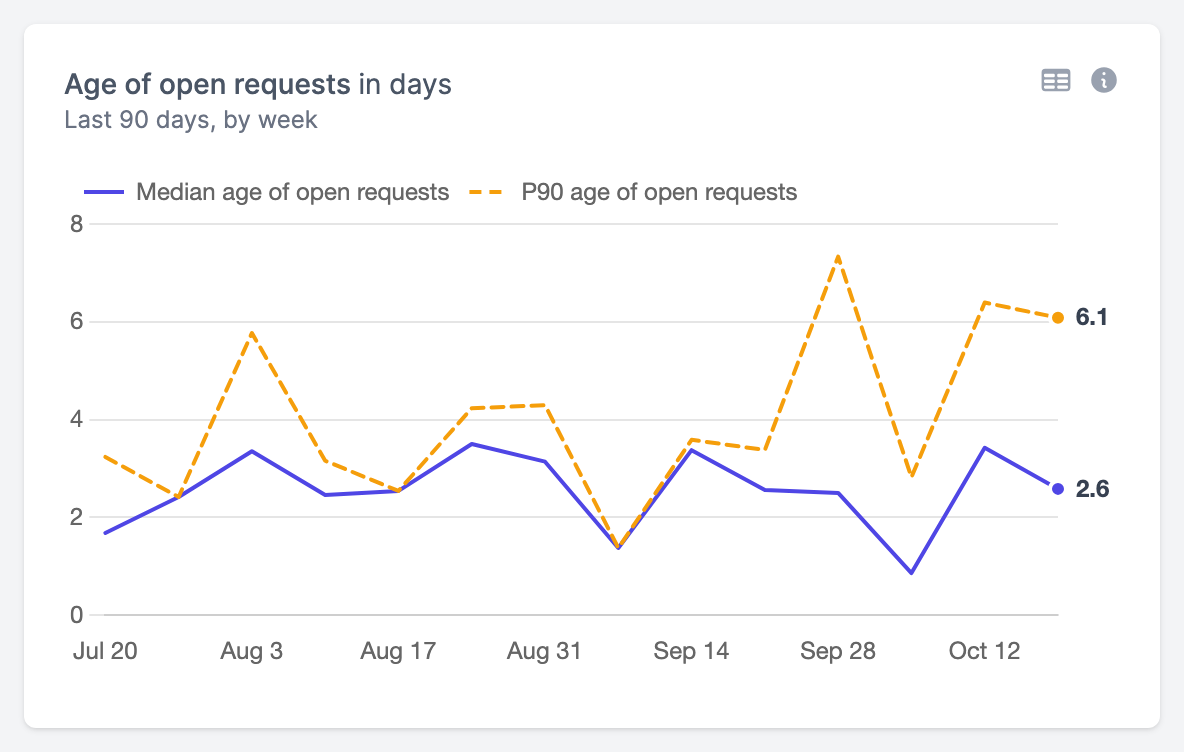
open_request_age:
  kind: "Panel"
  spec:
    display:
      name: "Age of open requests"
    plugin:
      kind: "TimeSeriesChart"
      spec:
        querySettings:
          - queryIndex: 0
            colorMode: "fixed"
            colorValue: "#4f46e5"
          - queryIndex: 1
            colorMode: "fixed"
            colorValue: "#f59e0b"
    queries:
      - kind: "TimeSeriesQuery"
        spec:
          plugin:
            kind: "EntropyDataMetricQuery"
            spec:
              metric: "entropy_data_marketplace_analytics.open_request_age_days"
      - kind: "TimeSeriesQuery"
        spec:
          plugin:
            kind: "EntropyDataMetricQuery"
            spec:
              metric: "entropy_data_marketplace_analytics.open_request_age_p90_days"
Bar chart
BarChart shows a metric for each group, largest first. groupBy chooses the groups: domain (the default), top-level-domain, team, or a field such as data_product.type. A group without a value, such as a team without data products the reuse rate counts, shows a dash.
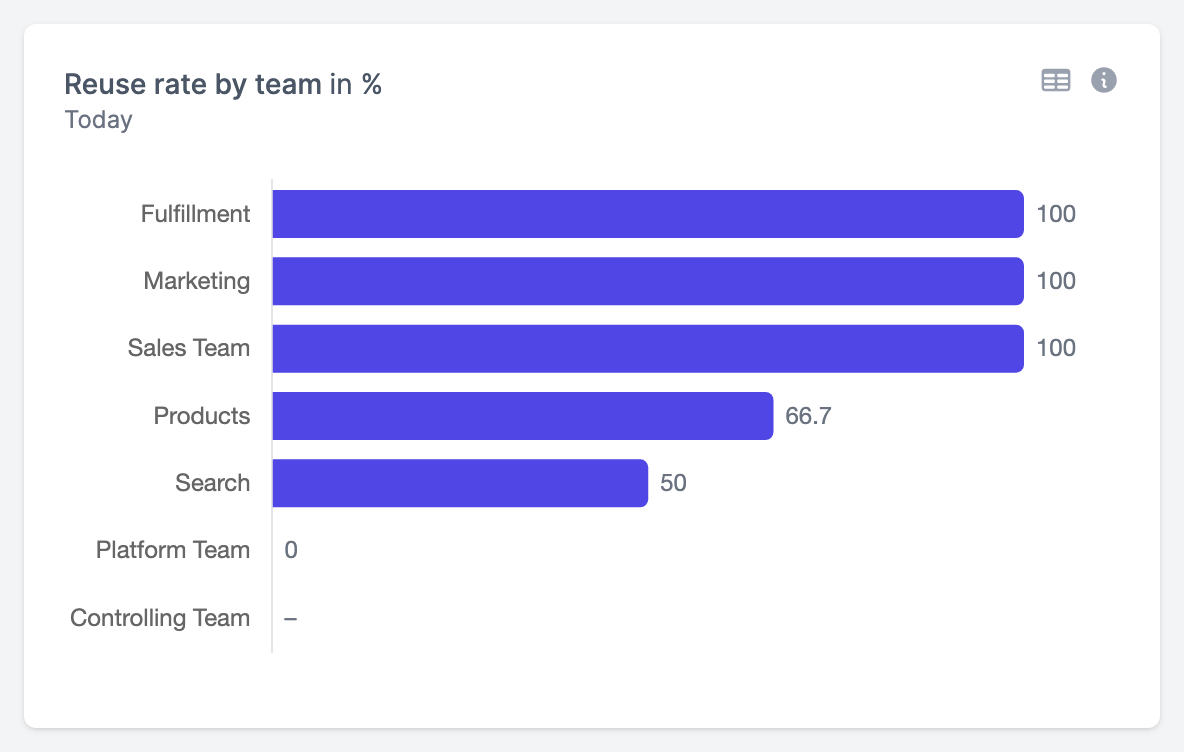
reuse_rate_by_team:
  kind: "Panel"
  spec:
    plugin:
      kind: "BarChart"
      spec: {}
    queries:
      - kind: "TimeSeriesQuery"
        spec:
          plugin:
            kind: "EntropyDataMetricQuery"
            spec:
              metric: "entropy_data_marketplace_analytics.reuse_rate"
              groupBy: "team"
Vertical bars
Bars are horizontal by default. orientation: "vertical" stands them up as columns, which suits a few groups with short names.
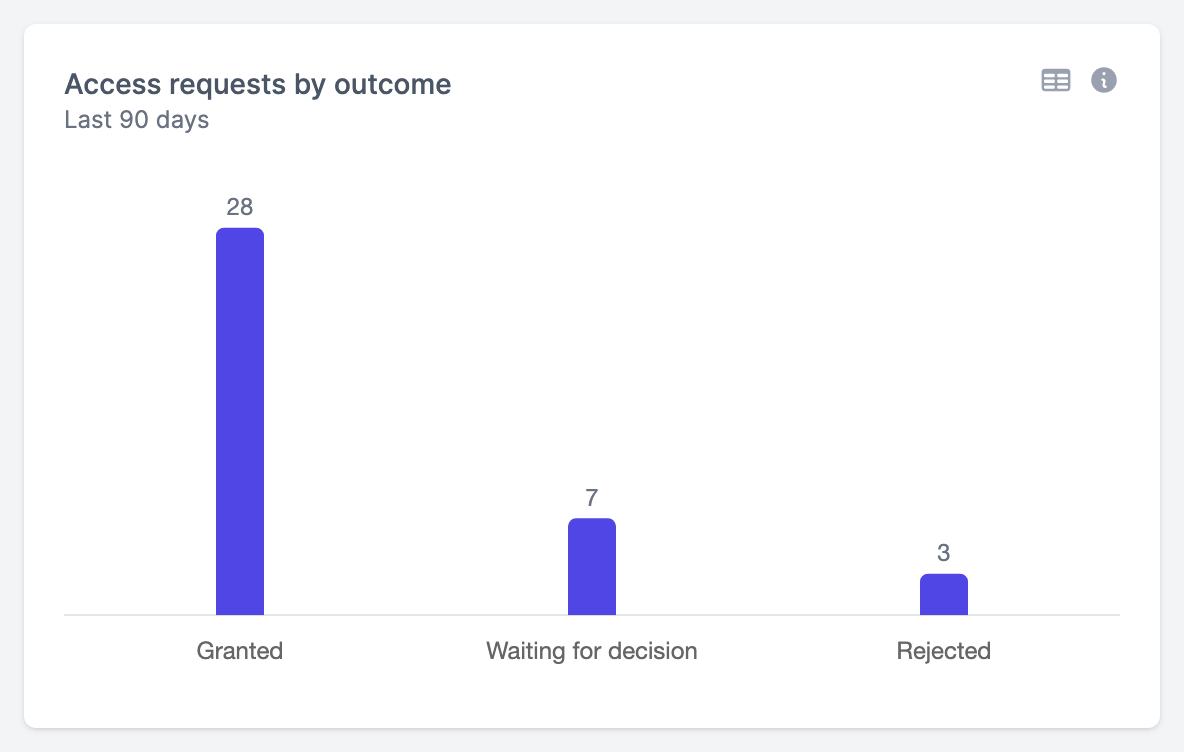
access_requests_by_outcome:
  kind: "Panel"
  spec:
    display:
      name: "Access requests by outcome"
    plugin:
      kind: "BarChart"
      spec:
        orientation: "vertical"
    queries:
      - kind: "TimeSeriesQuery"
        spec:
          plugin:
            kind: "EntropyDataMetricQuery"
            spec:
              metric: "entropy_data_marketplace_analytics.access_requests"
              groupBy: "access_agreement.outcome"
Stacked by a second grouping
stackBy splits each bar into parts by a second grouping, with a legend. It takes the same values as groupBy. When the model lists the field's values, such as the bands of waiting_band, the parts keep that order and their colours. Otherwise the five largest parts get a colour each and the rest are stacked as Other.
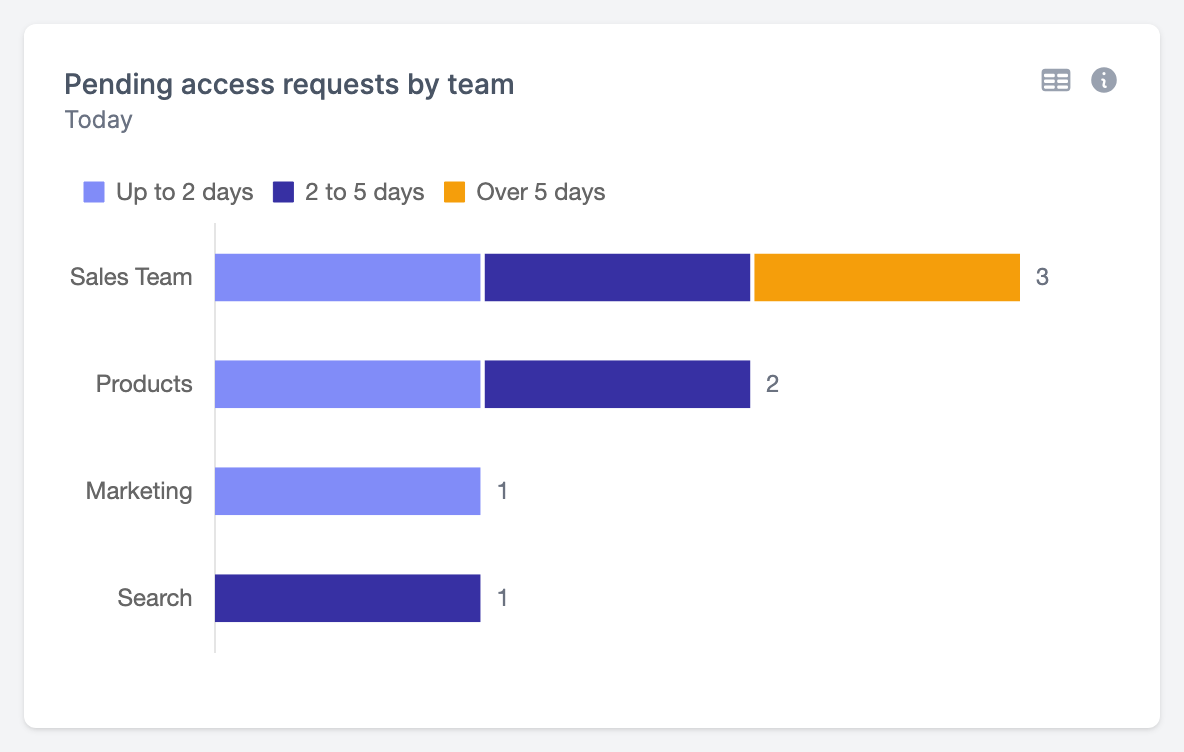
pending_access_requests_by_team:
  kind: "Panel"
  spec:
    plugin:
      kind: "BarChart"
      spec: {}
    queries:
      - kind: "TimeSeriesQuery"
        spec:
          plugin:
            kind: "EntropyDataMetricQuery"
            spec:
              metric: "entropy_data_marketplace_analytics.pending_access_requests"
              groupBy: "team"
              stackBy: "access_agreement.waiting_band"
Stacked by metrics
Up to three queries each add a part to every bar, such as the phases that add up to a duration. The metrics need the same unit, and the bars are grouped by the groupBy of the first query. A bar chart stacks either by stackBy or by its metrics, not both.
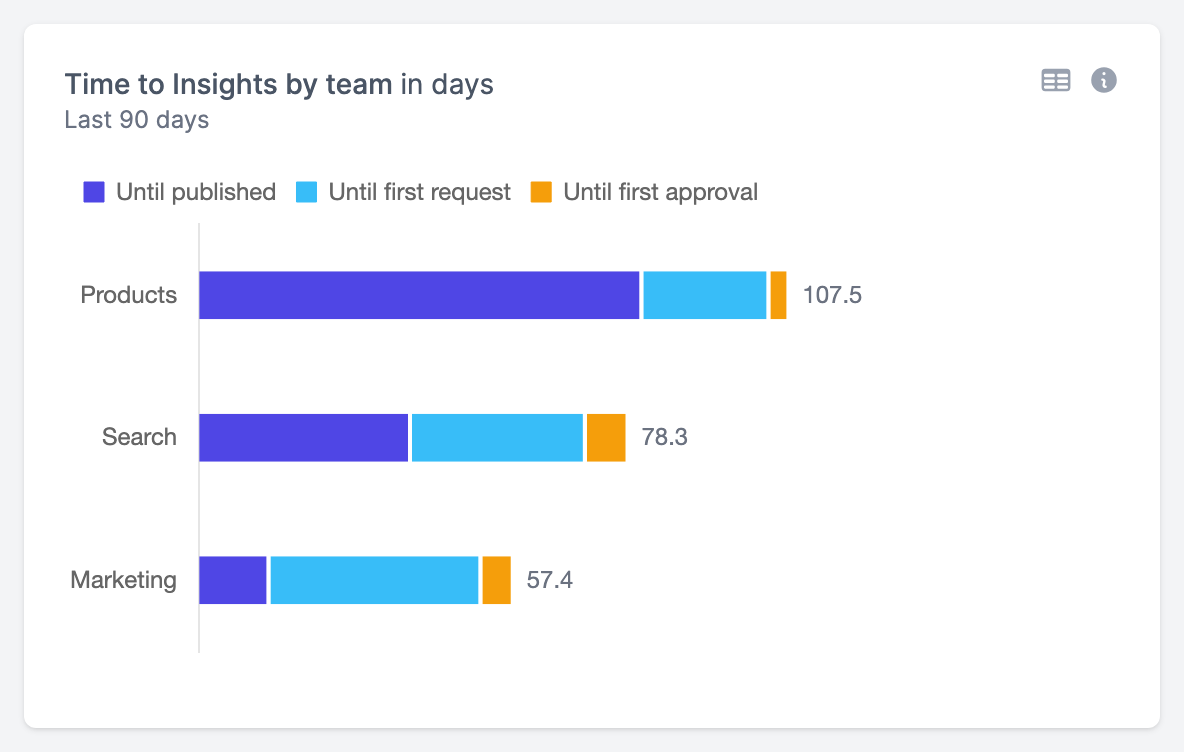
time_to_insights_by_team:
  kind: "Panel"
  spec:
    display:
      name: "Time to Insights by team"
    plugin:
      kind: "BarChart"
      spec:
        querySettings:
          - queryIndex: 0
            colorMode: "fixed"
            colorValue: "#4f46e5"
          - queryIndex: 1
            colorMode: "fixed"
            colorValue: "#38bdf8"
          - queryIndex: 2
            colorMode: "fixed"
            colorValue: "#f59e0b"
    queries:
      - kind: "TimeSeriesQuery"
        spec:
          plugin:
            kind: "EntropyDataMetricQuery"
            spec:
              metric: "entropy_data_marketplace_analytics.insights_publish_days"
              groupBy: "team"
      - kind: "TimeSeriesQuery"
        spec:
          plugin:
            kind: "EntropyDataMetricQuery"
            spec:
              metric: "entropy_data_marketplace_analytics.insights_request_days"
      - kind: "TimeSeriesQuery"
        spec:
          plugin:
            kind: "EntropyDataMetricQuery"
            spec:
              metric: "entropy_data_marketplace_analytics.insights_approval_days"
Table
Table shows a row for each group and a column for each query, up to three. The columns can have different units. The rows are grouped by the groupBy of the first query, largest first. A Data Product Score shows its rating by the organization's rating bands.
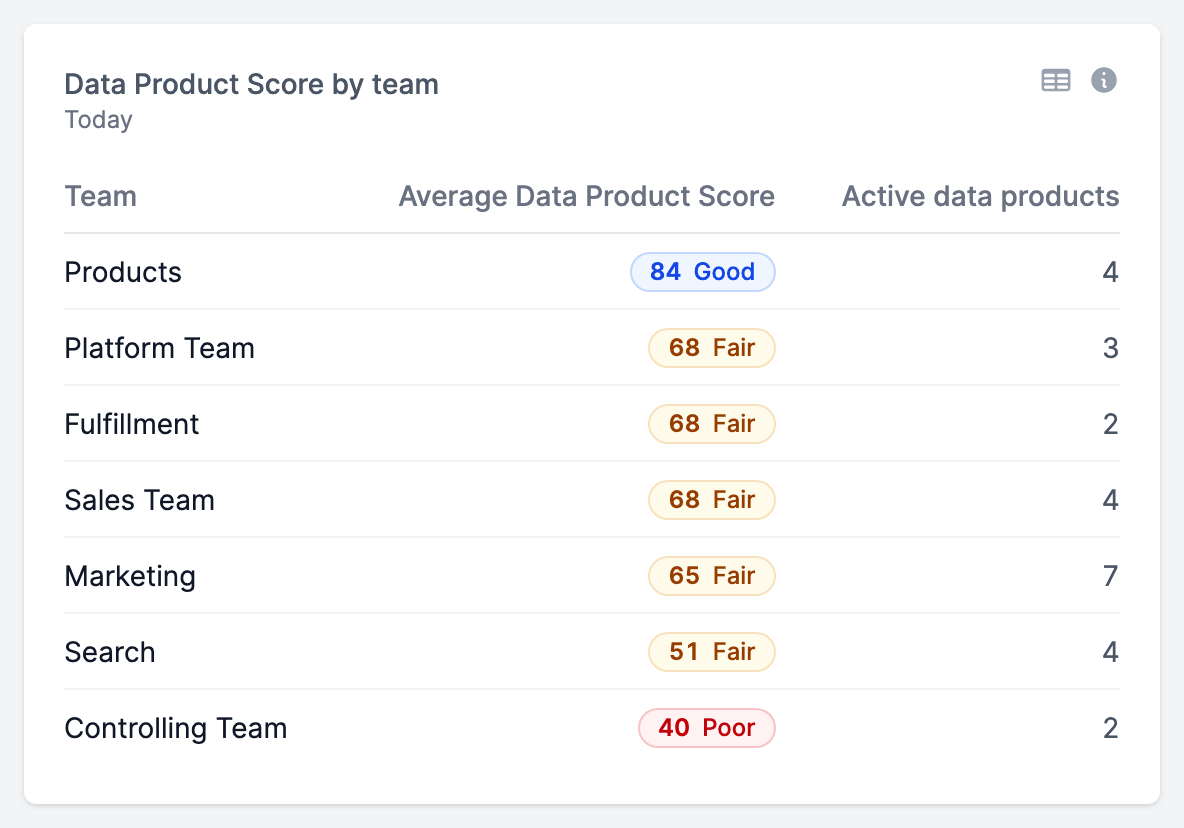
score_by_team:
  kind: "Panel"
  spec:
    display:
      name: "Data Product Score by team"
    plugin:
      kind: "Table"
      spec: {}
    queries:
      - kind: "TimeSeriesQuery"
        spec:
          plugin:
            kind: "EntropyDataMetricQuery"
            spec:
              metric: "entropy_data_marketplace_analytics.average_score"
              groupBy: "team"
      - kind: "TimeSeriesQuery"
        spec:
          plugin:
            kind: "EntropyDataMetricQuery"
            spec:
              metric: "entropy_data_marketplace_analytics.active_data_products"
Pie chart
PieChart shows the share of each group in a count or sum. Up to five groups get a slice of their own; the rest share one slice as Other. Groups without a positive value have no slice.
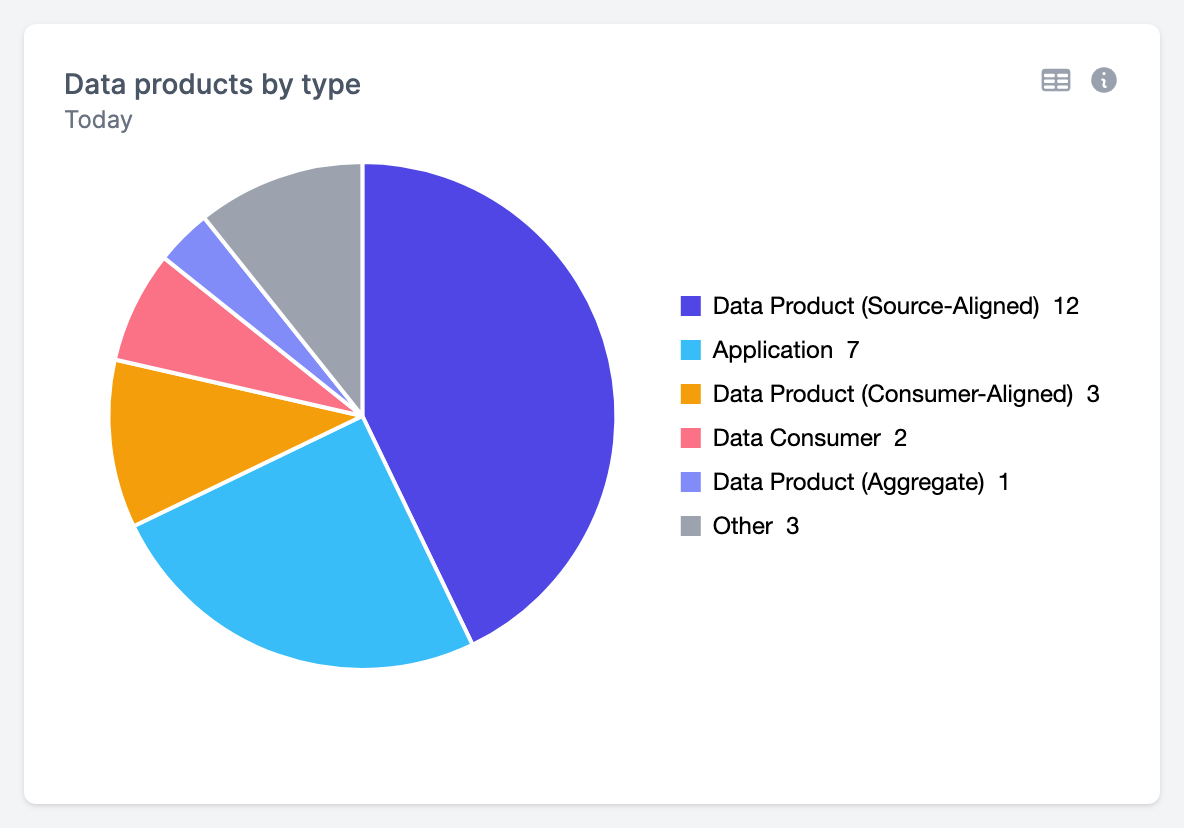
data_products_by_type:
  kind: "Panel"
  spec:
    display:
      name: "Data products by type"
    plugin:
      kind: "PieChart"
      spec: {}
    queries:
      - kind: "TimeSeriesQuery"
        spec:
          plugin:
            kind: "EntropyDataMetricQuery"
            spec:
              metric: "entropy_data_marketplace_analytics.data_products"
              groupBy: "data_product.type"
Funnel
FunnelChart shows the steps of a lifecycle and how many rows drop off between them. Its groupBy is a field whose semantic model lists its values in order, such as data_product.lifecycle_stage or access_agreement.access_stage. Each value is the furthest step a row reached, and a step counts the rows at it or at a later step. The metric must be a single COUNT or SUM without DISTINCT.
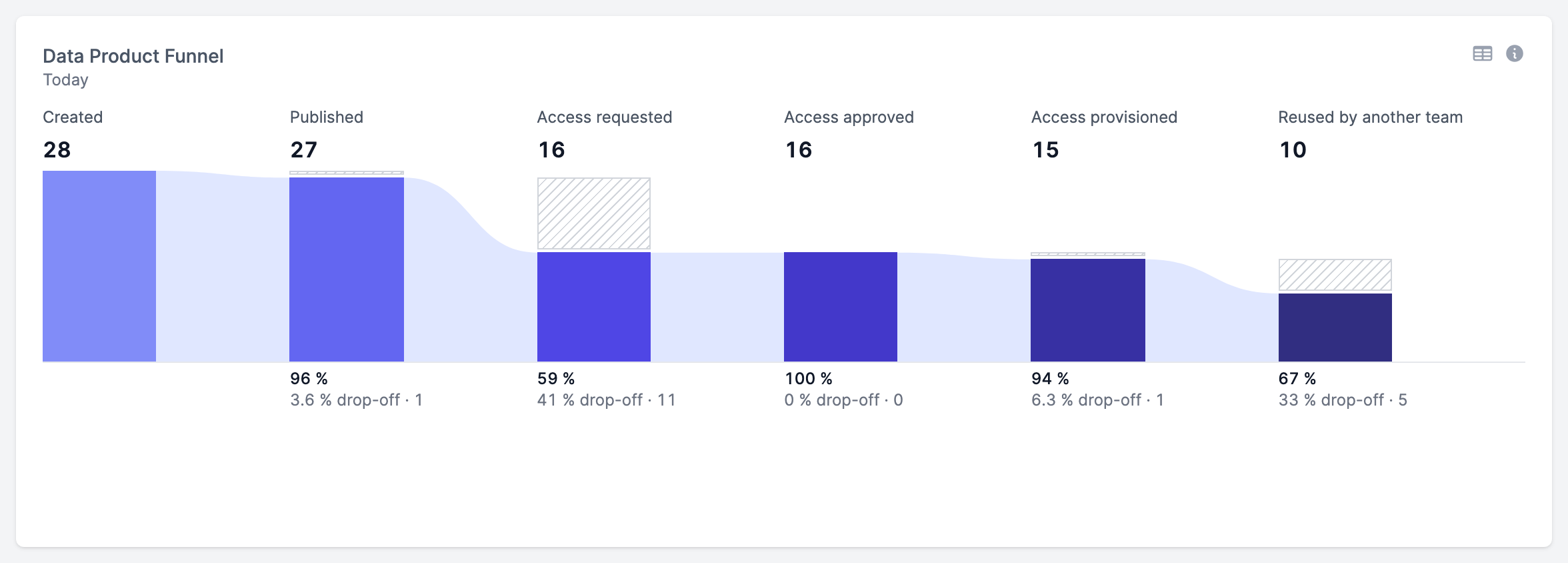
data_product_funnel:
  kind: "Panel"
  spec:
    display:
      name: "Data Product Funnel"
    plugin:
      kind: "FunnelChart"
      spec: {}
    queries:
      - kind: "TimeSeriesQuery"
        spec:
          plugin:
            kind: "EntropyDataMetricQuery"
            spec:
              metric: "entropy_data_marketplace_analytics.data_products"
              groupBy: "data_product.lifecycle_stage"
A funnel needs the full width: give it width 24 and height 9.
Scatter chart
ScatterChart shows a dot for each row of the metric's dataset in the period, such as each data product, at the row's date and with the metric computed for that row alone. It shows outliers that an average hides. An optional groupBy colours the dots by group. The metric must be dated, read one dataset, and not be a running total.
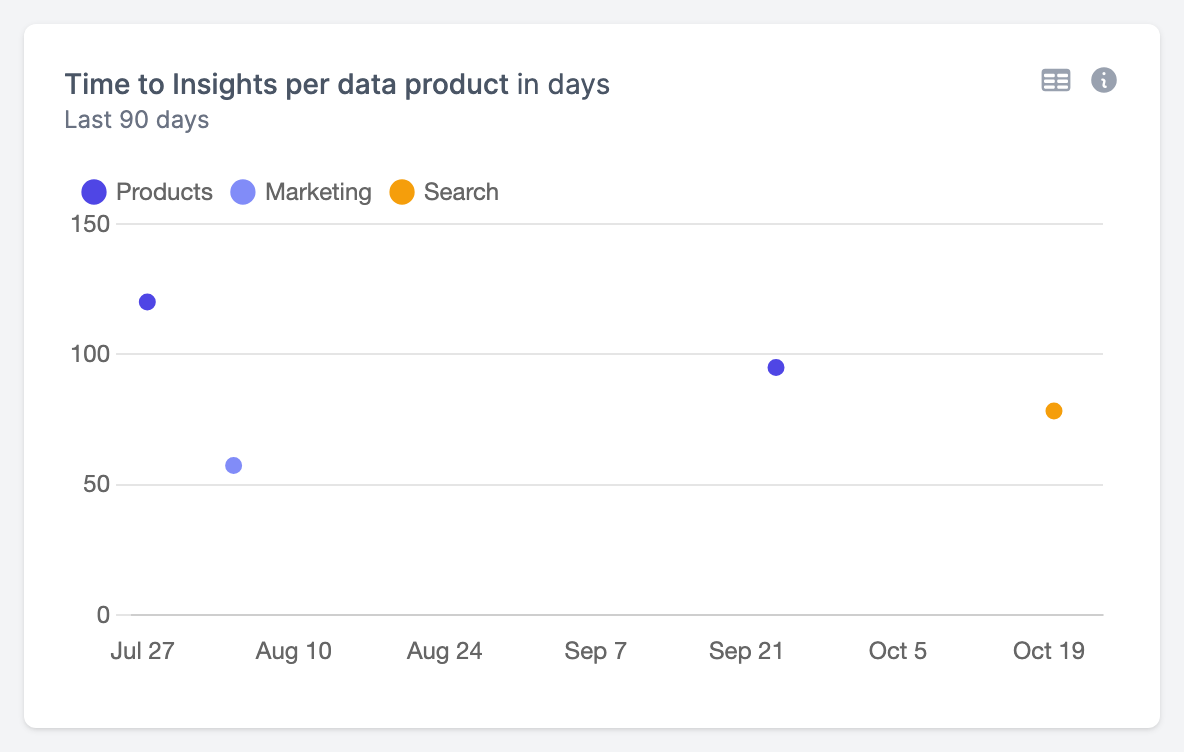
time_to_insights_per_data_product:
  kind: "Panel"
  spec:
    display:
      name: "Time to Insights per data product"
    plugin:
      kind: "ScatterChart"
      spec: {}
    queries:
      - kind: "TimeSeriesQuery"
        spec:
          plugin:
            kind: "EntropyDataMetricQuery"
            spec:
              metric: "entropy_data_marketplace_analytics.time_to_insights_days"
              groupBy: "team"
Text
Markdown shows text, such as the takeaways of a section or how to read the panels next to it. It queries nothing; write the text in text, in Markdown.
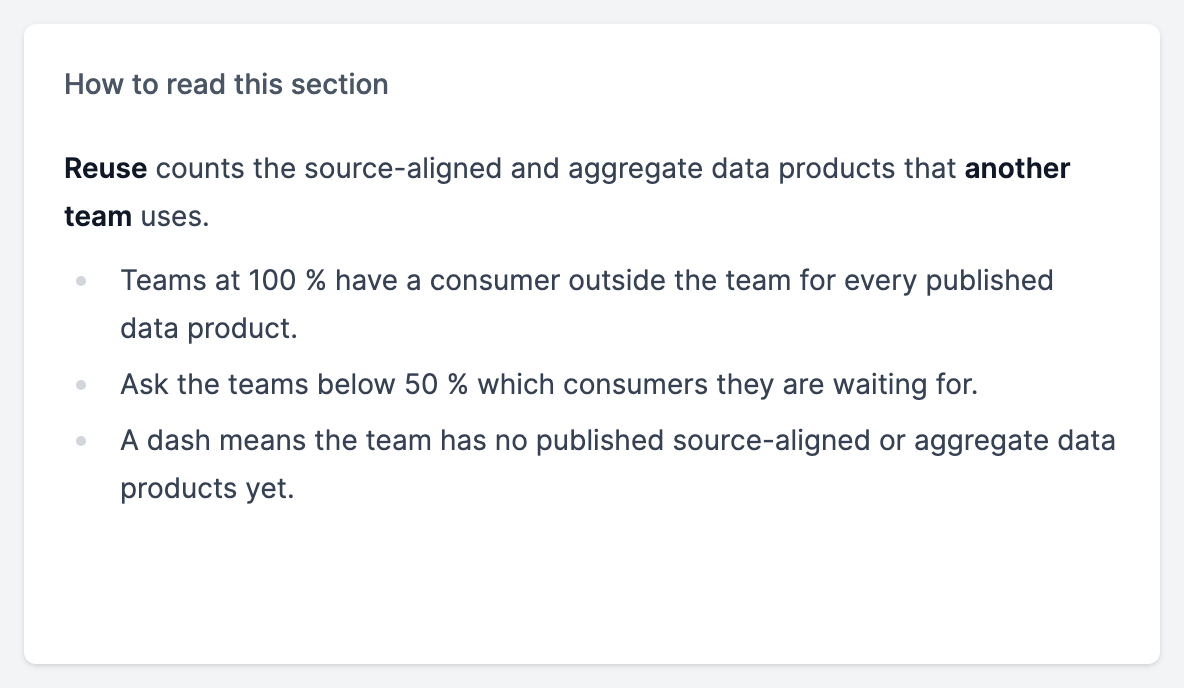
reuse_explained:
  kind: "Panel"
  spec:
    display:
      name: "How to read this section"
    plugin:
      kind: "Markdown"
      spec:
        text: |-
          **Reuse** counts the source-aligned and aggregate data products that **another team** uses.

          - Teams at 100 % have a consumer outside the team for every published data product.
          - Ask the teams below 50 % which consumers they are waiting for.
          - A dash means the team has no published source-aligned or aggregate data products yet.
Colours
Line and bar charts take the dashboard's colours unless querySettings sets a colour for a query:
| Field | Description |
|---|---|
queryIndex | The query, counted from 0. Each query can have one setting. |
colorMode | fixed colours every series of the query. fixed-single colours only a query with a single series, so bars stacked by stackBy keep their colours. |
colorValue | The colour as #rrggbb, such as "#f59e0b". |
Only line and bar charts have a colour per query; querySettings on another chart is a problem.
Thresholds
Line and bar charts can mark zones on their value axis, such as the range above a target, with Perses thresholds:
plugin:
  kind: "TimeSeriesChart"
  spec:
    thresholds:
      mode: "absolute"
      steps:
        - value: 75
          color: "#ef4444"
          name: "Over 75 days"
| Field | Description |
|---|---|
steps[].value | Where the zone starts. It reaches up to the next step's value, or to the top of the axis. |
steps[].color | The zone's colour as #rrggbb. |
steps[].name | Optional. The label written in the zone. Defaults to the step's value with the metric's unit, such as Over 75 days. |
Two steps can't start at the same value, and thresholds on another chart is a problem.