
Dashboards
Insights dashboards show metrics about your data mesh, such as data products, reuse, access requests and Time to Insights, as numbers, charts and tables. You arrange them in a visual editor or write them as YAML.
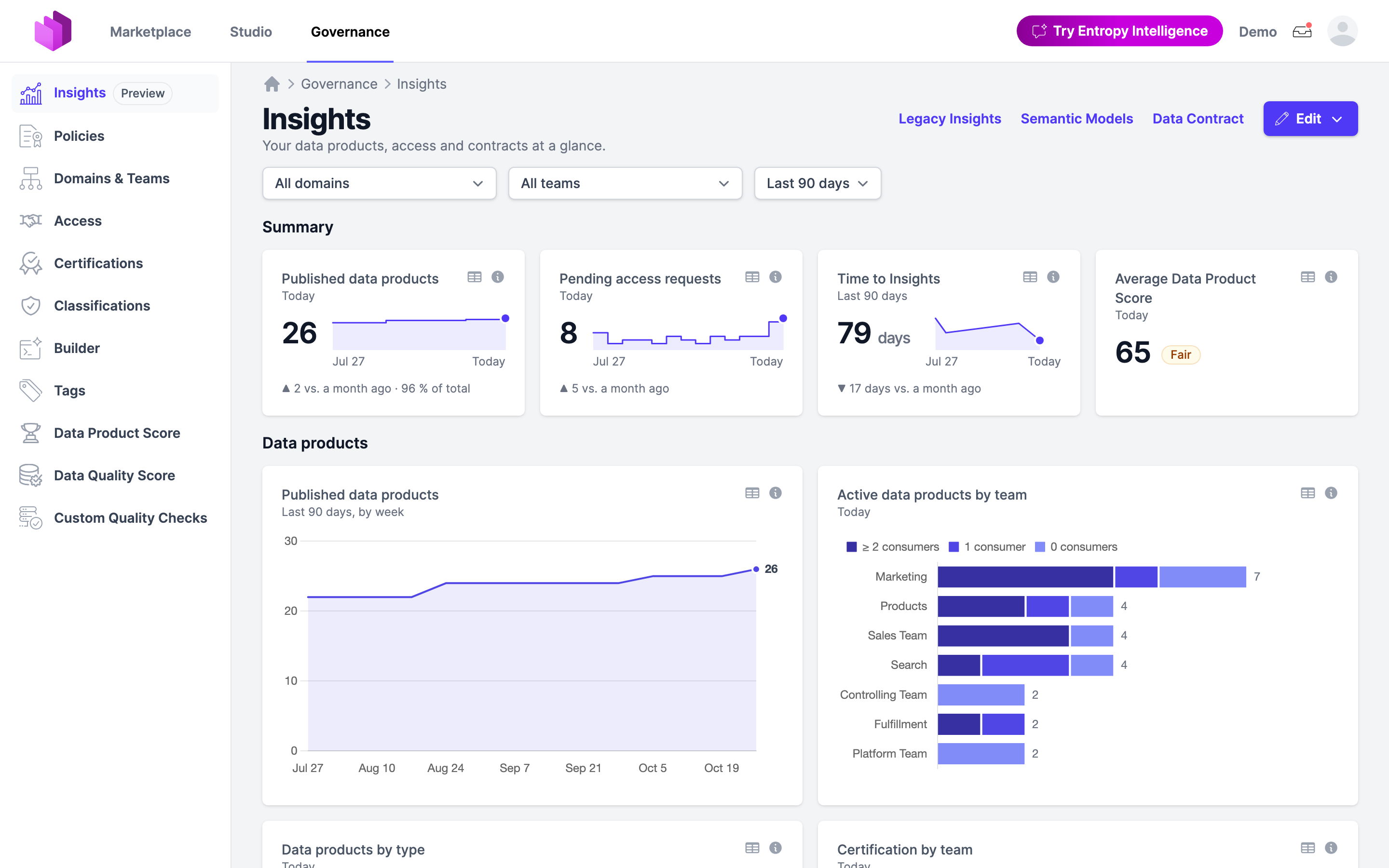
Dashboards are part of the Insights v2 preview. An organization owner turns it on under Settings → Preview Features → Insights v2. Governance → Insights then shows the dashboards; the previous Insights page stays reachable through the Legacy Insights link. Without the preview, the dashboard pages and their API answer 404.
How it fits together
- A dashboard is a YAML document in the Perses dashboard format, the format Dash0 and the Perses operator use. It lists panels and places them on a grid.
- A panel shows one or more metrics in a chart: a number, a line over time, bars, a table, a pie, a funnel, a scatter plot, or Markdown text. The Chart Gallery shows every chart with its YAML.
- A metric is defined in a semantic model, an Apache Ossie document under Governance → Insights → Semantic Models. A panel refers to a metric as
<semantic model>.<metric>, for exampleentropy_data_marketplace_analytics.reuse_rate. - The metrics read the datasets of Entropy Data Marketplace Analytics: the data products, output ports and access agreements of your organization as fact tables, with its domains and teams. Data Contract on the Insights page shows the data contract of these datasets, with every table and column. The same datasets can also be downloaded for your own BI tools, see Marketplace Analytics datasets.
Every organization has the built-in Overview dashboard. Further dashboards appear as tabs next to it.
Who sees and edits dashboards
| Role | Can do |
|---|---|
| Organization owners and members of the governance group | See every dashboard, create, edit and delete dashboards, edit semantic models |
| Other members | See the dashboards visible to everyone, and the dashboards whose visibility names one of their teams or a team above it |
A dashboard is visible to everyone in the organization unless it names teams in entropy-data.com/visible-to (in the visual editor: Visible to). Tabs of restricted dashboards carry a lock.
Reading a dashboard
- Filters. A dashboard can offer a Domain filter, a Team filter, or both. A domain includes its subdomains, a team its subteams. The filters apply to every panel.
- Period. Viewers choose Last 30 days, Last 90 days or This year. Charts over time show weeks for the last 30 or 90 days and months for this year. The dashboard opens with its
duration. - Today. Some metrics have no history, such as contract coverage. Their panels say Today and ignore the period. Running totals, such as the number of data products, also say Today in a number or bar chart.
- Details. The table icon on a panel opens Metric details: the SQL with the dashboard's filters filled in, the first rows of each dataset the metric reads, and Download CSV with all of them. The info icon explains how the metric is calculated.
Create a dashboard
Choose Edit → New dashboard on the Insights page. The editor has two modes; switch between them with Visual and YAML at the top.
Visual editor
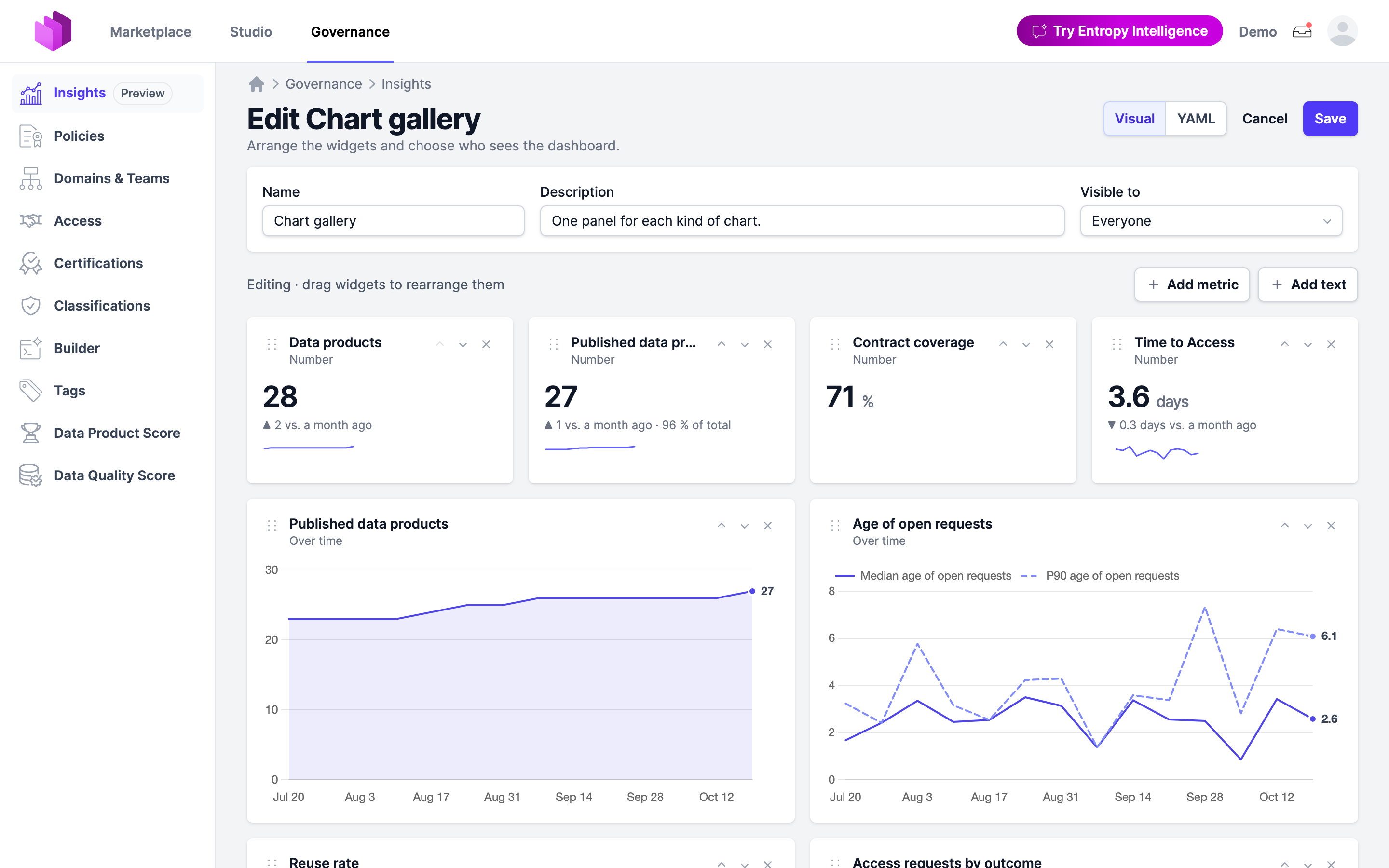
- Name, Description and Visible to describe the dashboard.
- Add metric opens a panel to choose the Metric, how to Show as (Number, Over time, By group, Table, Pie chart, Funnel, Scatter chart), what to Group by or Color by, the Width and, for bar charts, the direction of the Bars. Options that don't work for the metric are disabled with the reason, for example Over time for a metric that is measured today.
- Add text adds a Markdown panel, for example to explain the takeaways of a section.
- Drag a widget to move it, or use the arrows on the widget.
Saving from the visual editor writes the dashboard's YAML anew, so comments in the YAML are lost.
YAML editor
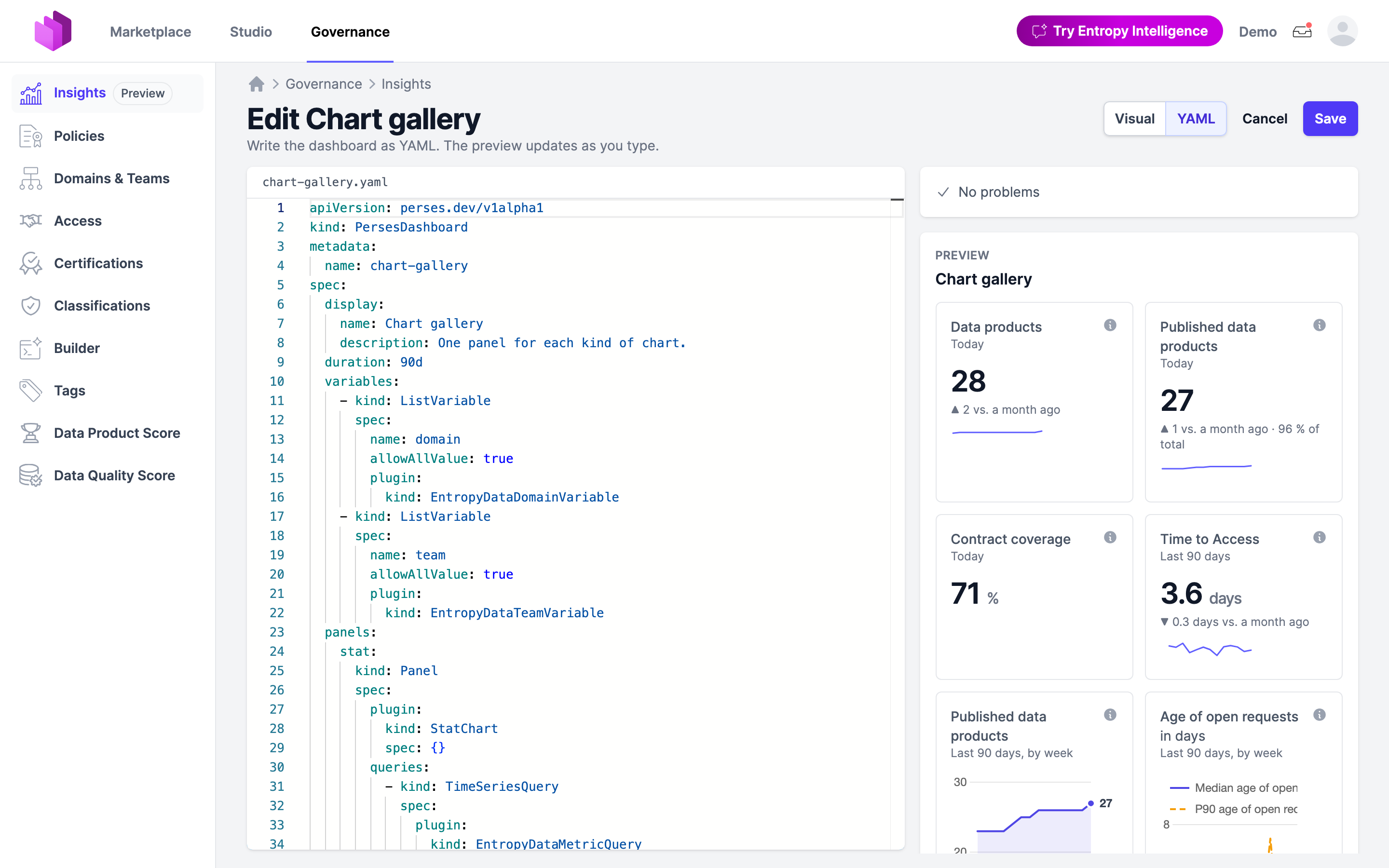
The YAML editor validates as you type. It completes metric references and groupBy values, lists every problem with its line, and previews the dashboard on the right. A dashboard with problems can't be saved.
To change an existing dashboard, open it and choose Edit → Edit dashboard or Edit → Edit YAML.
A complete example
This dashboard has a domain filter, three numbers in a summary section and two charts in a collapsible section:
apiVersion: "perses.dev/v1alpha1"
kind: "PersesDashboard"
metadata:
  name: "reuse"
  annotations:
    entropy-data.com/owner: "governance-team"
    entropy-data.com/visible-to: "governance-team, platform-team"
spec:
  display:
    name: "Reuse"
    description: "How much of our data other teams use."
  duration: "90d"
  variables:
    - kind: "ListVariable"
      spec:
        name: "domain"
        allowAllValue: true
        plugin:
          kind: "EntropyDataDomainVariable"
  panels:
    data_products:
      kind: "Panel"
      spec:
        plugin:
          kind: "StatChart"
          spec: {}
        queries:
          - kind: "TimeSeriesQuery"
            spec:
              plugin:
                kind: "EntropyDataMetricQuery"
                spec:
                  metric: "entropy_data_marketplace_analytics.data_products"
    published:
      kind: "Panel"
      spec:
        plugin:
          kind: "StatChart"
          spec: {}
        queries:
          - kind: "TimeSeriesQuery"
            spec:
              plugin:
                kind: "EntropyDataMetricQuery"
                spec:
                  metric: "entropy_data_marketplace_analytics.marketplace_data_products"
          - kind: "TimeSeriesQuery"
            spec:
              plugin:
                kind: "EntropyDataMetricQuery"
                spec:
                  metric: "entropy_data_marketplace_analytics.data_products"
    reuse_rate:
      kind: "Panel"
      spec:
        plugin:
          kind: "StatChart"
          spec: {}
        queries:
          - kind: "TimeSeriesQuery"
            spec:
              plugin:
                kind: "EntropyDataMetricQuery"
                spec:
                  metric: "entropy_data_marketplace_analytics.reuse_rate"
    reuse_rate_by_team:
      kind: "Panel"
      spec:
        display:
          name: "Reuse rate by team"
        plugin:
          kind: "BarChart"
          spec: {}
        queries:
          - kind: "TimeSeriesQuery"
            spec:
              plugin:
                kind: "EntropyDataMetricQuery"
                spec:
                  metric: "entropy_data_marketplace_analytics.reuse_rate"
                  groupBy: "team"
    funnel:
      kind: "Panel"
      spec:
        display:
          name: "From creation to reuse"
        plugin:
          kind: "FunnelChart"
          spec: {}
        queries:
          - kind: "TimeSeriesQuery"
            spec:
              plugin:
                kind: "EntropyDataMetricQuery"
                spec:
                  metric: "entropy_data_marketplace_analytics.data_products"
                  groupBy: "data_product.lifecycle_stage"
  layouts:
    - kind: "Grid"
      spec:
        display:
          title: "Summary"
        items:
          - x: 0
            "y": 0
            width: 8
            height: 3
            content:
              $ref: "#/spec/panels/data_products"
          - x: 8
            "y": 0
            width: 8
            height: 3
            content:
              $ref: "#/spec/panels/published"
          - x: 16
            "y": 0
            width: 8
            height: 3
            content:
              $ref: "#/spec/panels/reuse_rate"
    - kind: "Grid"
      spec:
        display:
          title: "Details"
          collapse:
            open: true
        items:
          - x: 0
            "y": 0
            width: 24
            height: 8
            content:
              $ref: "#/spec/panels/reuse_rate_by_team"
          - x: 0
            "y": 8
            width: 24
            height: 9
            content:
              $ref: "#/spec/panels/funnel"
Replace governance-team and platform-team with IDs of your own teams; a team ID that doesn't exist is a problem. Quote the key "y": some YAML parsers read a bare y as the boolean true.
Dashboard reference
metadata
| Field | Description |
|---|---|
name | Required. The dashboard's ID in its URL and the API. Letters, digits, dots, dashes and underscores, starting with a letter or digit. new, save, preview and datacontract are reserved. |
annotations.entropy-data.com/owner | The ID of the team that owns the dashboard. |
annotations.entropy-data.com/visible-to | IDs of the teams whose members see the dashboard, separated by commas. Members of their subteams see it too. Leave it out for everyone in the organization. |
namespace, labels and other annotations are allowed, so a dashboard exported from Kubernetes or Dash0 validates, but Entropy Data ignores them.
spec
| Field | Description |
|---|---|
display.name | The dashboard's name on its tab. Defaults to metadata.name. |
display.description | Shown below the dashboard's name. |
duration | The period the dashboard opens with: 30d or 90d (default). Viewers can switch to the other one or to this year. |
variables | The filters, see Filters. |
panels | Required. The panels by key. A key has letters, digits, dots, dashes and underscores. |
layouts | Required. The grids that place the panels, see Layout. |
Filters
Each entry of variables adds one filter above the dashboard. A dashboard has at most one filter of each kind.
variables:
  - kind: "ListVariable"
    spec:
      name: "domain"
      allowAllValue: true
      plugin:
        kind: "EntropyDataDomainVariable"
  - kind: "ListVariable"
    spec:
      name: "team"
      allowAllValue: true
      plugin:
        kind: "EntropyDataTeamVariable"
| Plugin kind | Filters by |
|---|---|
EntropyDataDomainVariable | A domain and its subdomains |
EntropyDataTeamVariable | A team and its subteams |
name must be unique among the variables. A metric whose dataset has no domain or team can't be filtered by it; its panel says so.
Panels
panels:
  reuse_rate_by_team:
    kind: "Panel"
    spec:
      display:
        name: "Reuse rate by team"
      plugin:
        kind: "BarChart"
        spec:
          orientation: "vertical"
      queries:
        - kind: "TimeSeriesQuery"
          spec:
            plugin:
              kind: "EntropyDataMetricQuery"
              spec:
                metric: "entropy_data_marketplace_analytics.reuse_rate"
                groupBy: "team"
| Field | Description |
|---|---|
spec.display.name | The panel's title. Defaults to the metric's label, such as Reuse rate by team. The metric's unit is added to the title, such as in %. |
spec.plugin.kind | The chart: StatChart, TimeSeriesChart, BarChart, Table, PieChart, FunnelChart, ScatterChart or Markdown. |
spec.plugin.spec | The chart's options. Entropy Data formats values from the metric's unit and ignores Perses options such as calculation, except orientation (bar charts), querySettings (colours of lines and bars), thresholds (zones on the value axis of lines and bars) and text (Markdown). |
spec.queries | The metrics the panel shows, one to three. A Markdown panel has none. |
spec.links | Optional. Pages with more about what the panel shows, see Links. |
The Chart Gallery describes each chart, how many metrics it takes and which options it has:
| Plugin kind | Visual editor | Shows | Queries |
|---|---|---|---|
StatChart | Number | One number, with the change and a sparkline when the metric has a history | 1, or 2 for a share of a total |
TimeSeriesChart | Over time | Lines by week or month | 1 to 3 with the same unit |
BarChart | By group | Bars by group, optionally stacked | 1 to 3 with the same unit |
Table | Table | Rows by group, one column per metric | 1 to 3 |
PieChart | Pie chart | Shares of the groups | 1 |
FunnelChart | Funnel | Steps of a lifecycle with their drop-off | 1 |
ScatterChart | Scatter chart | A dot for each row, such as each data product | 1 |
Markdown | Text | Markdown text | none |
Queries
| Field | Description |
|---|---|
spec.plugin.kind | Always EntropyDataMetricQuery. |
spec.plugin.spec.metric | Required. The metric as <semantic model>.<metric>. |
spec.plugin.spec.groupBy | For BarChart, Table and PieChart: the groups, see Grouping. Defaults to domain. For FunnelChart: the field whose values are the steps. For ScatterChart: optional, colours the dots by group. |
spec.plugin.spec.stackBy | For BarChart with one query: splits each bar into stacked parts by a second grouping. |
A panel with several queries reads groupBy and stackBy from the first one.
Grouping
groupBy and stackBy take one of:
| Value | Groups by |
|---|---|
domain | The domain the row belongs to |
top-level-domain | The top-level domain above that domain |
team | The team the row belongs to |
<dataset>.<field> | A field of the metric's dataset that its semantic model declares as a category, such as data_product.type |
A metric can group by a field only when it reads that one dataset. The YAML editor lists the possible values, and a wrong one is a problem that names the alternatives. Bar charts, tables and pie charts show the 200 largest groups.
Links
A panel can link to pages with more about what it shows, such as the Data Product Score leaderboard behind a score chart:
panels:
  score_by_team:
    kind: "Panel"
    spec:
      display:
        name: "Average Data Product Score by team"
      links:
        - name: "Data Product Score"
          url: "/governance/dataproducts/score"
      plugin:
        kind: "BarChart"
        spec: {}
      queries:
        - kind: "TimeSeriesQuery"
          spec:
            plugin:
              kind: "EntropyDataMetricQuery"
              spec:
                metric: "entropy_data_marketplace_analytics.average_score"
                groupBy: "team"
| Field | Description |
|---|---|
url | Required. A path that starts with / opens in the organization, such as /governance/dataproducts/score. A URL that starts with https:// or http:// opens as it is. A link with another URL is left out. |
name | What the link is called, read out for its icon. |
tooltip | The text shown on hover. Defaults to name. |
targetBlank | true opens the link in a new tab. |
Each link gets an icon next to the panel's title, and the title itself opens the first link.
Layout
Each entry of layouts is a grid of 24 columns. A grid with a title gets a heading; with collapse, viewers can collapse and expand it.
layouts:
  - kind: "Grid"
    spec:
      display:
        title: "Access requests"
        collapse:
          open: false
      items:
        - x: 0
          "y": 0
          width: 12
          height: 8
          content:
            $ref: "#/spec/panels/pending_access_requests_by_team"
| Field | Description |
|---|---|
display.title | A heading above the grid's panels. |
display.collapse.open | Whether the grid starts expanded. Without collapse, the grid can't be collapsed. |
items[].x | The first column, from 0 to 23. |
items[].y | The first row, from 0. |
items[].width | Columns, 1 to 24. x + width can be 24 at most. |
items[].height | Rows of about 30 pixels. |
items[].content.$ref | The panel, as #/spec/panels/<key>. |
Panels move up to close gaps between rows, and a panel that overlaps another moves below it, as in Perses. Every panel must be placed by a grid; one that isn't is a problem. Good sizes are width 6 and height 3 for four numbers in a row, width 12 and height 8 for two charts side by side, and width 24 and height 9 for a funnel.
Metrics
The built-in semantic model entropy_data_marketplace_analytics is maintained by Entropy Data. Its metrics:
| Metric | Label | Unit | Dated by |
|---|---|---|---|
active_data_products | Active data products | Measured today | |
certified_data_products | Certified data products | Measured today | |
data_products | Data products | Creation, running total | |
marketplace_data_products | Published data products | Publication, running total | |
published_data_products | Newly published data products | Publication | |
contract_coverage | Contract coverage | % | Measured today |
average_quality_score | Average Data Quality Score | % | Measured today |
average_score | Average Data Product Score | Measured today | |
test_pass_rate | Test pass rate | % | Measured today |
reuse_rate | Reuse rate | % | Measured today |
time_to_market_days | Time to Market | days | Publication |
time_to_insights_days | Time to Insights | days | First approved consumer |
insights_publish_days | Until published | days | First approved consumer |
insights_request_days | Until first request | days | First approved consumer |
insights_approval_days | Until first approval | days | First approved consumer |
time_to_first_request_days | Time to First Request | days | First access request |
access_requests | Access requests | Request | |
pending_access_requests | Pending access requests | Open at each point in time | |
open_request_age_days | Median age of open requests | days | Open at each point in time |
open_request_age_p90_days | P90 age of open requests | days | Open at each point in time |
time_to_access_days | Time to Access | days | Activation |
time_to_approve_days | Time to Approve | days | Approval or rejection |
time_to_provision_days | Time to Provision | days | Provisioning |
Dated by is the timestamp that places a row in the period. A running total counts every row up to each point in time, open at each point in time every request still waiting then. Metrics measured today can't be shown over time. A scatter chart needs a dated metric that reads one dataset and is not a running total or open requests. Semantic Models lists each metric with its description and formula.
Besides domain, top-level-domain and team, the metrics group by these fields of their dataset:
| Dataset | Fields |
|---|---|
data_product | type, status, visibility, certification, certification_tag, specification_type, specification_version, reused_by_other_team, consumption, lifecycle_stage, insights_band, rating |
data_product_output_port | output_port_type, status, environment |
access_agreement | consumer_type, status, lifecycle_state, auto_approve_reason, outcome, waiting_band, access_stage |
Some fields list their values in order, which gives the steps of a funnel and the order of stacked bars:
| Field | Values |
|---|---|
data_product.lifecycle_stage | created, on-marketplace, access-requested, access-approved, access-provisioned, reused |
data_product.consumption | several-consumers, one-consumer, unused-on-marketplace, unused-unlisted |
data_product.insights_band | within-30-days, 31-to-90-days, over-90-days, no-approved-consumer |
data_product.rating | excellent, good, fair, poor, not-scored |
access_agreement.access_stage | requested, approved, active, provisioned |
access_agreement.outcome | granted, approved-not-active, waiting, withdrawn, rejected |
access_agreement.waiting_band | up-to-2-days, 2-to-5-days, over-5-days |
The built-in model can't be changed. To change a built-in metric, open it under Semantic Models and choose Duplicate to change, then refer to the metric in your copy. When you rename or remove a metric that a dashboard shows, the model editor asks whether to point the panels at another metric, remove them, or keep them with a notice.
Problems
The editors and the API check the whole dashboard and report each problem with its line, for example:
There is no metric entropy_data_marketplace_analytics.reuse.Can't show Reuse rate over time: it is measured today, so it has no history. Use a StatChart, BarChart, Table or PieChart instead.Can't group Reuse rate by data_product.score: dashboards can't group by data_product.score. Group by domain, top-level-domain, team, data_product.specification_type, …No layout places the panel reuse_rate_by_team, so the dashboard doesn't show it.The panel reaches past the grid's 24 columns: x plus width can be 24 at most.
A dashboard with problems can't be saved. A saved dashboard can get problems later, for example when a metric it shows is removed; the dashboard then lists them under Some widgets can't be shown.
The Overview dashboard
The built-in Overview has the ID overview and shows the summary, data products, access requests and trust. Its Data Product Score by team table links to the Data Product Score leaderboard. Editing it saves your own copy for the organization, which replaces the built-in one. Reset to the built-in Overview in the editor, or DELETE /api/insights/dashboards/overview, brings the built-in one back.
The Overview's YAML is a good starting point for a dashboard of your own: open Edit → Edit YAML on the Overview and copy it.
API
Dashboards can live in a Git repository and be deployed through the API. The endpoints are experimental.
| Method and path | Description | API key |
|---|---|---|
GET /api/insights/dashboards | All dashboards as JSON, the Overview first | Any API key of the organization. An organization key reads every dashboard, a team or user key the dashboards its team or user sees in the web app. |
GET /api/insights/dashboards/{id} | One dashboard as JSON | Same as above |
GET /api/insights/dashboards/{id}/dashboard.yaml | One dashboard as YAML, as it was saved | Same as above |
PUT /api/insights/dashboards/{id} | Adds or replaces a dashboard; the body is JSON | Writable organization API key with the organization admin grant, or a writable user API key of an organization owner or governance group member |
DELETE /api/insights/dashboards/{id} | Deletes a dashboard; for overview, the built-in one returns | Same as PUT |
metadata.name in the body must match the ID in the path. An invalid dashboard is refused with 422 and every problem with its line. The location-html response header links to the dashboard in the web app.
# Download a dashboard as YAML
curl -H "x-api-key: $API_KEY" \
  https://api.entropy-data.com/api/insights/dashboards/reuse/dashboard.yaml > reuse.dashboard.yaml

# Deploy it, converting the YAML to JSON with yq
yq -o=json reuse.dashboard.yaml | curl -X PUT \
  -H "x-api-key: $API_KEY" \
  -H "Content-Type: application/json" \
  --data-binary @- \
  https://api.entropy-data.com/api/insights/dashboards/reuse
Semantic models have the same endpoints under /api/insights/semantic-models, with GET /api/insights/semantic-models/{name}/model.yaml for the YAML. Reading them takes an organization key or the user key of an organization owner or governance group member. The built-in entropy_data_marketplace_analytics can be read, but changing or deleting it is refused with 422. A PUT that removes or renames metrics that dashboards show is refused with 409 and names them; send it again with ?removedMetrics=remove to take those panels off the dashboards, or ?removedMetrics=keep to leave them with a notice.
See the OpenAPI reference for the request and response formats.
Marketplace Analytics datasets
The datasets the metrics read can be downloaded with an organization API key, to analyze them in your own BI tools. These endpoints are experimental and don't need the Insights v2 preview.
| Method and path | Description |
|---|---|
GET /api/analytics/experimental/entropy-data-marketplace-analytics-v1 | The datasets, each with its links to the JSON and Parquet file |
GET /api/analytics/experimental/entropy-data-marketplace-analytics-v1/{dataset}.json | One dataset as JSON |
GET /api/analytics/experimental/entropy-data-marketplace-analytics-v1/{dataset}.parquet | One dataset as a Parquet file |
GET /api/analytics/experimental/entropy-data-marketplace-analytics-v1/odata | The datasets as a read-only OData v4 feed, which Power BI and Excel load in one step. It supports $select, $filter, $orderby, $top, $skip and $count. Basic authentication accepts the API key as the password with any username. |
Compatibility with Perses
Entropy Data reads the perses.dev/v1alpha1 PersesDashboard resource, the format the Perses operator and Dash0 exchange. It supports Grid layouts, ListVariable variables with the Entropy Data plugins, queries with the EntropyDataMetricQuery plugin, and panel links. Perses v1alpha2, which moved the dashboard into spec.config, and Prometheus or other data source queries are not supported.