
Output Ports
An output port is the interface through which a data product serves its data to consumers.
In the Open Data Product Standard (ODPS),
output ports live in the outputPorts array of the data product and usually reference the
data contract that describes the provided data.
While input ports document what a data product consumes, output ports are what consumers actually work with: they carry the server connection details (for example a Snowflake database and schema, or a Databricks catalog), the port type, its status, and the data contract with schema and terms. Consumers discover output ports in the marketplace and request access to them through the access approval workflow.
Data Contracts
An output port references the data contract that describes the data it
serves through the ODPS contractId field. The contract is the stable agreement between the data
product team and its consumers: it defines the schema of the provided models, terms of use,
service levels, and quality guarantees.
On the output port, Entropy Data resolves the referenced contract and shows its schema, terms,
and the latest quality and test results directly on the card. The server connection details that
consumers use (and that the Open In menu builds on) can also come from the contract's
servers section, so connection information is defined once and stays consistent for everyone.
Request Access
Access to data is granted per output port. Consumers find an output port in the marketplace, click Request Access, and state the purpose of the intended usage. The request then goes through the access approval workflow: the data product owner (or a governance team) reviews and approves or rejects it, and the result is recorded as an access agreement between the consuming and the providing side.
Output ports with autoApprove enabled skip the manual review, so consumers get access
immediately. The referenced data contract governs what the consumer may do with the data, and
its terms are part of what the consumer accepts when requesting access. See the
Request Access guide for a walkthrough from the consumer's perspective.
Open In
Once a consumer has active access to an output port, the port shows an Open In menu. It lets consumers jump from the marketplace straight into the tool they want to use the data with, with the connection details of the output port already applied.
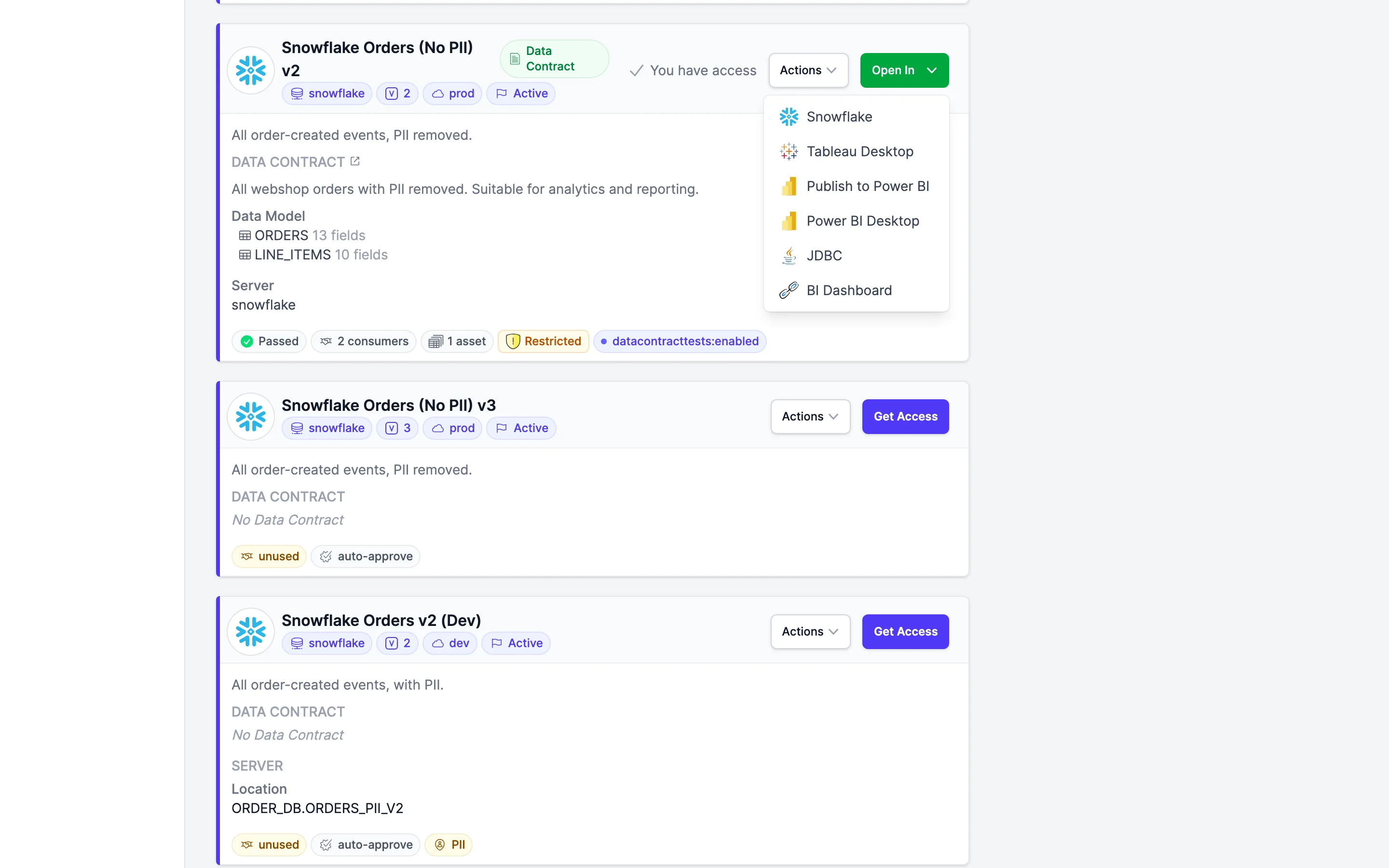
Which entries appear depends on the output port's server type and on the integrations configured for your organization:
- Open in Snowflake / Open in Databricks: A direct link into the platform's web console, pointing to the database and schema (Snowflake) or catalog and schema (Databricks) of the output port.
- Publish to Power BI: Creates a semantic model in a Power BI workspace from the output port's data contract. Requires the Power BI integration to be configured for your organization. When semantic models are already connected, an additional Open in Power BI workspace entry navigates directly to them.
- Power BI Desktop: Downloads a
.pbidsconnection file that opens in Power BI Desktop with the connection preconfigured. - Tableau Desktop: Downloads a
.tdsdata source file that opens in Tableau Desktop with the connection preconfigured. - JDBC: Shows a ready-to-copy JDBC connection string for the output port.
The connection-based entries (Power BI Desktop, Tableau Desktop, JDBC) are available for SQL-based server types such as Snowflake, Databricks, PostgreSQL, MySQL, and MariaDB.
Do you need an additional Open In tool for your organization, such as your BI frontend or a notebook environment? Reach out to support@entropy-data.com, and we will look into adding it.
Restricting available options
Organization owners can control which of the built-in Open In tools are offered across all data products. Under Settings → Open In, each tool has a checkbox, and only the selected ones are shown to consumers; unselected tools are hidden on every output port.
The direct links are listed per platform — Snowflake, Databricks, and Looker — so you can permit a direct console link for some platforms and not others. The two Power BI workspace entries (Open in Power BI workspace and Publish to Power BI) share a single Power BI workspace checkbox and are toggled together.
By default all options are enabled, and new tools added in future releases become available automatically. Restricting the list only hides tools that are otherwise supported — a selected option still appears on an output port only when its platform and data support it (for example, a direct link needs a Snowflake, Databricks, or Looker server, and the Power BI options need Power BI configured for your organization). When a port ends up with no available entries, its Open In button is not shown at all.
Custom Open In Links (openInLinks)
Beyond the built-in tools, an output port may declare custom links in an openInLinks custom
property. Each entry is an object with a name and a url:
outputPorts:
  - name: "orders"
    version: "1.0.0"
    contractId: "orders-contract"
    customProperties:
      - property: "openInLinks"
        value:
          - name: "BI Dashboard"
            url: "https://bi.example.com/dashboards/orders"
The links are read from the ODPS YAML at read time. They render in the
output port's Open In menu for any port type when the viewer has active access; each link's
icon is derived from its name and URL. An entry without a url is ignored, and a missing name
falls back to the URL.