
Semantics
Model your organization's business domain as a shared ontology of concepts and relationships, and link those concepts to the data products and data contracts that implement them.
Semantics gives you a single place to define what an Order, a Customer, or Monthly Recurring Revenue actually means in your organization, independent of any particular system or schema. Once a concept is defined, every data contract field that represents that concept can link to it. This makes data discoverable by meaning (not just by table name), keeps definitions consistent across teams, and powers semantic search and AI-driven querying.
Semantics replaces Business Definitions. If you are currently using business definitions, plan to migrate them to semantic concepts. Business definitions remain available through the API for backwards compatibility, but new work should use Semantics.
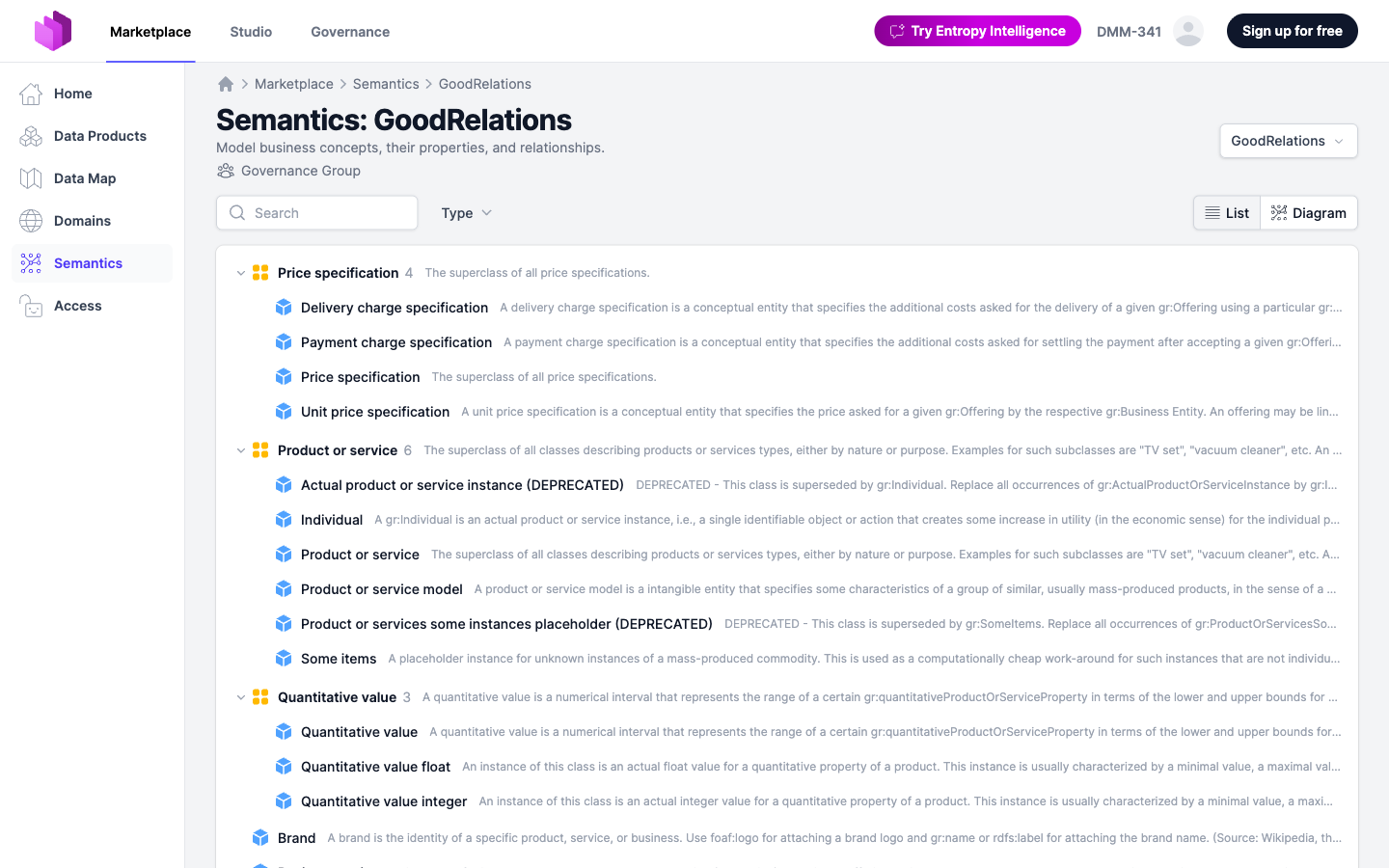
Enable Semantics
Semantics is disabled by default and controlled per installation via a feature flag.
- Entropy Data Cloud: contact support to enable Semantics for your organization.
- Self-Hosted: set the environment variable
APPLICATION_SEMANTICS_ENABLED=true(equivalent property:application.semantics.enabled=true) and restart the application.
When the feature is enabled, a Semantics entry appears in the marketplace and studio navigation.
Quickstart: Import an Industry Standard
To get started fast, open Studio > Semantics and use the Add > Import Industry Standard action. Entropy Data ships with ready-to-import ontologies for several industries:
- GoodRelations (E-Commerce)
- FIBO (Finance)
- EBU Core Plus (Media)
- CGMES (Energy)
- IDMP (Pharma)
- EPCIS (Supply Chain)
- IATA ONE Record (Air Cargo)
- TM Forum SID (Telco)
You can also upload your own RDF/OWL files (Turtle, OWL, RDF/XML, N-Triples, N3, JSON-LD).
An ontology may describe its classes with SHACL shapes instead of, or alongside, OWL restrictions. A node shape's property shapes become the properties of the class it targets: an anonymous sh:property becomes an inline property of that class, a named sh:PropertyShape becomes one shared property linked from every class whose shape reuses it, and a shape whose values are instances of a class (sh:class) becomes a relationship. The shape's sh:name, sh:description, sh:datatype, sh:minCount/sh:maxCount, sh:in, sh:pattern and value bounds are carried over; only a sh:path that is a single IRI is understood.
Semantic Concepts
A semantic concept is a named, reusable definition of something that exists in your business domain. Each concept lives in a namespace (the default is main), has a stable external ID, a human-readable name, a description, and an IRI that allows it to be referenced from RDF tools.
Concepts come in four kinds:
- Entity: A real-world thing your business cares about. Examples: Customer, Order, Article, Invoice. Entities are the nouns of your domain.
- Shared Property: A reusable attribute with a primitive data type that can be attached to one or more entities. Examples: Email Address, Order Status, SKU, IBAN. Shared properties are the right choice when the same definition is reused across multiple entities and you want a single source of truth for it.
- Metric: A measurable, often aggregated quantity used to track business performance. Metrics carry additional attributes such as a unit (e.g.
EUR,count), a "better when" direction (higher,lower), and an optional formula. Examples: Monthly Recurring Revenue, Active Users, Order Conversion Rate. - Group: A container used to organize concepts into logical sets, for example by domain, subject area, or initiative. Groups have no schema of their own; they exist purely for navigation and filtering.
In addition to shared properties, an entity can declare inline properties directly on itself. Inline properties are attributes that are not meant to be reused outside the parent entity (for example a one-off internal_note field on Customer). They are shown on the entity's detail page rather than as standalone entries in the concept list.
Each concept can also carry extended metadata: data type, classification (e.g. PII), a required flag, examples, allowed enum values, regex patterns, and free-form tags.
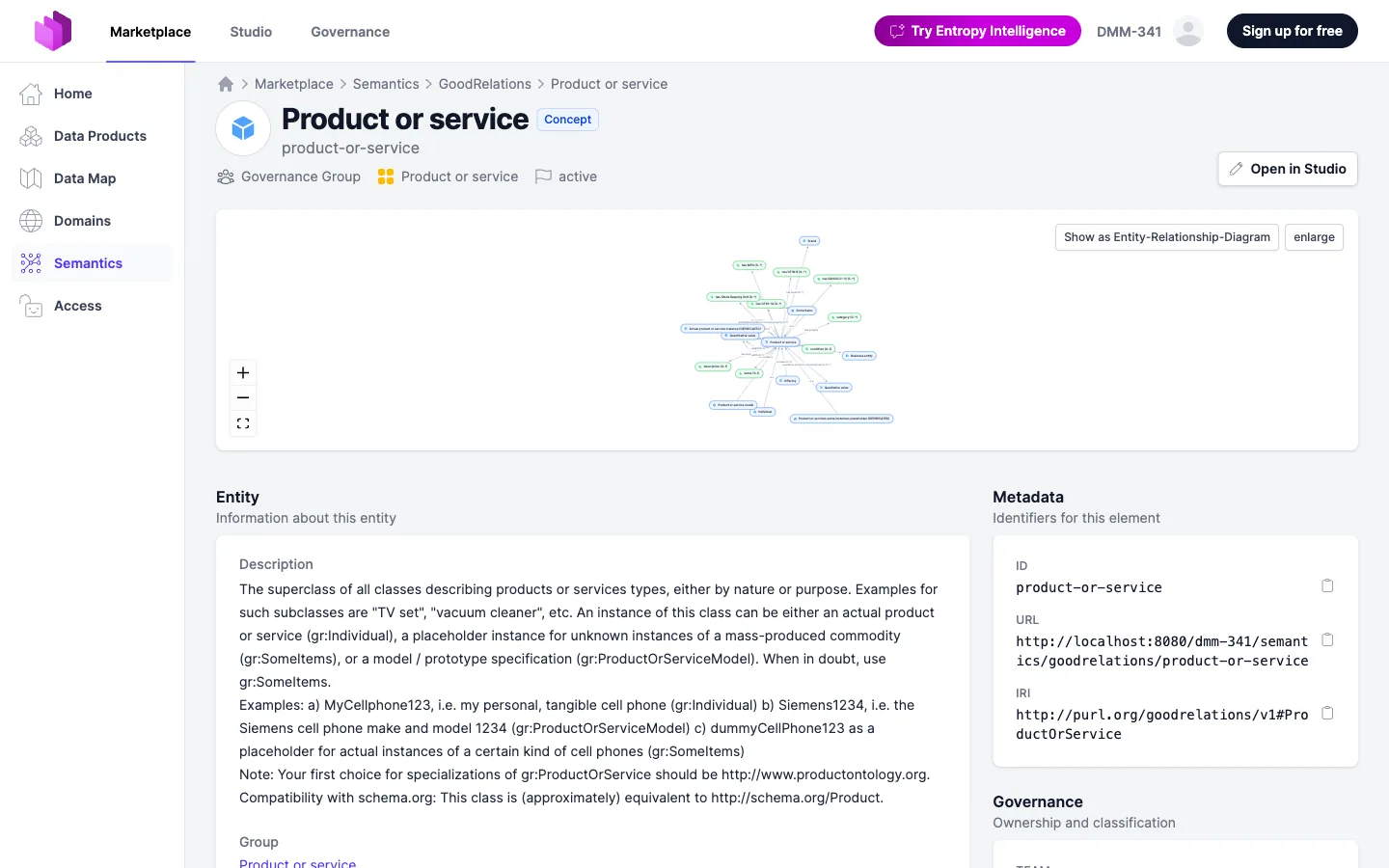
Relationships
Concepts gain meaning through their relationships with other concepts. A relationship is a directed, typed edge from a source concept to a target concept.
Common relationship types:
- hasProperty: An entity has a particular property or shared property. Customer hasProperty Email Address.
- isA: A specialization or inheritance relationship. Premium Customer isA Customer.
- memberOf: A concept belongs to a group. Customer memberOf Sales Group.
- measures: A metric measures an entity or another concept. Monthly Recurring Revenue measures Subscription.
- derived_from: A concept (typically a metric) is derived from one or more other concepts via a formula.
- relatedTo: A generic association used when no more specific type applies.
Relationships are visible on the detail page of every concept, split into outgoing and incoming edges, so you can navigate the ontology in either direction.
Diagram View
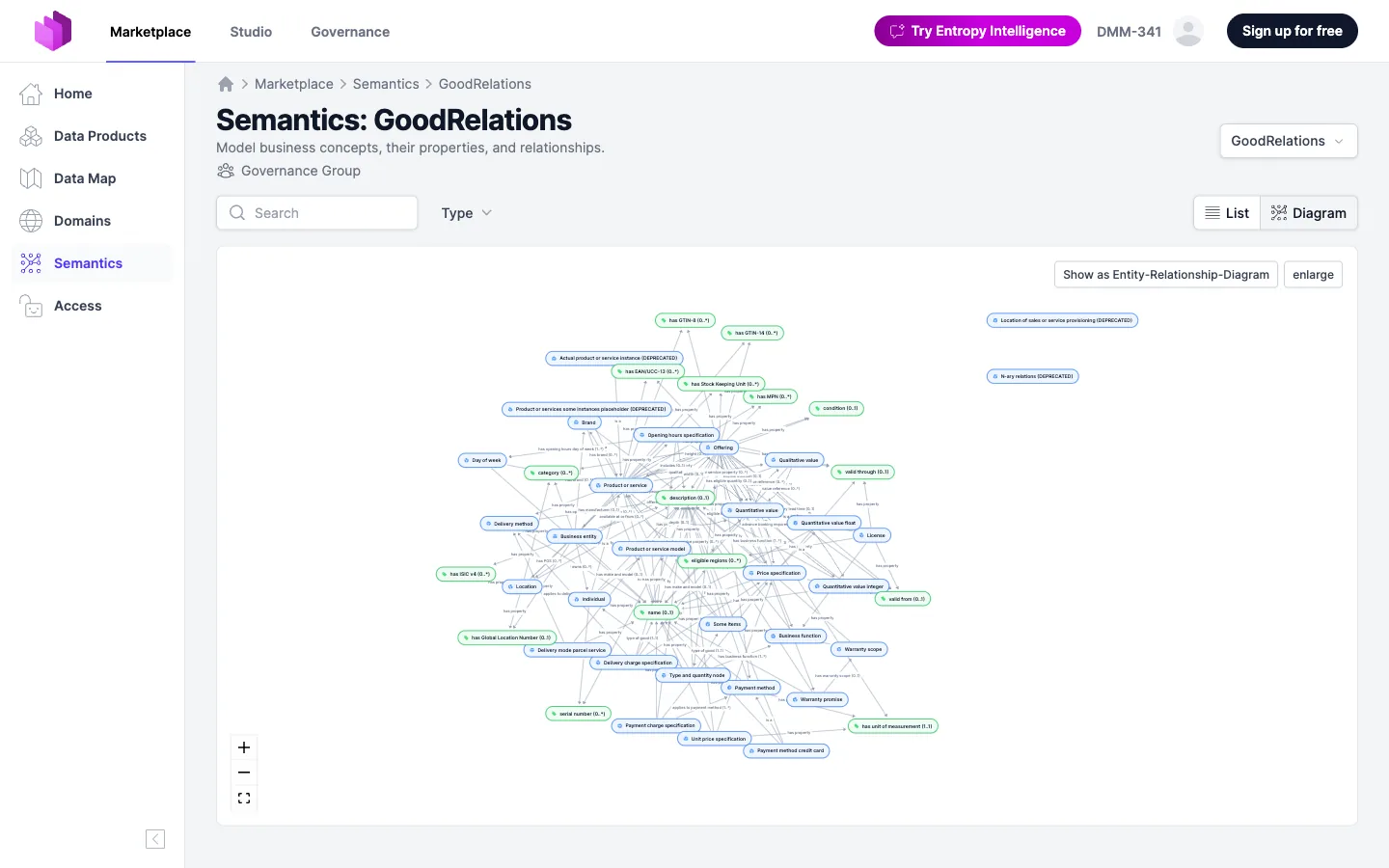
In addition to the searchable list view, Semantics provides a Diagram view that renders the concepts and their relationships as an interactive graph. Use the List / Diagram toggle at the top of the namespace page to switch.
The diagram is useful for:
- Getting an overview of how an area of the domain is structured.
- Spotting concepts that have no relationships yet (orphans).
- Communicating the model to stakeholders without exposing them to YAML.
You can pan, zoom, and click any node to jump to the corresponding concept's detail page.
Connect Data Products and Data Contracts to Concepts
Concepts only become useful when the data that implements them is linked back to them. Entropy Data uses authoritative definitions to express these links.
You can link a concept at three levels:
- Data product (in the ODPS specification): the data product as a whole represents the concept.
- Data contract (root or per-schema-object): the contract or one of its tables/models represents the concept.
- Field / property (inside a data contract schema): a specific column represents the concept.
Linking from the Data Contract Editor
Open a data contract and go to the Schemas tab. On every schema object and every property, use the Add from Definition button to open the Find Definition picker:
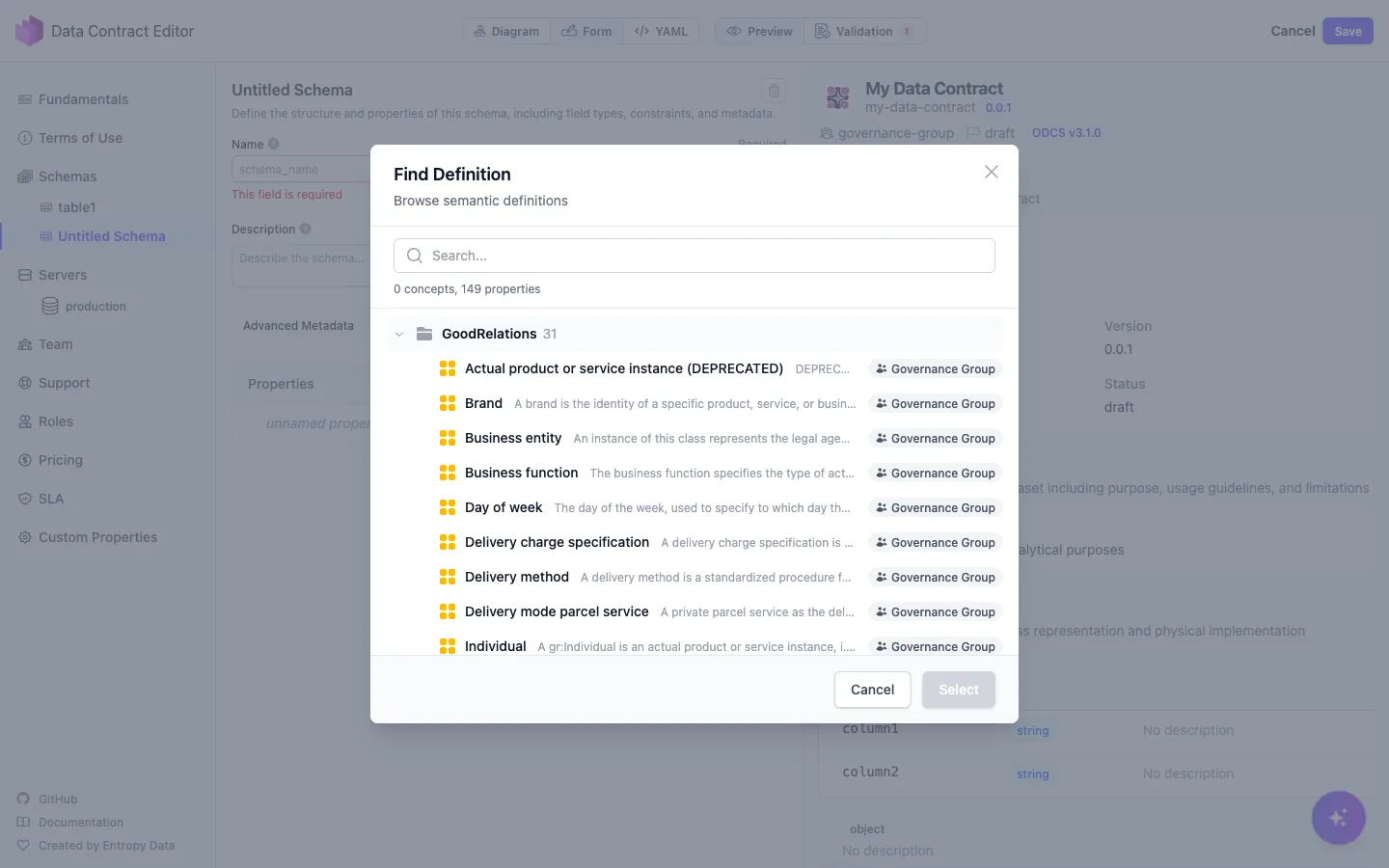
The picker lets you browse all namespaces and concepts, search by name, and pick the right element. Selecting a concept inserts an authoritativeDefinitions entry pointing to the concept's IRI, and the link becomes visible (and clickable) on the data contract page.
Suggest Semantics for All Properties (AI)
Instead of linking each property by hand, you can let Entropy Data analyze an entire data contract and propose a semantic concept for every unlinked property in one pass.
From a data contract, choose Suggest semantics for all properties. A short wizard first asks which namespaces (vocabularies) the suggestions should draw from — all are selected by default; narrow the selection to keep recommendations from mixing concepts across unrelated ontologies. Entropy Data then starts a background analysis and opens a review screen listing every property, grouped by schema object. As the analysis runs, each row fills in with its suggested concept and a short reason, or is marked as having no confident match.
Each property is presented the same way as on the data contract's schema — business name, technical name, type, and description — so the list reads familiarly. Properties that are already linked to a concept are shown too, as read-only context, so you review the whole contract rather than only the gaps; a toggle hides them when you want to focus on the unlinked ones.
On the review screen you can:
- select or deselect individual suggestions,
- open any linked or suggested concept to see its full details in a side panel,
- replace a suggested concept with a different one — or create a new concept (an entity, or a property under an existing entity) from the same picker, for a property that has no good match yet.
Applying your selection links all chosen concepts in a single save: one new contract version and one audit entry for the whole batch, rather than one per property. Applying suggestions requires edit permission on the contract.
This is an experimental, AI-powered feature and is turned off by default. It requires the Semantics feature and a configured AI model. Self-hosted deployments enable it with application.bulksemanticsuggest.enabled (env APPLICATION_BULKSEMANTICSUGGEST_ENABLED=true) — see Configuration.
YAML Example
The same link can be added by editing the data contract YAML directly:
description:
  authoritativeDefinitions:
    - type: "semantics"
      url: "https://app.entropy-data.com/<org>/semantics/main/customer"

schema:
  - name: "CUSTOMERS"
    type: "table"
    authoritativeDefinitions:
      - type: "semantics"
        url: "https://app.entropy-data.com/<org>/semantics/main/customer"
    properties:
      - name: "EMAIL"
        logicalType: "string"
        authoritativeDefinitions:
          - type: "semantics"
            url: "https://app.entropy-data.com/<org>/semantics/main/email-address"
The type: semantics marker tells Entropy Data that the URL points to a semantic concept and should be resolved (and rendered) accordingly.
Linking from a Data Product (ODPS)
In a data product that uses the Open Data Product Standard, attach authoritativeDefinitions to the data product itself or to any output port:
authoritativeDefinitions:
  - type: "semantics"
    url: "https://app.entropy-data.com/<org>/semantics/main/customer-360"
Reverse Lookup
On every concept's detail page, Entropy Data shows all data products and data contracts that link to that concept. This makes it easy to answer questions like "which datasets contain customer email addresses?" or "who owns the source of truth for our MRR metric?"
Editing Concepts as YAML
The whole namespace can be edited as a single YAML file via the YAML Editor action on the namespace page. This is convenient for bulk edits, code review, and storing the ontology in Git. Individual concepts also have a per-concept YAML editor.
The document follows the Open Semantics Interchange (OSI) format. A namespace declares its version, name, and description, and lists its concepts under ontology:
version: 0.2.0.dev0
name: main
description: Core business semantics for the retail organization.
ontology:
  - concept: Customers
    id: customers
    type: GroupType
    description: People and households the business serves.
    iri: http://www.example.com/ns/main/Customers

  - concept: Customer
    id: customer
    type: EntityType
    group: Customers
    description: A natural person who places orders in the online shop.
    iri: http://www.example.com/ns/main/Customer
    relationships:
      - id: customer_places_order
        name: places
        type: relatedTo
        description: A customer places one or more orders.
        multiplicity: OneToMany
        roles:
          - concept: Order
            role_name: order
      - id: customer.customer_email
        name: customer_email
        type: hasProperty
        roles:
          - concept: Customer Email

  - concept: Customer Email
    id: customer_email
    type: ValueType
    shared: true
    group: Customers
    description: The email address a customer signs in and receives order updates with.
    iri: http://www.example.com/ns/main/customerEmail
    extends:
      - String
    classification: Confidential
    examples:
      - "jane.doe@example.com"
The concept kinds described above map onto type: EntityType for entities, ValueType for properties (shared: true for a shared property), MetricType for metrics, and GroupType for groups.
concept holds the concept's name, and the concept's remaining fields sit beside it. A relationship written in the explicit two-role form sits at the document root rather than under a concept. The per-concept YAML editor and the MCP tools use the same spelling, so a concept can be moved between the namespace document and a single-concept document verbatim.
This is the spelling introduced with OSI 0.2.0. Documents in the earlier shapes — a nested mapping under concept, or a namespace block with a flat concepts list — are no longer read. Export the namespace again to obtain a document in the current spelling.
For a programmatic interface, use the SPARQL endpoint at /api/semantics/sparql or the experimental REST API under /api/semantics/experimental/.
Connect a Namespace to Git
A namespace can be kept in a Git repository the same way a data contract or a data product can. Open the namespace in Studio and choose Edit > Connect to Git. Pick the Git provider and credential, enter the repository, the branch and the path of the file, and Entropy Data writes the namespace as one OSI YAML document to that path. If the file already exists, you are asked whether to keep the file or the namespace.
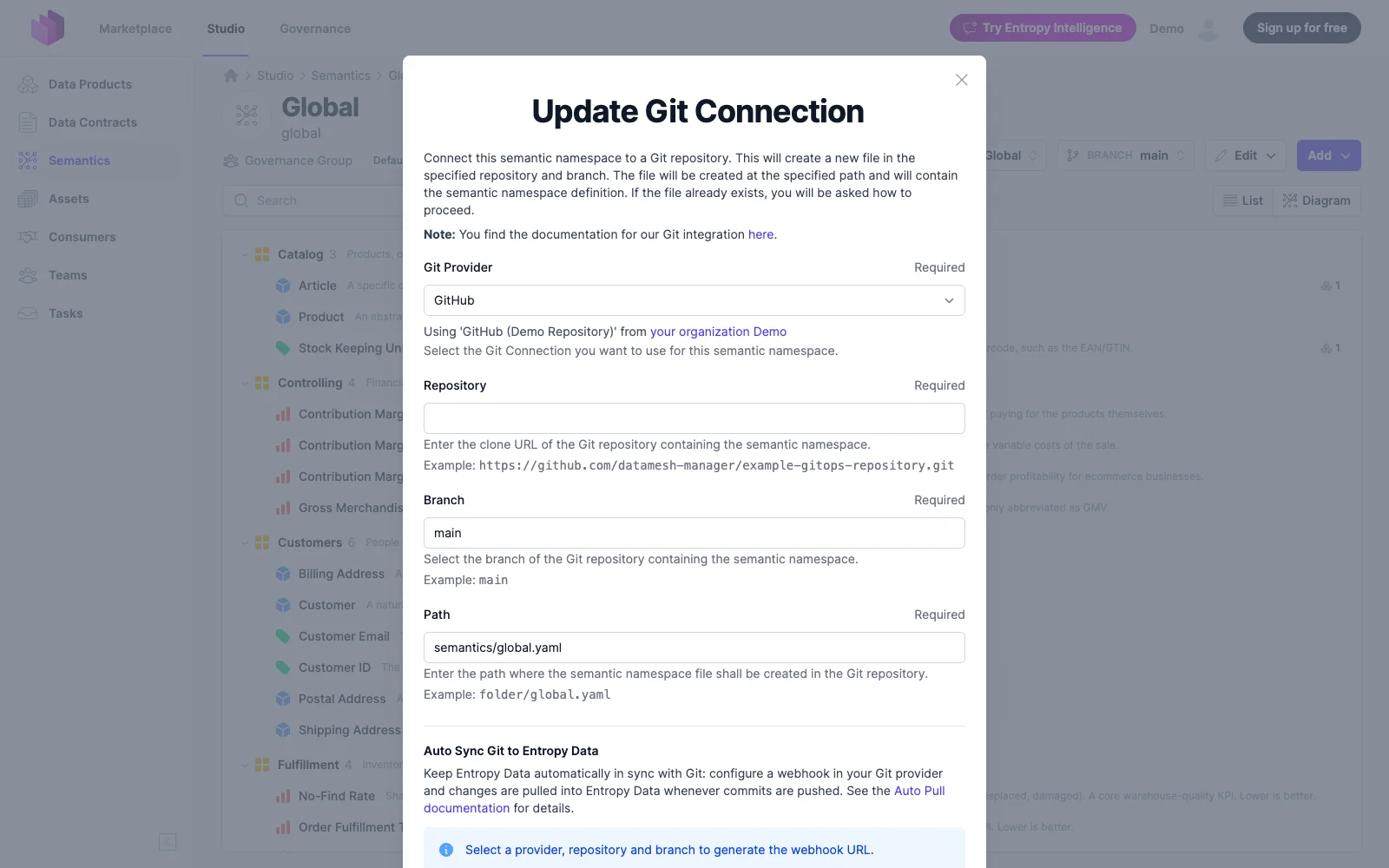
Once connected, the namespace header shows the Git badge with the sync status. Click it for the details, to Push local changes to Git, or to Pull what changed in the repository. Two settings keep both sides in sync without clicking:
- Auto Sync Git to Entropy Data: a webhook in your Git provider pulls every commit into the namespace. See Auto Pull.
- Auto Sync Entropy Data to Git: every save in Entropy Data is pushed to the repository, directly or through a pull request, following the organization's auto-push setting or an override on this connection.
The connection is edited under Edit > Edit Git connection. See Git Integration for credentials and the commit and branch settings that apply to every connected resource.
Branches
A branch is a working copy of a namespace where changes are made before they land. Use it to draft a larger change, to let a colleague or an agent propose one, or to review a set of edits as a whole before the namespace changes. Every branch of a namespace is listed in the Branch dropdown on the namespace page; New branch cuts one from the namespace as it is now.
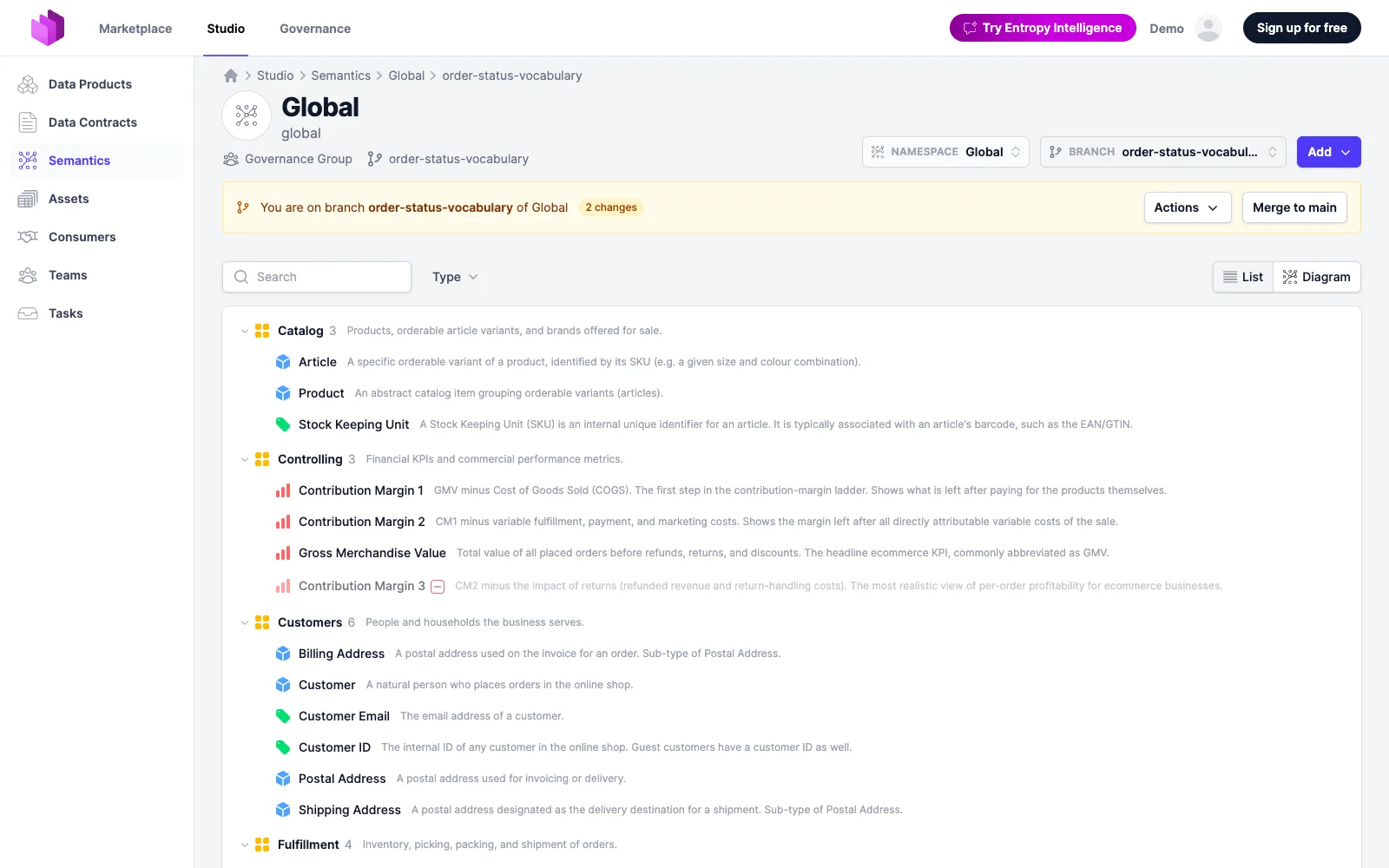
On a branch you work the way you work on the namespace: the list, the diagram, the element pages, the editors and the YAML editor are all there, and they all write to the branch. The namespace itself does not change until the branch is merged. What the branch did is marked on every row and in the diagram: + for an element the branch adds, a pencil for one it edits, − for one it removes. A removed element stays in the list, washed out, so a reader sees what goes away.
Open an element to read its change in place: the description shows the old text struck through above the new one, edited properties and relationships are marked, and a dot on a language flag says the branch touched that translation. The rail's Changes tab lists every element the branch touched; View changes in the band opens the first of them. YAML diff shows the whole branch, or one change, against the namespace side by side.
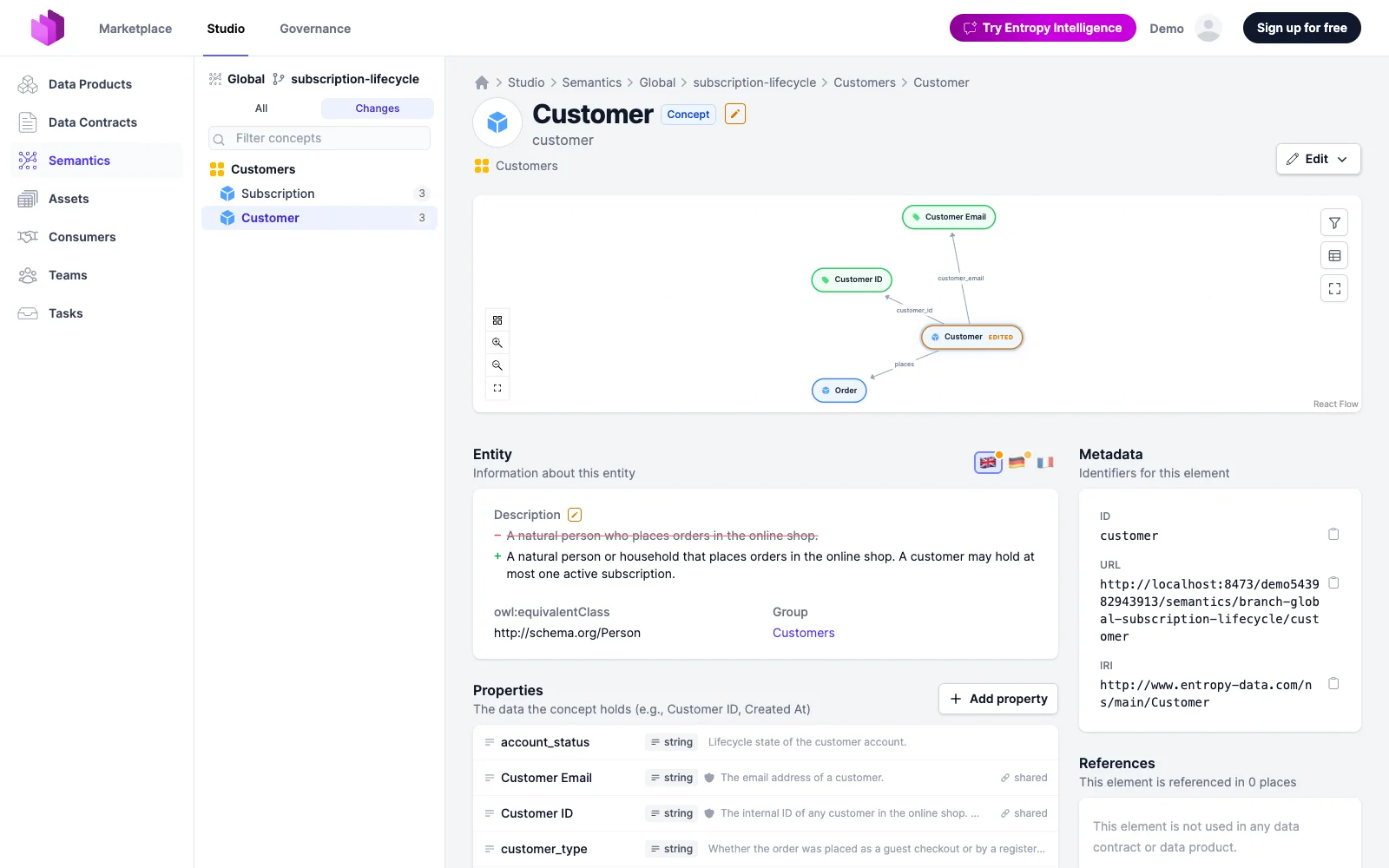
The band on the branch page holds everything a branch can be done to:
- Merge to main lands every change on the namespace and deletes the branch. Merging takes what editing the namespace takes: the edit permission on the owning team, or the organization owner role.
- Actions > Update from main replays what changed on the namespace since the branch was cut into the branch. It is offered while the namespace has moved; merging does the same update first.
- Actions > Edit YAML edits the whole branch as one document, and Actions > Delete branch discards it.
Conflicts
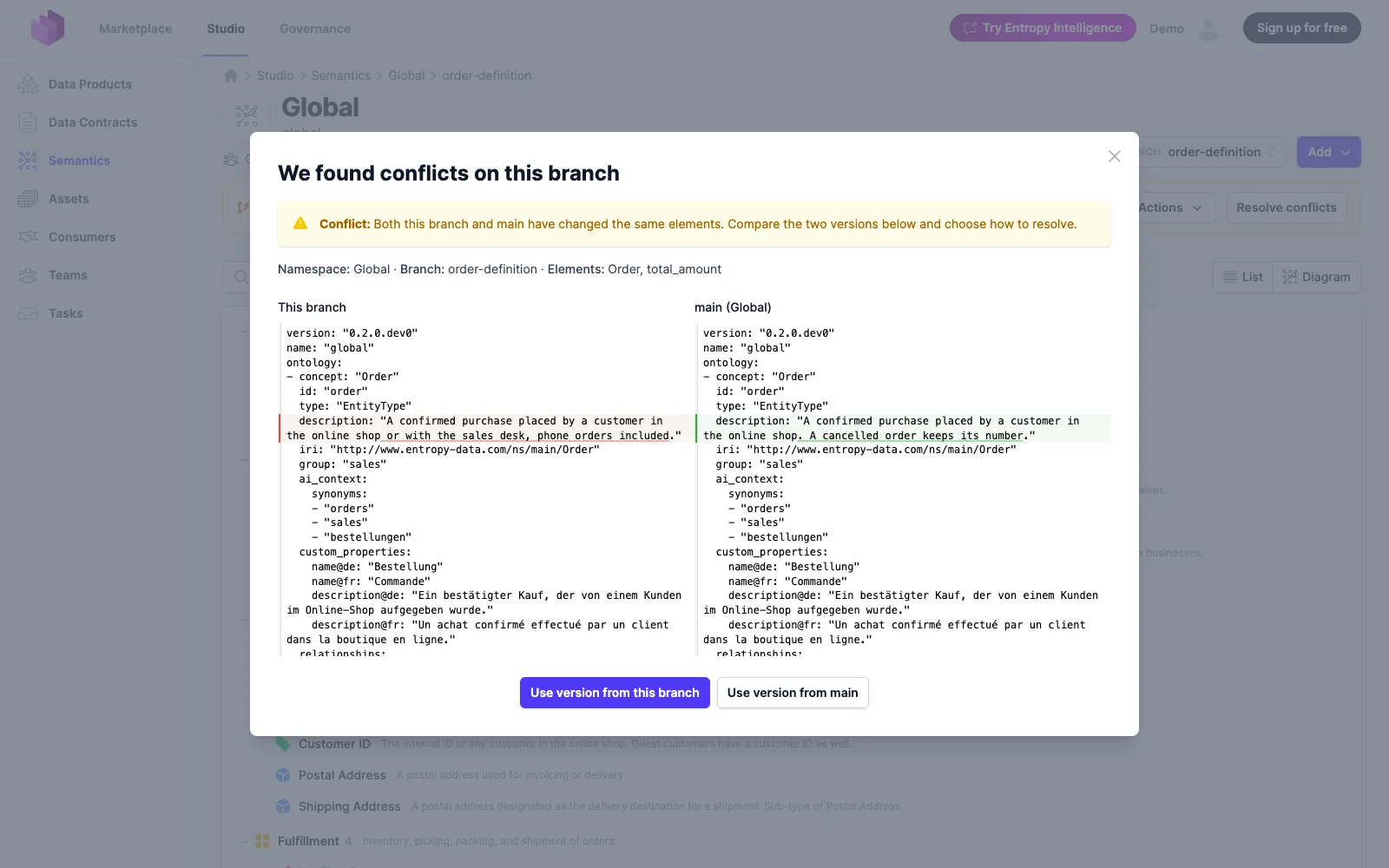
When the namespace and the branch changed the same element, updating from main stops and marks the branch as Conflicted: the branch dropdown shows a warning icon, the band a badge, the diagram reads Conflicted on the element, and the element's page carries an exclamation mark and a warning under its diagram. A conflicted branch cannot be merged. Resolve conflicts in the band opens the two versions of the conflicting elements side by side; choose Use version from this branch or Use version from main for all of them, and the branch is up to date again.
Branches and Git
If the namespace is connected to Git, each branch is mirrored as a Git branch named entropy-data/<namespace>/<branch>. Every edit and every update from main pushes the namespace file to that branch, and deleting the branch deletes it again.
The mirror works in both directions. The band on the branch page shows how the branch stands against its Git branch: Changed in Git when someone committed to the Git branch, with Pull from Git to take those commits into the branch; Changed here and in Git when both sides moved, with Resolve to keep the branch as it is here or take the Git version whole. Entropy Data never overwrites a commit it has not seen: an edit made here while the Git branch has moved is kept here and not pushed until the two are reconciled. A webhook ping pulls a Git branch that moved on its own into its branch automatically.
What Merge to main does depends on the namespace's Git branch:
- If the branch can be pushed to directly, the merge lands here as described above, and the namespace reaches Git according to the connection's auto-push setting.
- If the branch is protected, or the connection's auto-push mode is push to pull request, the band offers Create pull request (or Create merge request on GitLab) instead. Entropy Data pushes the branch to Git once more and opens the request from
entropy-data/<namespace>/<branch>against the namespace's branch. The branch stays open here: further edits and updates from main keep flowing to the request's branch, and review commits made in Git can be pulled back as above. A request needs the namespace itself in Git to be reviewed against, so until the namespace has been pushed once, the band asks for that push instead of offering the request.
While a request is open, the band shows it with its number linked to Git, whether the provider reports it as Mergeable, in Conflicts, Blocked by a rule such as a required review or pipeline, or still Checking, and the number of comments on it when there are any. Once the request is merged or closed in Git, the branch is removed here the next time its page is opened or a webhook ping arrives. The other way round, deleting the branch here closes its request without merging and deletes the Git branch. The merged document reaches the namespace the way any change in Git does: through the webhook or Pull on the namespace page.
Branches via the API
Branches are available under /api/semantics/experimental/namespaces/{namespace}/branches/{branch}: PUT cuts a branch, GET and PUT …/ontology.yaml read and replace the branch as one OSI document, GET …/changes lists what the branch changed, POST …/rebase updates it from the namespace, POST …/merge lands it — or, where the namespace's Git branch only takes reviewed changes, opens a pull request from the branch's Git mirror and returns it (200 with the request, 204 when the branch landed) — and DELETE discards it. A branch read with GET carries its open request under merge_request, with the provider's status, mergeability and comment count. The namespace's own endpoints never touch a branch. See the usage examples for a walkthrough.