
Entropy Intelligence Security
This page explains how Entropy Intelligence, the in-app "Chat with your data" experience, works from a security and data-protection standpoint.
The same tools that power the chat (search, fetch, request access, and query) are also exposed to external AI clients such as Claude or ChatGPT through the Entropy Data MCP Server. The MCP server reuses the same backend, credentials, and access and governance checks described here, so the security model on this page applies equally to it.
For the product-level description, see Chat with your data.
Executive summary
| Question | Answer |
|---|---|
| What is Entropy Intelligence? | The conversational "Chat with your data" feature built into Entropy Data. Users ask a question in natural language; it finds the right data product, generates the query, and returns the result within their existing access rights. See Chat with your data. |
| What are the benefits over a standalone AI assistant? | It works out of the box. There is nothing to deploy or maintain per user, no separate AI workspace to procure and connect to your data, and no additional per-seat AI license cost beyond the model you already configure. Governance and access control are built in rather than bolted on. |
| Does Entropy Intelligence create a new attack surface or a separate data lake? | No. It runs inside the existing Entropy Data application and database. There is no separate copilot or agent runtime to operate. |
| Can it read data a user is not entitled to? | No. By core design, every query runs on behalf of the current user with their personal identity and their own data-platform credentials, never a service account or technical user. Access is gated by the user's existing access grants (Access Agreements). |
| Where does my data go? | Prompts, conversation history, and metadata are sent to the AI model you configure (managed cloud model, or your own Anthropic / Azure OpenAI / OpenAI-compatible endpoint). The current query's result rows (capped at 100) are sent back to the model only so it can phrase the answer; nothing is extracted in bulk. |
| Are query results stored? | The result rows are not persisted or cached. They are returned to the chat transiently. The assistant's written answer is saved in the conversation and audit log, and it can quote individual values it derived from the data. |
| Are data-platform credentials protected? | Yes. Connection secrets and OAuth tokens are encrypted at rest with AES-256-GCM. |
| Is there a human in the loop? | For anything that widens access, yes: grants are approved by people, the governance policies are written by people, and AI never grants access on its own. Resource and access-request checks are advisory. The one automatic decision is the query-time purpose check, which can only block a query within access the user already holds, and denies if the model is unavailable. Under the EU AI Act these features are limited risk — see EU AI Act. |
| Can I prove what happened? | Every interaction is written to a structured audit log (prompt, model, tools used, the SQL that ran, result, token usage). |
How it works
Entropy Intelligence is a feature of the Entropy Data application. It does not introduce a new service or a new place where data lives. It reuses the application database, the existing per-user data-platform connections, and the access-management model.
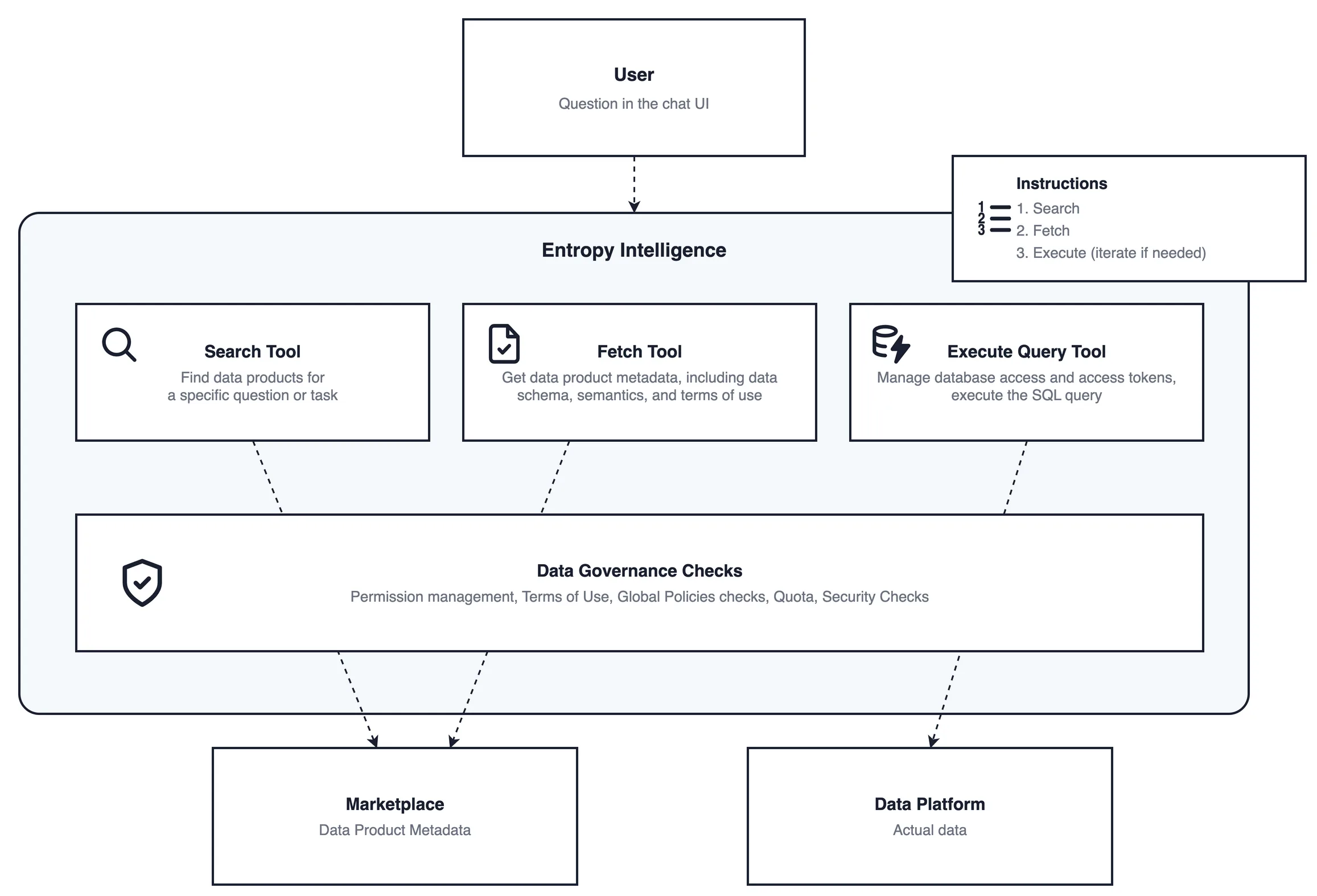
A question typed in the chat UI drives Entropy Intelligence, which works through a small set of tools, all behind a single governance layer. Search and Fetch read data product metadata from the marketplace to find the right product and load its schema, semantics, and terms of use. Execute Query manages the data-platform connection and the user's access token, then runs the read-only SQL against the data platform itself. Every tool call passes through Data Governance Checks (permission management, terms of use, global policy checks, quota, and security checks) before it takes effect. Only Execute Query reaches the actual data, and it does so with the user's own token, so the data platform's own access controls still apply. The full step-by-step request flow, including the AI model that writes the SQL, is shown under Tools and data flow.
Architecture
Entropy Intelligence does not add a new service or a new place where data lives. It reuses the existing Entropy Data containers: the browser chat UI, the application backend, and the application database. The diagram below shows these core components and how the backend reaches the external systems it depends on.
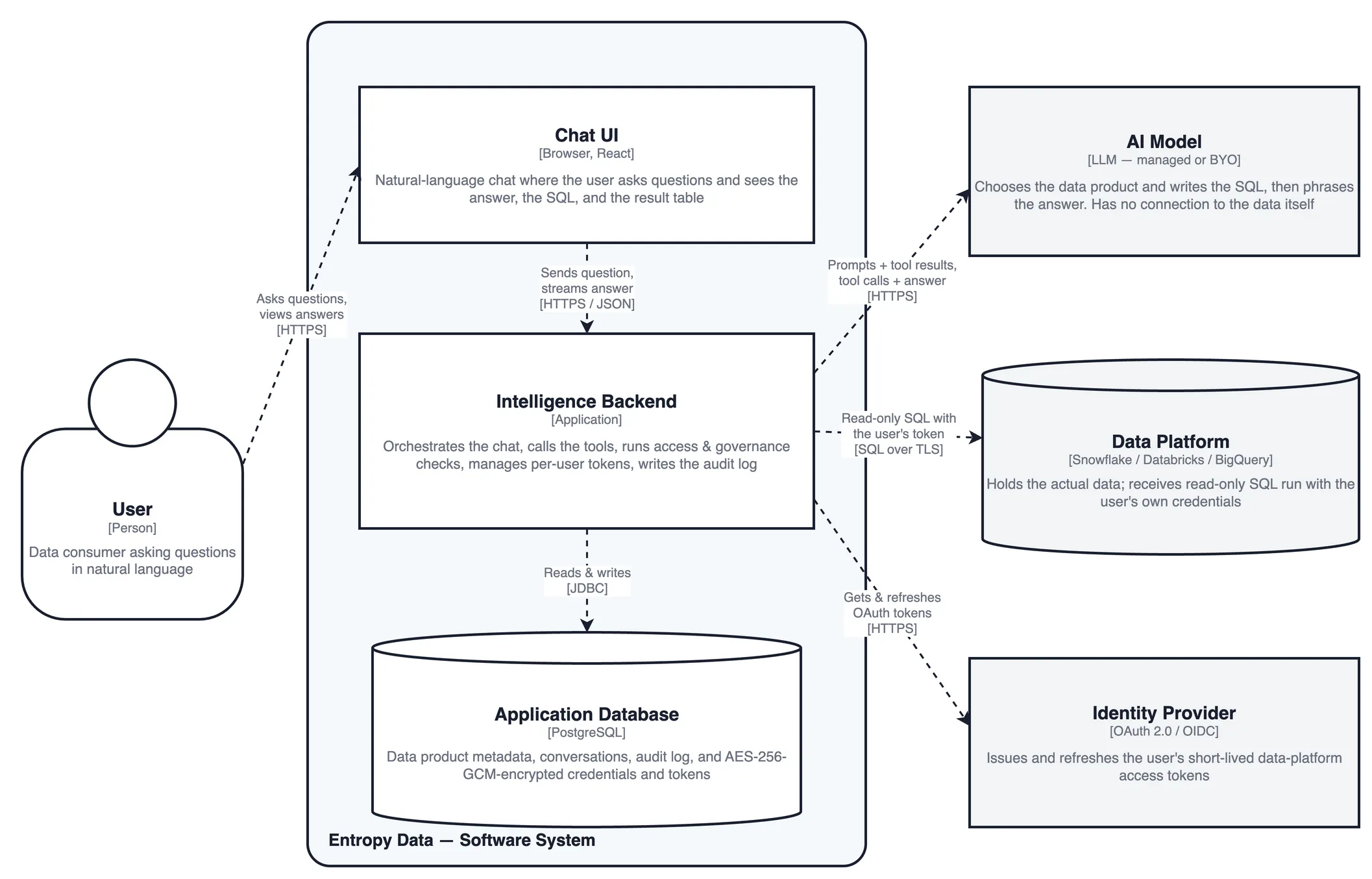
- Chat UI — the in-browser chat where the user asks questions and sees the answer, the generated SQL, and the result table.
- Intelligence Backend — orchestrates the conversation, calls the tools, runs the access and governance checks, manages per-user tokens, and writes the audit log. It holds all the logic; the AI model and the data platform are only ever called from here.
- Application Database — stores data product metadata, conversations, and the audit log, plus data-platform credentials and tokens encrypted with AES-256-GCM.
- AI Model (external, managed or BYO) — chooses the data product and writes the SQL, then phrases the answer. It never connects to the data itself. See AI model and data residency.
- Data Platform (external, your environment) — holds the actual data and receives read-only SQL executed with the user's own credentials.
- Identity Provider (external) — issues and refreshes the short-lived OAuth tokens used for the user's data-platform connections. See Access token handling.
Every connection out of the backend is initiated by Entropy Data; nothing connects inbound to your environment.
Configuration
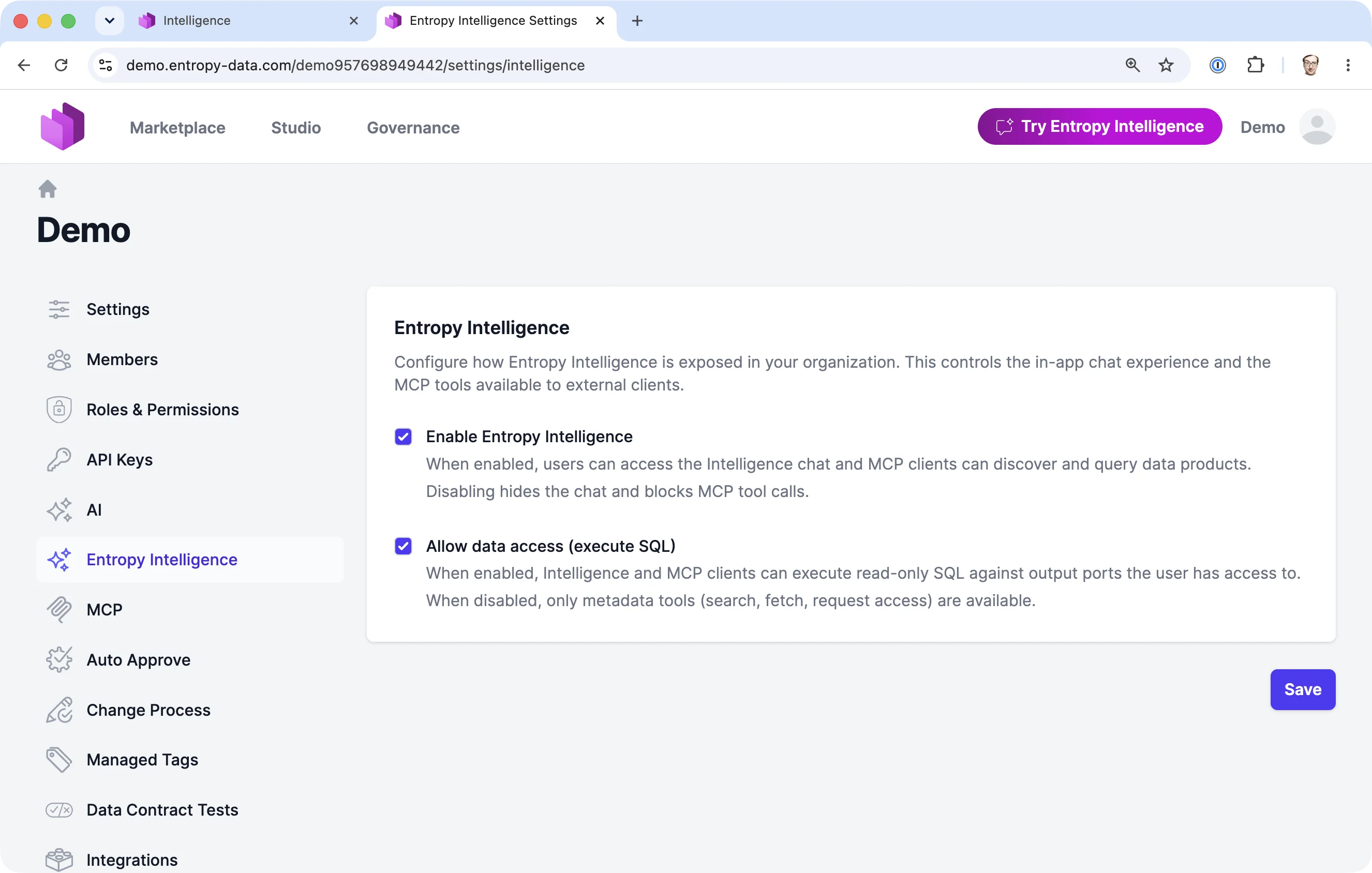
Entropy Intelligence is disabled by default and must be enabled per organization by an organization owner. SQL execution against data is a second, separate toggle that is also off by default. No AI processing happens until both an AI model is configured and the feature is explicitly enabled.
Tools and data flow
Entropy Intelligence works through a set of tools.
| Tool | What it does | Security characteristic |
|---|---|---|
| Discover (search) | Finds data products from a business question | Read-only over catalog metadata the user can already see |
| Evaluate (fetch) | Returns a data product's details: access status, data contract, and terms of use | Read-only metadata; no access to the data itself |
| Request access | Submits an Access Agreement request with a stated business purpose | Creates a request for the normal approval workflow; never grants access by itself |
| Query (execute SQL) | Runs read-only SQL against a data product the user is entitled to | Requires an active Access Agreement, passes the governance check, and runs with the user's own credentials |
Discover, Evaluate, and Request access are metadata-only and stay available even when Allow data access (execute SQL) is off. Only Query touches data.
The sequence below shows a question that ends in a SQL query (the Query tool), including the access and governance checks.
What this means for security:
- The model only decides which data product to use and writes the SQL. It has no connection to your data platform and cannot run anything itself. Entropy Data runs the query, using the user's own credentials, and only after re-checking the user's access rights and the governance rules.
- The user always sees the data product and the exact SQL that produced an answer, so AI output is verifiable rather than opaque.
- The result rows go to the model only as a tool result for that turn (so it can phrase an answer), and are not retained after the conversation row is written.
AI Context
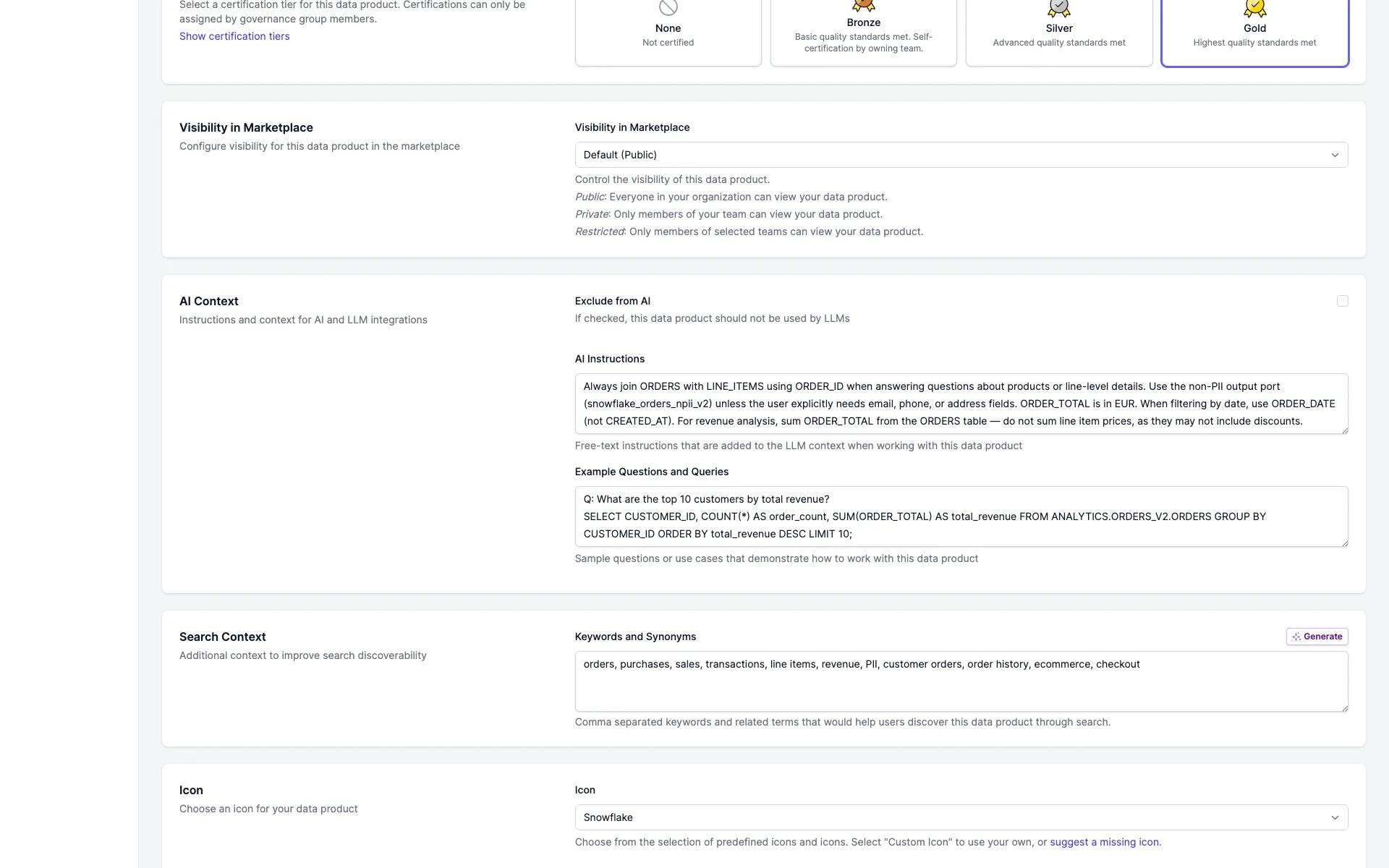
Entropy Intelligence is guided by AI Context: instructions and example queries that data product owners attach to a data product. This is how domain knowledge reaches the AI in a controlled way, instead of through unmanaged prompts scattered across individual users. See Chat with your data for the product view.
AI Context has three parts:
- AI Instructions — domain rules the AI should follow for this data product, for example "join orders with line items on order id" or "amounts are in EUR".
- Example questions and queries — sample questions with the corresponding SQL, demonstrating intended usage.
- Exclude from AI — when set, the data product is left out of Entropy Intelligence search, recommendations, and querying entirely.
Security-relevant properties:
- Owner-curated, governed metadata. AI Context is authored by data product owners and stored with the data product (as custom properties in its specification), not entered by end users at query time. It follows the same roles, review, and change management as the rest of the data product metadata. See Data Products.
- It guides, it does not grant. AI Context shapes how the AI phrases and builds queries. It never widens access. The access-grant and governance checks still apply to every query, regardless of what the instructions say.
- It is sent to the AI model. AI Context for the relevant data product is added to the system prompt, so it leaves the governed perimeter together with the prompt (to the model you configure, see AI model and data residency). Treat it as guidance content, never as a place to put secrets, credentials, or data that must not reach the model.
- A clean off switch. "Exclude from AI" removes a sensitive data product from all Entropy Intelligence surfaces without affecting its normal marketplace governance.
Access control and authorization
Entropy Intelligence never broadens what a user can see. A query is allowed only when both conditions hold:
- Active access grant. The user has an active Access Agreement for the target data product. This is the same grant that governs the rest of the platform. See Access Approval Workflow.
- Terms-of-use and policy match. When AI governance is enabled, the query's stated purpose is checked against the data contract terms of use and organization policies before it runs.
The query itself executes with the user's own data-platform credentials (their OAuth token or database login), so the data platform applies its own row-, column-, and role-level security on top. Entropy Data does not hold a shared privileged account for query execution.
Compliance and governance checks
Governance checks apply organization-defined, text-based policies and data contract terms at three points (see Features using AI):
- Resource validation — does a data product or contract comply with policy.
- Access request evaluation — does an access request meet policy and terms of use.
- Query validation — does a query conflict with terms of use or policy before it runs.
For Entropy Intelligence, query validation is the relevant check. It runs at execution time, after the access-grant check. The check loads the relevant terms of use, semantically analyzes the query together with its stated purpose, decides whether the intended use is admissible, records that decision, and then either runs the query or returns an error.
Two further layers complement the data-contract terms check:
- Global policy checks (coming soon) — organization-wide policies, set centrally by a data office, evaluated on every query in addition to the per-data-product terms of use. This lets you enforce rules that apply across all data products, not just the terms of a single contract.
- Guardrails — heuristic, non-AI safeguards that run alongside the model: read-only enforcement (only
SELECTstatements reach the data platform) and detection of prompt-injection attempts in the question or in retrieved content, so a crafted prompt cannot steer the AI into unintended actions.
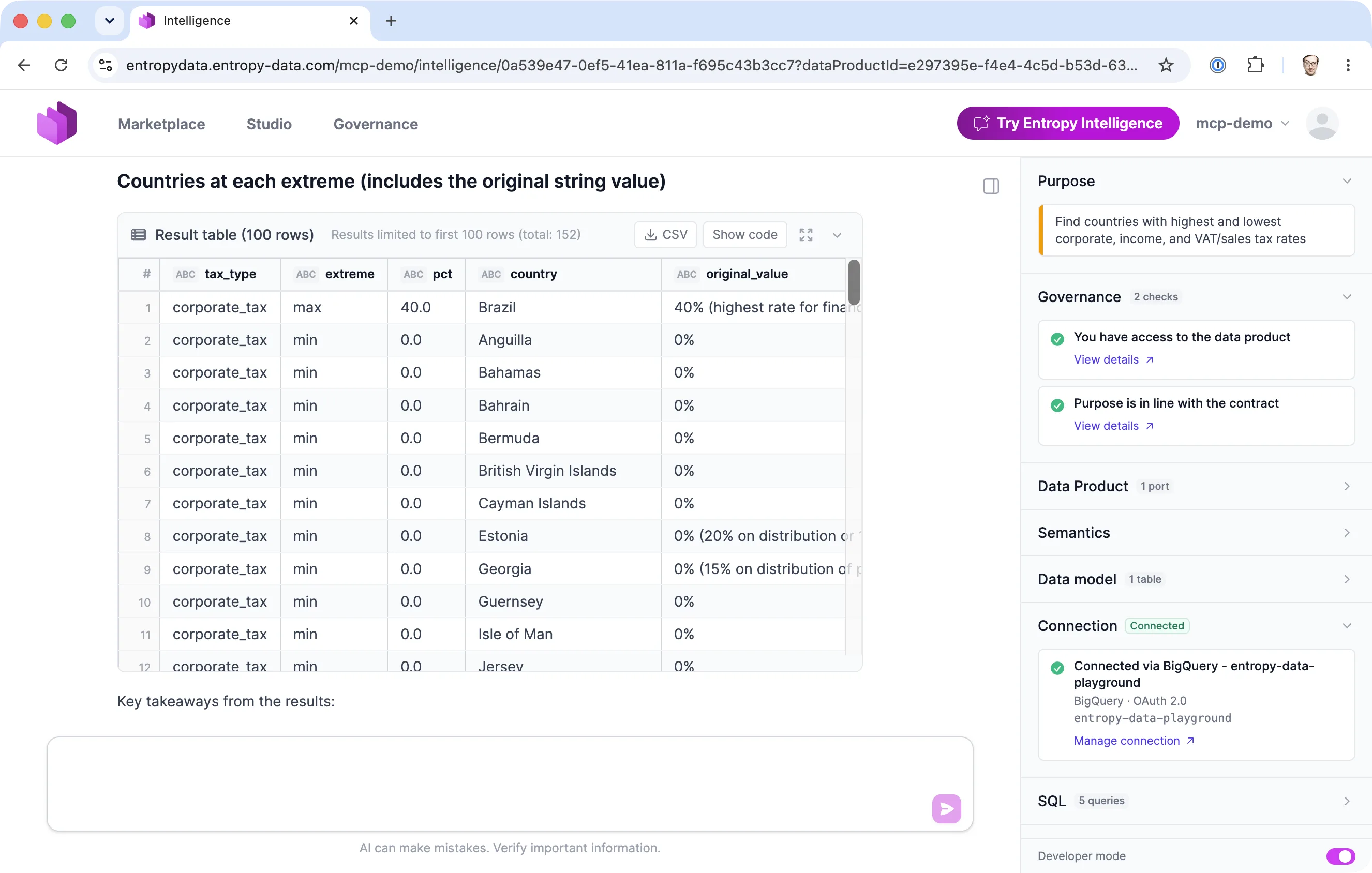
The governance check is itself AI-driven, and it can either let a query through or block it.
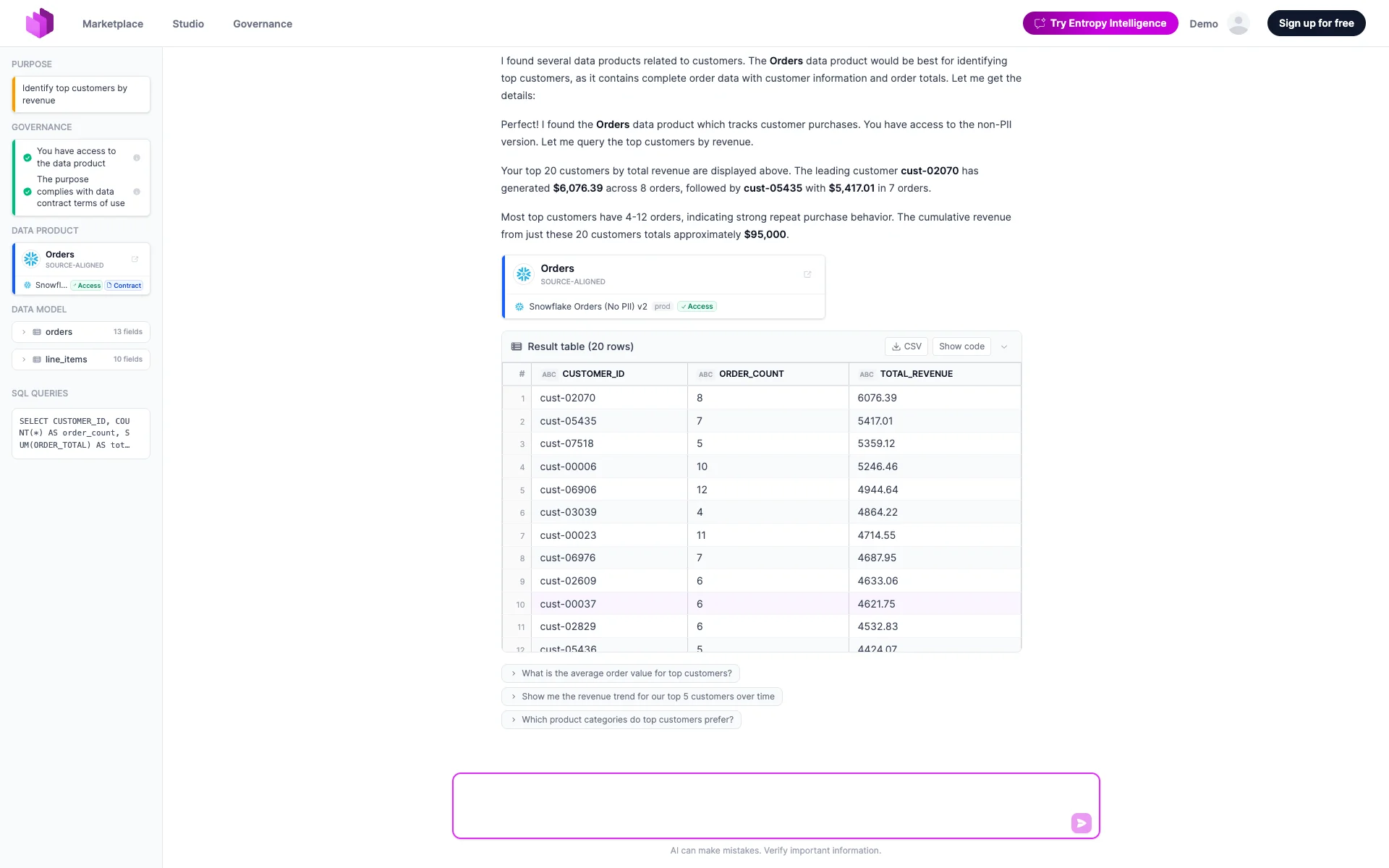
When the purpose fits the data contract, the access and contract checks pass (green in the governance panel) and the query runs:
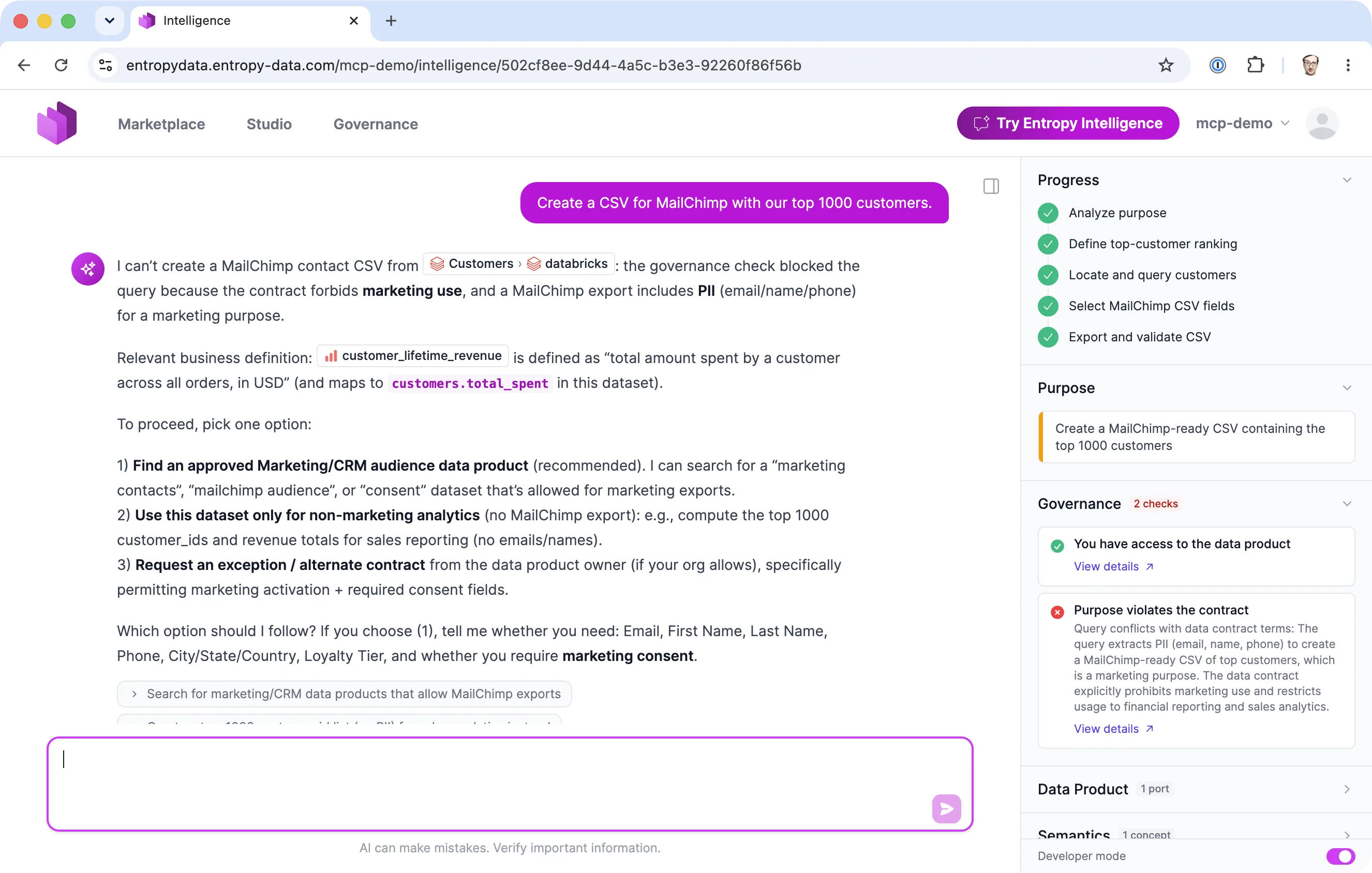
When the purpose conflicts with the contract, the check blocks the query before it runs. Here a request to export the top 1000 customers for MailChimp is blocked because the data contract forbids marketing use and the export would include PII:
Access token handling
Entropy Intelligence never holds a shared service account for your data platform. Each user connects their own data-platform identity, and every query runs with that user's credentials.
Wherever the platform supports it, Entropy Data uses short-lived OAuth 2.0 access tokens (for example BigQuery, Snowflake, and Power BI / Microsoft Fabric). These tokens are issued by your identity provider, expire quickly, and are refreshed automatically, so a long-lived, reusable secret never has to sit in the database. Personal access tokens (PAT) and username/password are used only as a fallback for platforms that do not offer OAuth in this context, such as Databricks (PAT) or direct database logins for PostgreSQL, MySQL, MariaDB, SQL Server, Exasol, and Trino.
When a query needs a connection the user has not yet established, or whose token has expired and cannot be refreshed, Entropy Intelligence does not fail silently. It returns a connection-required prompt that guides the user to authorize with the identity provider (for OAuth platforms, a link to the authorization flow) or to add their personal credentials, and then to retry the question. This keeps the user, rather than a stored long-lived credential, at the center of obtaining an access token.
Whatever the mechanism, the credential is stored per user and encrypted with AES-256-GCM before it is written (see Encryption and secrets management below). The non-secret part of a connection (host, project, account, auth type) is stored separately in clear text.
Example: BigQuery OAuth 2.0
BigQuery uses the Google OAuth 2.0 authorization-code flow. The user authorizes once, Entropy Data stores the resulting tokens encrypted, and refreshes them automatically as they expire.
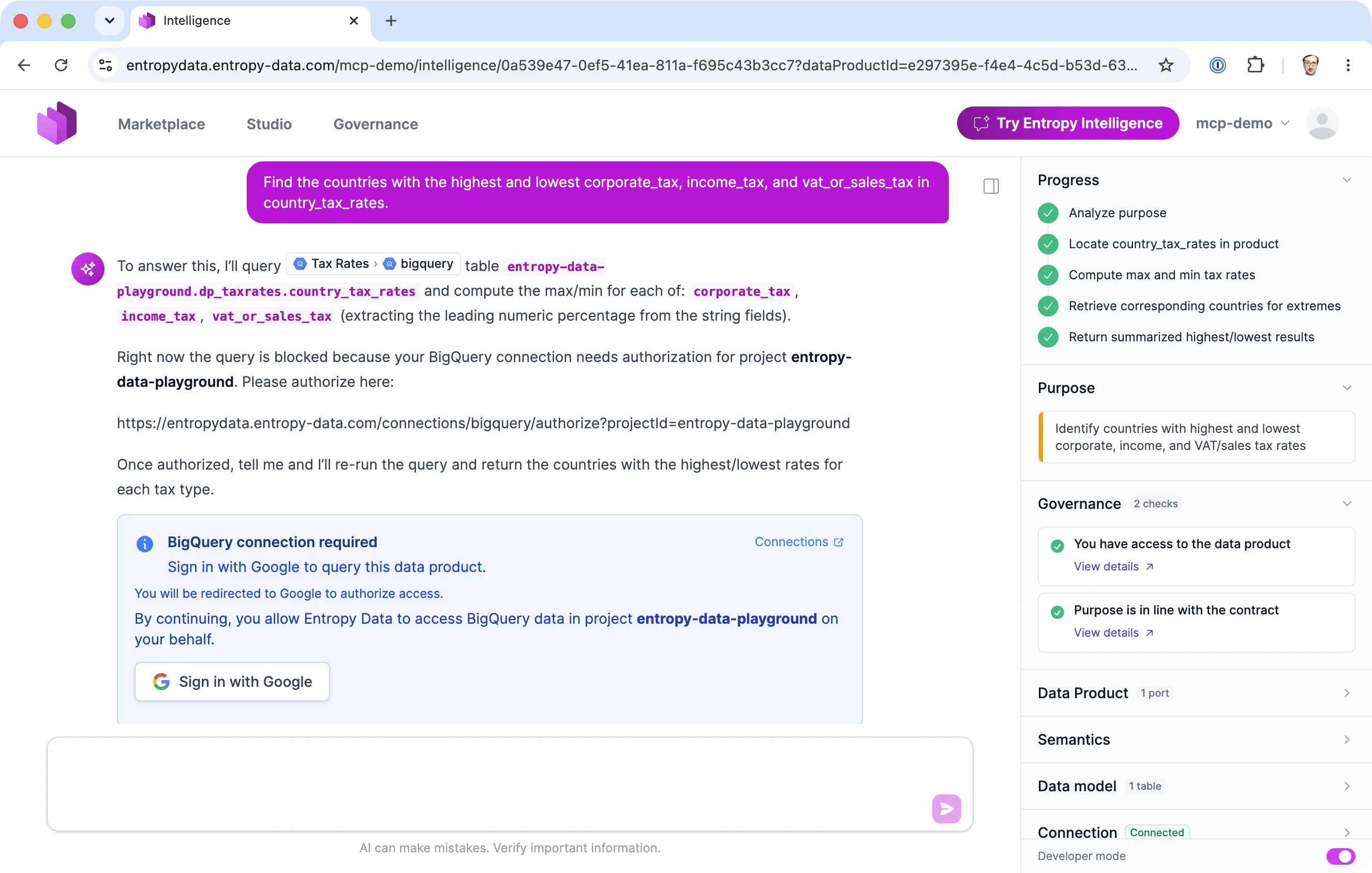
When a BigQuery-backed data product is queried without a connection, Intelligence prompts the user to sign in with Google, which leads to the standard Google consent screen:
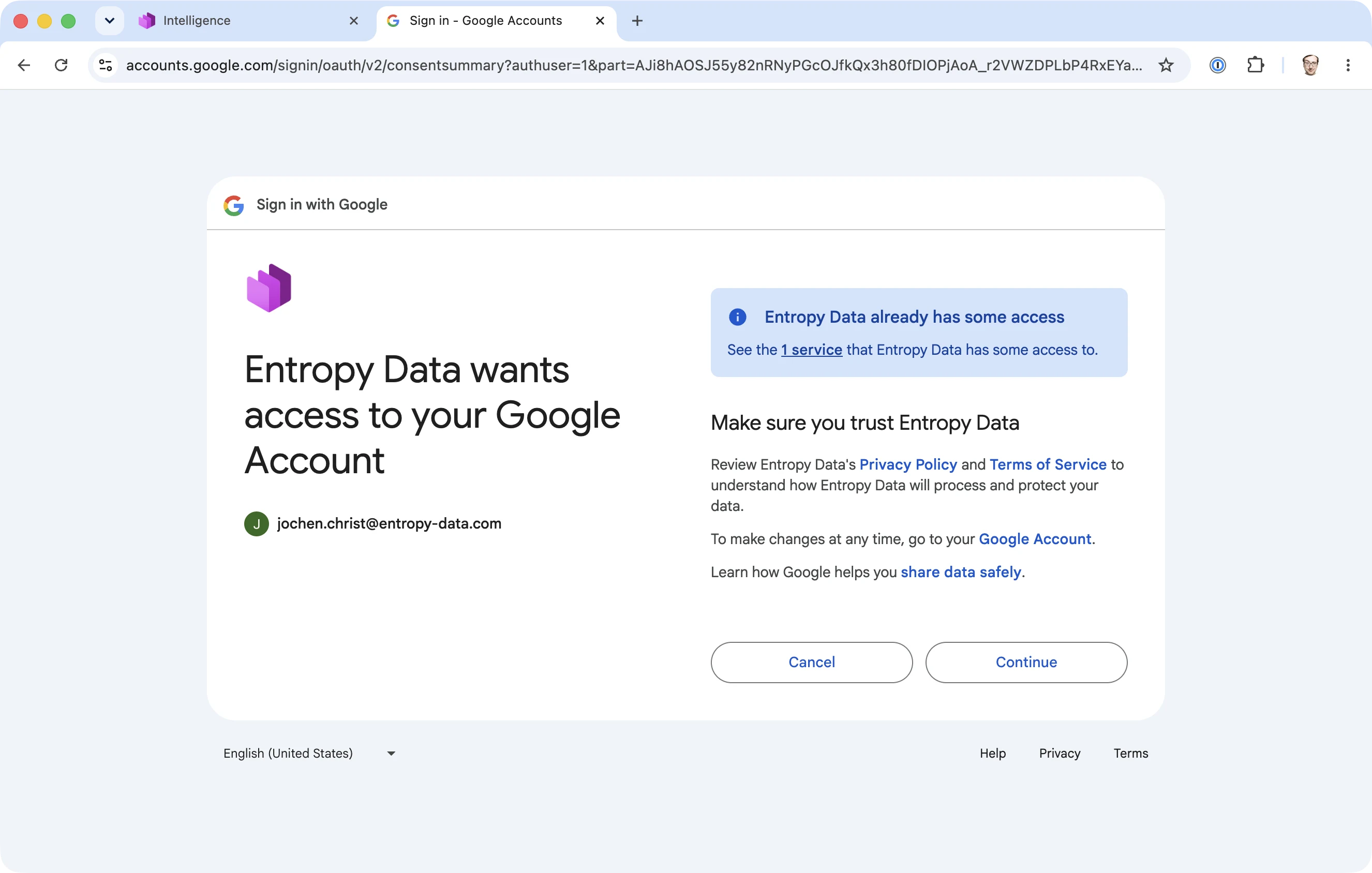
Properties worth noting for review:
- The refresh token is requested explicitly (
access_type=offline,prompt=consent) so Entropy Data can keep the connection alive without re-prompting the user. - Access tokens are refreshed when they are expired or within five minutes of expiry, then re-encrypted. If a refresh fails or no refresh token is available, the connection is deleted rather than left in a broken state, and the user is asked to reconnect.
Snowflake authentication via your identity provider
Snowflake follows the same pattern but can authenticate users through your own identity provider. See Snowflake External OAuth for connecting Snowflake authentication to your IdP.
Token mechanisms by platform
| Platform | Authentication mechanism | What is stored (encrypted) | Auto-refresh |
|---|---|---|---|
| BigQuery | Google OAuth 2.0 (authorization code, offline) | Access token, refresh token, expiry | Yes |
| Snowflake | Snowflake OAuth 2.0, or external/IdP OAuth (org-configured), or Programmatic Access Token (PAT) | OAuth: access + refresh tokens; PAT: the token | OAuth: yes; PAT: no |
| Power BI / Microsoft Fabric | Microsoft Entra OAuth 2.0 | Access token, refresh token, expiry | Yes |
| Databricks | Personal Access Token (PAT); OAuth 2.0 (coming soon) | The PAT | No (static until rotated) |
| Amazon Redshift | AWS access key ID and secret (optionally a session token) | The AWS credentials | No |
| PostgreSQL | Username and password | The password | No |
| MySQL | Username and password | The password | No |
| MariaDB | Username and password | The password | No |
| SQL Server | Username and password | The password | No |
| Exasol | Username and password | The password | No |
| Trino | Username and password | The password | No |
All of the above secrets share the same protection: AES-256-GCM at rest, scoped to the individual user, and removed when the user disconnects or is erased. OAuth and PAT mechanisms avoid storing a reusable password, and OAuth additionally lets the data platform enforce its own token expiry and revocation.
Where data is stored
The table below lists each category of data that Entropy Intelligence touches, where it lives, and how it is protected.
| Data | Where it lives | Encrypted at rest | Retention |
|---|---|---|---|
| Data-platform tokens / credentials | Application database, per user | Yes — AES-256-GCM (APPLICATION_ENCRYPTION_KEYS) | Until the user disconnects or is erased |
| SQL query result rows | In memory only (streamed to the chat, max 100 rows) | Not stored | Not retained |
| Conversation & message history | Application database, per user | Database / disk encryption at rest | Until the user is removed or erased |
| Audit log (prompt, model, tools, SQL; no result rows) | Application database, per user | Database / disk encryption at rest | Until the user is removed or erased |
The two most sensitive categories are the easiest to reason about: data-platform credentials are encrypted with AES-256-GCM, and query result rows are never written to disk at all. Notes on the rest: data-platform credentials cover Snowflake/BigQuery OAuth, Databricks PAT, database passwords, Redshift keys, and Power BI tokens (OAuth tokens are auto-refreshed and re-encrypted); the conversation and audit rows can quote individual values the AI derived from the data.
Encryption and secrets management
Data-platform connection secrets, OAuth tokens, and other integration secrets are encrypted at the application layer with AES-256-GCM before they reach the database. The key comes from the APPLICATION_ENCRYPTION_KEYS environment variable, and key rotation is supported. In transit, all traffic uses TLS.
For self-hosted deployments, always set APPLICATION_ENCRYPTION_KEYS (for example openssl rand -hex 32) and keep it in your secret store. Without it, secrets are stored without application-layer encryption, protected only by your database and disk encryption. See Configuration.
AI model and data residency
You choose where the AI processing happens. See AI Configuration for the full setup.
- Managed (cloud only). Entropy Data hosts the model. Suitable when you want it to work out of the box and accept the managed provider's terms.
- Bring your own model. Connect your own Anthropic, Azure OpenAI, or any OpenAI-compatible endpoint. The AI traffic then terminates in an environment you control, so you decide the region, the logging, and the retention. For EU data residency, deploy the model in an EU region (for Azure OpenAI we recommend Sweden).
What is sent to the model: the system prompt, the relevant conversation history, the owner-authored AI Context for the data product, the user's current question, and tool results (including the rows returned for the current query so the model can phrase an answer). What is not sent: other users' data, data products outside the user's access, or bulk extracts beyond the per-query 100-row cap.
If your security posture requires that no prompt or result content is retained by a third party, bring your own model and point it at an endpoint configured for zero data retention. With the managed model, retention follows the managed provider's policy.
Retention and deletion
| Item | Retention |
|---|---|
| Conversation history and summaries | Retained until the user is removed or erased (see below). |
| Interaction audit log | Retained until the user is removed or erased (see below). |
| SQL query result rows | Not retained. |
| Data-platform tokens | Retained (encrypted) until the user removes the connection, it is revoked, or the user is erased. |
Conversation history and the audit log are deleted when a user's data is removed, through one of two triggers:
- Removing a user from an organization deletes that user's conversation entries, summaries, and audit-log rows for that organization.
- GDPR erasure of a user iterates every organization the user belongs to, applies the same deletion, and additionally removes the user's encrypted data-platform connections before deleting the account.
This satisfies the right to erasure: once a user is erased, no Entropy Intelligence conversation or audit data for that user remains. See GDPR Deletion for the full deletion behavior across the platform.
Auditability
Every Entropy Intelligence interaction is recorded in a structured audit log, including:
- The user, organization, and conversation.
- The model used and token usage (prompt, completion, total).
- The system prompt and the user input.
- The tools the AI invoked and the SQL that ran.
- The outcome (success or error) and duration.
This gives you a reconstructable record of who asked what, which data product and query answered it, and which model processed it, without storing the result rows themselves.