
What's new
The release notes of Entropy Data
Upcoming
Highlights
- API Keys: An API key now carries the permissions it may write with. When creating a key, choose All (everything you may do for the scope), Restricted (pick permissions one by one; on a team only those you hold there are offered) or Read only. A key never carries more than its creator holds, so an editor can no longer mint a team key with owner-level rights.
POST /api/api-keystakes apermissionslist and echoes it; omitted, the key gets everything the calling key holds on the team. Organization settings — members, roles, SCIM, customization — take the newORGANIZATION_ADMINgrant, which only an organization key or an owner's user key carries. Existing keys keep exactly what they could do. An MCP session opened with an API key is bound by the same list. See API Key Permissions. - API: Several writes that used to demand an organization-scoped key now take the permission the same action takes on the page, so team and user keys holding it may use them: a team's notification channels and git credentials (
TEAM_EDIT), costs (DATAPRODUCT_EDITon the product), creating a team (TEAM_ADDon the parent, organization-wide for a root team), usage traces (organization-wideDATAPRODUCT_EDIT) and deleting lineage across the organization (organization-wideDATAPRODUCT_DELETE). Fixed: writing a team's git credentials through the API now checks the user's permission on that team; a user-scoped key could write any team's credentials before.
Data Products
- Input ports can now be added, edited and deleted on an ODPS data product. An Add Input Port popup connects an existing data contract, searchable by contract, data product or output port, creates a new one, or leaves it to be connected later. See Input Ports.
- An input port's Version now resolves against its data contract the way an output port's does, with the version consumed today explained under the field and shown on the card with a Pinned badge.
- Fixed: When the customization makes
contractIdrequired on output ports, the output port forms now ask for a data contract instead of failing every save.
Access Agreements
- A personal access request from a member of the providing team is approved on submit, so an owner no longer has to review their own request. The access button reads Get Access whenever a request will be approved instantly, and its tooltip names the rule that approves it.
Governance
- A classification scheme's value is now only the header badge on the data product and data contract pages, instead of also being listed as a raw entry under Custom Properties.
- A
classificationkey that no scheme owns is now an ordinary custom property on the data product form, so it can be seen, edited and removed. - Editing a scheme's Custom Property field now warns that values already set keep their old field until their owners move them.
Semantics
- Fixed: A TMF SID import whose schemas share field names such as
idornamenow completes. A clashing concept name is qualified by its schema, asid (Party), and a namespace left half-imported finishes on the next run.
Integrations
- Preview: A data contract's descriptions and tags are written back to Databricks Unity Catalog, onto the tables and columns it names, and kept in step as the contract changes. Tags other tools set stay as they are. Available on request. See Databricks Integration.
Other Fixes
- Fixed: A data product, data contract or semantic concept whose ID contains
[,],|or^, such asorders[v1], can now be opened. New and renamed IDs reject characters that break URLs. - Fixed: An MCP client that reports a change to its roots now gets an acknowledgement instead of a server error.
2.1.4 (2026-09-29)
Highlights
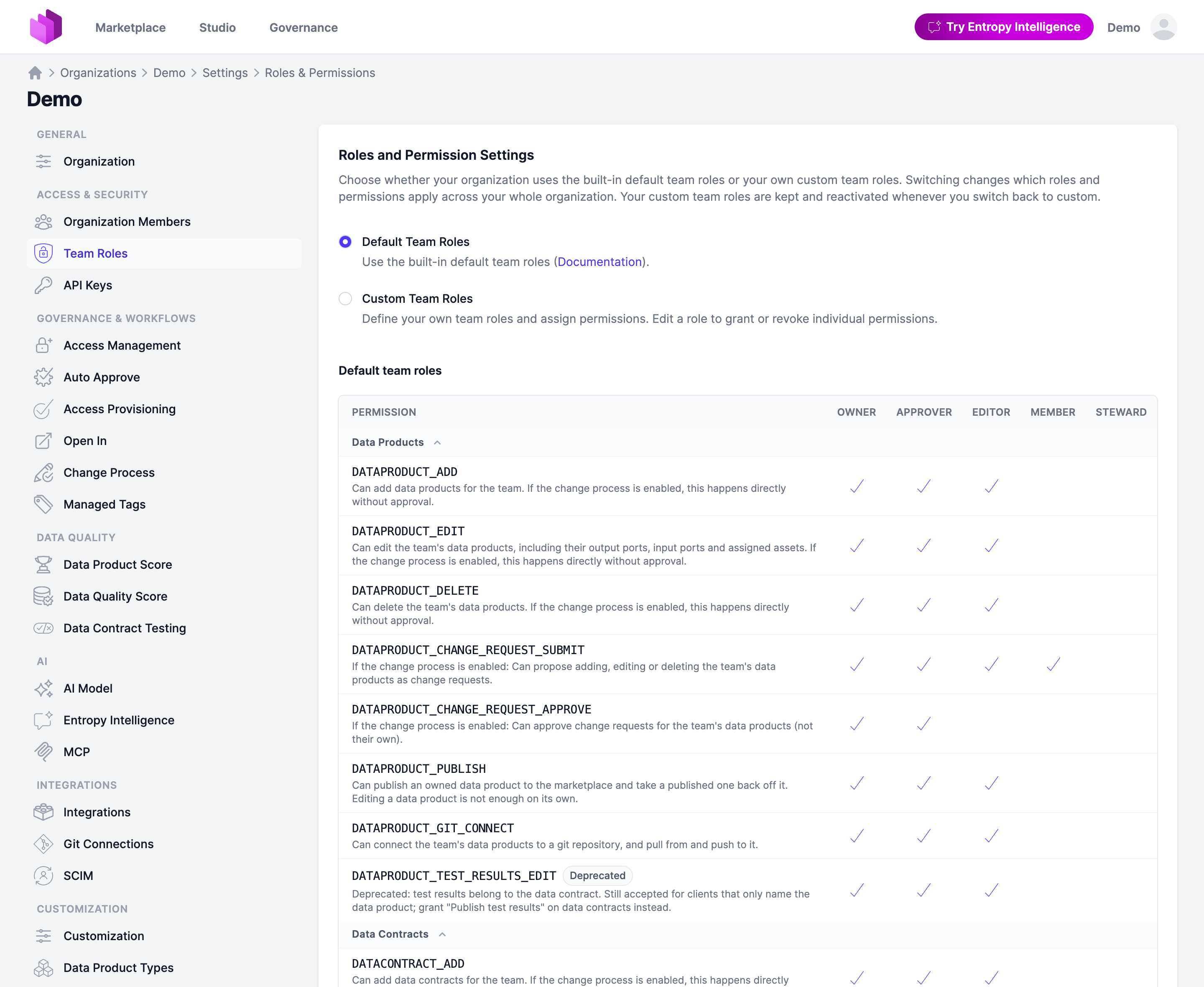
- Roles & Permissions: Team permissions are now one permission per resource and action, such as
DATACONTRACT_EDITorDATACONTRACT_TEST_RUN, and none implies another, so proposing, approving and branching can be granted separately. Existing custom roles are converted on upgrade without losing anything. See Roles & Permissions.
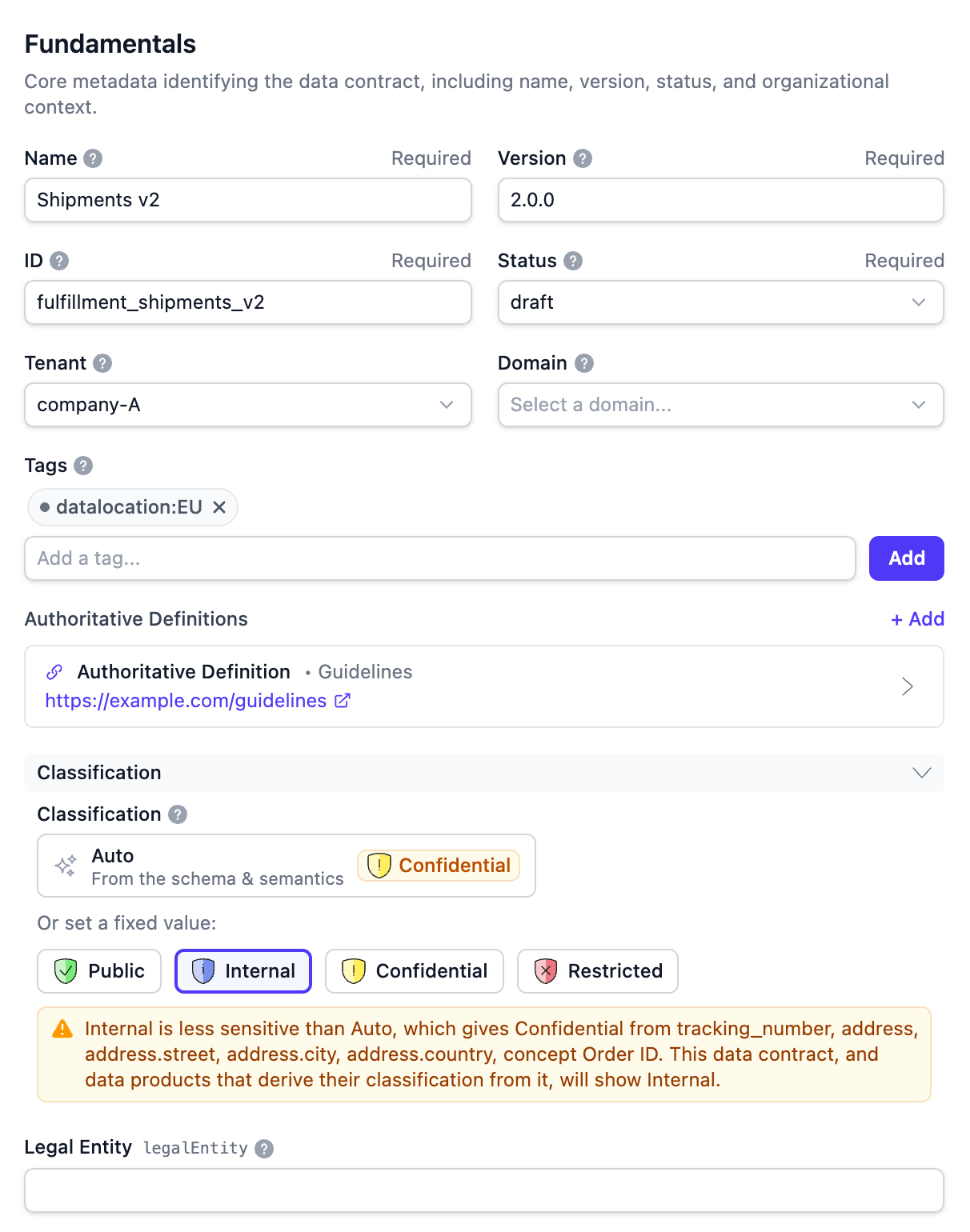
- Data Contracts: Contract-level classification fields in the editor now offer Auto, showing the values the columns and linked concepts give as badge chips. A warning appears when an explicit value is less sensitive than Auto or leaves values out.
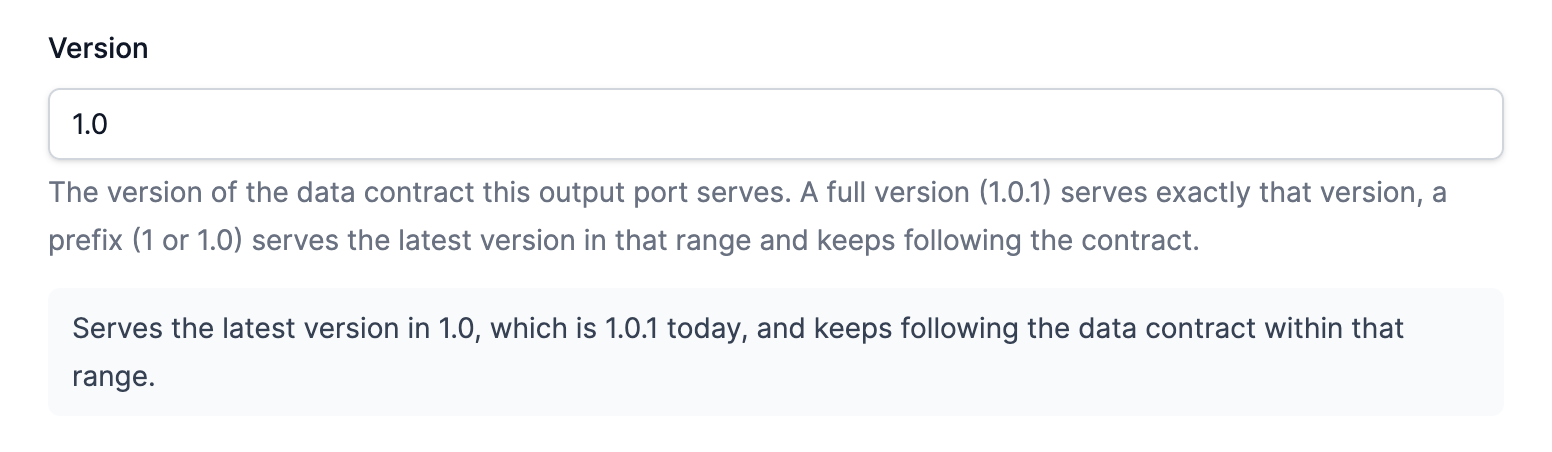
- Data Products: An output port can pin the data contract version it serves:
1.0.1serves that version,1.0the highest patch,1the highest minor, and blank stays on head. The port links the contract at the version served.
- Search: Data products and data contracts are ranked by relevance, with names, ids, tags and keywords weighing most, and the data product list and map no longer match text a product only mentions in passing.
Data Products
- The audit trail details page has an Older / Newer pager to browse changes one after the next without going back to the list.
- An output port without a data contract server now offers the server types and fields of the organization's
dataContract.serverscustomization. - Changing a data product's visibility across the marketplace boundary takes Publish data products wherever the change is made.
- Fixed: A support channel URL with a space in it, such as
mailto: someone@example.com, is now reported under the field on the data product form instead of failing on save and losing the edits. - Fixed: Picking ODPS on the new data product screen now keeps that specification when the flow continues on the full form.
- Fixed: A rejected output port save, such as a duplicate external id, now shows the error under the field and keeps the edits.
Data Contracts
- Code generation moved into a Generate flyout in the Edit and Actions dropdowns, so it is available in the read-only and marketplace views too.
- The data contract list has a Tenant filter, shown once at least one contract sets a tenant.
- The data contract editor has tighter property rows, with example values as chips and the row actions on hover.
- A field showing a value inherited from a semantic concept has an Override link that copies the value into the field for editing.
- Fixed: A long ID now wraps in the Fundamentals preview of the data contract editor instead of overflowing it.
- Fixed: The Data Quality card is hidden on a data contract that has nothing to show the viewer.
- Fixed: The schema table no longer shows an empty column when a contract has table assets but no test results, nor repeats a physical name that matches the column name.
- Fixed: The data contract list now names the data product implementing a contract and counts its consumers.
Access Agreements
- Fixed: A new access request is emailed only to the team members who can approve it, instead of to everyone in the providing team.
Governance
- Fixed: The Data Product Score settings page and the try-it picker on an AI rule now open quickly in an organization with hundreds of data products.
Semantics
- The semantic graph has a full-screen mode, so a large namespace can be explored without the surrounding page.
- Fixed: Giving an inline property a name another concept in the namespace already holds now shows the clash under the name field, instead of Save appearing to do nothing.
- Fixed: Relationship labels in the semantic graph sit in free space along their edge and behind the concepts, so a label no longer covers what it crosses.
- Fixed: A non-square data product logo now stays inside its box in the semantics Data Products and References lists.
Entropy Intelligence
- Fixed: A chart in a chat stays drawn once the badges in the message resolve and when the conversation is reopened.
Integrations
- Fixed: Databricks Catalog Explorer links on ingested assets and the data products imported from them now work when the configured host has a trailing slash or no scheme.
Administration & API
- A description in the organization customization can carry a safe subset of HTML, such as a link, shown on the edit forms and detail pages alike.
- HTML, CSS, JavaScript and JSON responses are sent compressed, so large pages and the stylesheet load markedly faster.
PUT /api/settings/team-roleskeeps accepting the retired permission names and expands them, so role definitions kept in infrastructure-as-code keep working. See Retired permissions.
Security
- Fixed: Values encrypted with an earlier key stay readable after
APPLICATION_ENCRYPTION_KEYSis rotated. - The MCP consent page shows the requesting client's ID and redirect URI, so a grant can be checked against the client that asked for it.
- MCP clients only accept redirect URIs the OAuth standard allows (HTTPS, HTTP on loopback, or a private-use scheme), on dynamic registration and in the client wizard alike.
- Fixed: Deleting an MCP client now revokes its secret and the authorizations and consents issued for it.
- Privacy: The MCP consent, login and user-cleanup logs record the user id instead of the email address.
- Fixed: Running, cancelling, editing and testing an asset import are now confined to the organization it belongs to.
Other Fixes
- Resource links render as compact chips everywhere they are shown, so a page with several links stays readable.
- Fixed: The YAML editors explain a rejected document by path and line, such as
Invalid value at support[1].url, line 49, and keep the edits. - Fixed: A YAML editor error for a missing required custom property now names the property.
- WebP is no longer offered for image uploads, since such uploads failed. Use PNG, JPEG, GIF or SVG.
2.1.3 (2026-09-20)
Highlights
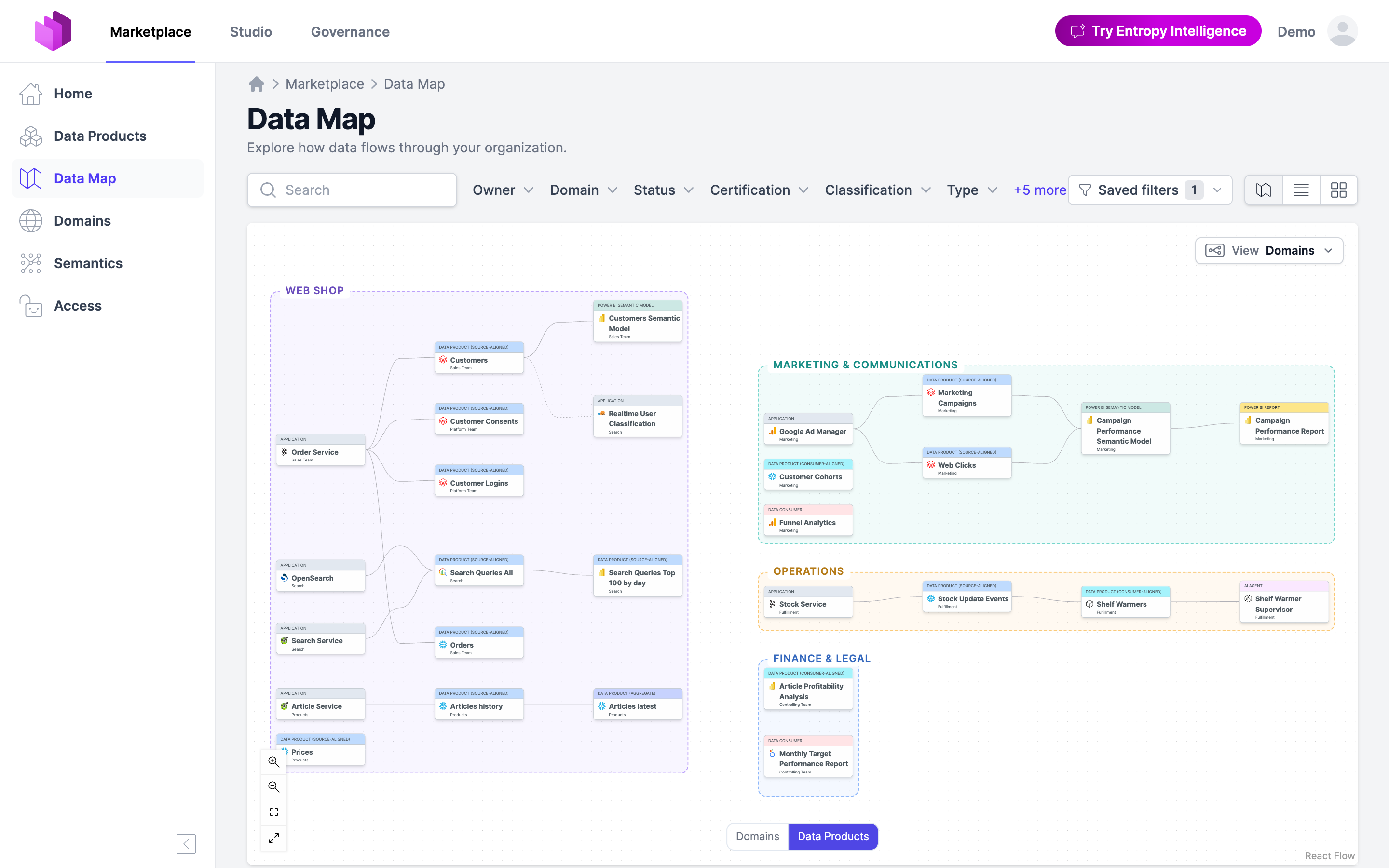
- Marketplace: The Data Map now lays out data products by domain, in one column per data product type, with zoom levels from a domain overview down to a single data product and its flows. The viewport is kept in the URL, and products without a domain share a No domain box.
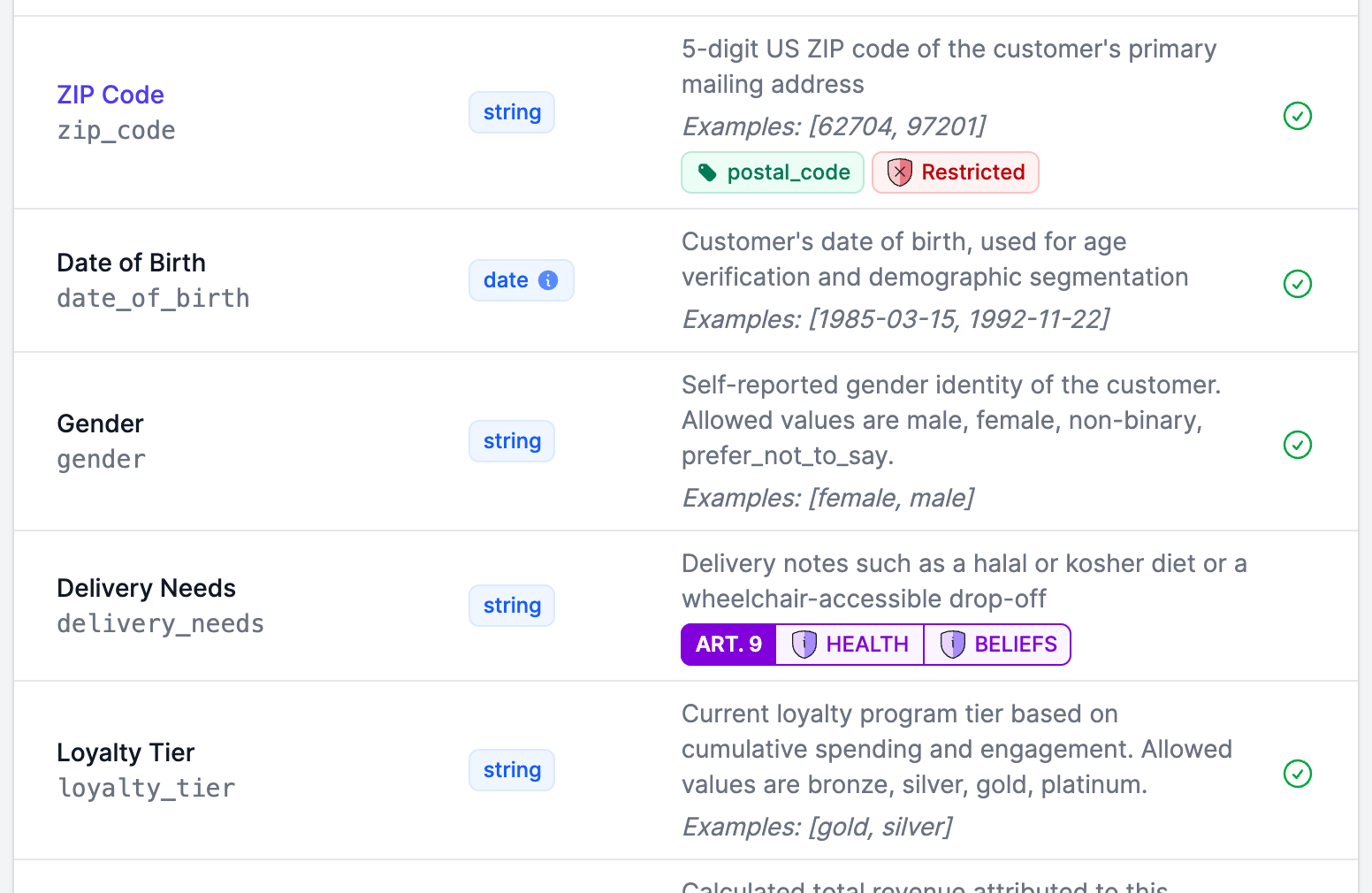
- Governance: Classification schemes can allow multiple values: a column, contract, data product or concept then carries several values at once, one badge each, and the roll-up collects all of them, stored as
OMEGA, GAMMA. See Classifications.
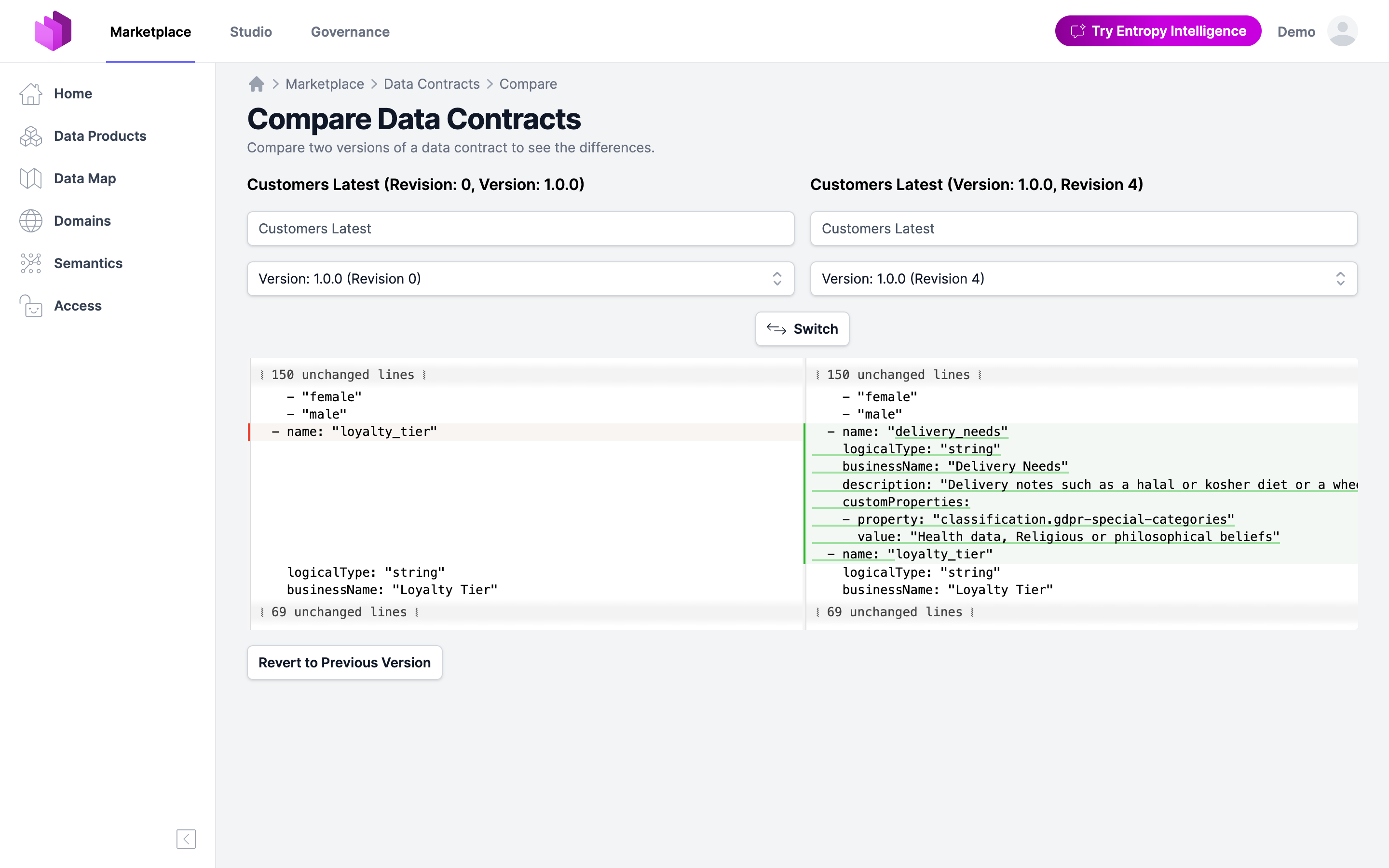
- Data Products: An older version of a data product or data contract can now be restored from its compare page: open the version from the audit trail, compare it with the current one, and confirm. The usual validation, permissions and change request rules still apply.
- Data Products: Data product IDs from a template: set a
templatestrategy such asacme.{domain}.{type}.{name}in the customization, and the new data product forms fill its placeholders as the form is filled. See Data Product ID Generation.
Data Products
- IDs suggested from a name now spell out umlauts — ä, ö, ü and ß become
ae,oe,ueandss— and no longer keep doubled or trailing dashes.
Data Contracts
- Fixed: The schema tables of a data contract now share one column grid, so the type and description columns line up across every schema instead of shifting from one table to the next.
- Fixed: An array property in the entity diagram now nests its element's fields underneath and names what the array holds (
array<object>,array<string>), instead of rendering as one row with nothing under it.
Governance
- Classification levels can have a short name that the badge prints instead of the full name, such as CTS for Cosmic Top Secret, with the full name in the tooltip. The NATO, US Government and GDPR Special Categories presets ship theirs, and a badge folds a multi-value scheme's extras into
+N. - Classification badges can carry a scheme prefix: set a short Badge prefix on a scheme and its badges render as a two-part shield,
COMP | OMEGA, so a row of badges says which scheme each one belongs to. Off until a prefix is set. - With Provisioning grants access, an access that has ended is now listed as Deprovisioning pending until the removal of its grant is reported, or someone marks it as deprovisioned, instead of showing Expired while the grant still exists.
- The Data Product Score YAML is now edited in the studio editor, with completion and validation against a schema served per organization, and its settings page sits under Settings → Data Quality → Data Product Score.
Semantics
- Concept names are now unique within a semantic namespace: a save or an ontology document that reuses a name is refused, naming each clash, so an export and re-import keeps relationships on the concept they belong to. Groups may still share names.
- Replacing a large ontology document is much faster — a thousand-concept document on a semantic branch now takes a few seconds instead of over half a minute.
Marketplace
- The Data Map adds a Domains (list) view that stacks the domains one below the other, upstream first, and draws the flows of a data product once it is selected.
- Selecting a card in a graph now offers actions on it: Hide unrelated leaves only what the card is connected to, and Open goes to its page.
- The graph visualizers replace the enlarge button with a full screen control in the zoom controls, which uses the browser's full screen mode and keeps the view centered.
- Fixed: A graph with three or more parallel flows between the same two nodes — a data product feeding several of its output ports to one consumer — renders again instead of showing an empty box.
Administration & API
- The custom schema overlays now carry the customization rules of every section — description, schema and its properties, output ports, team — instead of only the root section, so they are published in the schemas and enforced on API and YAML-editor writes.
2.1.2 (2026-09-17)
Highlights
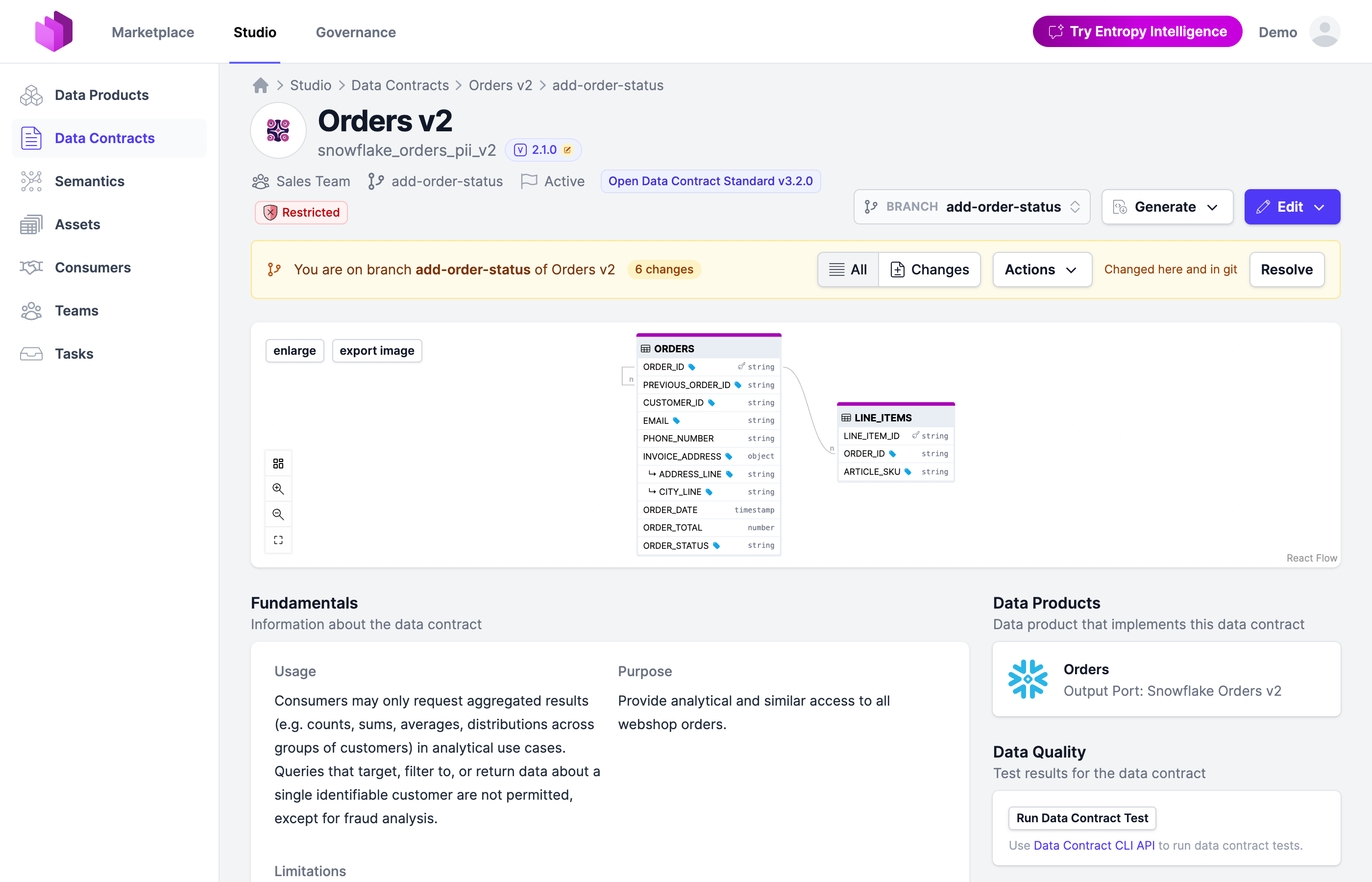
- Data Contracts: Branches for data contracts: cut one from the Branch dropdown of an ODCS contract, draft and test the change with every element it touches marked, then merge it with the version to land with, optionally written to the implementing output ports. Branches are mirrored to git and offered through the API and the CLI. See Branches.
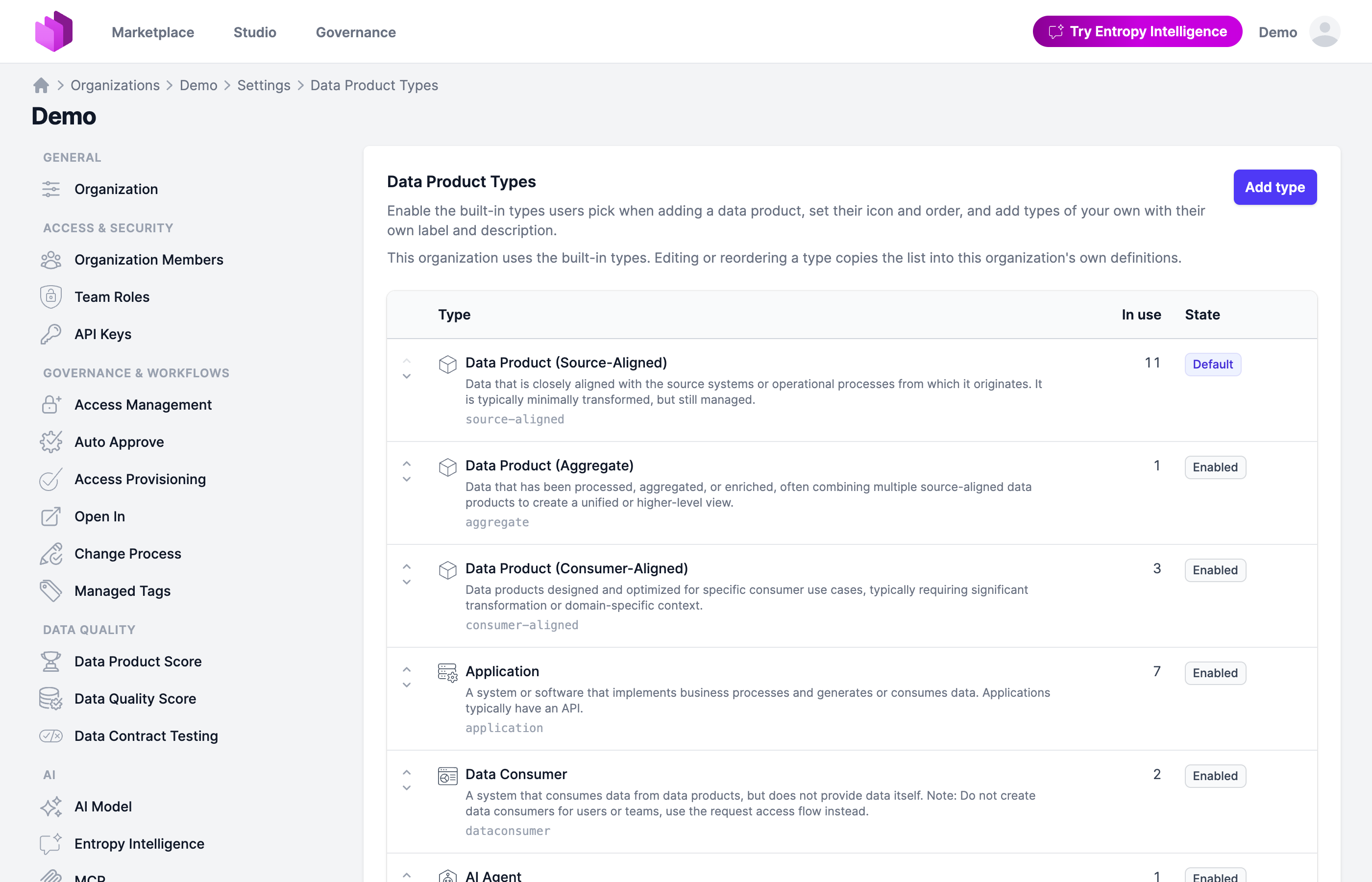
- Data Products: Configurable data product types: an organization can define its own under Settings → Customization → Data Product Types, with label and wizard texts per locale, an icon, whether the type has output ports, and which one is the default. The built-in types stay available. See Data Product Types.
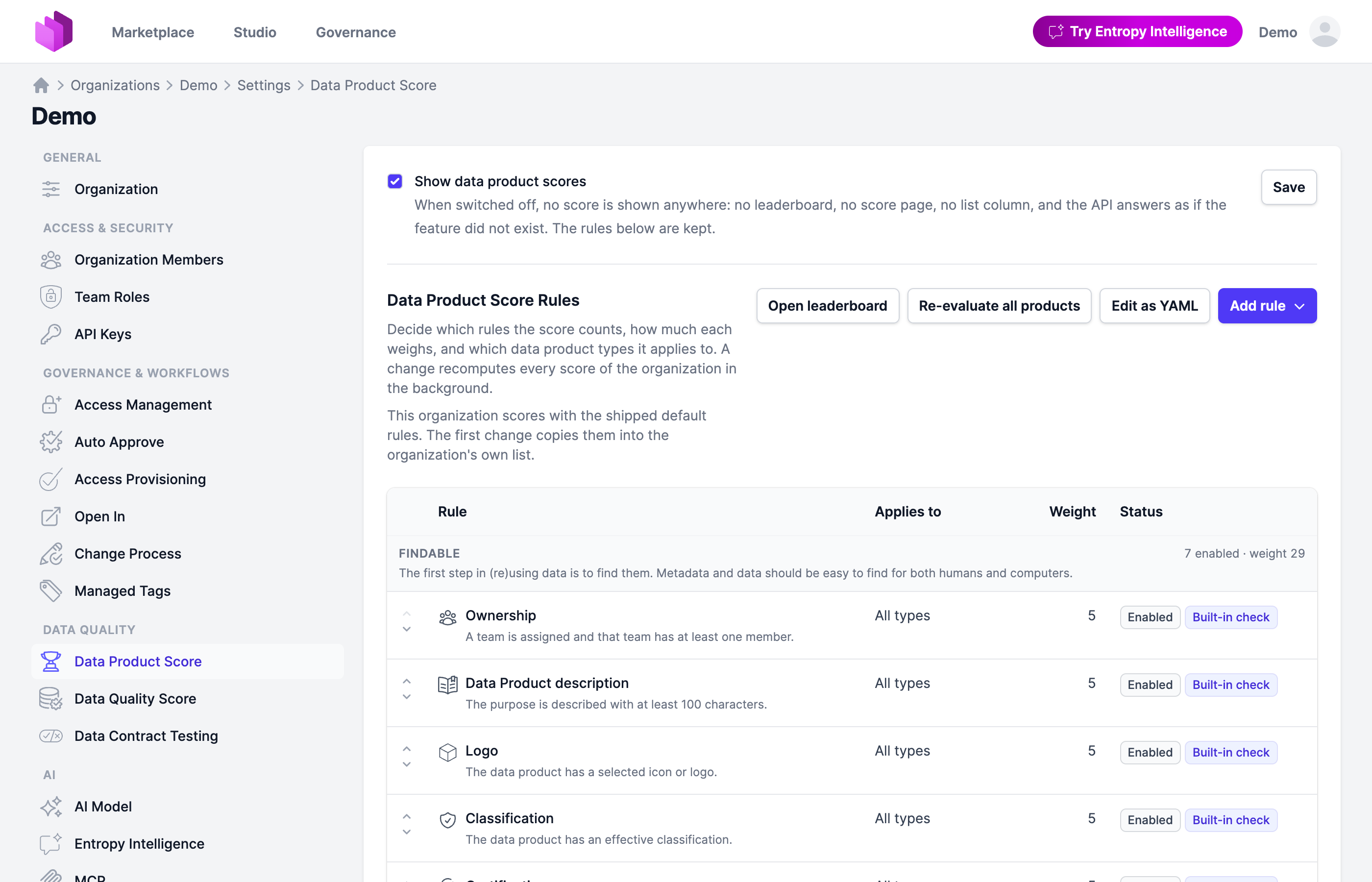
- Governance: The Data Product Score is now customizable under Settings → Data Quality → Data Product Score: enable, weight and scope the built-in rules, tune their thresholds and rating bands, and add rules of your own as JSONata expressions or AI-judged instructions. See Data Product Score.
Data Products
- The Select Type step when adding a data product is now one flat, compact list of the organization's types instead of nested cards.
- Applications are now scored on their output ports and contracts by the Data Product Score, like data products.
- Data Product Scores are now stored and refreshed in the background within seconds of a change, so the leaderboard no longer recomputes every product per visit, and a rule's detail dialog shows what it looked at, where to fix it, and AI-made recommendations.
- Products in a draft or proposed status keep their own Data Product Score but stay out of ranks, averages and team scores, and scored products show their score in the data product list. The switch that turns the score on moved from Preview Features to its settings page.
- Deprecated: The
typeenum of the customization YAML is replaced by the Data Product Types settings page; it keeps working until the organization defines its own types there. - Assigning a data contract to a data product now opens ready to create a new product, prefilled with the name, ID, owning team and server the contract already answers. An organization with no team to create under still opens on picking an existing product.
- The data product filter bar now collapses trailing filters behind more based on the space the row actually has, so the filters fit whatever the configured set, the language and the viewport happen to be.
- Fixed: A data product whose closest domain repeats the name of its owning team no longer shows that name twice in the header path.
- Fixed: An output port whose server type is not recognised now shows the output-port icon instead of the data products one, and ODCS's
localserver type has an icon of its own.
Data Contracts
- Excel import and export now follow the ODCS version of the contract, with templates for ODCS 3.0.2, 3.1.0 and 3.2.0. A blank template downloads in the version the organization writes, and an import keeps the stored contract's field order.
- Exclusive bounds on a schema property are edited and shown as values — Exclusive minimum and Exclusive maximum — instead of true/false flags beside the minimum and maximum.
- The contract editor now writes ODCS 3.2.0 and offers every field the standard defines for a server, per server type, including a Snowflake server's account.
- A new ODCS contract now starts with the Snowflake account guessed from the organization's recent contracts, or from its Snowflake connection settings when those agree on one, so only the database and schema are left to fill in.
- The quality score and checks pages now apply their filters without a page reload, and the all-time range starts at the earliest run.
- The quality badge and the quality pills now lead with the exact score before the rating, matching the Data Product Score format.
- Server types now carry their real brand marks everywhere they are shown, and the BigQuery logo paints in full again.
- Fixed: An Excel round trip no longer adds
logicalType: objectto an ODCS 3.2 schema that leaves the logical type empty.
Governance
- Access Provisioning is a new setting under Governance & Workflows. With Provisioning grants access, an approved access stays Provisioning pending, without Open In or querying, until the grant is reported as provisioned; accesses active at the switch count as provisioned.
- Certifications can now be read via the API with any API key scope, so team- and user-scoped keys may list them like the UI shows them to every organization member. Creating, updating and deleting a certification still requires an organization-scoped key.
- Fixed: Opening a data contract or data product from a team or domain score breakdown now keeps the Governance area instead of landing in the marketplace.
Semantics
- A relationship may now run from a concept to itself, as a hierarchy such as region and subregion needs. It is offered in the relationship picker, imported from RDF, and drawn as a loop on the diagram.
- A property whose ends an ontology leaves open is now imported onto the built-in Any concept, and every concept page lists Any's relationships as inherited, read-only rows behind show inherited. Any sorts last in the tree with a built-in tag and stays off the namespace diagram.
- Properties that no concept declares are now imported instead of dropped, attached through their nearest super-property or through the individuals that use them, and otherwise kept as shared properties. The result message counts what was kept.
- OSI
requiresconstraint expressions are now carried on value types and relationships: exported in both YAML shapes, shown on the property page, and editable on the concept form and in the relationship drawer. - Import Ontology now groups its sources into Git, Industry Standards and Custom, and starts on creating a new namespace named after the uploaded file.
- The ontology import summary now lists the source files for TMF SID and FIBO with open links, so a file can be inspected before importing. FIBO lists one loader file per domain; the files it references are discovered during the import.
- An imported ontology's header now lands on the namespace: its abstract becomes the description and its IRI the URI when the namespace has none, and the remaining annotations, such as title, licence and version IRI, are kept as custom properties that survive an export and re-import.
- A repeated annotation now keeps every value instead of only the last one, and a source, licence or version IRI stays a link where it is shown.
- Cardinality restrictions are now imported: a lower bound of one sets the property's required flag, anything beyond one value becomes a
requirescount constraint, and every imported relationship keeps its object property's IRI. - SHACL shapes are now imported. A node shape's property shapes become the properties of its target class, shared when a named shape is reused or a relationship when the values are instances of a class, with names, datatypes, counts, allowed values, patterns and bounds read from the shape.
- Import Ontology now follows
owl:imports, fetching each referenced ontology so superclasses and properties borrowed from another file resolve, and an inverse pair takes its name from the side the ontology treats as primary. - Merging a branch now opens a pull request when the target's git branch is protected or the connection pushes to requests only. The branch stays open, showing the request with its mergeability and comment count, and closes once the provider merges it.
- A branch's git branch is now mirrored both ways: the branch band reports a git branch that moved and offers to pull it or resolve a divergence. A pull request needs the namespace in git first, and the band points at the namespace's push until then.
- Fixed: Ontologies exported by Protégé now import instead of failing on the XML entity expansion limit, which
application.xml.entity-expansion-limitraises further. - Fixed: A branch's concepts no longer appear on the diagrams of the namespace it was cut from, and a branch's own diagram no longer draws the same concept twice.
- Fixed: Deleting a namespace now returns to the namespace overview instead of a namespace called "main", which organizations that renamed their default do not have.
Entropy Intelligence
- Fixed: A suggestion card whose prompt contains a
%now opens the chat instead of an error page.
Integrations
- A datasource connection now has a detail page of its own with the full configuration, token status, re-authorize and delete actions, and a Test Connection button whose result is shown in place.
- A connection that has never synced a file that already exists in git now reads as Not synced yet rather than a conflict, and the compare-and-choose wizard opens with first-sync wording.
- Fixed: The Git badge on a data product or data contract now opens the Git details instead of a link that reopens the page itself, and Jump to file shows the plain path with a note while nothing has been pushed yet.
- Fixed: The Git card now shows its Edit and Configure actions only to users who may change the resource's git settings, instead of opening a modal that could not be saved.
- Fixed: A manual push now refuses a file that moved in git since the last exchange instead of overwriting it.
- Fixed: Auto-push no longer pushes to a pull request the provider has already merged or closed; it opens a new branch and request instead.
- Fixed: A semantic branch on Bitbucket whose pull request was merged with close source branch now closes as merged instead of staying on "Git could not be reached".
- Fixed: A pull request branch named from the default template no longer carries a doubled separator before the first push, while
{{shortenedCommitHash}}is still empty.
Administration & API
- Email templates can now be read and replaced as one document through
GET/PUT /api/settings/email-templates, and the organization-wide auto approve policy round-trips through the organization features API. See Email Templates. - The data product list, data map and leaderboard filter, and
GET /api/dataproducts, now take?type=;?archetype=keeps working as a deprecated alias. The ODPS and DPS specifications keeparchetypeas their field name. - The Data Product Score definition can be read or replaced as YAML through
/api/settings/dataproduct-score, and the rule catalog is served at/api/data-product-score/rules(previously/criteria); score responses name their linesrules. - The custom schema overlays at
/api/schemas/odcs-custom.schema.jsonandodps-custom.schema.jsonnow carry customized titles and descriptions, so tools that generate forms or docs from them show the same wording as the web form. - A SCIM group can now own a team's membership through a teamMember rule: users joining the group are added with
scimGroupDefaults.defaultTeamMemberRole(Member when unset), a role changed in the app survives the next sync, and users leaving the group are removed. - Semantics is now on by default in self-hosted deployments; set
application.semantics.enabled=falseto turn it off. - The organization features API reports the new
accessProvisioningPolicy. - A custom property's condition can now be evaluated against the owning team, so a form shows the property only for the teams it applies to and follows a change of team right away.
- Customization texts per language: any customization text can be given per language by adding a language tag to its key, such as
title@denext totitle; each user sees their language's variant or the untagged text. See Customizations.
Sign-in
- Fixed: A verification link now opens a confirmation page with a button instead of verifying on the click, so a mail scanner that follows it cannot spend the link. An expired or unknown token offers a next step instead of dead-ending.
2.1.1 (2026-09-09)
Semantics
- A branch's YAML diff is now a page of its own, with breadcrumbs and labelled panes, so it can be linked and shared. The op mark on a changed concept opens the diff narrowed to that change.
- A concept page inside a branch now marks each property with its own change: an added property shows as Added, and a property the branch removed is shown back in place, struck through and marked Removed.
- Fixed: The semantic concept form now accepts owner teams and domains from your own organization only.
2.1.0 (2026-09-08)
Highlights
- Data Contracts and Data Products: ODCS 3.2.0 and ODPS 1.1.0 are the platform defaults: new documents are written in the released versions, and every field they define survives a round trip through the platform, the converters, the asset import and the API. Both editors offer a Migrate action while a document is behind the organization's version, with a popover naming the structural steps. An organization that wants to stay on 3.1.0 or 1.0.0 pins the
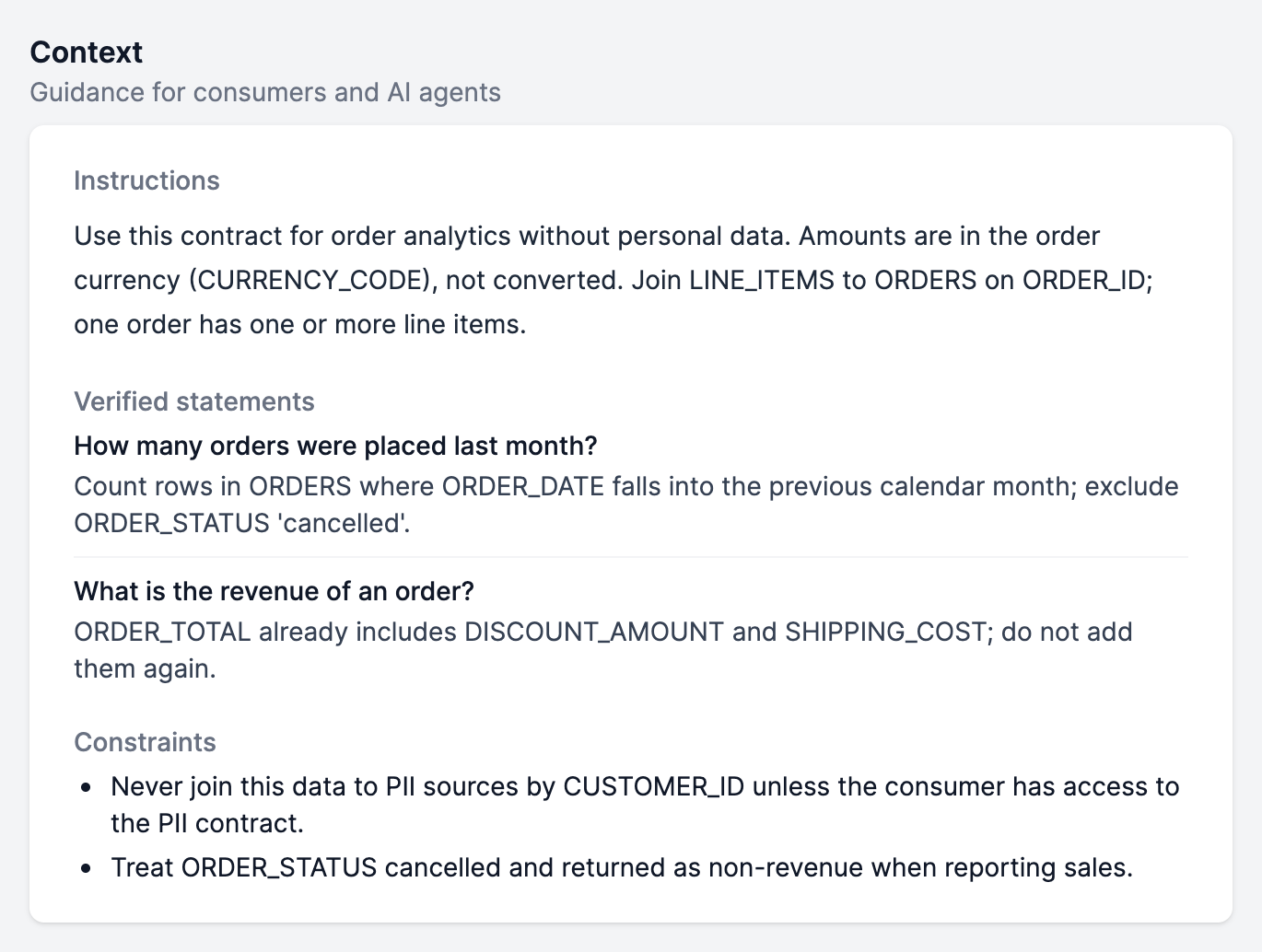
apiVersiondefault in its Customization YAML. - Data Contracts and Data Products: The context block the new versions introduce (instructions, verified statements and constraints for consumers and AI agents) is shown on the data contract page, in the editor preview, on the data product page and per output port, and is folded into each schema object's header. Entropy Intelligence reads it as well.
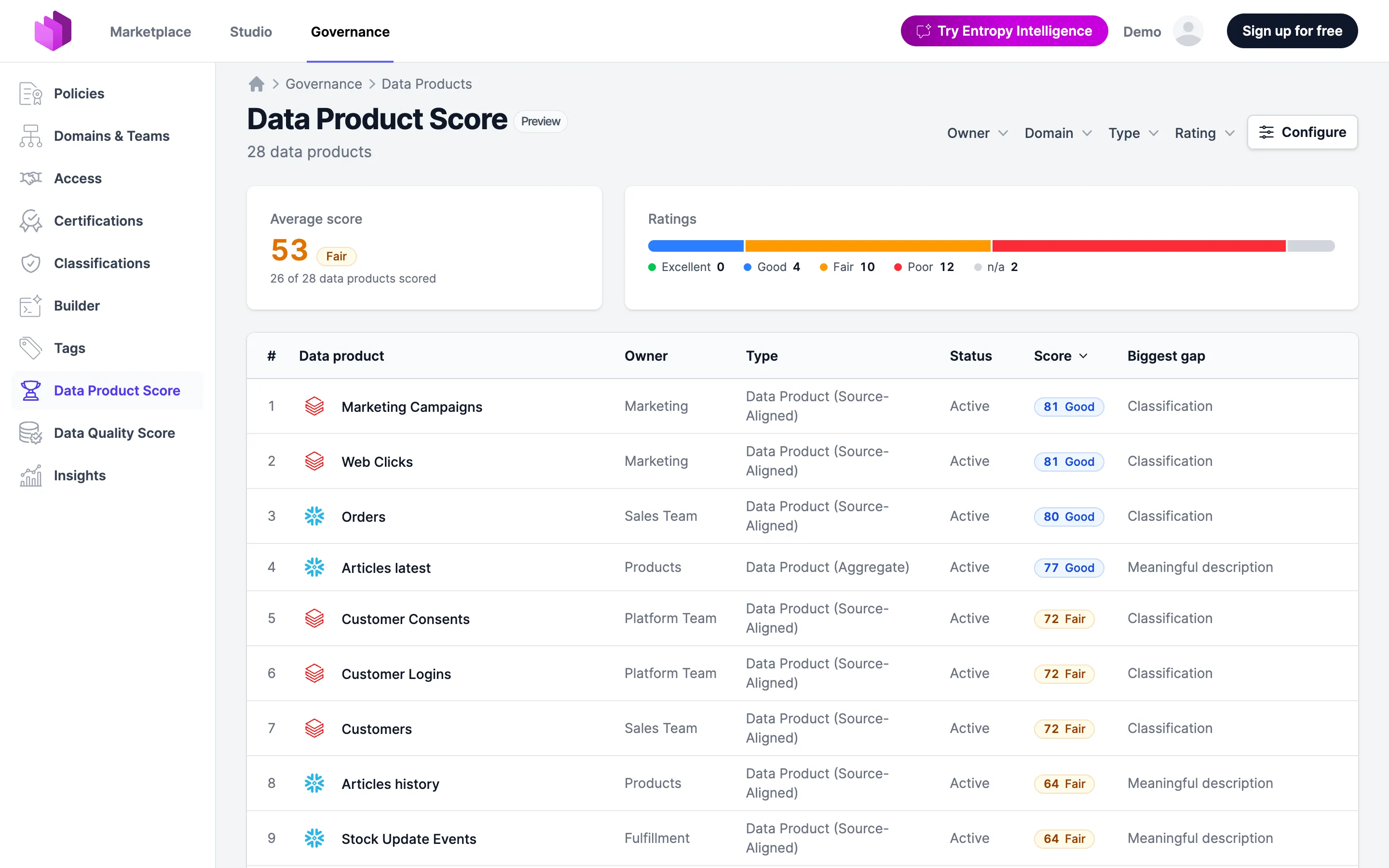
- Governance: Preview: every data product now carries a Data Product Score, a rating out of 100 for how complete, owned, contracted and trusted it is, grouped by the FAIR principles. A score page shows what to fix, and a leaderboard under Governance ranks all products. Opt in under Settings → Preview Features.
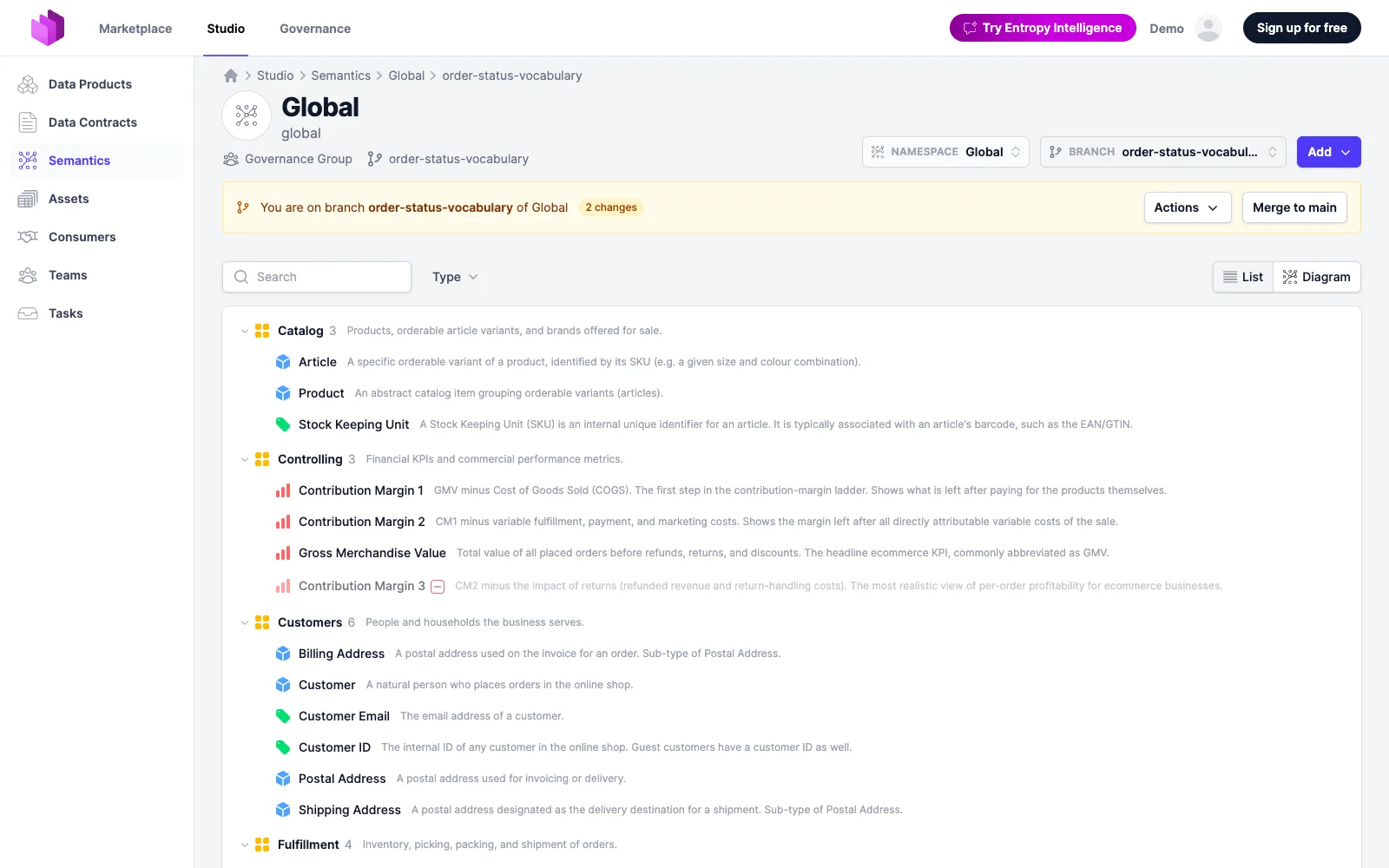
- Semantics: A namespace can now be edited on a branch: cut one from the Branch dropdown, draft changes with every touched element marked, update it from main, resolve conflicts side by side and Merge to main when it is ready. See Branches.
Data Products
- A data product's AI context is now the standard
contextblock of ODPS 1.1.0, read and written by the edit form. TheaiInstructionsandaiExamplescustom properties keep working for older documents and move into the block on migration. - The Keywords and Synonyms field now edits the standard
synonymslist of ODPS 1.1.0, and migration turns thekeywordscustom property into it. A product's and its output ports' synonyms count in search and in the Data Product Score. - Publishing a data product to the marketplace, and taking one back off, now needs the new Publish data products team permission. Every role that can edit resources receives it on upgrade, so nothing changes until an administrator narrows it.
- Fixed: Editing an ODPS data product no longer drops the assets assigned to it.
- Fixed: Editing a data product in an organization that hides the visibility control no longer clears its visibility, which made a private product public.
- Fixed: The data product editors no longer rewrite a document's
apiVersionto the organization's configured version when the page loads; the stored YAML is shown as saved, and the base schema follows the version the document declares.
Data Contracts
- The data contract view renders the structures ODCS 3.2.0 adds — map and vector properties, enum values and synonyms — and shows icons for the ten new server types such as Exasol, Teradata, Iceberg and SAP HANA.
- The YAML editor validates each document against the schema of the version it declares, with the organization's customizations layered on.
- A test result may now report a check as skipped. Skipped checks are shown next to the tally but do not count towards the Data Quality Score, and
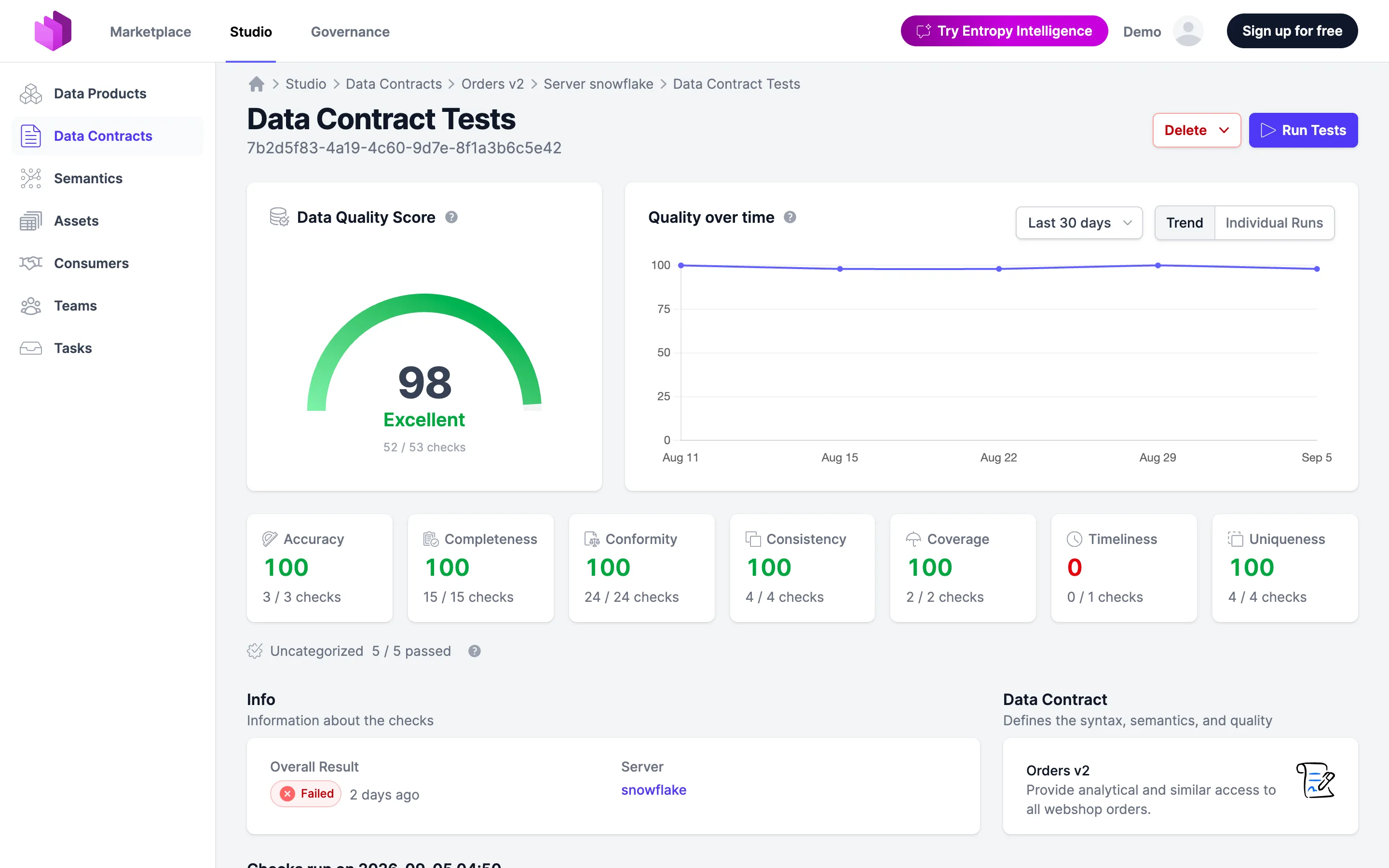
skippedis accepted on the test results API. - The checks page's History list is replaced by a chart card with the score gauge, the trend over the selected period and one bar per run. Picking a run scores that run in the gauge, the dimension tiles and the breakdown.
- A quality check that keeps failing now emails each watcher at most once a day instead of once per test result. The first failure of a streak still alerts immediately.
- Fixed: Opening the form editor for a data contract stored as ODCS now redirects to the ODCS editor instead of showing an error page.
Semantics
- A semantic namespace can now be connected to a git repository, like data contracts and data products: its OSI ontology is pulled in by webhook or pushed out from the app. Import Ontology gains a From Git source that creates the namespace and its connection in one step.
- A new concept, property or relationship is now owned by a team its creator can act for, so creators can always edit what they just created. Owners can still pick any team.
- Add now appears on group pages only, where it creates members; element pages no longer carry it, and the namespace switcher is shown on the namespace list only.
- The namespace an organization gets on its first use of Semantics is now called Global instead of Main. Existing organizations keep their namespace as it is.
Governance
- The Data Quality Score's data contract breakdown now has a Team column, so a low-scoring contract can be traced to its owner.
Marketplace
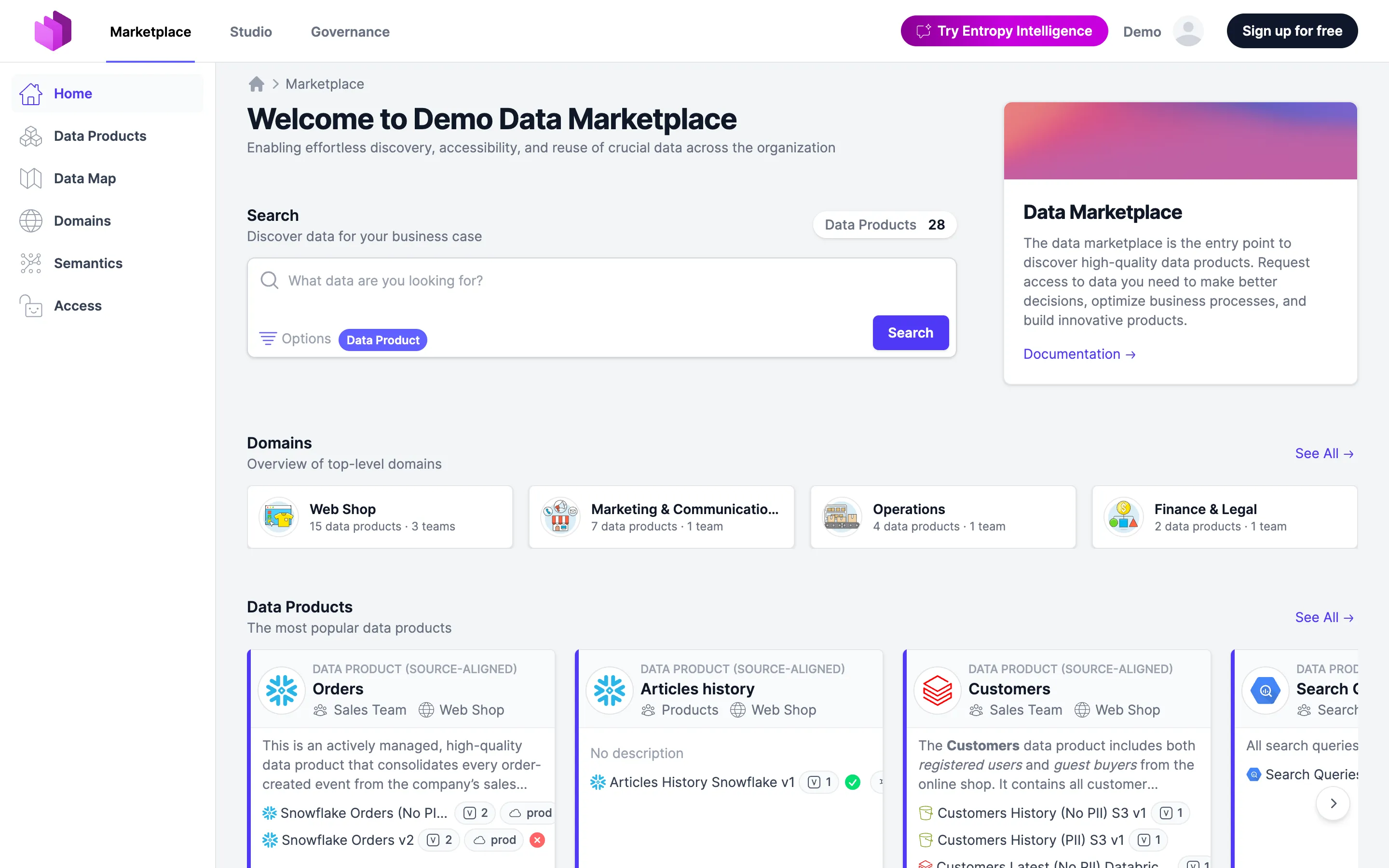
- The marketplace home page shows domains as a compact tile grid with icon, name and data product and team counts, replacing the carousel.
Entropy Intelligence
- The assistant now receives a data product's constraints, each output port's own context, and the linked contract's context and schema-object context, next to the instructions and verified statements it already used.
- The chat inspector's Tools card no longer lists the assistant's
updatePlancalls, so it shows only the tools that ran and its call count matches.
Integrations
- Fixed: A data product's patch submissions and Git sync status now use the credentials of the team that owns it, instead of failing with "No Git credentials found" when tokens are scoped per team or connection.
- Fixed: Overwriting a git-connected resource during a conflict now succeeds, and a connection that has never been pushed no longer links to a missing file.
Administration & API
- Two new team permissions, Run tests and Publish test results, let a quality pipeline run a data contract's tests and push results back without being allowed to edit the catalog. Roles that can edit resources keep both abilities.
- Super admins now have an email protocol under Admin → Emails: every email of the last 90 days with recipients, subject, body and whether it was sent, failed or skipped and why, plus volume statistics.
application.mail.protocol.*sets body storage, retention and on/off. - Deprecated:
application.mail.archiveis superseded by the email protocol. It still works for now and logs a warning at startup when set. - Deprecated:
application.customschema.enabled(APPLICATION_CUSTOMSCHEMA_ENABLED) is ignored; custom schemas are superseded by Customizations. Setting the property logs a warning at startup. - The Data Product Score is available over the API:
GET /api/dataproducts/{externalId}/scorefor one product,GET /api/dataproducts/scoresfor the paginated catalog andGET /api/data-product-score/criteriafor the criteria. All three are read-only and work regardless of the preview flag. - Branches of a semantic namespace are available over the API under
/api/semantics/experimental/namespaces/{namespace}/branches/{branch}: cut, read and replace the branch as one OSI document, list its changes, rebase, merge or delete it. Experimental. - The organization language picker under Settings now offers a System default option, so the setting can be left at, or reset to, the installation's language.
- Fixed:
GET /api/organization/membersno longer logs a warning for every member it returns, and resolves their users in a single query, so a call on a large organization is quieter and faster. - Fixed: Removing a user from one organization over SCIM no longer deletes their whole account when they are still a deactivated member of another organization.
- Fixed:
/actuator/healthnow answers probes without authentication under every SSO configuration, instead of sending them into the login flow. The new/actuator/health/syntheticgroup reports database and process liveness only, for uptime checks. - Fixed: Installing onto a non-empty database schema now runs all migrations instead of skipping the first one and failing later. A database already baselined at version 1 has to be dropped and migrated again.
Support
- A signed-in user who hits an error page can now report the failure to support from that page. The form lists what the report includes — never request bodies, credentials or contract content.
application.support.portal.urlnames where reports go. - The self-hosted diagnostics report now lists only the organizations the caller is a member of, as counts, and describes the deployment's SSO and SCIM configuration without client ids, secrets or mapping YAML.
Security
- An organization can now block email addresses from becoming members under Members → Blocked users, with
*globs such as*@contractor.example. The list is enforced for SSO auto-join, SCIM provisioning and invitations, and matching members are deactivated when it is saved.
2.0.18 (2026-08-26)
Highlights
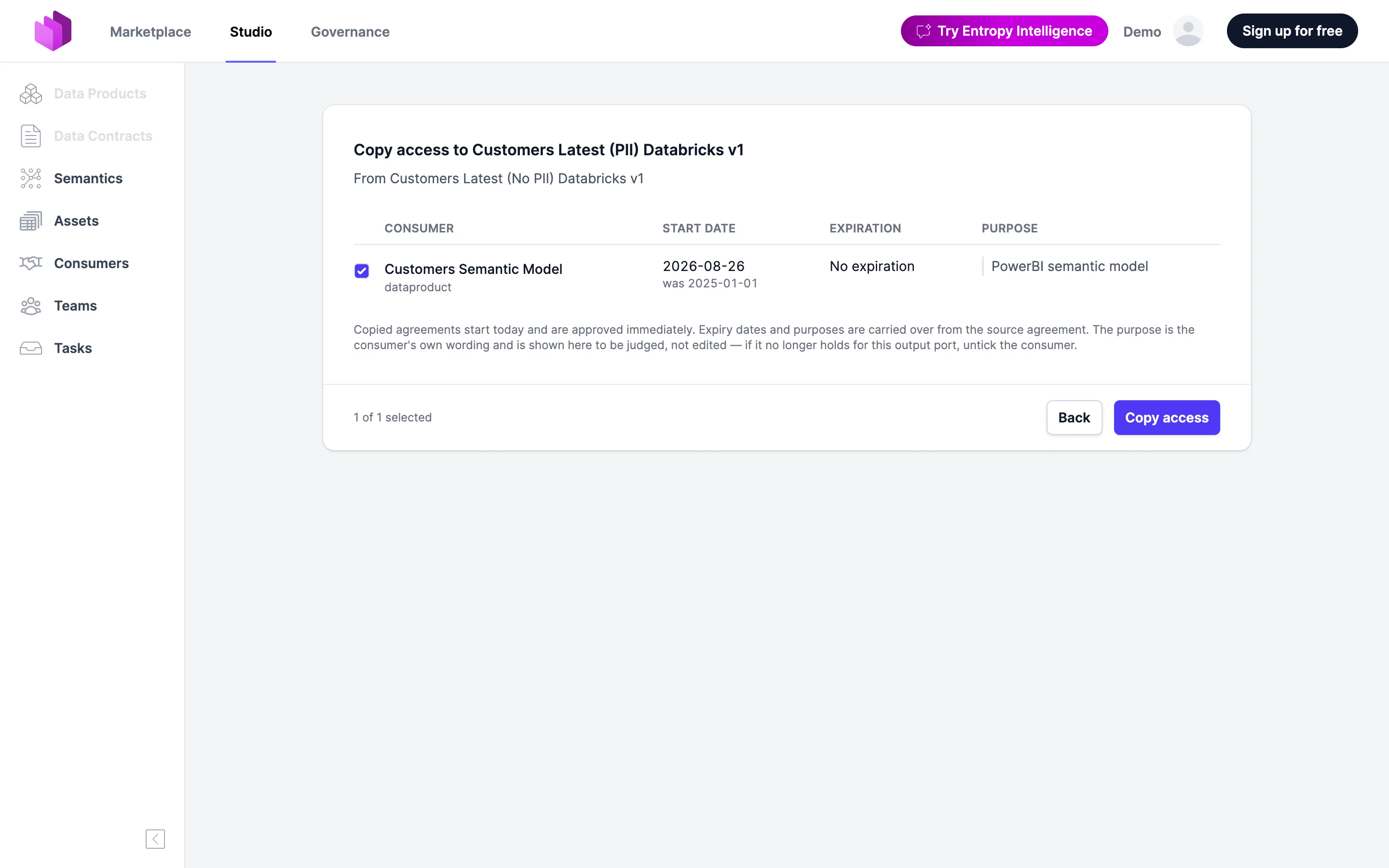
- Access Agreements: An owner can now copy the consumers of one output port onto another through Copy Access From ... in the output port actions menu, for example after publishing a new major version as a new port. Copied agreements are created approved, the source agreements stay untouched, and consumers that already have access are skipped.
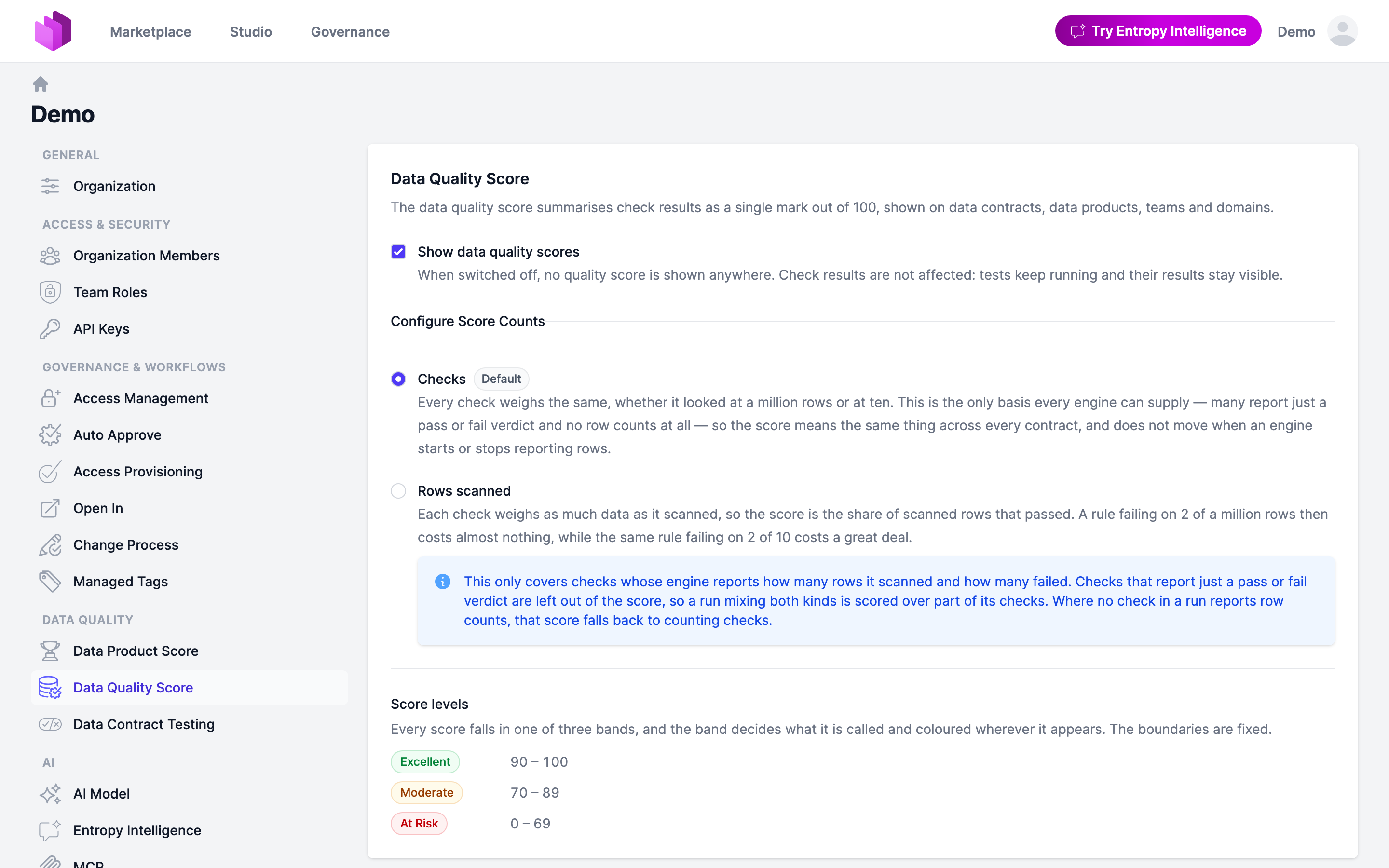
- Data Contracts: The data quality score can now be counted by rows scanned instead of by checks, so a rule failing on 2 of a million rows costs far less than one failing on 2 of 10. An organization owner picks the basis under Settings → Data Quality Score. See Data Quality Score.
Data Classifications
- All surfaces now agree on which scheme owns the standard ODCS
classificationfield: a scheme owns it only by claiming it, and when none does, every surface uses each scheme's own field. - The data contract editor no longer offers the standard
classificationfield when no scheme reads it; each scheme's own dropdown is the single way in. - Two schemes can no longer be saved against the same custom property; the form refuses it and shows the reason.
- Level values are validated on write: distinct within a scheme and at least 1. The API answers 400 for a missing or duplicate level, and the governance table names which end of the list is the most sensitive.
- Managing classification schemes through the REST API now triggers the organization-wide re-derivation, as the UI always did.
- The classification buttons now name what they edit: Edit Level on a classification's details page and Edit Scheme on the scheme list.
- Fixed: A classification on a column inside an array now rolls up as well.
- Fixed: The data product list no longer labels auto-derived classifications as manual overrides.
- Fixed: Creating a classification level now checks that the scheme belongs to the caller's organization.
Access Agreements
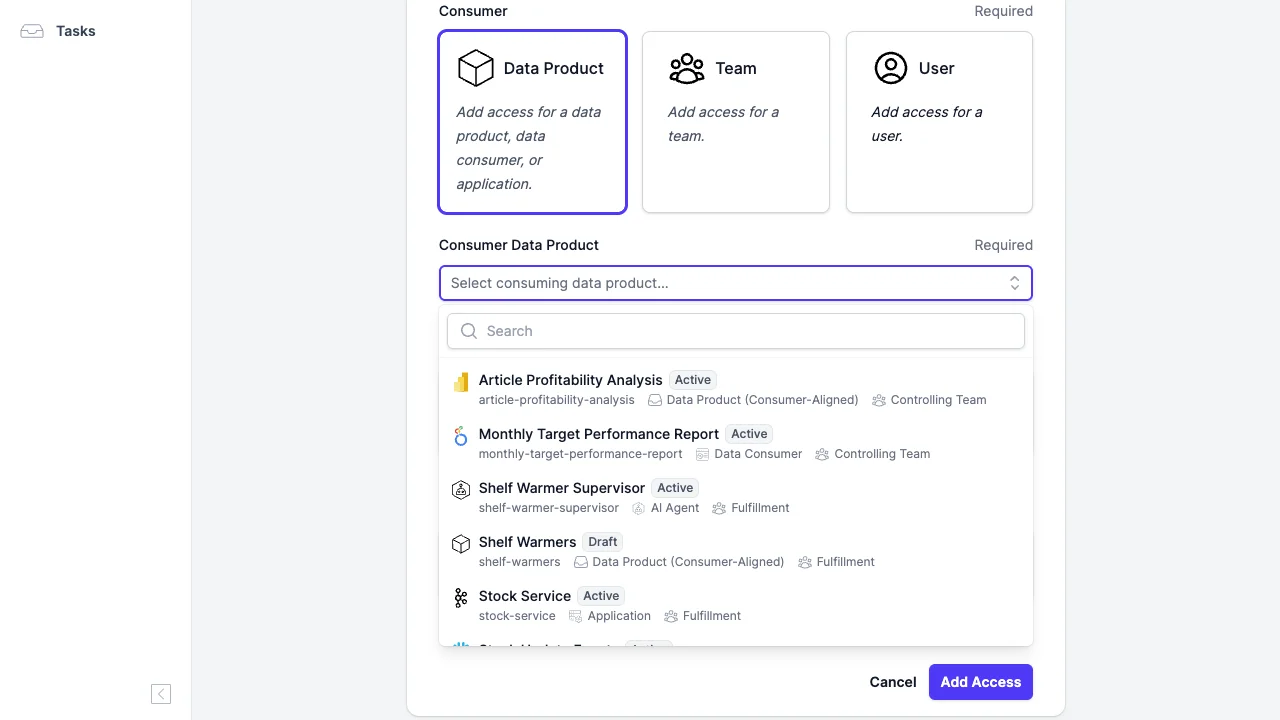
- The consumer picker on the request access and Add Access forms is now a searchable combobox showing each data product with its status, external id, archetype and owning team.
Semantics
- A concept's property and inherited-parent links now point at the namespace the element actually lives in, instead of the namespace of the page being viewed.
- The namespace diagram now hides concepts from other namespaces once there are more than ten, with a toolbar dropdown to bring them back per namespace.
Governance
- Data Quality now sits above Insights in the governance sidebar.
Administration & API
- Copying access between output ports is available over the API:
GET /api/dataproducts/{id}/outputports/{outputPortId}/copy-access?sourceOutputPortId=...previews what a copy would do, andPOSTon the same path performs it for all or for named consumers. Notifications stay off unless requested. - Editor seats are now counted only for teams that own at least one data product, as the pricing page describes. Custom roles with add or delete rights count towards a seat like edit or approve rights.
- Replacing a SCIM group's members and listing SCIM users by
userNameare now far faster, so a provisioning cycle no longer scales with the square of the directory size. - Fixed: Deprovisioning a user over SCIM no longer re-adds the team memberships it has just removed.
- Self-hosted installations now log connection pool statistics every 30 seconds and warn when a connection is held for longer, naming the thread.
- Self-hosted installations get an admin-only diagnostics report at
/admin/diagnostics/report(JVM, memory, GC, threads, container limits, connection pool, database ping) and the last 10,000 log entries at/admin/diagnostics/logs. Neither identifies a person, and secrets are redacted. - Fixed: A malformed request now answers with the proper 4xx status instead of a 500, so junk posted at a public endpoint no longer trips error alerting.
2.0.17 (2026-08-21)
Highlights
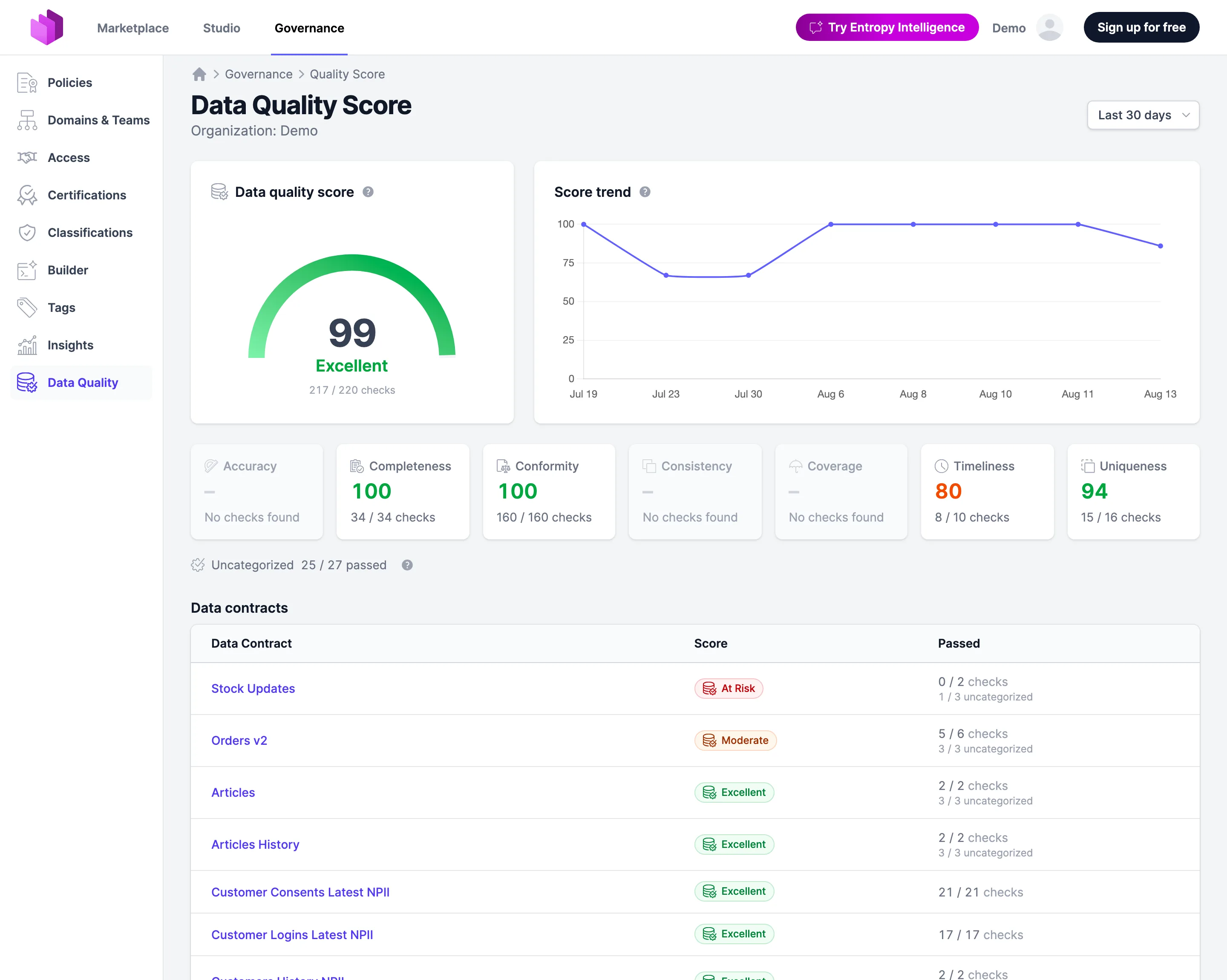
- Data Contracts: Check results are now summarised as a data quality score out of 100 per data contract, data product, team, domain and organization, broken down into the seven ODCS quality dimensions and rated Excellent, Moderate or At Risk. Switch it on under Settings → Data Quality Score. See Data Quality Score.
Data Products
- Fixed: The data product YAML editor no longer goes blank when switching the specification type or schema on the edit page, and cancelling the confirmation resets the dropdown.
- A data product mapped to ODPS now always reports
apiVersionv1.0.0, instead of carrying over the version of the specification it was written in.
Data Contracts
- The details page now shows the whole server block, including fields such as
catalog,warehouse,regionandstagingDirthat were dropped before. - A server, and every schema whose table the catalog knows, now links to the catalog asset it describes through a Show Asset button. Hand-written contracts without an asset reference show no button.
Assets
- An asset's detail page now shows a hierarchy tree with its parents and children; a leaf asset lists its siblings instead. Both lists are capped at 50 entries.
- The Schema section now sits above the custom properties and is no longer shown for assets without columns.
Semantics
- Saving an ontology through the
PUTendpoint, the MCP bulk save or the YAML editor now replaces the namespace instead of merging into it, so removed concepts and relationships are deleted. Importing an ontology still merges. - Fixed: The namespace diagram now draws relationships that leave the namespace, with the foreign endpoint badged with its namespace.
- An ontology now survives a round trip unchanged: relationships are identified by their endpoints rather than by name, nested groups are exported and imported, and
extendsentries keep a stable order so an export can be diffed. - Semantic writes that touch several rows — saving a concept, creating a property inline, deleting a namespace — now either complete or leave nothing behind.
- Semantics now opens on the namespace overview whatever the namespace count. Every element page offers Add: on a group it creates members, elsewhere siblings. A subgroup created from the parent picker takes the id its parent implies.
- A viewer who may edit a namespace can now get to Studio from the marketplace namespace page.
- An inherited parent can now be removed through the MCP tools:
extendsinsemantics_save_conceptis the complete list of a concept's parents. - Accepting a semantic suggestion now checks that the concept still exists, instead of writing a link that resolves to nothing.
- An
ownerordomainthat names no team is now refused instead of quietly leaving the concept unassigned. - Concept pages, namespace diagrams and ontology imports are faster, especially in large organizations.
- Importing an ontology no longer loses classes whose local names collide; concepts are identified by their full identifier. A re-import reports zero creations, and a file over 100 MB is refused.
Domains & Teams
- A team's ID can no longer be changed once the team owns data products, data contracts or source systems, since those carry the ID in their specification. The edit form shows the field read-only with a note.
- A team whose membership a SCIM mapping controls now says so on its page, so owners know the identity provider will undo manual member changes on its next sync.
- Fixed: The "no domains yet" empty state now sits in the list card, and marketplace viewers no longer see a prompt to create their first domain.
Integrations
- A broken Git connection now shows an error badge with the provider's message and a retry button, instead of a silent "no connection" badge.
- An MCP OAuth2 token without a consent row now gets a 401 the client can act on instead of a 500.
- MCP OAuth2 clients are now issued their scopes in the colon form
mcp:read/mcp:writeonly; the dot form stays recognized for clients registered earlier. - A Trino server URL is now validated on save to be an absolute
http(s)URL, so ahost:portvalue fails at configuration time instead of on every connection test.
Administration & API
- The organization members table can now be sorted by Member, Role or Added; the sort is part of the URL and survives pagination.
- A team-scoped API key now also acts on that team's sub-teams, matching team membership and marketplace visibility. Inheritance is strictly downward.
- The groups your identity provider has synced are now listed on a searchable page of their own, with name, identifier, member count and what the mapping does with each. Mapping rules that silently do nothing — an unknown group or team, a missing role, unreadable YAML — are flagged.
- The SCIM mapping editor now completes the organization's synced group names, teams and team roles.
- A rejected API key now names the scope the resource requires, and the SCIM paths in the OpenAPI spec document that requirement.
- A member can now remove their own user-scoped API keys; owners manage every key in the organization.
Sign-in
- A failed single sign-on now lands on a page that explains what happened — account not assigned in the identity provider, a temporary provider problem, or a configuration mismatch — instead of retrying the sign-in until the browser gives up.
Security
- The organization an MCP token or API key acts in is now verified on every request, so a revoked membership takes effect immediately. This also closes a gap where three semantics tools could read another organization's semantic graph.
- Successful logins no longer record the user's email address in telemetry; they report the same non-PII audit id used elsewhere.
- An API key's name is no longer attached to log records, since it is often a person's name.
- Prompt and completion content from the AI features is no longer logged outside local development.
- The client IP address is now anonymized on traces as well as in logs, and per-request logs no longer carry the session id or remote user.
- Unhandled errors and rejected create-account forms no longer log raw request data such as passwords; a rejected form logs which field failed which constraint.
- Every released image now carries an SBOM that meets the NTIA minimum elements, attached with
cosign attestin SPDX and shipped inside the image as CycloneDX at/app/sbom.cdx.json. See SBOM. - SPARQL queries can no longer reach out to other hosts:
SERVICEclauses are rejected and federation is disabled in the engine. - An API key can no longer take over a namespace it does not own; reassigning a namespace requires rights on both teams.
Other Fixes
- Server-emitted text now follows the user's language setting on the first request of a session as well.
- Fixed: Elements meant to appear only under a condition no longer render regardless of it — the access menu showed every state at once, and the watch menu ticked both options. A test guards against the pattern.
2.0.16 (2026-08-10)
Highlights
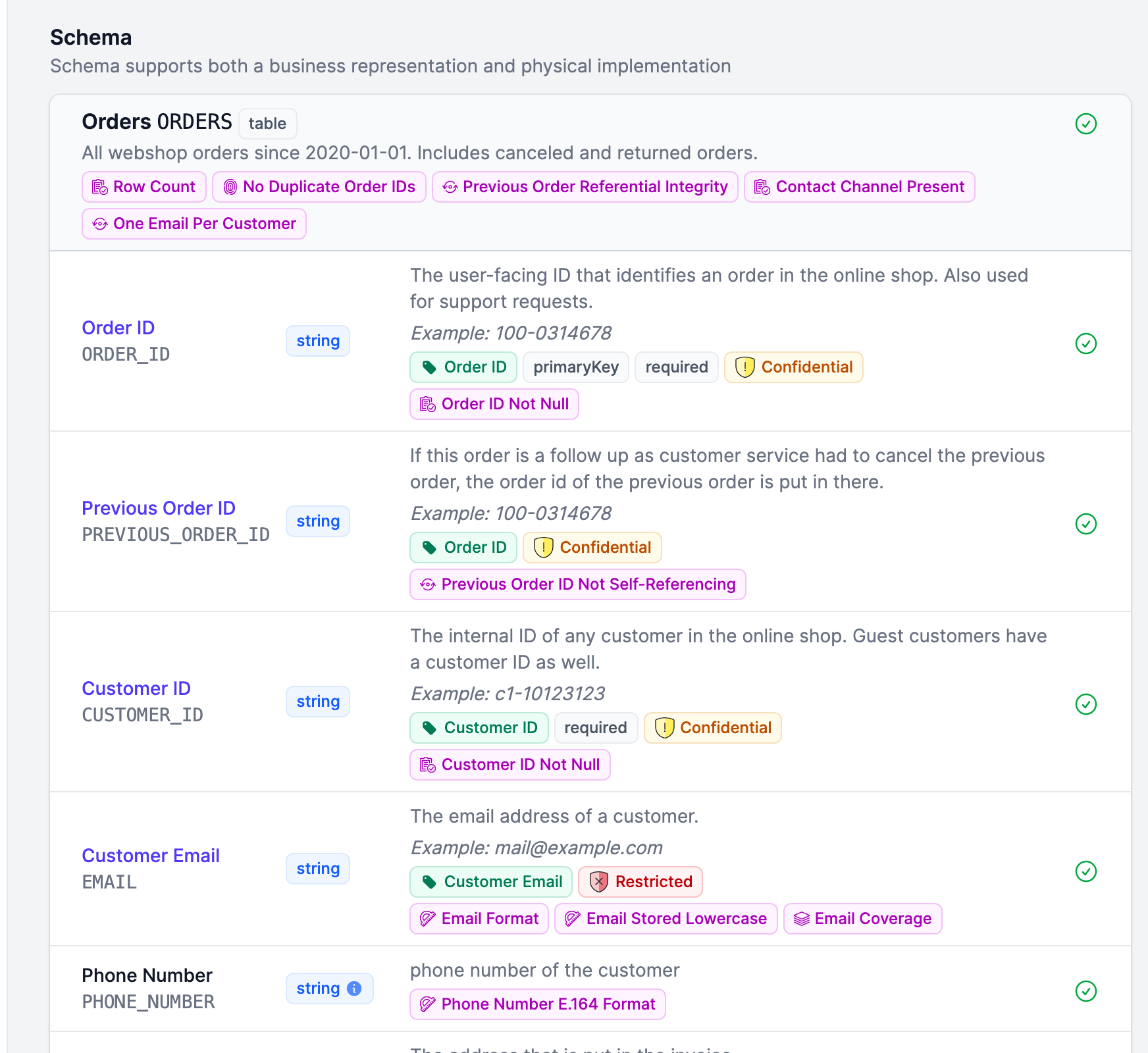
- Data Contracts: The schema view now shows quality checks and their latest test results per column — a badge with the check's name (or a generic label) and an icon for its ODCS quality dimension, with a lighter outline glyph for passing checks so a failing one stands out. The glyph links straight to the checks page, pre-filtered to the model and field you clicked.
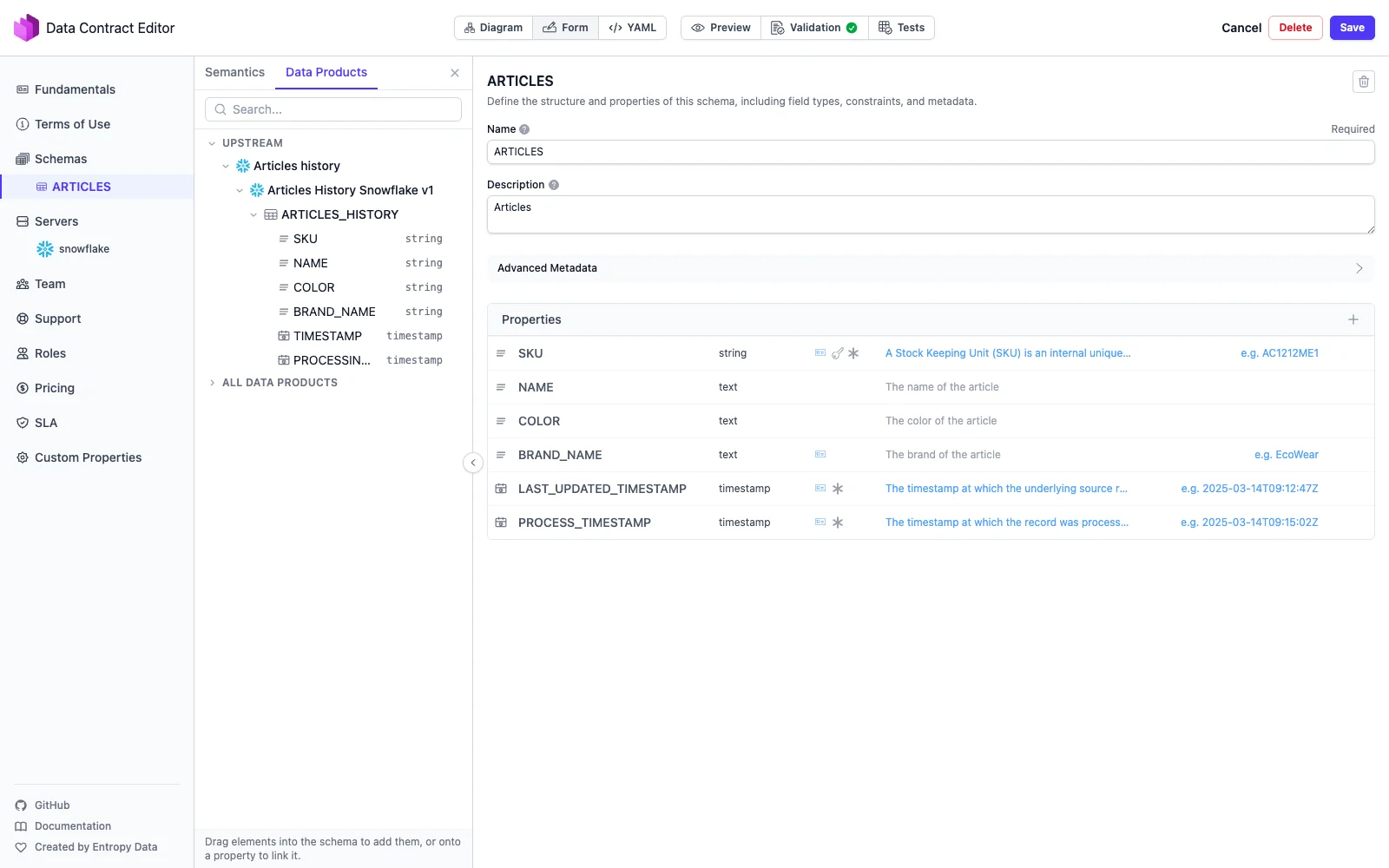
- Data Contracts: The contract editor's browse panel can now also browse data products — the upstream products already feeding the current one, or every data product in the organization publishing a contract — letting you drag a field from an upstream schema into the editor to insert or link it, recording the source as transform lineage. See Edit a Data Contract.
- Semantics: Opening Semantics now lands on a namespace overview instead of always jumping into
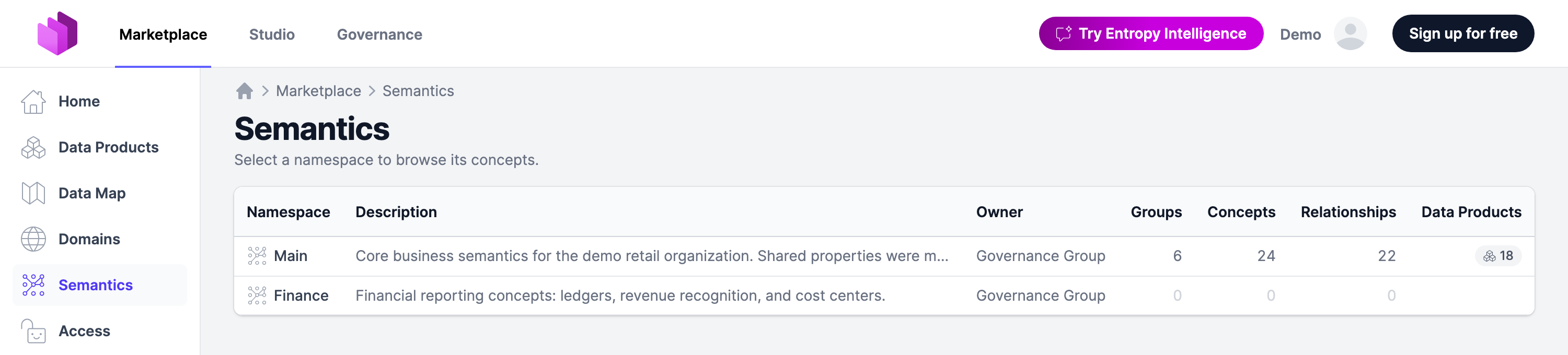
main— every namespace with its concept, group and relationship counts, plus how many data products use it, populated namespaces first. An organization with exactly one namespace still opens it directly, and an ontology import can be started from the overview, picking its target namespace in the form. See Semantics.
Data Products
- Team members and organization owners can now request access to private data products; the action was previously hidden for them entirely, with a tooltip explaining the limited audience.
- Input port cards now link to the data product that provides them, when it's known.
- The schema check indicator now shows results per server when a check ran against multiple servers, instead of merging them into a single ambiguous status.
- The name column on the data products list is wider, so longer product names stay readable instead of truncating early next to their badges.
- Fixed: With access active, a data product's buy box now always shows a primary action — either the Open In dropdown, when a port has something to open, or a "You Have Access" button linking to the access agreement — instead of sometimes showing nothing.
- Fixed: A data product without a name — ODPS does not require one — now falls back to its external id everywhere its name is shown: headings, labels, graph nodes, breadcrumbs, flash messages, the search index, emails and channel notifications, and AI tool output. The stored specification is left untouched, so it keeps round-tripping exactly as the producer sent it.
- Fixed: Saving an output port no longer fails when its server section isn't shown.
- Fixed: Publishing a data product to the marketplace no longer fails with an optimistic-locking error on a repeated click.
- Fixed: A data product's lineage graph is now loaded once per page view instead of being refetched by every page fragment update.
- Fixed: The lineage graph now ranks a data product that both provides to and consumes from the focused one alongside the other providers, instead of placing it in the downstream column next to the consuming teams.
- Fixed: Team and domain graphs now resolve data product visibility the same way as the rest of the app, and the teams graph now counts domain and subteam data products as well.
Data Contracts
- The data contract list now has a Semantics column and filter, matching the one on the data product list — filter by concept, including a Not set option for contracts that link none, with irrelevant options greyed out based on the other active filters. Selecting an entity concept also matches contracts linked only through one of its properties.
- The contract editor now supports custom properties on relationships, so a relationship can carry your own additional metadata alongside its roles.
- A schema relationship written in the single-column string form is now read as such, so contracts using that ODCS spelling import without a change.
- Fixed: Specifications whose YAML repeats a key are read again — the last value wins, as before — instead of silently failing to parse, which had, among other things, dropped output port server names in the marketplace.
- Fixed: The YAML studio editor validates documents again. It reported "0 errors or warnings found" on every document while checking none of them, because a root-relative schema URL aborted the validation pass before any marker was produced. Its icon font now loads reliably as well, independent of the page it is embedded in.
- Fixed: The contract editor now registers a link drop that involved a long vertical drag, instead of dropping it.
- Fixed: The contract editor's add-schema buttons no longer insert a schema stub that ODCS 3.1.0 rejects; both buttons now add the same valid stub, with logical and physical type set.
- Fixed: The contract editor no longer offers a description field on a relationship, which ODCS 3.1.0 does not allow there.
Access Agreements
- Terminating an access, and an access reaching its end date, now notify both sides — the consumer and the providing team — by email and on the connected notification channels (Slack, Teams, Teams O365, Google Chat). The message names the data product, the output port, and which side the recipient is on. Both are new email types with customizable templates in English and German, and both can be switched off per organization. See Email Templates.
- The input port badge is now labeled Access Agreement instead of Access Request, matching the term used across the rest of the app.
- Fixed: The request access page now offers only the roles that apply to the output port — the data contract's root-level roles plus those of the one server the port names — instead of the union of every server's roles. On a multi-server contract, picking a role was mandatory but the offered roles often granted nothing on the target server. The type and environment badges on the request access pages are correct again alongside it.
- Fixed: Consumer counts on data contract and data product pages now consistently include only active and upcoming consumers.
Semantics
- A concept's property rows now show a badge with how many data contract properties link to them; hovering lists the linking contracts and their field paths.
- The concept tree sidebar now shows each node's data product count instead of its subelement count.
- The namespace switcher now shows each namespace's concept count and links back to the overview, so it reads as a context switcher rather than a filter.
- Ontology YAML now follows the flattened concept spelling of OSI 0.2.0 —
conceptholds the concept's name and its remaining fields sit beside it, rather than the concept being a nested mapping. Relationships written in the explicit two-role form now sit at the document root, and the single-concept document behind the YAML editor and the MCP tools uses the same spelling, so a concept can be moved between the two verbatim. The earlier shapes — the nested component and the older namespace block with a flat concepts list — are no longer read; export a namespace again to get a document in the current spelling. - Properties imported from the TMF SID standard now get their own IRIs under the standard's scheme, backfilled on re-import, so linking them from the data contract editor references the standard instead of a platform URL.
- Looking up a concept by reference now also accepts a concept's browser URL, not just its IRI. Data contracts frequently record the URL in an authoritative definition of type
semantics, and those references now resolve instead of coming back as not found. - The property panel's semantic-link picker now labels a linked target by its kind — Business Definition or Semantic Concept — instead of a generic "definition" label.
- The concept visualizer now draws a distinct accent-colored ring around the selected concept, so it no longer blends into its highlighted neighbors in dense views.
- Fixed: The Suggested data products card on a concept's page now loads for concepts nested in a group, instead of staying on its loading skeleton — binding a suggested data product from one of those concepts works again.
- Fixed: Creating a namespace or starting an ontology import no longer preselects an owner team you aren't allowed to publish to, which made the form look empty and the save fail with an authorization error.
- Fixed: The property type dropdown on the concept create form now opens upward when there isn't room below, instead of rendering off-screen and becoming unselectable on the last property row.
Domains & Teams
- Domain pages and their subresources (Git credentials, notification channels, members) now use
/domains/URLs instead of/teams/; existing/teams/links for domains keep working. - A domain's detail page now reads as a domain throughout — its section headings, the member action, and the Git credentials and notification channel copy all say "domain" instead of "team". Organizational units and governance groups keep the team wording. See Domains & Teams.
- Breadcrumbs now take their labels from the entity's type rather than the URL, so a team opened through a domain link no longer appears under Domains, and a domain opened through a team link no longer appears under Teams. Domain links on data product, data contract, and semantics pages now point straight at the canonical
/domains/URL.
Customization
- A standard property marked
requiredin the organization customization is now enforced everywhere a data product or data contract is written — through the API and through both YAML editors (ODCS and ODPS) — instead of only in the form editor. The API rejects a violation with a validation error, and the YAML editors flag the missing value while you edit, so the status bar no longer reports a clean document that the save then rejects. See Customizations.
Integrations
- A connector now shows its version and health on the integrations page — the version next to the connector type, the health as a badge with the time it was last reported and the error message when there is one. A connector that has stopped working no longer looks exactly like one that is fine. Connectors that report nothing keep working and show as not reported. Both fields are now part of the API specification.
- Fixed: A change in what GitHub, GitLab, or Bitbucket returns no longer breaks the connection. Entropy Data now reads only the fields it actually uses, so an added or altered field elsewhere in the provider's response is ignored.
- Fixed: Snowflake connections and scheduled ingestions for accounts whose name contains an underscore no longer fail with a certificate error.
- Fixed: Snowflake OAuth connection popups now show a proper error page instead of failing silently when the flow errors, including during the Entropy Intelligence chat's OAuth flow.
- Fixed: The Authorization on organisation level checkbox on the Git credentials form now takes effect when unchecked; the setting previously stayed on and the token was never cleared.
Administration & API
- The admin dashboard now shows a Version card with the running build version, its release date, and a link to the changelog. See Admin Console.
- Creating an API key now accepts a team's external id in addition to its internal identifier, so a key can be scoped to a team using the id you already use everywhere else.
- Fixed: The ODPS API now returns 400, not 500, when a payload is missing required output port fields.
- Fixed: The application container now exits when the JVM hits an
OutOfMemoryError, instead of keeping its socket open and serving failures indefinitely — a state restart policies and liveness probes could not recover from, since they only act on a process that actually exits. Applies to both the self-hosted and the cloud image.
Security
- Descriptions and other user-supplied text are now escaped or sanitized everywhere they are rendered — the semantic concept preview, the AI chat, the ODPS semantics editor, the MCP login success page, and the YAML studio editor. A concept description containing a script tag or an event-handler attribute previously executed for anyone opening its preview.
- CSRF protection is now enforced across the application's browser-facing requests, including the data contract and YAML editors.
- User-registered datasource connections (Databricks, MariaDB, MSSQL, MySQL, Postgres) and server-side ontology imports (e.g. FIBO) now validate the target host before connecting, blocking requests into internal/private networks.
- A specially crafted chat message could make the assistant stop responding while it cleaned up its answer, tying up the request indefinitely. Such messages are now processed normally.
- The code editor used by the YAML views is now served by Entropy Data itself instead of a public CDN, so the application no longer loads code from a third-party origin. This matters for deployments with a restricted content security policy or without outbound internet access.
- Released container images — self-hosted and cloud — are now signed with keyless cosign, and the released images additionally carry full build provenance attestations. There is no public key to distribute: the signature is bound to the GitHub Actions workflow that built the image, so a deployed digest can be traced back to the pipeline that produced it. See SBOM.
Other Fixes
- Detail pages (data products, data contracts, access agreements, definitions, classifications, certifications, and more) now show a descriptive browser tab title — the resource's name plus its type — instead of a generic one.
- Hierarchical filter dropdowns (Semantics, Owner, Domain) now toggle an option when clicking anywhere on its row, not just the checkbox.
- Navigating back or forward to a filtered list page no longer throws errors in the browser console on the data product, data contract, assets, teams, tags, definitions, access agreement, domain and semantics listings.
- Asset requests made relative to the SSO login URL (a favicon, for one) now return 404 instead of rendering a 500 error page.
- Deleting an organization now also removes the access provisioning records that belonged to it.
2.0.15 (2026-07-24)
Highlights
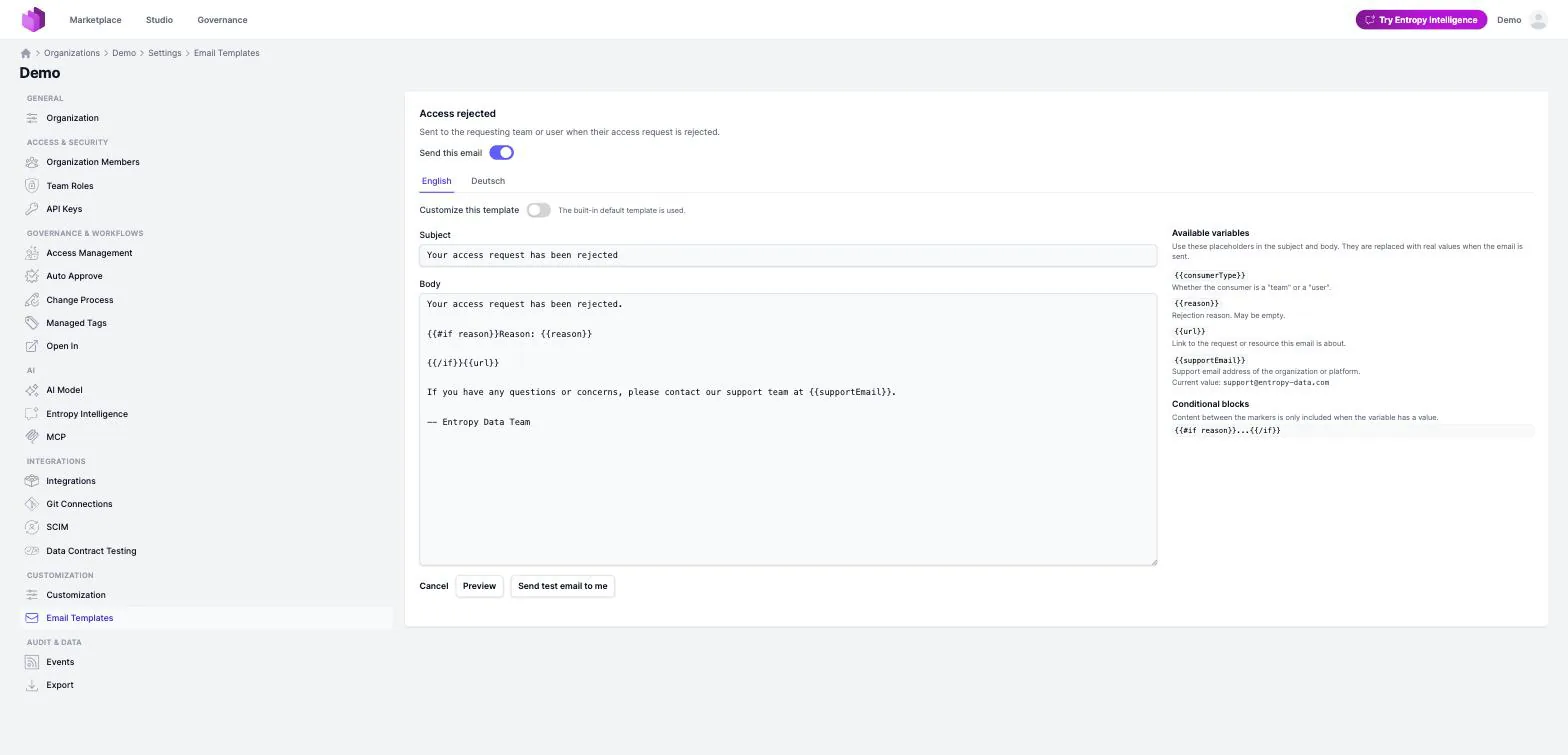
- Custom Email Templates: Organization owners can now customize the subject and body of the emails Entropy Data sends on their organization's behalf, per email type and per language, and switch individual email types off, under Settings > Email Templates. See Email Templates.
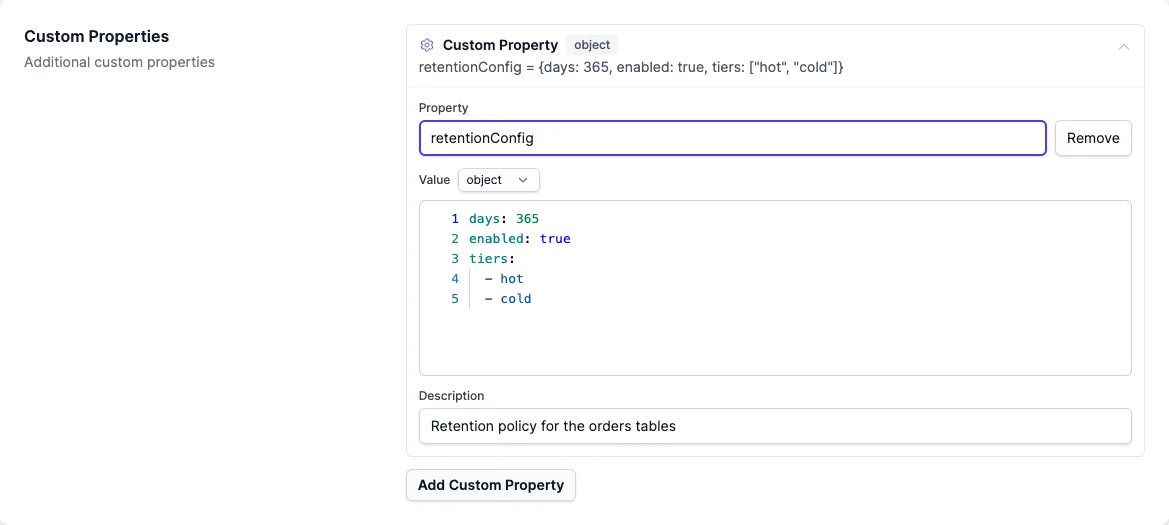
- Data Products: Custom properties on ODPS data products and output ports now have a typed editor. A property's value keeps its real type — text, number, boolean, list, or object — with an inline type switcher that warns before a change would clear the current value, and a YAML editor for object and list-of-object values. Previously every value was flattened to a string on save.
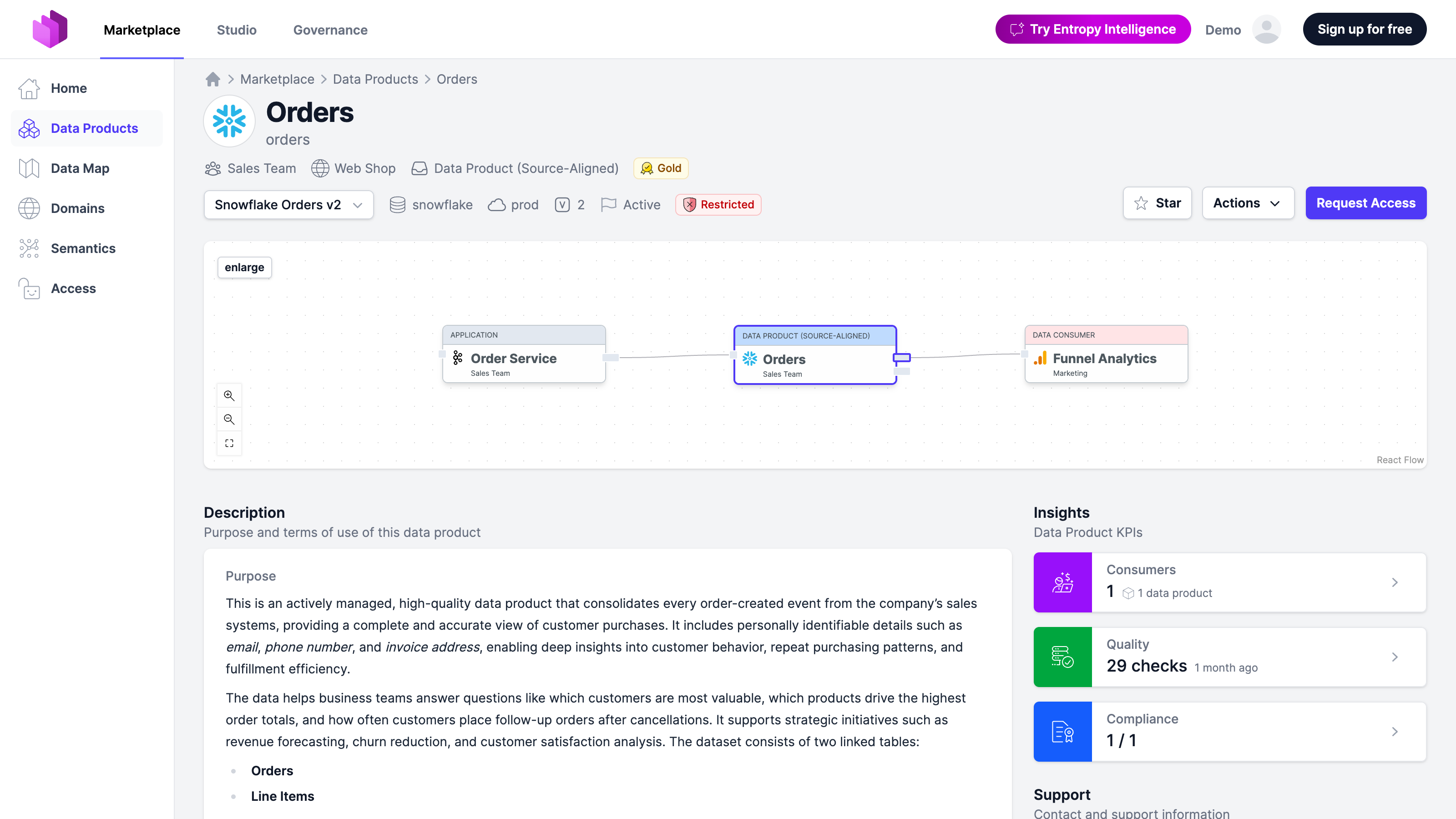
- [Preview] Data Products: A simplified data product page: the marketplace details view focuses on the information consumers need, scoped to the selected output port, while the studio and governance views keep the classic page. Organization owners can enable it under Settings > Preview Features.
Added
- Semantics: A concept tree sidebar on the Semantics details page shows where the current concept sits in its namespace, so you can switch between sibling and related concepts without going back to the list.
- Semantics: A namespace's ontology can now be exported and re-imported as a single OSI YAML document through a new namespace-level API endpoint.
- Semantics: The semantics list and a concept's detail page now show how many data products reference each concept — respecting the viewer's data product visibility — with a new Data Products section on the concept detail page.
- Data Products: The insights panel for a selected output port now includes a Quality KPI card showing the latest check-run result — pass/fail counts and time since the run — linking through to the port's checks page.
- Insights: A new Entropy Intelligence section on the Governance Insights page shows how your organization uses the built-in AI assistant in the selected time range — unique users, unique conversations, peak users per day, and a bar chart of distinct users per day. See Insights.
- Insights: The Governance Insights page now shows an Output Ports per Data Product chart, alongside the existing distribution charts.
- Access Management: A new organization-wide auto-approve policy for access requests. Set it to Always to auto-approve every access request in the organization (enabling it asks for confirmation), or keep Default for the existing per-output-port and same-team auto-approval. The output port form shows a hint when Always is active, since the per-port setting has no effect then.
- Access Management: Organization owners can now restrict which access request types — data product, team, or user — are available to request, from a new Access Management page under Governance & Workflows. At least one type must stay enabled.
- Access Management: Access agreements can now track provisioning state — whether the grant was actually created on the target data platform. Components report progress through a new API (or it can be recorded by hand when there's no connector); each transition shows up in the audit trail, with an email to the consumer on success and to the provider on failure. Organizations that don't use it see no change.
- Integrations: Integrations are now automatically disabled after repeated consecutive failed scheduled runs (configurable, on by default), with the owning organization notified by email and the asset owner team through its notification channels. The integration details page explains when and why it was disabled.
- Integrations: Organization owners can now limit which Open In options are offered on output ports, via a new Open In settings page. Deselected options disappear from the dropdowns, and the Open In button is hidden entirely on ports with no remaining options.
- Customization: Custom properties can now be declared with the
yamltype (any value — object, list, or scalar — edited in a YAML editor) or thearraytype (a list of strings, edited as rows, bounded byminItems/maxItems) on data products and output ports. Structured values stay structured in the specification instead of being stored as quoted text. See Customizations. - API:
GET /api/teamsnow supports anemailfilter, returning only the teams that user is a direct member of. - API: The organization's portable feature configuration can now be read and updated via
GET/PUT /api/organization/features. - SCIM:
GET /api/scim/v2/Groupsnow supports filtering by member id or email, in addition todisplayName.
Changed
- Semantics: The concept create flow has been reworked — the Add dropdown offers Entity, Shared Property, or Metric directly instead of a generic Concept type picker, simple properties can be defined right on the entity create page, and a group's Children section can start a new entity prefilled with that parent.
- Semantics: The bulk semantic-link suggestion flow for a data contract is now a two-step wizard. First select which namespaces the suggestions should draw from, so unrelated vocabularies stay out of the results; then review the suggestions on a screen that mirrors the data contract schema, with already-linked properties shown as read-only context.
- Semantics: The organization Settings export now includes the semantics graph — every namespace and its ontology — so a re-imported organization no longer loses its concepts and relationships.
- Semantics: Fetching a data product now includes the semantic concepts it implements, resolved from both the product's own specification and the data contracts behind its output ports.
- Semantics: Editing a concept that's referenced by a data product or data contract now shows a warning above the ID/IRI fields, since changing either would break the existing links. A concept's IRI is only flagged once it already has one, so adding a new IRI doesn't trigger the warning.
- Data Products: Tags that are referenced by a certification no longer appear as ordinary tag chips or tag filter options — they are already surfaced through the certification badge and its own filter.
- Data Products: Detail pages in the marketplace and governance views no longer show editing-oriented sections (lineage, assigned assets); these remain available in the Studio.
- Data Products: Members without edit permission now get a read-only Actions menu (including Show YAML) on studio detail pages.
- Data Contracts: The contract detail header now shows a badge for every classification scheme the contract is classified against — including classifications inherited from linked semantic concepts — instead of only the organization's default scheme.
- Data Contracts: A schema column now shows one classification badge per scheme. A column whose own classification agreed with the one inherited from its linked concept previously rendered two identical badges side by side.
- Data Contracts: A contract's ID can no longer be changed once a data product references it through an input or output port — renaming it would silently break the referencing ODPS
contractIdand external links. The editor now disables the ID field and lists the data products using the contract; save attempts that try to rename an in-use contract are rejected. - Data Contracts: The ODCS schema table has been refined — the Technical Details toggle is gone since names are always shown; a code icon next to the property name reveals its physical name in a tooltip, and the logical-type pill's tooltip now lists the physical type plus humanized options (max length, format, pattern, minimum/maximum, and more). A new toggle shows custom-property pills only on properties that have them.
- Data Contracts: The contract visualizer now truncates wide tables (more than 10 properties) to primary keys, referenced fields, and the first few remaining properties, expandable via a "+ n more properties" row, instead of rendering every property inline.
- Data Contracts: Technical custom-property badges in the schema view are now hidden behind the Technical details toggle, matching the other technical fields shown there.
- Data Contracts: Multi-word search on the data contracts list now matches results containing any of the search terms, instead of requiring all of them.
- Data Classifications: The classification scheme seeded for new organizations now uses the four tiers that are conventional in industry — Public / Internal / Confidential / Restricted, with Restricted as the strictest level. Existing schemes are untouched.
- Data Map: Input ports declared via a data contract but without an access agreement now render as dotted edges in the data mesh graph, so ungoverned contract-based connections are visually distinct from governed access-agreement edges.
- Entropy Intelligence: The assistant now also searches data contracts (not just data products) alongside semantic concepts, and lists the data contracts that define a concept even when no data product implements it yet.
- Access Management: Removing an organization member now asks for confirmation before submitting, and the button is labeled Remove from organization. It's available on every plan; only editing a member's role remains an Enterprise feature.
- Integrations: The Open In settings page now shows which server types each option applies to and, where relevant, a
Requires: <integration>hint linking to its configuration. - Integrations: The integration wizard now suggests an incrementing name (e.g. "Databricks Integration (2)") when the auto-suggested name for a new integration already exists.
- Customization: The Customization settings page now confirms a save, and reports parse errors and concurrent-edit conflicts, instead of silently returning to the form.
- Search: Multi-word searches now rank an exact full-name match first, instead of tying with any resource that merely shares one of the words.
Removed
- Marketplace: The Your Tasks section has been removed from the marketplace start page. Tasks remain available on the Tasks page in the user menu.
- Semantics: The property-level unique flag has been removed from semantic properties — the edit form, details page, public API, and ontology YAML no longer expose it. Existing YAML exports containing
uniquestill import without error.
Security
- Remember-me cookies were signed with a built-in default key when no key was configured, so a cookie forged against one deployment was valid against another. The default is gone; when no signing key is set, remember-me is now disabled outright. Self-hosted deployments that want remember-me must set
application.security.rememberme.key. - Four data contract save endpoints (the ODCS full-form save and its Studio variant, copy-from-existing, and the two asset → data contract flows) accepted writes without checking ADD/EDIT team permissions, so any authenticated organization member could create or overwrite contracts regardless of team role. All four now enforce the same permission check as the standard save endpoint.
- Signing in via OIDC no longer writes the identity provider's full claim set (email, name, and protocol values such as session handles) to the application logs; only protocol metadata is logged. The
x-api-keyrequest header is now masked in request logs.
Fixed
- Entropy Intelligence: Conversation-starter suggestions no longer render the icon name as literal text in the prompt.
- Entropy Intelligence: Concept badges in chat answers no longer occasionally render as raw
[concept: ...]text with a broken link, including for concepts with multi-segment external IDs. - Entropy Intelligence: The assistant now recognizes when a data contract field is directly linked to a semantic concept, instead of reporting it as unmapped.
- Entropy Intelligence: Concept and data product badges in chat answers now resolve reliably while the answer is still streaming, including when a badge is cited without a tool call earlier in the same turn.
- Entropy Intelligence: Chat answers now render h4–h6 headings, keep bold and italic spans on one line, and add breathing room below tables; dropped table rows, late-arriving contract badges, and leaked internal marker/summary text are also fixed.
- Semantics: Deleting a concept now also removes its inline properties, so a stale classification from a deleted concept can no longer keep appearing on linked data contracts and data products.
- Semantics: An entity extending another concept defined later in the same YAML import no longer loses that relationship.
- Semantics: Group membership is now preserved across an ontology YAML export/import round-trip.
- Semantics: Property, shared-property, and group YAML editors now validate against the same concept schema as entities, instead of stale per-kind schemas that rejected valid exports.
- Semantics: RDF ontology imports no longer append the property's range as "(Type: ...)" to imported property descriptions; the type is already captured in the structured data type field.
- Semantics: Sub-resource links on the concept edit page (e.g. to properties and relationships) generated incorrect paths.
- Semantics: Clearing a concept's per-scheme classification no longer gets silently restored on save, and duplicate flash-error banners on semantics pages have been removed.
- Data Products: Assigning or editing an asset assignment from the studio editor no longer redirects out of the studio context afterward.
- Data Products: Long asset external IDs no longer overflow the asset details page header.
- Data Products: An output port's removal guard no longer misfires on unrelated edits when its id or name isn't already in normalized form, which had blocked edits to ports with active access agreements.
- Data Products: Icon pickers and previews across the app now consistently render the same icon; the unused hexagon icon has been removed in favor of the cube icon used everywhere else.
- Data Products: Uploading an icon on the data product create form no longer fails with a 404.
- Data Products: The "Show all" toggle on output port and input port cards now works.
- Data Contracts: A small layout issue with the classification badge in the schema view.
- Data Contracts: Importing an Excel data contract no longer fails when the workbook is missing an optional sheet (Roles, SLA, Support, Team, or Custom Properties).
- Data Contracts: The definitions page no longer fails to load when one data contract's YAML is malformed.
- Access Management: Saving an access agreement from its edit page no longer fails with an error.
- Integrations: A connection problem in the Power BI integration.
- Integrations: Ingestion no longer stamps imported data products and Fabric/Power BI assets with automatic
powerbi/fabrictags; manually assigned tags are unaffected. - Integrations: Snowflake connections authorized via External OAuth are now matched by normalized host and a case/separator-insensitive account-name comparison, so a freshly authorized connection is found instead of prompting to sign in again. The Test Connection button also now tests the values currently in the form instead of the saved configuration.
- Insights: The Marketplace Users tile on the Governance Insights page now counts all non-editing members, and organization owners are no longer double-counted in both the Editors and Marketplace Users tiles.
- Insights: A doubled chevron icon on the time-range dropdown.
- Insights: Governance Insights charts and labels now follow the viewer's language and locale instead of always using English text and US-style dates and numbers.
- Certifications: The Restricted checkbox on a certification's edit page is now saved correctly; it previously never persisted as checked.
- Policies: The line, word, and cursor counters in the policy editor's status bar now update while editing instead of staying at their initial values.
- Inline code in markdown descriptions no longer renders with a duplicated pair of backticks around it.
- MCP: The
execute_querytool description now lists Amazon Redshift among its supported database types.
2.0.14 (2026-07-09)
- Data Products & Data Contracts: A new read-only YAML viewer lets anyone inspect the underlying specification (ODPS, ODCS, or the legacy formats) of a data product or data contract directly from its detail page — no edit rights required.
- Data Products & Data Contracts: Marketplace and governance detail pages now bundle Open in Studio, Request Access, and Show YAML into a single Actions dropdown, replacing the scattered standalone buttons. The Edit dropdown is now shown only in the studio editor.
- API: The JSON Schemas that data contracts (ODCS) and data products (ODPS) are validated against are now served over the API — as the pristine base standard or with the organization's Customization overlay applied, either the current version or pinned:
/api/schemas/{odcs|odps}[-<version>][-custom].schema.json. Useful for validating specification YAML in CI pipelines or powering editor tooling. - Fixed: Data product descriptions on certification detail pages now render markdown formatting instead of showing the raw markers.
- Fixed: Data product list pages and the Data Map no longer render as a truncated, seemingly empty page in organizations with several thousand semantic concepts; the Semantics filter hit an internal expression-evaluation limit mid-render.
2.0.13 (2026-07-08)
- Platform: Single sign-on now works with any standards-compliant OpenID Connect provider — such as Okta, PingFederate, or Keycloak — not just Microsoft Entra. The provider's standard
subandissclaims are used when the Entra-specificoid/tidclaims are absent, and a missing email claim now fails with a clear error listing the claims that were received. See Single Sign-On. - Data Products: You can now star a data product from its detail page. The total star count shows as a badge on list, card, and board views; sort by "Most starred" or filter by My starred / No stars / More than 10 stars.
- Data Products: The icon field on the data product edit form is now a searchable icon picker — browse and filter icons by name, each shown with its image — instead of a plain dropdown.
- Data Products: Output ports can now carry custom Open In links — add an
openInLinkscustom property (a list of{ name, url }) to an ODPS output port and each link appears in the port's Open In dropdown, with an automatically matched icon. See Output Ports. - Data Products: The full domain hierarchy path (e.g. DE / B2C / Network) is now shown on data product list and detail pages instead of only the leaf domain name, with every segment linking to its domain. Paths deeper than three levels truncate to root / … / leaf, with the hidden levels shown in a tooltip.
- Data Products: The marketplace data product listing and Data Map now show a Semantic Concepts column and a Semantics filter, listing each product's linked semantic concepts, including those inherited from the data contracts bound to its output ports.
- Data Products: The data products table on team and domain detail pages is now grouped by archetype, matching the layout of the main data products list.
- Data Products: The Example Data section on data product detail pages now appears below the ports section.
- Data Products: Cloudera has been added to the built-in data product logos.
- Data Contracts: Classifications can now be authored directly on a data contract, per scheme, overriding the auto-derived column/concept roll-up — set from a new Classification section on the contract's Overview form. The detail page badge distinguishes an authored value from a derived one.
- Data Classifications: The Add Scheme button on the governance classifications page is now a dropdown — start from a blank scheme, or import a ready-made preset (GDPR, TLP 2.0, US Government (CUI), or NATO) in one click with a preview and confirm step. See Classifications.
- Semantics: Authoritative definition links that reference a semantic concept by its stable IRI (rather than the
/semantics/{namespace}/{id}path) now resolve to that concept in the data contract editor, so linked properties render the concept's inherited business name, type, and other values instead of just preserving the link. - Customization: The data contract editor's schema property description and examples fields now honor
title,description(rendered as help text below the field), andrequiredoverrides, in addition tohidden. Where no override is set, the built-in label/help for the requested language is used. See the Data Contract Editor Customization documentation. - Customization: A custom section in the data contract editor is now automatically hidden when all of its custom properties are hidden — no more empty section header. A section with any visible (or required) property still renders.
- Customization: The data contract editor's schema physical type field now respects a customized
enumallowlist (previously the override was ignored). - Customization: The data contract editor's team tags field can now be hidden — set
hidden: trueon thetagsstandard property underdataContract.team. Mirrors the existing teamname/descriptionhiding. See Customizations. - Customization: The output port description and tags fields can now be hidden individually via organization customization — set
hidden: trueon thedescriptionortagsstandard property underdataProduct.outputPorts. Both are hidden on the output port edit form and its details view. See Customizations. - Customization: The support-channel tool selector can now be restricted or hidden. Configure an
enumallowlist (with optionallabeloverrides) on thetoolstandard property underdataProduct.supportto limit which tools are offered, orhidden: trueto hide the selector entirely. The dropdown also gained a None option to clear the (optional) tool. See Customizations. - Teams: The teams list now loads significantly faster for organizations with many teams and members.
- Teams: Member email suggestions now show an Invitation pending badge for organization members who haven't joined yet (they can still be added). Deactivated members are excluded from suggestions and rejected on manual entry.
- Access Management: Invitation emails now open with the inviting organization's name and briefly introduce the product with a link to its website, plus step-by-step guidance on what happens next. Welcome emails for SSO organizations state up front that no registration or password is needed.
- Git Integration: Auto Pull — data contracts and data products with a connected Git repository can now be automatically pulled whenever the repository receives a push, mirroring the existing Auto Push. Configure it per connection or organization-wide in Organization Settings → Git.
- Git Integration: The Auto-sync directly to branch push mode is now selectable in the Git connection form and in organization-level Git settings, alongside the existing push modes.
- Integrations: A new Amazon QuickSight ingestion syncs QuickSight datasets — including their column schema — as assets, authenticating with a cross-account IAM role or IAM user access keys. Marked Experimental. See Amazon QuickSight.
- Integrations: The Snowflake External OAuth configuration form now shows setup guidance, a copyable redirect URI, and live-generated security integration SQL, plus a Test Connection button that runs the OAuth flow and reports the authenticated Snowflake user and role.
- Entropy Intelligence: AI-generated data product suggestions and conversation-starter suggestions are now generated in the user's profile language instead of always in English.
- Localization: German coverage has been extended to surfaces that still showed English after the initial rollout — the Entropy Intelligence inspector and connection panels, the insights drill-down modals, and various remaining interface labels — so the interface now follows the chosen language more consistently.
- Privacy: User email addresses are no longer written to the request-tracing attribute used in application logs, closing a gap where SSO and MCP requests could expose plaintext emails in telemetry.
- API: Data product stars are now available over the REST API —
PUT/DELETE/GET /api/dataproducts/{id}/starto star, unstar, and read a product's star count and your own star, plusGET /api/dataproducts/{id}/stargazers(organization owners only). - Fixed: Data Products: The compliance summary count on a data product page now matches the check list rendered below it — runs for draft, missing, or deleted policies are excluded from the fraction too, so the tile no longer shows e.g. "2 / 3" above a list of only two checks.
- Fixed: Data Products: Editing a source system input port no longer risks duplicate submissions from double-clicking or repeated Enter/submit presses.
- Fixed: Data Products: The builder edit page no longer crashes for data products with certain server types configured.
- Fixed: Data Products: Editing an ODPS data product's custom fields no longer duplicates support-channel values or drops AI Context values on save.
- Fixed: Data Products: Assigning or unassigning an asset on an ODPS output port no longer silently drops other existing assignments on save.
- Fixed: Data Contracts: The classification badge on the contract detail page now reflects classifications derived from linked semantic concepts, not just column values.
- Fixed: Data Contracts: Submitting a data contract payload without an
idnow returns 422 instead of a 500 error. - Fixed: Data Contract Editor: The technical property-name badge is no longer shown when a field's title differs from the property key only by case.
- Fixed: Data Map: Classification and certification filters now actually filter the graph; previously selecting them had no effect.
- Fixed: Data Map: Output port type and environment filters now correctly exclude data products with no matching output port, instead of still showing them.
- Fixed: Access Management: Access agreement detail pages are now visible to any member who can see both linked data products in the marketplace, instead of being gated only on provider/consumer team membership.
- Fixed: Access Management: Access-request restrictions — such as disabling user- or team-level agreements, or requiring requests to go through an external system — are now enforced consistently across the web UI, the public and internal REST APIs, and the MCP
request_accesstool. - Fixed: Access Management: The access agreement/request heading and audit trail are now fully localized in German, instead of partly showing hardcoded English text.
- Fixed: Git Integration: Long YAML lines in the conflict resolution editor now wrap within the pane instead of overflowing horizontally.
- Fixed: Teams: Users authenticated via SSO no longer see a misleading hint about changing their email address.
- Fixed: Entropy Intelligence: Chat streams that run past the response timeout now close cleanly with an error message instead of ending in a broken error page.
- Fixed: Insights: The insights details table no longer crashes when rendering the visibility column, which could also cause the drill-down panel to pop open unexpectedly on page load.
- Fixed: "Open in Studio" and access links (business definitions, marketplace task cards, output port access buttons) no longer 404 for some resources.
- Fixed: Dropdown menus for Generate, Edit, Watch, and other actions now close consistently when clicking outside.
2.0.12 (2026-06-30)
- Data Products: ODPS data products can now declare input ports in the
inputPortsarray. Declared input ports appear as cards on the data product detail page alongside access-request-derived ports, showing contract schema, source technology icon, and custom properties. Input ports are also visible on linked data contract detail pages. Read more in Input Ports. - Data Products: Output port cards now show a separate badge for data products consuming the contract via an input port, alongside the access-agreement consumer count. Output ports are no longer marked "unused" when an input port consumes their data contract.
- Data Map: When a data product's input port consumes the same data contract that another product's output port exposes, a provider → consumer edge is now drawn in the data mesh graph, rendered identically to access-agreement edges. Self-consumption and pairs already covered by an access agreement are excluded.
- Data Map: "Add Data Product" buttons are now hidden in the marketplace view, consistent with other data product list pages.
- Data Contract Editor: Authoritative definition links now resolve via a single batched request instead of one request per link, significantly reducing editor load time for schemas with many semantic references.
- Data Contracts: ODCS data contracts now validate that all server names within a contract are unique; submitting a contract with duplicate server names returns a clear validation error.
- Platform: The Azure Marketplace SaaS subscription integration has been removed. Azure SSO authentication is unaffected.
- MCP: A new
dataproduct_saveMCP tool lets AI agents create or update a data product from a DPS or ODPS YAML specification. (Experimental) - MCP: A new
dataproduct_schemaMCP tool returns the JSON Schema for data products — DPS or ODPS, including any organization-specific custom schemas — so AI agents can validate or generate data product YAML. (Experimental) - Insights: The Users insights page now includes a language breakdown showing how users are distributed across the available interface languages.
- Customization: Team tags are now hidden by default on all team pages (list, detail, filters, edit). Organizations can surface them by setting
teams.tags.hidden: falsein their customization YAML. - API: Custom team roles and the role mode are now managed through a single aggregate endpoint —
GET /api/settings/team-rolesandPUT /api/settings/team-roles— which carries both the mode (defaultorcustom-team-roles) and the role catalog in one resource. The previous/api/organization/custom-team-rolesendpoints have been removed. - Fixed: AI: OpenAI-compatible AI provider endpoint URLs (Ollama, LocalAI, and similar) are now automatically normalized to include the
/v1path segment when missing, restoring chat, suggestions, and connection tests that were returning 404 errors. - Fixed: Data Map: Filtering the graph — for example by searching for a data product by name — now keeps the matched products' connected sources and sinks visible, instead of showing them stripped of their data flow.
- Fixed: API: Concurrent writes that hit an optimistic locking conflict now return 409 Conflict with a retry hint instead of 500 Internal Server Error.
- Fixed: API: Creating an access agreement with an external id that already exists is now idempotent — duplicate or concurrent requests return the existing agreement or a 409 Conflict instead of a 500 error.
- Fixed: Azure SSO: Static assets such as the favicon are no longer blocked by the Azure SSO authentication filter, preventing spurious OAuth2 500 errors on Azure SSO deployments.
- Fixed: The "resend verification email" and "resend member invitation" actions now correctly honor their 5-minute cooldown — showing a disabled button with a tooltip instead of a misleading success message — and the profile resend button no longer disrupts the page layout.
- Fixed: Saving a data product or data contract spec that only reorders fields no longer records a spurious update in the audit trail or emits update events.
2.0.11 (2026-06-25)
Data Classifications. Organizations can now define classification schemes — such as Data Sensitivity — with configurable tiers (e.g., Public, Internal, Confidential, Restricted). Data products, data contracts (ODCS columns), and semantic concepts can be classified, and badges appear on data product lists, cards, and detail pages with tooltips explaining whether the level was set manually or derived from linked contracts or concepts. Per-scheme filters are available on the data products list, and classification schemes are manageable via the REST API. Read more in Classifications.
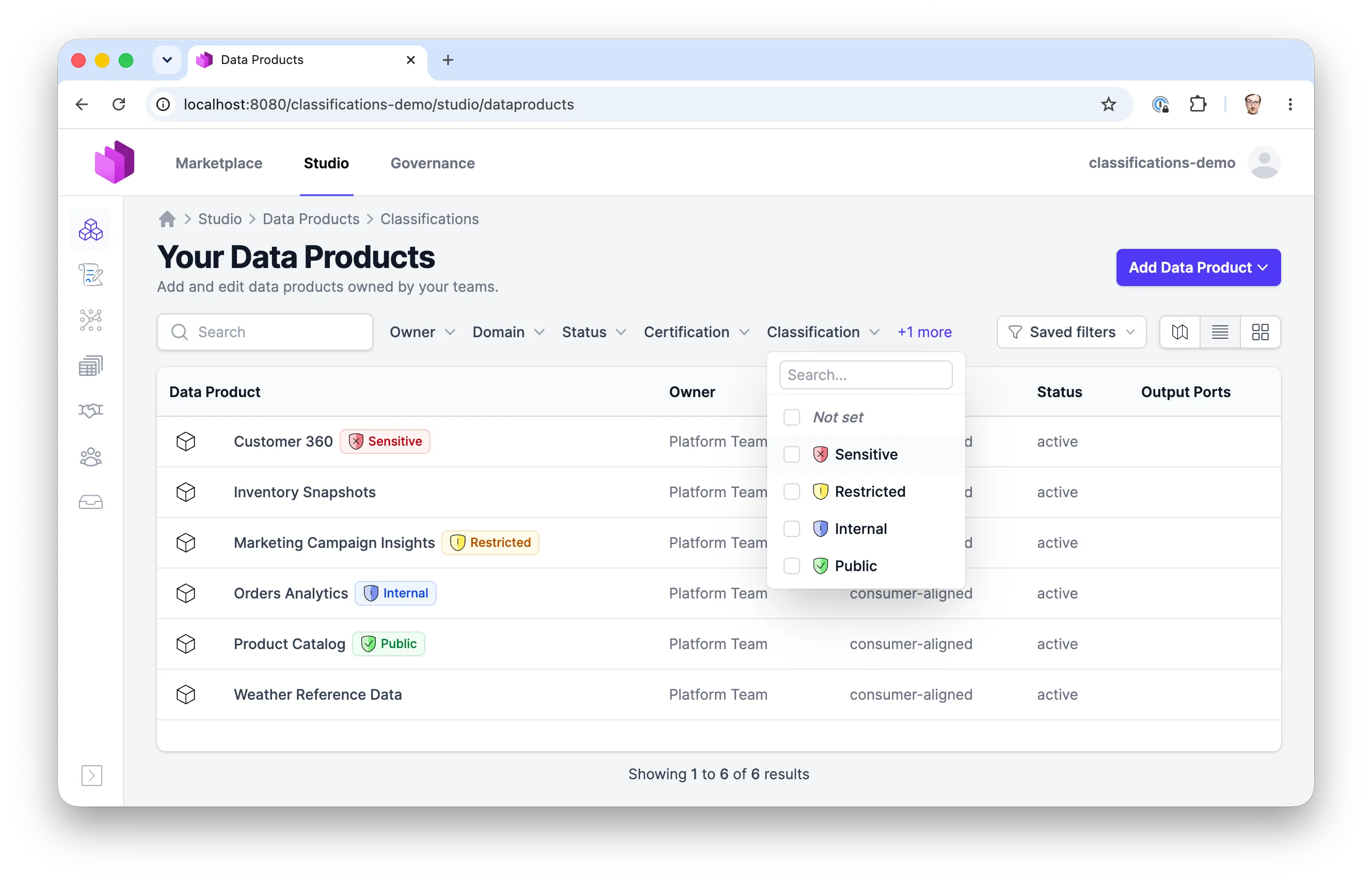
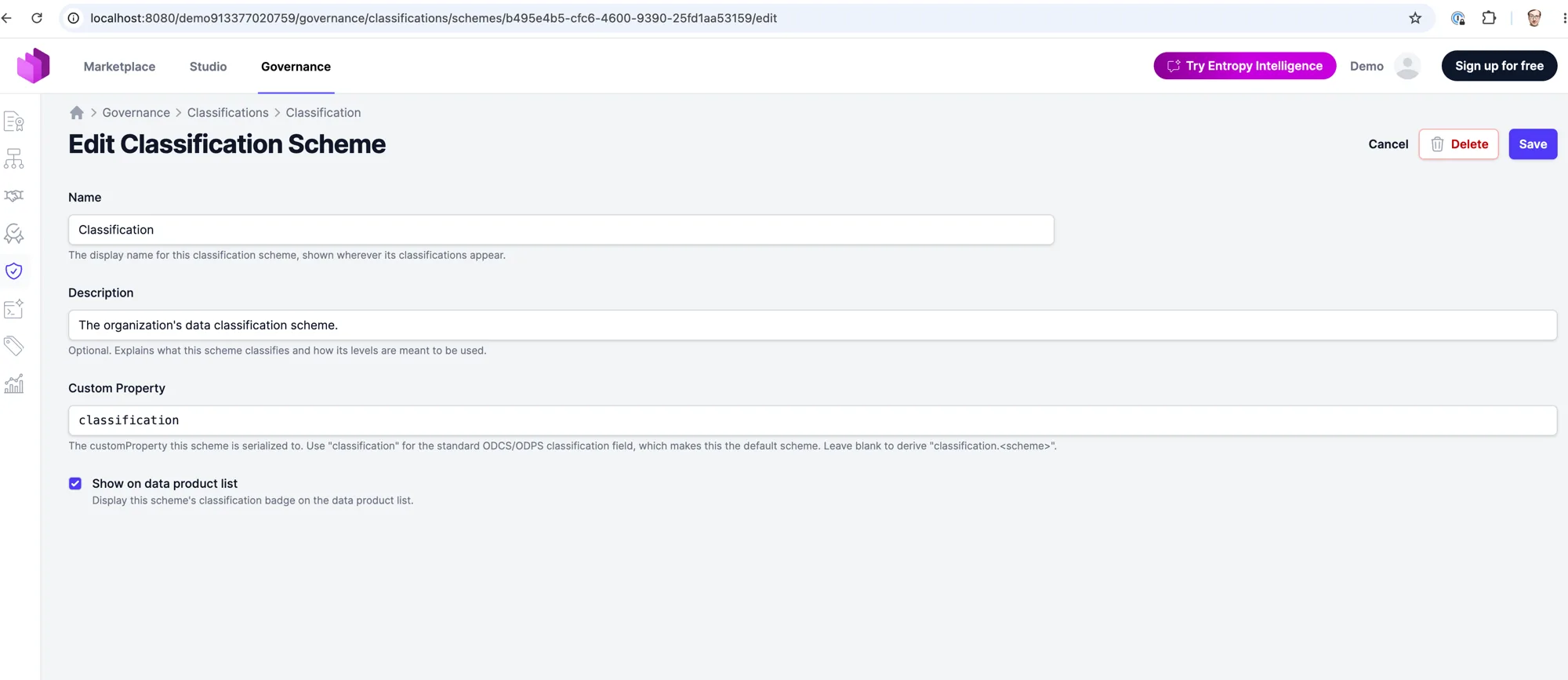
German language support. Entropy Data is now available in German. Each user can choose their preferred language in their profile settings, and the entire interface — along with transactional emails and channel notifications — follows that choice. English remains the default, and organizations can set a default language that seeds new members. Self-hosted deployments control which languages are offered and which is the default via application.i18n.supported-locales (env APPLICATION_I18N_SUPPORTED_LOCALES=en,de) and application.i18n.default-locale (env APPLICATION_I18N_DEFAULT_LOCALE=en); the language picker stays hidden while only one locale is enabled.
- Data Contracts: When an organization restricts the allowed values of a standard data contract field — such as limiting
statusto a defined set of values — that restriction is now enforced in the data contract editor's YAML view and on save, not just in the form view's dropdown. Out-of-range values are flagged live in the editor and rejected on save with a clear message, while the underlying open standard schema is left untouched. - Data Contracts: Custom property descriptions on ODCS data contracts and ODPS data products are now shown in a hover tooltip, so longer explanations are available on demand without cluttering the detail pages.
- Navigation: The Studio can now be hidden from the main navigation per deployment by setting
application.studio.enabled: false(envAPPLICATION_STUDIO_ENABLED=false) — useful when a tenant manages its data products and contracts entirely via the API. The Studio nav entry and all "Open in Studio" buttons are hidden when disabled. - Assets: Asset schema pages now include a "Technical details" toggle that shows physical column names and types alongside the logical view.
- Assets: Integration setup links in the assets list are now restricted to organization owners.
- Assets: The assets list page now loads significantly faster for large datasets, with filter options computed more efficiently.
- Teams: The member avatar row on team detail pages now caps at 10 avatars; additional members are indicated with a "+N" count badge.
- Git Integration: Organizations can now configure a custom commit author name and email for all Git operations in Organization Settings → Git — useful when commits should appear under a service account identity rather than the triggering user's credentials.
- Integrations: A native Trino ingestion provider is now available — it discovers catalogs, schemas, and tables directly over Trino's REST statement protocol, so you can catalog Trino-governed data without a separate connector.
- Access Management: API keys can now be given an expiration date when created, so programmatic access can be time-boxed and expires automatically without manual cleanup.
- Privacy: Email addresses and user names are no longer included in HTTP request/response logs or observability telemetry.
- Fixed: A misconfigured or broken Git connection on a data contract no longer prevents the detail page from loading; an unrecognized connector type now produces no link instead of a crash.
- Fixed: The sort dropdown and "Add Data Product Builder" menu no longer get clipped behind sticky table headers.
- Fixed: The ODCS data contract schema view no longer crashes with an error when a classification scheme field contains a null value.
- Fixed: Data products with a legacy custom icon value no longer show a broken image; the archetype default icon is used as a fallback.
- Fixed: The Organization Insights page no longer crashes when displaying drilldown panels.
- Fixed: Access approvals now complete correctly even when email notifications fail due to a misconfigured mail server; previously a mail configuration issue could leave an access agreement in an approved-but-inactive state.
- Fixed: Snowflake External OAuth settings pages no longer throw a template error for organization owners.
- Fixed: Assigning or removing an asset on an ODPS data product no longer clears previously assigned assets of the same type; the fix corrects a deserialization issue that caused existing assets to be silently dropped.
- Fixed: Navigating to assign, edit, or unassign assets now returns you to the studio or governance context you came from, instead of always redirecting to the marketplace.
- Fixed: ODCS specifications containing null elements inside collection fields (such as
exampleslists) are now accepted and the null entries are skipped, instead of failing with a parse error. - Fixed: Assets with very long descriptions can now be saved; previously descriptions beyond a certain length failed to save.
- Fixed: Asset search no longer crashes when an asset contains invalid control characters in custom fields ingested from binary sources such as Parquet or zip column statistics.
2.0.10 (2026-06-17)
- Power BI: "Publish to Power BI" has been redesigned as a multi-step wizard — connect a Power BI workspace, choose publish options with connections pre-filtered to compatible technologies, preview the semantic model structure, and track publish progress, all within a guided dialog.
- Entropy Intelligence: Data contract and access agreement badges in the inspector panel are now clickable links that open the related resource in a new window.
- Organization Settings: The Roles & Permissions settings page now supports per-role editing for custom team roles — click any custom role in the matrix to edit its individual permissions. Switching between default and custom role modes now requires an explicit confirmation step, with a lockout warning when switching to custom mode without any custom roles defined.
- API: The Integrations API is now keyed on
externalIdinstead of internal UUIDs across all paths; audit fields (createdAt,createdBy,updatedAt,updatedBy) are no longer returned in Integrations and Custom Team Roles API responses; integration configuration is now returned inline on the detail endpoint asapplication/yaml; a newGET /api/integrations/{externalId}/runs/latestendpoint returns the most recent run. The separate/api/integrations/{externalId}/configurationendpoint has been removed. - Fixed: Entropy Intelligence: The chat input is now cleared after retrying a query following an access approval, preventing the previous message from being re-sent unintentionally.
- Fixed: Submitting a scalar value for an output port server property that expects an object now returns a 400 response instead of a 500.
- Power BI: A new "Open in Power BI Workspace" dropdown entry on output ports lets you navigate directly to the matched Power BI workspace in the portal. Connected semantic models are listed and grouped by workspace — with Power BI icons and external-link indicators — and server properties such as
httpPathare pre-filled from the output port's server configuration. - Data Products: The data product editor now shows concept icons next to semantic references and provides a preview sidebar when linking a semantic concept.
- Semantics: The bulk "Suggest semantics for all properties" feature can now be enabled on self-hosted deployments by setting
application.bulksemanticsuggest.enabled: true(envAPPLICATION_BULKSEMANTICSUGGEST_ENABLED=true). - Fixed: Entropy Intelligence: The access check badge in the inspector panel now deep-links directly to the specific matched access agreement.
- Fixed: Teams: The Status column in the data products table no longer gets clipped.
2.0.9 (2026-06-15)
- Marketplace: Domain and data product carousels now use arrow-button paging instead of a scrollbar, snapping to card boundaries.
- List Views: Sticky table headers and content-aware scroll panels now apply to many more list views — including domains, teams, assets, certifications, policies, semantics, tags, and access agreements — so long tables scroll within their panel while short ones shrink to fit instead of leaving empty space.
- List Views: Table rows across the application are more compact. Tags on list items now display the first two tags with a "+N" badge for any additional tags, keeping rows to a single line.
- Filters: List filter dropdowns now stay open while you type or toggle options, instead of snapping shut on each change.
- Filters: The data products list gains a Certification filter and a "Not set" option on Owner, Domain, Status, Type, and custom field dropdowns that matches data products where the field is unset. A shortcut on the Certifications governance page links directly to uncertified data products.
- Filters: The Consumers list filter dropdowns (provider data product, consumer, and status) now pre-filter to only show options that would yield results given the other active filters — matching the behavior introduced for the data products list. A "Show all" toggle reveals the full option set.
- Data Products: The "Add Data Product" form now auto-suggests an ID derived from the name you type — the derived slug is editable, automatically satisfies the organization's configured ID pattern, and the pattern is enforced server-side as well.
- Data Contracts: When linking a data contract to a data product, you can now create a new data product on the spot — with a changeable owning team — instead of only picking an existing one.
- Data Contracts: Adding a new field in the embedded data contract editor now pre-fills configured property defaults.
- Data Contracts: When ODCS is the supported specification format, the deprecated Web UI and YAML edit and add options are now hidden from the Add Data Contract dropdown and the ODCS details page options menu, keeping only the relevant actions visible.
- Semantics: Semantic reference links in the data contract visualizer now show the semantics icon, making them visually distinct from plain reference links.
- Certifications: The certifications governance page now shows a Coverage column with the percentage of all data products that hold each certification tier.
- Entropy Intelligence: SQL queries via MCP now time out gracefully across all supported warehouse types (Snowflake, BigQuery, Databricks, Postgres, Trino, Redshift, MySQL, MariaDB, MSSQL) — connect timeout 10 s, query timeout 40 s — so a slow or hung warehouse no longer blocks the MCP connection indefinitely.
- Visualizers: All graph visualizers — semantic graph, OpenLineage, data contract, data map, and ODCS editor — now share a unified toolbar with consistent zoom, fit-view, and layout/collapse controls and icons.
- Organization Settings: The organization settings sidebar navigation is now grouped into labeled sections — General, Access & Security, Governance & Workflows, and AI — making it easier to find the right settings page.
- Organization Settings: The Roles & Permissions settings page now groups permissions by category and shows a read-only matrix of the five built-in roles (Owner, Approver, Editor, Member, Steward) against all permissions for a quick at-a-glance review. Selecting a role type (Default vs Custom) collapses the unselected section to reduce scrolling.
- Git Integration: Changing or pulling a data product's git connection now requires edit permission, matching the REST API; these actions are hidden from users without edit access.
- Git Integration: Deleting a data product now also removes its git connection, so you can immediately create a new product against the same repository, branch, and path.
- Integrations: Microsoft Fabric: Several fixes to OneLake asset imports — Eventhouse items are no longer incorrectly traversed as OneLake folders; KQL database tables link to the correct Fabric portal page; Warehouse tables include the SQL Server port (1433); all OneLake table types now emit ODCS servers with connection details so the generated data contract is immediately queryable.
- Teams: Deleting a team is now blocked when it has child teams, preventing the children from being orphaned.
- Data Product Builders: Builders can now be restricted to specific server technologies (e.g. Snowflake, BigQuery, S3). A builder with server types configured is only shown for data products whose output ports or bound data contracts use a matching server technology.
- Access Agreements: The team picker in the Request Access and Add Access forms is now hierarchical — teams are shown with type badges and their parent path, making same-named teams across different org units distinguishable.
- Customization: The output port environment, version, and server sections can now be hidden individually via organization customization — set
hidden: trueon theenvironment,version, orserverstandard property underdataProduct.outputPorts.standardProperties. Useful when those fields are managed in the linked data contract and the duplicate display adds clutter. - Custom Properties: Custom property sections on data product, data contract, output port, and access agreement detail pages now display as description-list cards — label above value — instead of name/value tables, for a cleaner and more consistent look.
- API: New REST API for managing custom team roles at
/api/organization/custom-team-roles— list all roles, fetch by name, create or update in place (PUT), and delete. Deleting or renaming a role that is still assigned to team members returns 409 Conflict; the settings UI now surfaces the same error instead of silently orphaning the assignments. - Fixed: Clearing the domain field in the data contract editor now saves correctly; previously the previous value persisted.
- Fixed: The Member role description shown on Governance Group team-member forms now reads "Can edit governance resources, such as policies and certifications" instead of the misleading "Cannot edit resources."
- Fixed: Team-level git credentials now appear in the data-product and data-contract import forms; previously only organization-wide and personal credentials were offered in the dropdown.
- Fixed: Markdown now renders correctly in long-form text fields across the application — including output port descriptions and cards, input port descriptions on data product detail pages, team descriptions, data usage agreement purpose and rejection reason, and contract terms (usage, limitations, billing). Previously these fields displayed raw markdown source.
- Fixed: Data Products: Editing an input port no longer overwrites the port's external ID with its source system's ID; previously, when the two IDs differed, saving the port caused a crash.
- Fixed: Policies: The "Change Status" modal on a new unsaved policy no longer becomes unresponsive when the policy name field is empty.
- Fixed: Access Agreements: Access Agreement details (purpose, consumer identity, rejection reason) are now restricted to involved parties — the provider team, consumer team, organization owners, and governance group members. Previously any organization member could view all access agreements.
- Fixed: MCP: MCP sessions no longer produce errors when a client reconnects after a sleep/wake cycle or network interruption.
2.0.8 (2026-06-05)
- Excel Import: Importing a data contract from Excel now enforces the organization's managed-tags policy, so organizations that require managed tags can no longer introduce unmanaged tags through an import. Property names that contain literal dots (e.g.
No. of sites) in hand-authored sheets are preserved instead of being silently dropped, and contract- and schema-level tags are trimmed on import. - API: The ODCS semantics and single-definition endpoints now accept API-key authentication, so programmatic callers such as the datacontract CLI can resolve semantic concepts and definitions with an API token. A new
GET /api/semantics?iri=…resolves a concept by its stable IRI. The OpenAPI spec now documents the RFC 7807application/problem+jsonerror format used by all/api/**responses, includingProblemDetailandValidationProblemDetailschemas, so consumers know the explanatory message lives at$.detail. - Semantics: Opening a semantic concept URL in a browser now serves the concept browser page instead of raw JSON;
odcs+jsonand API-key requests still receive the JSON definition. - Power BI: "Publish to Power BI" is no longer gated behind a global feature flag — availability is now determined solely by each organization's Power BI settings.
- Privacy: Deleting a user — via the SCIM
DELETE /api/scim/v2/Users/{userId}endpoint or admin user deletion — now erases all of the user's personal data along with the account: AI assistant conversations, summaries and chat logs, search history, saved filters, data contract watches, user-scoped API keys, in-progress Microsoft Fabric / Power BI OAuth flows, git credentials, data source connections, uploaded profile picture (avatar) images, user settings, password-reset and email-verification tokens, active sessions, and MCP authorizations and consents, in addition to organization and team memberships. Audit fields and activity history are retained for traceability. See GDPR Deletion. - Insights: The Assets Insights breakdown now shows source and type logos, making it easier to identify asset categories at a glance.
- Navigation: Breadcrumbs have been added to the Intelligence, Export, MCP Clients, SCIM, and Schemas settings pages for easier navigation.
- MCP: New
dataproduct_savetool to create or update a data product from a YAML specification (DPS or ODPS). (Experimental) - MCP: New
dataproduct_schematool to retrieve the JSON Schema for data products (DPS or ODPS), including organization-specific custom schemas. (Experimental) - Git Integration: Bitbucket Cloud repository listing now works correctly using the current workspace API. API Token is the recommended credential type and App Password is marked as deprecated.
- Data Contracts: The data contracts list and cards now show a server count badge with deduplicated technology icons. Hovering over the badge opens an overlay listing each server with its environment badge and connection details.
- Data Contracts: Custom properties are no longer shown on schema badges to eliminate redundancy and duplication.
- Certifications: New certification analytics and visualizations are available on the Organization Insights page.
- Data Products: Users with an active Data Usage Agreement (DUA) can now view restricted or private data product detail pages. Previously an active DUA was visible in the access overview but navigating to the product returned a 403.
- Entropy Intelligence: Read-only query validation now also accepts
WITH,DESCRIBE,SHOW, andEXPLAINstatements in addition toSELECT. - Integrations: Informatica is now listed as a coming-soon integration.
- Semantics: Importing an ontology into an unregistered namespace now automatically registers the namespace, so imported concepts are immediately reachable in the namespace-scoped Studio UI.
- Admin: The organizations admin table now displays host and brand columns for easier identification.
- Fixed: OneLake icon no longer disappears when a Power BI icon is displayed on the same page.
- Integrations: Microsoft Fabric OneLake tables and files are now discoverable through the Fabric integration. OneLake tables appear in the asset tree with their Delta Lake column schemas, so creating a data product from a OneLake table pre-populates the data contract with the table's columns automatically. Lakehouses, Warehouses, and SQL endpoints are also supported. The Import-from-Asset wizard correctly sets the output port type for each Fabric asset type.
- Data Contracts: The data contract visualizer now supports exporting the diagram as a high-resolution image, including a full-graph view at native zoom.
- Customization: Organizations can now restrict which server types appear in output port and data contract server dropdowns by configuring an allowlist on the
typeproperty'senumin the customization schema. Each enum option supports an optionallabelto override the display text while preserving the stored value. Server types already in use are always preserved. - Semantics: The "Convert to Semantic" confirmation modal now explains the type mapping — object definitions become Entities, all others become Shared Properties — and notes that the conversion cannot be undone.
2.0.7 (2026-05-21)
- Data Product Builders (experimental): A new opt-in feature that guides you — and your coding agents — through building a data product from its contract. Each builder ships Markdown usage instructions; the dbt builder additionally bootstraps a project from an ODPS draft and exposes a reload command. Usage instructions can now vary by data product status, with a generic fallback when no status-specific block matches. dbt and Snowflake builders are available, while Databricks and AWS Glue appear as "Coming soon". Enable with
application.dataproductbuilder.enabled. - Data Product Builders: Usage instruction cards gained a one-click copy button for code snippets and an
entropy-data connection testline in the authentication step, plus a Feedback section linking to the builder plugin repository. The install/update cards on the agent setup page have been consolidated, and the API-key-created info box is aligned with the builder layout. - Semantics: New bulk "Suggest semantics for all properties" for data contracts. An async job analyses an entire ODCS contract, proposes one best concept per unlinked property, and applies the selected suggestions in a single save (one version bump and audit entry). A progress poller and a dedicated review screen, grouped by schema, drive the workflow.
- Semantics:
authoritativeDefinitionURLs that don't match the/semantics/{ns}/{id}path pattern (custom IRI schemes, e.g.http://host/ns/main/Article) now resolve by the stored IRI as a fallback, so the link is preserved instead of dropped. Semantic link buttons resolve by IRI even when the host is internal. - Power BI: Semantic-model details now render a dedicated "Tables" section that mirrors the data contract schema view, with column-level relationships between tables. Columns and relationships are enriched from upstream input-port data contracts so descriptions, types, semantics, and foreign-key links carry over, and data contracts generated from a semantic model inherit those column definitions on 1:1 matches and promote table relationships onto the contract's column
relationshipsinstead of leaving them as an opaque custom-properties blob. The Import-from-Asset wizard preview now shows the full lineage chain — source data product → semantic model → report — when launched from the matched-Power-BI banner, and the marketplace view hides Power BI import banners. - Data Products: Creating a data contract from the type-selection flow now connects the contract to the selected output port and no longer overwrites an output port that already has a contract bound to it.
- Data Contracts: The Data Quality card has moved above Support on the ODCS details page. The embedded data contract editor bundle has been refreshed with a semantic-link icon and inherited-type rendering in the diagram view.
- Import/Export: Governance policies are now included in the organization export zip (
policies/) and restored by theentropy-data import zipcommand.
2.0.6 (2026-05-13)
- API: New policies REST API (experimental) with GET/PUT/DELETE endpoints under
/api/policiesfor managing governance policies through API tokens, documented in the OpenAPI spec. - Git Integration: Pushing newly created files now succeeds on the first push for both data products and data contracts, instead of failing when the path does not yet exist. Pulling no longer silently drops a rename — a contract or product whose externalId was changed in Git is now looked up by UUID first, falling back to externalId on Import, and whitespace in YAML IDs is normalized before lookup. Error messages on Git operations are clearer.
- Marketplace: AI search now reranks results before truncating to the top 10, so exact name matches are no longer dropped by Postgres
ts_rankordering when many products share similar terms. - Data Products: ODPS input port saves with invalid data now surface inline validation errors instead of a generic error page.
- Integrations: Removing a Snowflake External OAuth configuration now works correctly from the configuration form.
- List Views: Filter dropdowns in data product and data contract tables no longer get clipped behind the sticky table header.
2.0.5 (2026-05-11)
- Multi-organization: Users who belong to multiple organizations now land on a new organization-chooser screen after login when no default is set, and the header gains an organization switcher dropdown that makes the active org clear and easy to switch. The default-organization flag is now toggled only by explicit Make Default / Unset Default actions, and never set automatically by SCIM provisioning or SSO auto-join.
- Data Products: Quick-create forms (data product, application, data consumer, AI agent) now expose an ID field so the externalId can be chosen at creation. The YAML editor opens with an editable
example-id # change meplaceholder rather than a pre-generated UUID, so the ID is chosen deliberately. Organizations that prefer auto-generated UUIDs can opt back in by settinggenerationStrategy: uuidon theidstandard property. - Data Products: "Add Source System Input Port" works again for ODPS data products, with the post-save redirect now resolving to the persisted UUID. Saving a data product with an invalid externalId is blocked at the API with a 422 and shown inline in the form instead of an error page.
- Data Products: The output port editor now guides users toward picking an existing data contract server when one is available, with an inline warning below the server select.
- Git Integration: New conflict-resolution wizard replaces the old single-form conflict screen. Step 1 shows local vs. remote YAML side-by-side using CodeMirror MergeView; step 2 offers a Push Directly / Create PR or MR choice with a dedicated PR/MR form. Conflicts also auto-resolve to "patch synced" when an open patch submission already covers the local changes.
- Intelligence: AI search now reranks results across tools using the same per-card relevance scoring as standard find mode, and honours the active resource-type filter so the LLM no longer queries tools for types that are unticked.
- Marketplace: The marketplace search filter now defaults to Data Products, and Semantic Concept results have received UX polish.
- API: Lineage endpoints (GET/POST/DELETE) now accept team- and user-scoped API tokens with proper per-team read and write scoping. A new endpoint returns organization settings, and the OpenAPI spec documents valid team-member role values.
- Semantics: Data contracts, the concept "Usages" list, and internal Markdown links now resolve hierarchical concept externalIds (e.g.
sales/customer), so grouped concepts inherit descriptions and examples in ODCS schemas again and render as internal Semantic Concept pills. - Data Contracts: Excel export and import handle property names containing dots and unnamed array items correctly instead of round-tripping them as
nullcells. ExternalId normalization is tighter on every save path. - List Views: Data product and data contract tables scroll inside a height-constrained panel with a sticky header row. Filter dropdowns render above the sticky header instead of behind it, and decorative icons in owner/domain/type/status/version columns have been dropped for a cleaner look.
2.0.4 (2026-05-06)
- Integrations: New built-in Microsoft Fabric / Power BI ingestion to import Power BI semantic models and reports as assets. Authentication uses a Microsoft Entra service principal scoped to selected workspaces. The asset tree mirrors
app.powerbi.com(workspace → folder → model/report → table), with reports carrying ausesedge to their semantic model so lineage resolves the dependency. Marked Experimental. - Data Products: Microsoft Fabric is now available in the Import-from-Asset wizard. Power BI semantic models can be imported as Power BI data products with output ports prefilled from the model's tables and columns.
- Data Products: New
ai-agentarchetype for data products that expose AI agents. Mirrors the data-consumer pattern with no output ports and no KPI card, and is excluded from the marketplace. - Assets: Power BI semantic-model assets show a
.pbidsdownload on the details page, so users can open the model directly in Power BI Desktop with the model's storage mode honoured. - Assets: Asset details now include a "Used by" section listing downstream relationships, with type-specific icons in the asset header.
- Navigation: The Assets nav item has moved from Governance to Studio for easier discovery.
- Marketplace: Domain and owner filter dropdowns now show all available values, not just the ones present in the current view.
- Git Integration: Pushing to a Git target branch now creates files on the first push instead of failing when the path does not yet exist.
- Git Integration: Conflict resolution for data products now resolves correctly and renders proper error fragments instead of a generic error page.
- Git Integration: Push and connect actions confirm success with a flash message after HTMX-driven submits, and credential-info updates are scoped to the relevant import page.
- Intelligence: Hardened chat suggestions against prompt injection by stripping sentinel sequences from untrusted metadata before the model sees it.
- Platform: CDN-loaded JavaScript and CSS dependencies have been replaced with local/webjar assets, so the platform runs cleanly in air-gapped installs.
2.0.3 (2026-04-29)
- Marketplace: Card icons are now clickable links matching their titles, for quicker navigation.
- Insights: New User Analytics section on the Organization Insights page, with a user growth chart and membership statistics.
- Insights: Time range filters across the insights pages can now be adjusted dynamically, and data product cards are interactive for drill-down.
- Insights: New Data Product Reuse metrics highlight how often data products are consumed across the organization.
- Governance: New "Servers per Contract" histogram on the Governance Insights page surfaces contracts missing server definitions or with unusually many.
- Power BI: When publishing a semantic model, users can now choose between Import and DirectQuery storage modes from the Open in Power BI dialog.
- Semantics: The visualizer now persists drag positions and toggle state per diagram in browser local storage, so layouts are preserved across reloads.
- Semantics: Translated descriptions now support Markdown, both in the editor (multi-line input) and on the details page (rendered output).
2.0.2 (2026-04-24)
- Integrations: Existing integrations can now be re-configured through the setup wizard. The Edit button is now a dropdown offering either the guided wizard or direct YAML editing, with credential handling that adapts when the authentication method changes.
- Notifications: New Microsoft Graph mail provider for self-hosted M365 tenants where SMTP AUTH is disabled. Configure with
application.mail.provider=graphand an Entra app registration holding theMail.Sendapplication permission. - Data Contracts: Output port IDs are locked once active consumers exist, preventing renames that would break consumers. An inline hint explains the locked state.
- Data Contracts: External IDs are now normalized and validated on every save path. Invalid external IDs are rejected at the API with 422, and form validation shows inline messages instead of an error page.
- Data Contracts: Creating a data contract through the editor API now requires the ADD permission.
- Governance: Data contracts using the DCS specification are now included in the governance insights aggregation.
- Semantics: The visualizer now supports collapse and expand, and renders semantic groups with a visual boundary around their concepts.
- Semantics: Property detail pages show the parent concept and its group. A new Technical Fields group surfaces last-updated and process timestamps.
- Semantics: Concept pages suggest bindable data products, scoped to entity and metric concepts for more relevant matches.
- Integrations: Amazon Redshift is now available in the integration schema, and credential form field keys are aligned with their data-class fields.
- ODCS: Data product team members are restricted to native members, and data product pages now include a support sidebar.
- Saved Filters: Filter scopes can now be set when saving, so the same filter set can be targeted at specific views.
- Fixed: Team and domain filters in the Data Products graph view.
- Fixed: Output port duplication when renaming an existing output port id.
- Fixed: Check run lookups now use the server-based format consistently, with SQL join bugs corrected.
- Fixed: Tooltip rendering in wrapped elements.
- Fixed: Integration secrets and ingestion updates are now strictly scoped to the owning organization.
2.0.1 (2026-04-21)
- Saved Filters: Save and reuse filter combinations on the Data Products list, board, cards, and map. One filter can be marked as default and is applied automatically when no other filters are selected.
- Data Products: The Owner and Domain filters now support picking a parent in the hierarchy. Selecting a parent filters the whole subtree and saves as a single value, so the filter stays valid when teams are added or moved later.
- Entropy Intelligence: New Intelligence Inspector with developer mode, tool-call inspection, semantics context, popovers for data-product references in chat, and a modal showing full SQL query details.
- Entropy Intelligence: Plan management to surface the agent's pre-execution plan before queries are run.
- Governance: New Data Contract Insights card on the Governance Insights page, including an owner filter.
- Data Contracts: Schema display now has a visibility toggle so large schemas can be expanded or collapsed in place.
- Data Products: Image uploads in rich-text fields are validated, rate-limited, and rehosted on the platform.
- Semantics: Properties linked through ODCS
authoritativeDefinitionnow show the semantics icon on the schema label, and bothsemanticandsemanticslink types are recognized. Studio context is preserved when navigating into semantics. - Customization: Custom properties and custom sections support enum anchors in
customization.schema.jsonfor richer dropdown configuration. - Fixed: Validation issues in the Data Contract Editor and missing CSRF header on accepting semantic suggestions.
- Fixed: Disabled integration badges are now styled in red on both the list and details pages for clearer status.
2.0.0 (2026-04-17)
- Semantics: Model your business domain as a shared ontology of concepts and relationships, and link them to data products and data contracts. Define what terms like Order, Customer, or Monthly Recurring Revenue mean across your organization, discover data by meaning rather than table name, and power semantic search and AI-driven querying. Semantics replaces Business Definitions.
- Open in Power BI Support
- Data Contract Editor: Relationship drawing, layout, and table collapse interactions have been polished for clearer edge handling and node-border anchoring.
- Access Management: Access agreement URLs and email notifications now use the external ID instead of internal UUIDs, and agreement changes are displayed as a diff in the audit trail.
- Access Management: Data product visibility is now inherited through team hierarchies, so members of parent teams can see data products owned by descendant teams.
- Access Management: Access agreements can now be deleted even when referenced entities have already been removed.
- Access Management: The "Connect" and "Add Access" flows now respect the
canRequestAccessFromcheck. - Integrations: Snowflake now supports dynamic role selection and resolves the appropriate role from access agreements automatically.
- Integrations: BigQuery ingestion now streams pages instead of loading everything in memory, significantly reducing memory usage on large projects.
- Customization: Output port customizations now support id, name, and description properties.
- Notifications: Email notifications now show the data contract title instead of the technical ID, both in the subject and body.
- Notifications: Quality check and data contract update emails now include a direct unsubscribe link. Clicking it opens a confirmation page where watchers can stop receiving notifications for the contract with a single click, without navigating the app.
- Notifications: Quality check failure emails now include a summary of the failing checks (check name and reason), so recipients can triage without opening the app.
- Entropy Intelligence: Snowflake connections via External OAuth now show role and warehouse as editable badges instead of text inputs. When roles are defined in the access agreement, they are pre-selected automatically.
- Entropy Intelligence: After completing SSO authentication, the query is now automatically retried without requiring manual intervention.
- Entropy Intelligence: Expired Snowflake OAuth tokens now correctly show the SSO login prompt instead of the PAT credentials form.
- Fixed: Output port tags overflowing horizontally instead of wrapping when many tags are assigned.
- Fixed: Various frontend JavaScript errors observed in production.
- Fixed: Customization links with blank hrefs no longer persisted on save.
- Fixed: Links in quality check emails now correctly encode server names that contain spaces or special characters.
- Fixed: Change request rejection emails now use the correct template (previously labelled as approval).
1.9.7 (2026-04-01)
- Data Contracts: Schema-level relationships are now displayed as edges in the data contract visualizer graph.
- Data Contracts: Excel exports now include relationships.
- Customization: Custom properties and custom sections are now supported on output ports, matching the existing data product customization capabilities.
- Git Integration: Git credentials now support an optional external ID for explicit credential selection. When multiple credentials exist for the same provider, a credential dropdown appears in the Git connection form, and the selected credential is remembered for consistent authentication.
- Integrations: PostgreSQL ingestion now captures richer column metadata including descriptions, nullability, and default values.
- Integrations: Snowflake now supports External OAuth as an authentication method with organization-level OAuth settings.
- API: Git import and connection endpoints now accept an optional
gitCredentialExternalIdfor explicit credential targeting. ThegitConnectionTypefield is optional when an external ID is provided.
1.9.6 (2026-03-31)
- AI: Data Contract Editor now supports Anthropic as an AI provider for the inline AI assistant.
- AI: Azure OpenAI endpoint URLs are now automatically normalized to the base URL on save.
- AI: Fixed support for GPT-4o and other non-reasoning models
1.9.5 (2026-03-30)
- Integrations: New built-in Amazon Redshift ingestion to sync databases and tables as assets.
- Integrations: Trino support for querying data via Entropy Intelligence and MCP.
- Integrations: Oracle and Dataiku icon support and asset import.
- Data Contract Tests: New Test Connection button on settings page to verify connectivity before running tests.
- Data Contract Tests: API and MCP tools for running data contract tests programmatically.
- Data Contracts: SLA properties now support description fields for richer metadata.
- Data Contracts: Quality results are now aggregated across all servers on the data contract page.
- Entropy Intelligence: Intelligence card added to data contract detail pages for quick access.
- Entropy Intelligence: Certification badges are now displayed on data product cards in chat results.
- Data Map: The data map is now accessible directly from the marketplace sidebar for easier navigation.
- Navigation: Renamed "Definitions" to "Semantics" in the sidebar.
- Fixed: External ID not being updated when editing data product YAML.
- Fixed: Organization members with no team memberships could see all data contracts in Studio.
- Fixed: Race condition when editing data product YAML by navigating directly.
- Fixed: ODCS server port serialization now correctly uses integer values.
- Fixed: Check run detail links and status badges on data contract pages.
- Fixed: Performance issue with check run summary queries.
1.9.4 (2026-03-20)
- AI: Anthropic Claude models are now available as a Bring Your Own provider. Supports direct Anthropic API and Azure-hosted endpoints.
- Access Management: Access agreements approaching expiration are now highlighted, with the option to renew directly.
- Entropy Intelligence: Improved query result rendering and markdown display.
- Data Products: Support channels are now displayed on data product detail pages with icons for Slack, Teams, Email, Discord, Google Chat, and more.
- Data Products: AI context attributes for improved search and discovery.
- Rich Text Editor: Description fields now support rich text formatting with markdown preview.
- Data Contract Editor: Test URL can now be changed directly in the editor.
- Data Contract Editor: Support for regex validation rules via customizations.
- Integrations: New built-in MariaDB ingestion to sync databases and tables as assets.
- Integrations: New built-in MySQL ingestion to sync databases and tables as assets.
- Integrations: New built-in SQL Server ingestion to sync databases and tables as assets.
- Integrations: AWS Glue ingestion now supports S3 folders as data sources.
- Customization: Customize Access Agreements and Request Access form.
- API: Improved owner field validation with clearer error messages.
- API: Team-level and organization-level Git credentials endpoints.
- API: API key management and data product Git connection endpoints added to OpenAPI spec.
- API: Git connection endpoints now use provider type and host instead of connection name.
- Platform: Upgraded from Java 21 to Java 25.
- Fixed: Excel export crash when a data contract has duplicate schema names.
- Fixed: Doubled commit messages caused by duplicate form fields.
- Fixed: Output port tooltip on the visualizer graph showing null values for missing type or status.
- Fixed: Improved performance for check run queries and chart loading on data contract pages.
1.9.3 (2026-03-09)
- Git Integration: Data products can now be imported from Git repositories.
- Data Products: ODPS team members can now be added and removed directly in the edit form.
- Data Contracts: External IDs are now editable when enabled via feature flag.
- SCIM: Added SCIM mapping API endpoints for configuration management.
- Fixed: Git settings optimistic locking and credential form issues.
- Fixed: Ingestion runs for parallel deployments.
1.9.2 (2026-03-05)
- [Experimental] Lineage: OpenLineage integration for ingesting, viewing, and managing lineage events. Lineage graphs are displayed on data product pages.
- Git Integration: Auto-push for data contracts. Changes to data contracts can now be automatically pushed to Git repositories, with support for conflict detection and configurable push modes at organization and data contract level.
- Data Products Customization: ODPS data products now have a dedicated edit form with full customization support, including standard property overrides (readOnly, hidden, required), custom properties, and custom sections.
- Data Products: ODPS description fields (purpose, usage, limitations) are now editable as separate fields with customization support.
- Data Contract Tests: Interactive check run history chart with bar selection and dynamic detail loading.
- Data Contract Editor: Tag autocomplete is now available in the Data Contract Editor.
- Access Management: Rejection emails now include the rejection reason and use consumer-aware wording.
- API: Improved error responses for invalid URLs and unsupported HTTP methods.
- Fixed: BigQuery ingestion of nested arrays.
- Fixed: Tag URLs using incorrect organization vanity URL.
- Fixed: Filter state lost when navigating back in integration wizard.
1.9.1 (2026-02-23)
- Certifications: Define certifications (e.g., Gold, Silver, Bronze) and assign them to data products. Certifications are displayed as badges across the catalog. Available via UI and REST API.
- AI: Support for GPT-5.2
- Integrations: AWS Glue now supports Entra Federation (OIDC) as an alternative authentication method.
- Ingestions: Improved experience when cancelling ingestion runs.
- Git Integration: Hierarchical credential resolution with team-level and organization-level Git credentials.
- Git Integration: Improved sync status with dedicated status values for patch submissions and better error reporting.
- Git Integration: Simplified push and patch submission workflow with restructured modals.
- Git Integration: Fixed various issues with Bitbucket error handling and stale sync state.
- Data Contract Editor: Better support for multiline YAML values.
- Search: Significant performance improvements for large search results.
- API: Added list endpoint for test results with filtering support.
- [Experimental] Governance Insights: New analytics dashboards for data products and access management, including time-to-insights, time-to-access, contract coverage, consumer distribution, and team-level breakdowns.
1.9.0 (2026-02-13)
- Major performance improvements.
- Internal links in data products, data contracts, and other resources are now automatically detected and displayed with resource lookup.