
Governance Policies
Write your data governance rules in plain language, and let AI monitor whether your data mesh follows them.
Most data governance rules live in a wiki, a slide deck, or a policy PDF that nobody reads. A policy in Entropy Data is the same text, but it sits next to the resources it governs, and it is continuously evaluated against them.
A policy is a Markdown document with a name, an ID (GLOBAL-1, GLOBAL-2, ...), and a status. There is no rule language to learn, no code to write. You describe the rule the way you would explain it to a colleague:
In a data contract these fields are mandatory:
- info.contact.name
- terms.usage (only when info.status is active)
You'll find them under Governance → Policies (/{organization}/governance/policies).
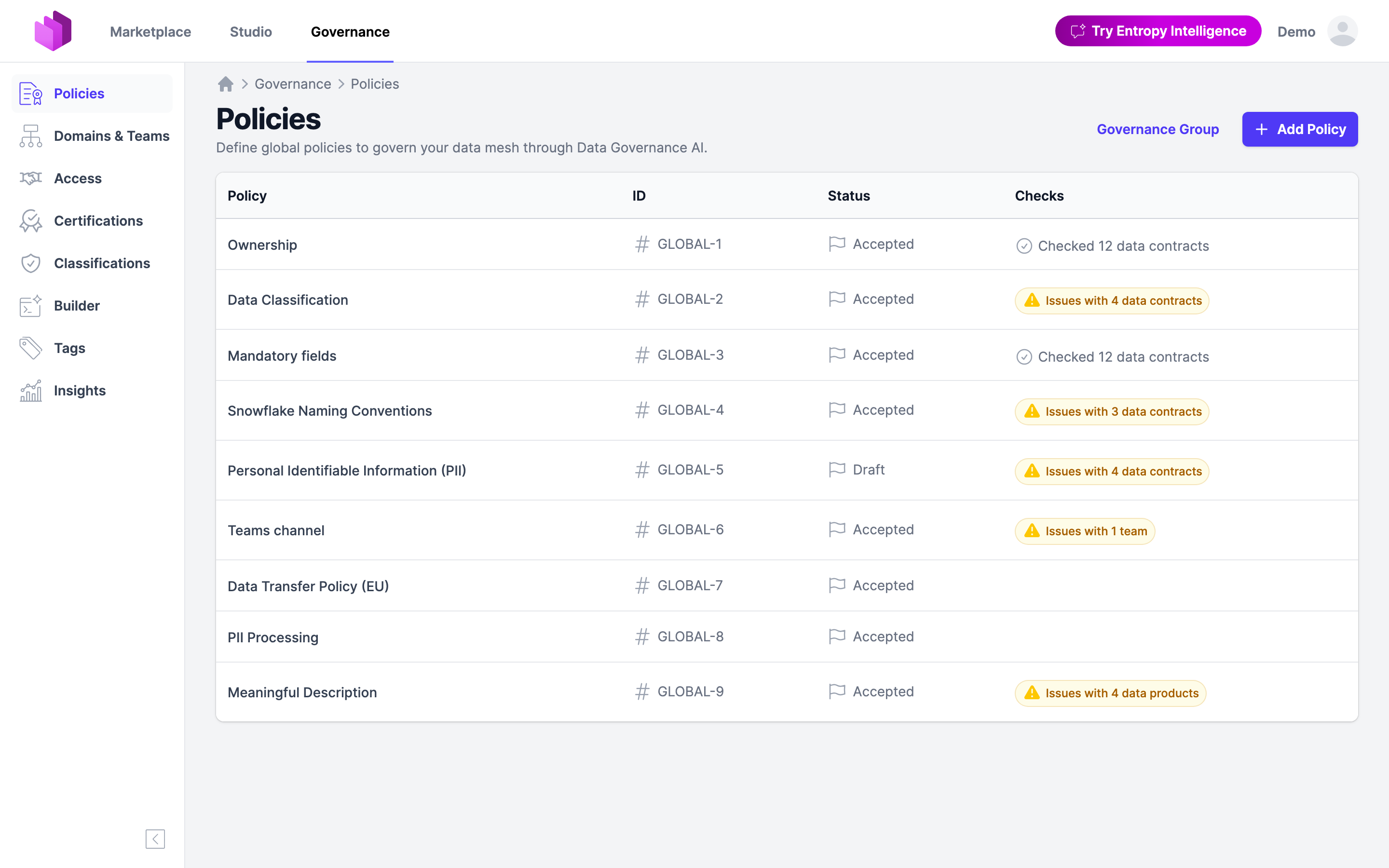
Lifecycle
Every policy has a status that says how binding it is:
| Status | Meaning |
|---|---|
| Draft | Being written or discussed. Checks already run, so you can see the impact before you commit to the rule, but the results stay out of the Marketplace views. |
| Accepted | In force. Checks run and results are visible to everyone. |
| Rejected | Proposed and turned down. Kept for the record. |
| Deprecated | No longer in force. |
Adding a policy, editing it, changing its status, and deleting it is for members of the Governance Group team, whatever their role, and for organization owners. Running a policy's checks takes POLICY_CHECK_RUN. See Roles & Permissions. Every change is recorded in the policy's audit trail.
Policies can also be managed through the API (GET, PUT, and DELETE on /api/policies/{id}), so you can keep them in a Git repository and sync them.
What a policy applies to
When a policy is saved, AI reads it and determines which kind of resource it governs. The detected policy type is shown on the policy page:
| Policy type | Checked against |
|---|---|
| Data Contracts | Every data contract in the organization |
| Data Products | Every data product |
| Domains and Teams | Every team |
| Tags | Every managed tag |
| Access | Every access request (see below) |
| General, Business Definitions, Platform | Recorded, but not checked automatically |
You do not select the type by hand. Write the rule, and the classification follows from the text.
How AI monitors compliance
Compliance checks are performed by Data Governance AI, one of the features using AI. They are optional and only run when an AI model is configured for the organization. See AI Configuration.
A check is scheduled whenever a policy changes (all matching resources are rechecked) or whenever a governed resource changes (that resource is checked against all matching policies). Checks run in the background, so nobody waits for a model.
For each pair of policy and resource, the AI answers two questions:
- Is the policy applicable to this resource? A Snowflake naming convention says nothing about a data contract served from S3.
- Does the resource conform? If not, it returns the most relevant issues, each with a recommendation of what the team could do.
The model is instructed to be lenient. Rules phrased with "should" or "can" are not reported as issues, and when in doubt it assumes the policy is met, so the results stay actionable instead of noisy.
Results appear in the Compliance card, both on the policy (all resources checked against this one rule) and on the resource (all policies checked against this one data product, data contract, team, or tag).
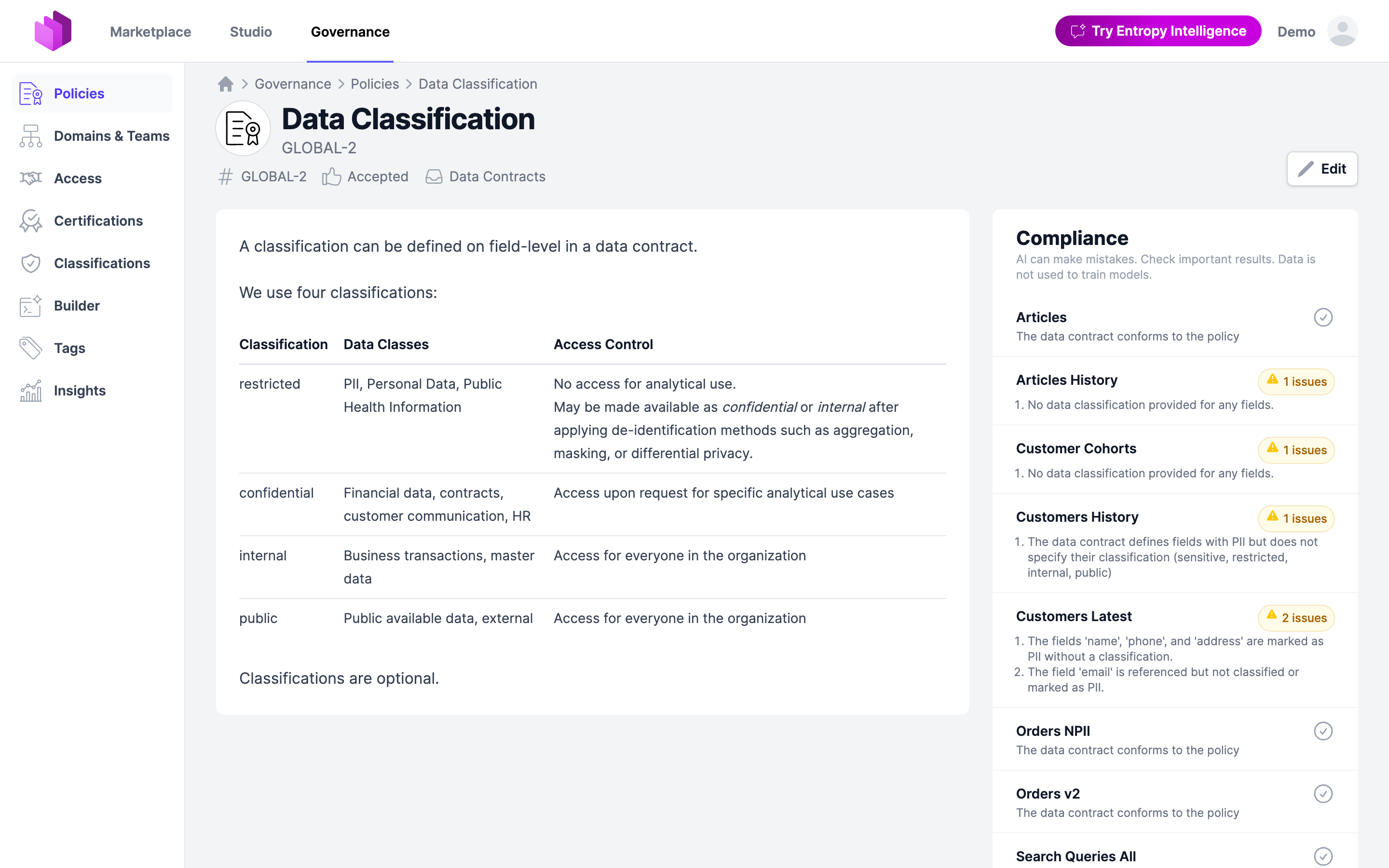
Opening a check shows the full detail: when it ran, whether the policy was applicable and why, the issues with their recommendations, and a Rerun action.
Humans stay in charge
An AI check produces a finding, never a decision. Nothing is blocked, rejected, or changed because of one.
Reviewers can mark an individual issue as a false positive. That feedback is stored with the resource and passed into every later run for the same policy, so a rule that the model keeps misreading stops complaining after you have corrected it once.
Access approval as a policy
Policies are not only about the state of your data mesh. They also inform decisions, and the most frequent decision in a data mesh is: should this consumer get access to this data?
That makes the Access Approval Workflow a place where policies are enforced. Write the rule that should govern access requests as an ordinary policy:
If a data set contains PII, then the data consumer must explain in the purpose
of an access request why PII fields are needed.
All personal data collected or processed within the European Union (EU) must
remain within the EU.

No data may be transferred, stored, or processed outside of the EU without
explicit approval from legal and compliance teams.
When a consumer requests access, Data Governance AI analyzes the request against all policies of the organization, together with the purpose of the request, the provider's data product, output port, and data contract including its terms of use, and the consuming data product and team.
The result is shown to the data product owner on the access request, right next to the Approve and Reject buttons, so it supports the approval decision at the moment it is made. Each warning names the policy it comes from, links to it, explains the concern, and often suggests how the consumer could reformulate their purpose.
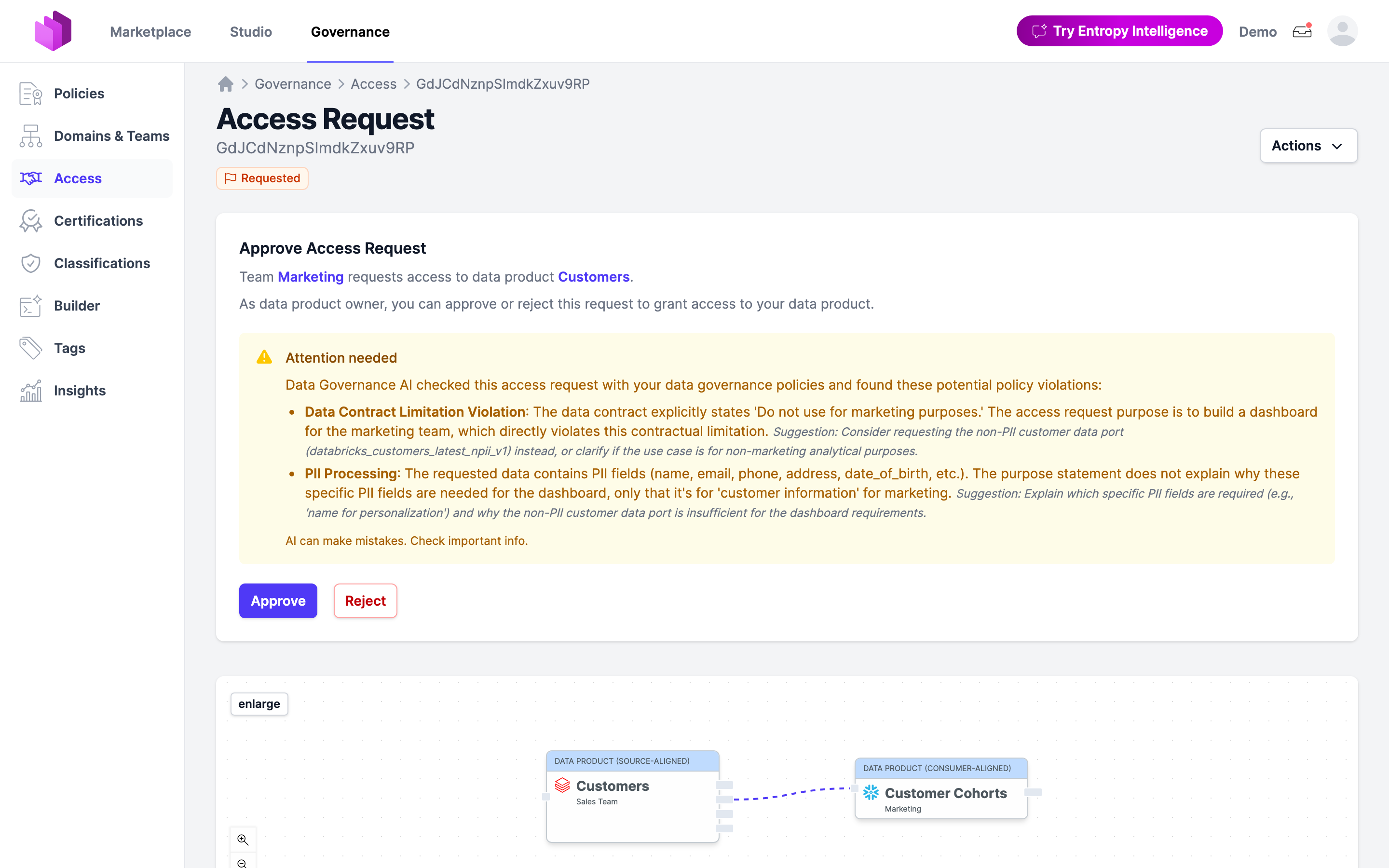
The owner approves or rejects. The AI only makes sure they decide with the organization's policies in front of them, instead of having to remember what a policy PDF says about PII and data residency.
If no policy is at risk, the card simply reports that no warnings were found.
Writing good policies
- One rule per policy. A policy that mixes naming conventions with retention rules produces findings that are hard to act on.
- Be concrete. Name the fields, values, or conditions you expect. "Data contracts should be good" cannot be checked.
- Use "must" for what you mean. "Should" and "can" are deliberately not reported as issues.
- Say who it applies to. Mentioning the resource ("In a data contract ...", "Every team ...") helps the classification pick the right policy type.
- Start as a Draft. Checks run immediately, so you can see how much of your mesh a proposed rule would flag before you accept it.
Related
- Features using AI: every AI feature, its purpose, and the AI Act classification
- AI Configuration: the supported models and how to enable AI
- Approval Workflow: how access requests are approved
- Tags: the governed vocabulary policies can refer to
- Roles & Permissions: who may edit policies