
Example Data
Example data lets you attach sample datasets to data products so data consumers can preview the data before requesting access.
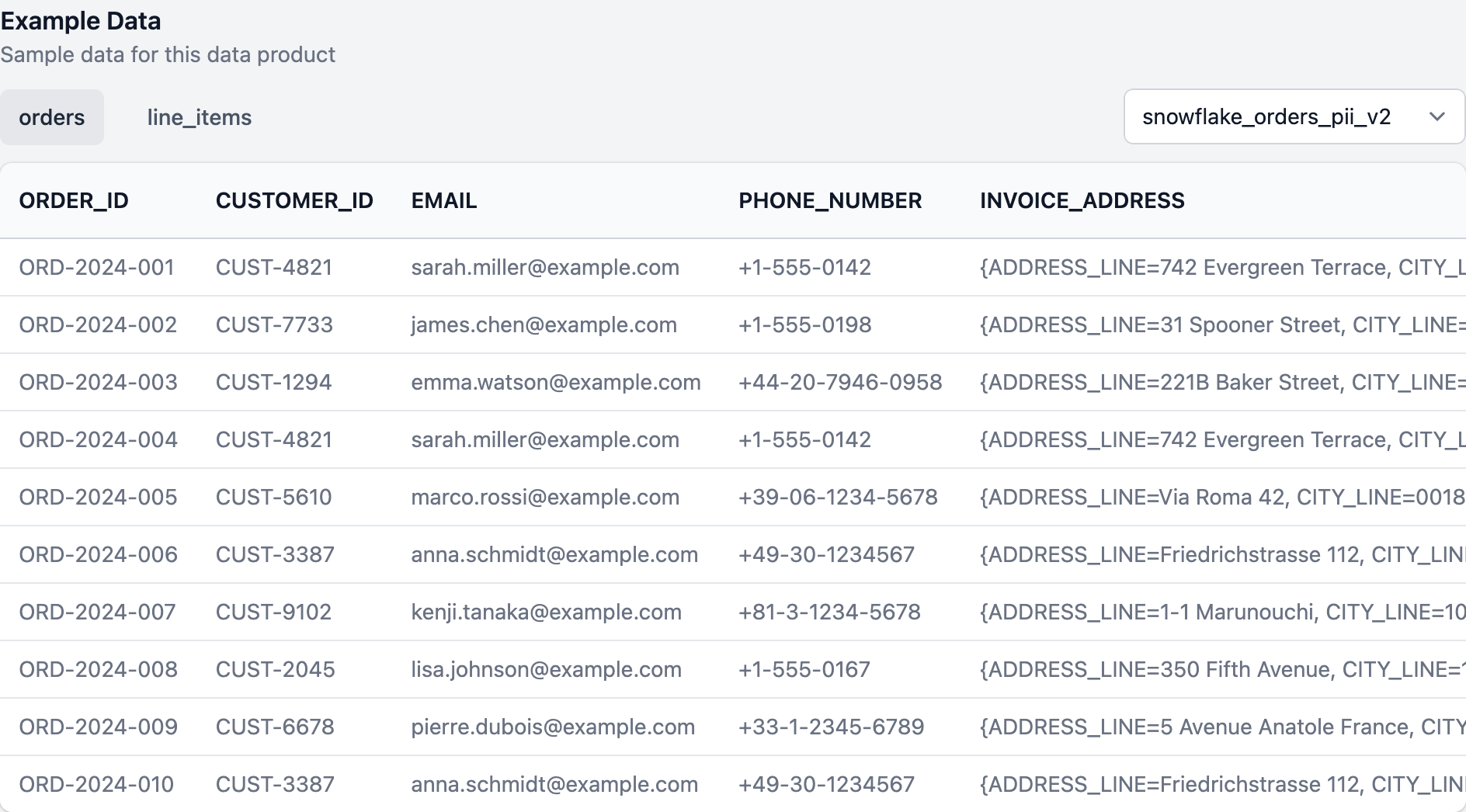
Example data is displayed on the data product details page.
Scope
Each example data entry can be scoped to different levels:
- Data product — At minimum, every entry must reference a
dataProductId. - Output port — Attach example data to a specific output port by setting
outputPortId(optional). When a data product has multiple output ports with example data, a dropdown lets consumers switch between them. - Data contract — Optionally link to a data contract by setting
dataContractId.
When an output port has multiple example data entries with different schemaName values, they are displayed as tabs (e.g., orders and line_items).
Data formats
The data field supports two structures, each rendered differently in the UI.
Tabular data (array)
Use an array of objects for table-like data. Each object represents a row, and the keys become column headers. Up to 30 rows are displayed.
Array example
{
  "data": [
    {"ORDER_ID": "ORD-2024-001", "CUSTOMER_ID": "CUST-4821", "ORDER_DATE": "2024-12-15T10:23:00Z", "ORDER_TOTAL": 249.90},
    {"ORDER_ID": "ORD-2024-002", "CUSTOMER_ID": "CUST-7733", "ORDER_DATE": "2024-12-15T11:45:00Z", "ORDER_TOTAL": 89.99}
  ]
}
Object data
Use a single object for key-value style. Nested objects are rendered with indentation. This is useful for JSON data, APIs, and messages.
Object example
{
  "data": {
    "pipeline": "orders-etl",
    "schedule": "daily",
    "lastRun": "2024-12-19T02:00:00Z",
    "config": {
      "source": "kafka",
      "destination": "snowflake"
    }
  }
}
The maximum payload size for the data field is 1 MB.
The example data model
Properties
- Name
id- Type
- string
- Description
A unique identifier for this example data entry.
- Name
dataProductId- Type
- string
- Description
The external ID of the data product.
- Name
outputPortId- Type
- string
- Description
The external ID of the output port this example data belongs to. Optional.
- Name
dataContractId- Type
- string
- Description
The external ID of the data contract. Optional.
- Name
schemaName- Type
- string
- Description
The schema or table name, e.g.,
ordersorline_items. Used for tab labels when an output port has multiple schemas.
- Name
data- Type
- array | object
- Description
The example data. Use an array of objects for tabular data, or a single object for key-value data.
Create or update example data
This endpoint creates or updates an example data entry. If an entry with the given id already exists, it will be replaced.
Request
curl --request PUT \
  https://api.entropy-data.com/api/example-data/orders-npii-orders \
  --header "x-api-key: $API_KEY" \
  --header "content-type: application/json" \
  --data @- << EOF
{
  "id": "orders-npii-orders",
  "dataProductId": "orders",
  "outputPortId": "snowflake_orders_npii_v2",
  "schemaName": "orders",
  "data": [
    {"ORDER_ID": "ORD-2024-001", "CUSTOMER_ID": "CUST-4821", "ORDER_DATE": "2024-12-15T10:23:00Z", "ORDER_TOTAL": 249.90},
    {"ORDER_ID": "ORD-2024-002", "CUSTOMER_ID": "CUST-7733", "ORDER_DATE": "2024-12-15T11:45:00Z", "ORDER_TOTAL": 89.99}
  ]
}
EOF
List example data
Returns all example data entries, optionally filtered.
Query parameters
- Name
dataProductId- Type
- string
- Description
Filter by data product ID.
- Name
outputPortId- Type
- string
- Description
Filter by output port ID.
- Name
dataContractId- Type
- string
- Description
Filter by data contract ID.
Request
curl https://api.entropy-data.com/api/example-data?dataProductId=orders \
  --header "x-api-key: $API_KEY"
Response
[
  {
    "id": "orders-npii-orders",
    "dataProductId": "orders",
    "outputPortId": "snowflake_orders_npii_v2",
    "dataContractId": null,
    "schemaName": "orders",
    "data": [
      {"ORDER_ID": "ORD-2024-001", "CUSTOMER_ID": "CUST-4821", "ORDER_DATE": "2024-12-15T10:23:00Z", "ORDER_TOTAL": 249.90}
    ]
  }
]
Get example data
Returns a single example data entry by its ID.
Request
curl https://api.entropy-data.com/api/example-data/orders-npii-orders \
  --header "x-api-key: $API_KEY"
Delete example data
Permanently deletes an example data entry.
Request
curl --request DELETE \
  https://api.entropy-data.com/api/example-data/orders-npii-orders \
  --header "x-api-key: $API_KEY"